

Someone suggested that I could use a USB pen drive to record audio on my laptop. Is this a good idea? How fast are they, and is it really a cheap way to separate my system and audio drives, or are there any problems inherent in this approach?
Mark Hinter
SOS contributor Martin Walker replies: USB pen drives (aka Flash drives and USB sticks) are an extremely convenient way to carry your personal data around, and to transfer data from one PC to another. They have increased in capacity over the last few years, from handy 64MB notepads to seriously capacious drives typically offering between 1GB and 8GB, at prices below $10.
 With most modern operating systems, such as Mac OS X and Windows 2000, XP and Vista, they are also 'plug and play', requiring no drivers to be installed, so you can be confident that wherever you go you'll be able to plug in your USB pen drive, wait for it to be automatically detected, and then access your data.
However, recording audio is a rather more serious undertaking, and relies on the one parameter invariably omitted from USB pen drive specifications: sustained transfer rate, or — in layman's terms — speed. Although many are described as 'fast', this is invariably in comparison to older USB 1.1 compatible USB sticks that might take a couple of yawn‑worthy minutes to save a 30MB file.
But let's turn for a moment to the main reason for considering a USB pen drive: to separate your audio files from the single hard drive found on most laptops. Given that you can buy a 250GB internal hard drive for $30, it's scrimping on a Scrooge‑like scale not to install a dedicated audio drive on a desktop audio PC. However, laptops are intended to be portable devices, and carting around an external drive somewhat defeats the object, which is why I suspect folk are interested in trying a USB pen drive instead.
Many musicians expect audio nightmares when recording and/or playing back multiple audio files from a hard drive that already has Windows and all its applications installed on it. However, you shouldn't worry unduly about your operating system being on the same drive, since (as I showed back in PC Musician May 2005) Windows activity on a properly-tweaked audio PC tends to be minimal once you've loaded your sequencer application.
Ultimately, the question you should ask yourself is whether your internal laptop drive is fast enough to record and play back the maximum number of audio tracks you need. I carried out some tests on a variety of hard drives in PC Notes April 2004, including various laptop drives with speeds ranging from 4200rpm to 7200rpm and, despite slowish sustained transfer rates of between 23MB and 36MB/second, all of them were nevertheless perfectly capable of managing dozens of simultaneous audio tracks.
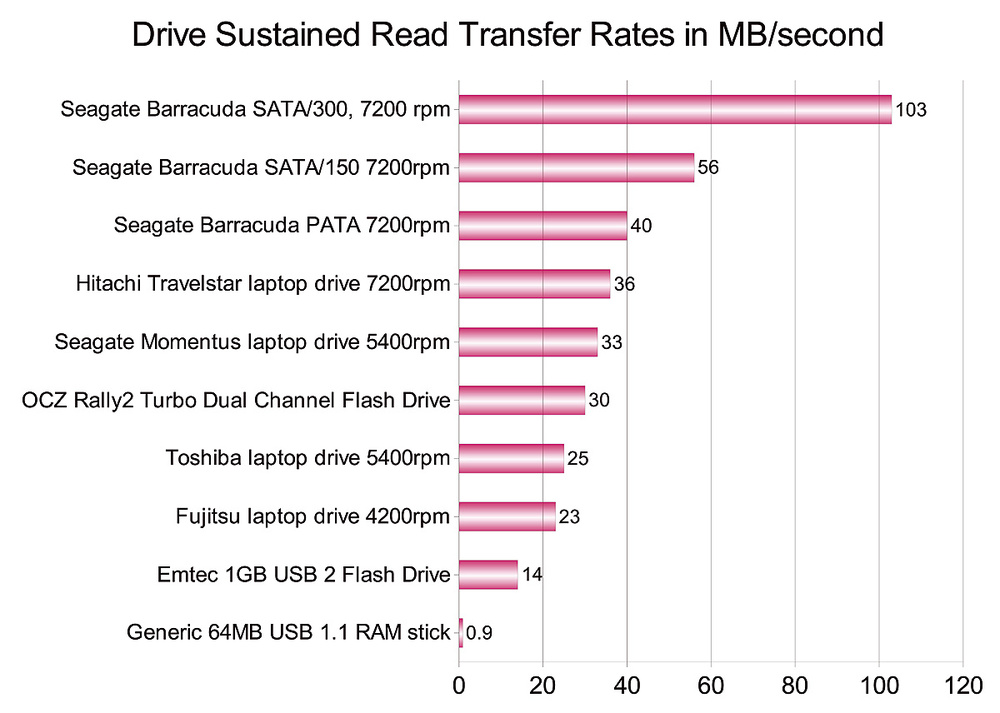 USB Flash Drives may be fast enough to play back a couple of dozen audio tracks, but are considerably slower than most laptop hard drives, unless you buy an expensive dual‑channel model that costs up to 10 times as much.Let's turn our attention back to USB pen drive speed. It's tempting to assume that pen drives will have a similarly huge bandwidth to system RAM, but this isn't the case. I dug out several in my collection, and even the fastest 1GB Emtec 1GB USB 2.0 Flash drive bought just a couple of weeks ago (for about $7) only registered a modest 14MB/second, quite fast enough to manage up to perhaps 20 24‑bit/96kHz audio tracks, but still about half the speed of a typical 4200rpm laptop drive. The fastest pen drive I discovered on the Internet (an OCZ Rally2 Turbo Dual Channel Flashdrive model costing about $30) managed about 30MB/second, making it slightly slower than a typical 5400rpm laptop hard drive.
So, yes, you could plug in a USB pen drive and use it for audio recording, but simultaneous track counts are likely to be considerably lower than those of even the slowest of today's laptop hard drives, and if you're interested in performance, creating a partition devoted to audio files on the laptop's single internal hard drive will generally offer much better performance.