

This month we look at wireless options for passing MIDI between your iOS device and your Mac.
Last month in Apple Notes, we looked at some of the cable and interface options that can get audio and MIDI data in and out of an iPad. Much of it works for the iPhone, too (except for the stuff with Apple's Camera Connection Kit, which isn't supported). Now, however, while there's no doubt that a wired connection between your Mac and your beloved iOS gizmo is your best bet for a bomb-proof link, there is another way — for MIDI at least — using Wi-Fi. For best reliability, it involves temporarily disconnecting from any wireless router you might normally use. This is a bit of a drag, as you'll lose your Internet while working, but for many users it will be well worth that slight inconvenience. I'll describe it here as if for an iPad.
What, Where & Wi-Fi
To try this out, you need your Mac's Wi-Fi turned on. If it isn't already, go to the Network pane in System Preferences, enable it, and tick the 'Show Wi-Fi status in menu bar' option while you're there.
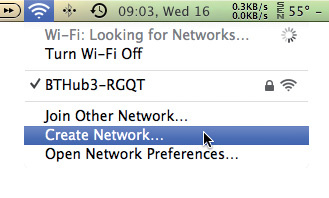 Creating an 'ad-hoc' Wi-Fi network from the Mac menu bar is quick and easy. The Audio MIDI Setup application is at the heart of network MIDI operations.Next, from that Wi-Fi menu-bar item choose Create Network, leave all the settings at their defaults, and click Create. You just made what's sometimes referred to as an 'ad-hoc' network. Later, when you've finished with all this, just choose your usual router name here again.
Now grab your iPad and go into its Settings app. Make sure Wi-Fi is turned on here too, and then look for the name of the ad-hoc network you just created in the list below. Tap it to join it.
Back on the Mac, open the Audio MIDI Setup application and switch to its MIDI window. You should see a Network device there. Double-click it and you get a configuration window. The 'Sessions' referred to here are like virtual MIDI cables extending across the airwaves from your Mac to other compatible hardware (in this case, your iPad!).
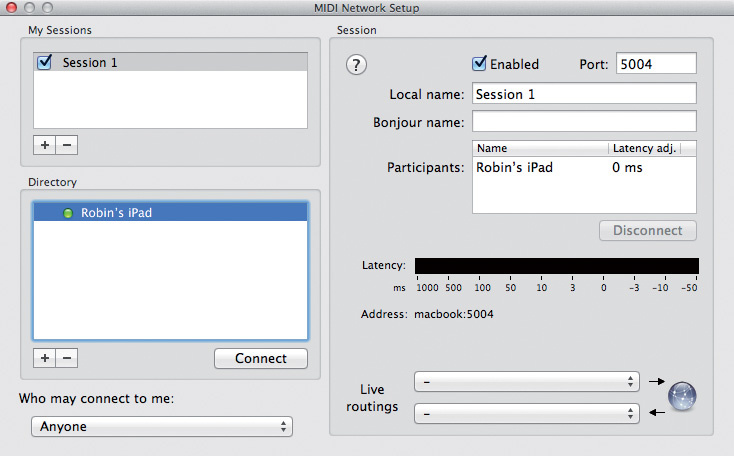 The MIDI Network Setup window in AMS.There may well be a session already in place by default, probably called 'Session 1'. If not, add one with the '+' button in the My Sessions section, call it anything you like, and then enable it. Keep 'Who may connect to me' set to Anyone, and keep the Live routings pop-ups empty.
If everything's gone to plan, you'll see the name of your iPad in the Directory section (and if not, try launching an iPad synth). Click the name, and then the Connect button beneath it. The iPad should then show up in the Participants box. And that's it; you've established a virtual, bi-directional, 16-channel MIDI connection between Mac and iPad.
The prime use for this is to sequence your iPad from your Mac DAW, using it like an external module. Launch your synth of choice on the iPad and navigate to its MIDI settings (which, be warned, vary considerably from synth to synth). Choose 'Network Session 1' as an input. In your Mac DAW, configure a MIDI track output to drive Network Session 1 (or whatever you named the session) and you should be away.
Quirk-arounds
Using an ad-hoc network like this can be reliable and offer low latency. There are a few quirks, though. One is that, regardless of what you call your network MIDI session in Audio MIDI Setup, it seems that it'll always show up as 'Network Session 1' on your iPad. What's more, it looks as though iOS devices only support one network session, regardless of how many you create in Audio MIDI Setup. The whole area is not well documented, and I wouldn't be surprised if this behaviour changes at some point, but that's how it seems to work for now.
And here's my final tip: plugging your iPad into a power source helps prevent it from sleeping and thereby dropping the MIDI connection. Kind of crucial during a gig!
Under The Bridge
 MIDIBridge brings complex MIDI routing, filtering and remapping to the iOS platform.Whether you use wired or wireless MIDI, check out the iOS app MIDIBridge (from the App Store, $8.99£5.99). It's decidedly unsexy but does all sorts of useful stuff, like filtering or remapping controllers and other MIDI message types, setting up keyboard splits between multiple synths, modifying velocity, and more. It can help with iOS synths (like Korg's otherwise excellent iMS20) that have very few MIDI options, and it has dedicated support for hardware like the Akai Synthstation 25 and Line 6 MIDI Mobilizers. All in all, it's an essential app for any dedicated iOS MIDI enthusiast.