

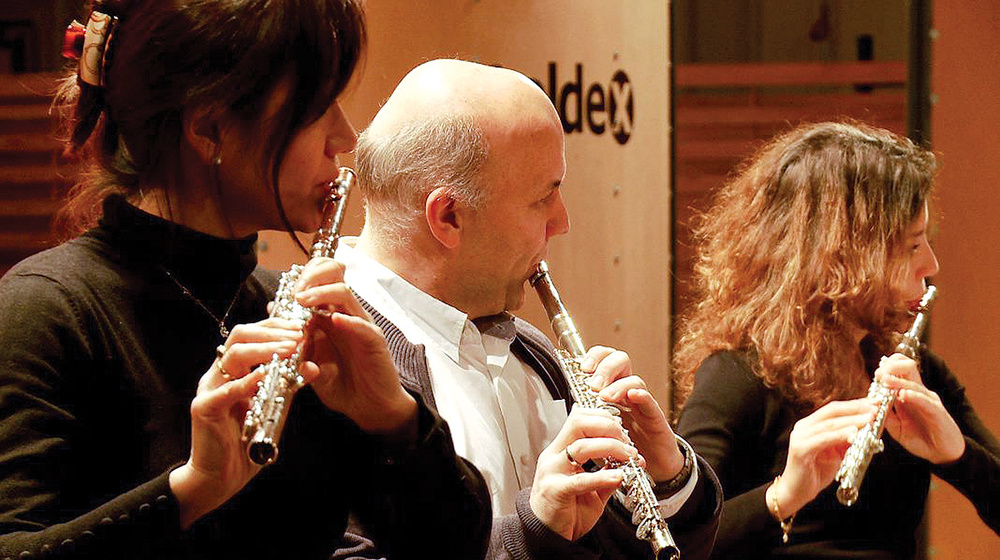
 Berlin Woodwinds' flute ensemble: (L-R) Yasuko Fuchs, Klaus Schöpp, Silvia Careddu.
An often overlooked part of the orchestra gets the royal treatment in a new sample library.
The German company Orchestral Tools first came to our attention in 2011 with their Orchestral String Runs library. Recorded by a large contingent of players from the Belarus Philharmonic, OSR (now expanded to 33.4GB) remains a go-to solution for those who need the dramatic effect of fast string section runs and figures but lack the dexterity, time or inclination to program them with single-note samples. (Read the SOS review of OSR at /sos/sep11/articles/orchestral-string-runs.htm.)
Strings and brass being the meat and potatoes of most media composers' orchestral arrangements, one might have guessed Orchestral Tools' next major sampling project would be a brass collection. Confounding expectation, the company have instead turned the spotlight on a less favoured section of the orchestra, namely the woodwinds (they're the guys sitting in the middle, being drowned out by the brass, percussion and strings). Entitled Berlin Woodwinds, the new library has created quite a stir on forums: in fact, such is the level of online speculation that it's essential for it to go under the SOS microscope without delay.
Whereas recording OSR's string samples entailed producer Hendrik Schwarzer periodically boarding a plane to Minsk, the new library was recorded much closer to home at Berlin's Teldex Studio. The location for hundreds of legendary Teldec Classics recordings down the years, the studio has become a leading international facility for classical music, film score and pop recording since its modernisation in 2002.
Berlin Woodwinds (BWW for short) runs on Kontakt 5 and also on the free Kontakt 5 player, which can be downloaded from Native Instruments' site, www.native-instruments.com. Minimum system requirements and supported interfaces for Kontakt are also listed there. This large library (100GB of samples, which compress to 53.2GB on your hard drive) is available only as a download direct from Orchestral Tools' site, in the form of 54 compressed RAR files. Buyers should be prepared for a lengthy download session!
View Over Berlin
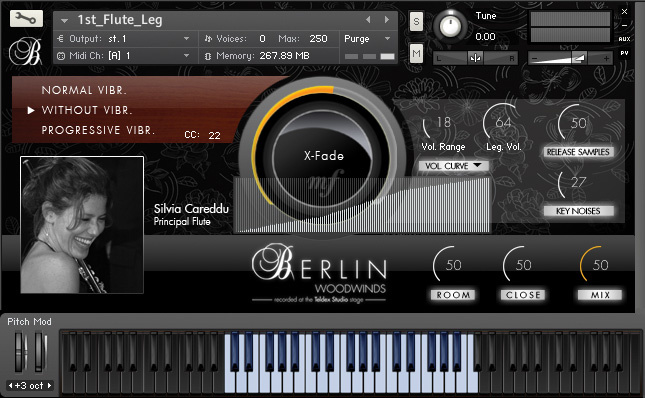 As well as displaying the name and photo of each performer, BWW's GUI shows the instrument's vibrato options, velocity-to-loudness curve and the current mod wheel setting (marked in orange), the mod wheel being the default controller for dynamic cross-fading. The 'X-Fade' function switches to Velocity control when you click in the centre of the circle. Clicking on the Close, Room and Mix on/off buttons loads the samples for those microphone positions; selecting the Mix option will automatically unload the other two.
BWW consists of 11 solo instruments and two three-player ensembles (see the 'Instruments & Articulations' box). With the exception of two players who double on piccolo/third flute and second oboe/English horn, each instrument was played by a different musician, and the ensembles were recorded in real time with no overdubbing. The provision of three flautists, two oboes, two clarinets and two bassoons means that you can program realistic duo and trio performances for each of those instruments, and give them unison notes with no fear of identical samples causing phase-cancellation.
The players perform a large range of articulations, which include true legato intervals for every instrument. Solo flutes, oboes and bassoons play their long notes in a choice of vibrato and no-vibrato styles, while the flutes and oboes also have a 'progressive vibrato' option. Patches incorporate all of an instrument's vibrato variants, which you can select on the fly via a MIDI controller number of your choice (the default is CC22).
As in OSR, the library also includes a large number of single- and double-octave runs, and a sizeable collection of short, tempo-sync'ed phrases (played by the flute ensemble and clarinet trio only) designed to be joined together to form custom runs and patterns. The runs and phrases are performed in all 12 keys.
The woodwinds were recorded in Teldex Studio's large hall from two positions: the hall's natural ambience was captured by a Decca Tree of Neumann M50 valve mics placed five or six metres back from the players, while a second stereo miking recorded the instruments close up. The Close and Room positions have their own mixer settings, and can be separately routed out of Kontakt as a front and rear pair for surround mixes. A third set of 'Mix' samples blends the two mic positions together, thereby halving the amount of RAM required to hear both simultaneously. Patches load with the blended mix samples in place.
Flutes & Piccolo
 BWW was recorded in the spacious hall of Berlin's Teldex Studio, location for hundreds of classical recordings down the years.
Since my initiation into orchestral arrangement came by writing for solo flute, that's invariably the first instrument I turn to when auditioning a woodwind collection. The instrument can be a make-or-break area in mock-ups, and even when all the technical aspects of the samples are up to scratch, the personal sound and expression of the player still makes an enormous difference. Happily, principal flautist Silvia Careddu does a great job, combining a pure, breathy tone with a bright delivery and a lyrical vibrato.
All the things I love about the flute are embodied in this sampled instrument: elegant, expressive sustains, piping short notes, bird-like trills and gracings, all delivered with economy and feeling. The first flute's sustain patch is surprisingly versatile: since its notes start with a well-enunciated attack, it can be used for both melodic and rhythmic purposes. However, once you hear the beautifully incisive staccatissimo performances, you'll find yourself wanting to add flute stabs and rhythmic ostinatos to your compositions just so you can hear them again. Maybe composers shouldn't fall into the trap of 'writing for the samples', but when the samples are this good, it's hard to resist the temptation!
BWW's second and third flutes maintain the high quality. The second flute's somewhat plainer, measured, long-note style contrasts well with the passionate delivery of the principal instrument, and I liked the third flautist's simple, sweet long notes, ideal for supporting parts in a woodwind chorale passage. The full, breathy tone of the third flute's short staccatos is also inspirational for composing, and its player turns in some lively and, for the most part, impressively accurate piccolo performances; the only flaws occur in the top two notes, which sound uncontrolled and unmusical in a few places. However, considering how hard it is to nail those high pitches (three octaves above Middle C), I don't think we can complain too much.
 Originally designed for Orchestral String Runs, the Runs Builder window has 10 slots into which you load the phrase types you need from the menu below. The green keyswitches select the key of the music, while the pink keys switch between the 10 phrases; you can also select the type of scale (major, minor, whole tone, and so oon) using the small slider positioned above the Room and Close mixer settings. The phrases are mapped across the white keys to the right of the pink set, appearing only on the scale steps that apply to the chosen key and scale.Departing slightly from the 'three unison flutes' format that's been a fixture in orchestral collections for the last 20 years, BWW's flute ensemble features one flute playing an octave higher than the others, necessitating a switch to piccolo in the high register. This engaging orchestration works well for strong lead lines, though I would caution against using it chordally, due to the synthetic-sounding effect of multiple pitches doubled at the octave. Given the difficulties of co-ordinating ensemble trills, I was pleasantly surprised by how natural, vivid and tuneful the flute trio's trilled notes sound.
What we have here is almost an embarrassment of riches: three fine flautists (one doubling on piccolo) and a flute/piccolo ensemble of high quality, performing a wide range of articulations that cover all the requirements of traditional orchestral scoring. The only significant item missing is an alto flute, which I hope will be added at some point.
Berlin Reeds
 The ingenious Trills Orchestrator: play two notes, and it does the rest. Some of BWW's instruments play trills of up to a fifth interval.
If you need an alternative expressive, fluid and melodic woodwind instrument, BWW's oboe players are ready to step up to the plate. The first oboe's poignant delivery works wonderfully for sad, wistful tunes (such as The Office's theme song intro) and pastoral folk-flavoured melodies, while the second instrument is more declamatory, useful for passages where you need a solo oboe to cut through a dense backing. Both instruments feature played trills ranging from a semitone to a fifth interval, the latter having something of a ritualistic, hunting-horn flavour.
There are no oboe ensembles in BWW. Am I bovvered? No. Although the first major orchestral libraries provided three unison oboes, I never found a use for that rather piercing sonority, preferring instead to work with the far more malleable solo oboe samples (which, after all, can be played chordally, if you wish!). The library's oboe family is completed by a decent English horn that sounds a touch strained in its top register (where it could be readily substituted for an oboe), but is in every other way perfectly serviceable.
 BWW's Articulation Performer allows you to assemble most of an instrument's patches in one Kontakt multi. Its 24 sound slots are arranged in two rows of 12; keyswitches control horizontal movements along a row, while a MIDI CC controller of your choice is used to move between the upper and lower row. Any pair of vertically-aligned cells may be used to stack, velocity-switch or morph between two instruments.Handsome, confident, muscular, eloquent, robust, mellifluous, fine-toned — although I might as well be describing SOS's male staff, these are the adjectives that come to mind when auditioning the pair of bassoons in this collection. Both are technically perfect and supremely playable. The second player eases into his long notes a little more than the first, which could give his bassoon a slight advantage for expressive solo passages, but really there's nothing to choose between these excellent instruments.
BWW's two clarinets are equally well-matched: the first player's sweet-toned legatos are a delight to play, while the second clarinet's subtly brighter tone adds a smart edge to its staccatos. Both instruments perform their sustains and legatos in the rather austere, classical no-vibrato style, which means they won't cut the mustard in a hot Dixieland jazz context! The three-player clarinet ensemble executes very strong unison lead lines, as well as lovely, super-dynamic chord pads: push up the mod wheel while holding down a chord and you'll hear a dramatic, smooth crescendo from a soft, soothing tone to a penetrating ff delivery. Every chord I played sounded beautifully in tune, a testament to how well these musicians play together, and to the producers' high technical standards.
Liquid Touch
If you fancy trying your hand at some free-form melodic improvisation, BWW's three-dynamic legato patches (supplied for all instruments and ensembles) will track your every move and transform keyboard licks into liquid, flowing lines; the musical equivalent of writing with a luxury fountain pen. True legato samples sometimes struggle to keep up with fast playing, but these never faltered, even when I approached Mach 1 tempos. Using the mod wheel to morph seamlessly between dynamic layers enables you to add dramatic, expressive swells to your legato melodies. I particularly enjoyed the principal flute's and 1st clarinet's ultra-sleek legatos, which are among the best I've played.
'Runs Transitions' patches (aka 'Playable Runs') are also a good outlet for keyboard speed freaks, offering fast legato transitions for all intervals up to a fifth. Provided for the clarinet ensemble, piccolo and flutes (the second and third flutes play theirs as a unison duo), these short-ish, non-vibrato notes work very well for quick runs and arpeggios. As is usually the case in orchestral libraries, the legatos and Runs Transitions patches are monophonic and need a slight overlap between notes to trigger the real-life legato transitions. Due to a programming blooper, the piccolo's runs transitions currently sound a semitone flat; the producers say they'll fix that in an imminent software update, but in the meantime a workaround is to set the value of the 'Tune' control on Kontakt's instrument GUI to '1.00' and re-save the patch.
Bob The Runs Builder
BWW uses many of the facilities implemented in Orchestral String Runs. One such entertaining feature is the Runs Builder (not to be confused with the Runs Transitions described above), which offers 10 types of mini-phrase including 16th-note figures, runs spanning fourth and fifth intervals, triplet figures and grace-note-like sfz trills, the last having a nice, cartoon-ish 'Tom & Jerry' feel. (The phrases are identical to those in OSR. For more details, see the review at /sos/sep11/articles/orchestral-string-runs.htm.) Performed by the clarinet and flute ensembles only, these phrase modules can easily be joined together to form lively-sounding custom runs and ostinato patterns in any key.
The Runs Builder GUI contains 10 play slots into which you load your selected phrases. Each slot has a dedicated keyswitch, and a second octave of keyswitches positioned below enables on-the-fly key changes. Only the actual scale notes in any given key are mapped; consequently, if you select the key of F# and play a note of C (or vice versa), you'll hear a resounding silence. The phrases themselves are also scale-based, and adapt to play the correct intervals for every scale step of the chosen key.
One advantage of this approach is that phrases can be instantly harmonised: for example, select the 16th-note figure G-F#-E-G and play an interval of G and B in the key of G major, and the Runs Builder creates the correct (for that key) harmony of B-A-G-B. Users can also alter the scale to minor, whole tone, chromatic, Lydian (and so on), making this a very flexible system. I shudder to think how long it must have taken to record all the samples...
The flutes and clarinets play their large menu of phrases with great spirit and accuracy, and the sound of the two ensembles playing in unison is fabulous. If you want to impress a client (or the person claiming to be Kylie Minogue you just met on the Internet) with the magical realism of your sampled orchestra, these patches are worth the entry price alone. Of course, you don't have to stick religiously to the Runs Builder phrases; inserting one of these pre-played licks into a straight single-note passage will add a little extra colour and zest to the piece.
 Hendrik Schwarzer (foreground) and Manfred Mantik of Orchestral Tools ponder the musical quality of Berlin woodwind sample No. 14,259.
Octavius Maximus
As in OSR, BWW provides a full set of pre-played octave scale runs, in this case for all instruments and ensembles except the English horn, bassoons and third flute. Variants include ascending, descending and up-and-down versions of single- and double-octave runs, two non-linear figures that take a zig-zag route up to their top note, and runs that start and finish on the fifth interval. In all, there are 14 run types, each with its own minor-key version. (This is an improvement on OSR, which lacks minor versions of some of its scales.) Due to range limitations, the oboes don't play all the variations.
You can manually toggle between major and minor scales on the Kontakt GUI, or assign a MIDI controller to do the same job. As with the Runs Builder patches, key changes can be effected by a low-lying set of 12 chromatic keyswitches, giving you on-the-fly control of key and tonality. The octave runs track perfectly from instrument to instrument, so you can confidently program unison runs for flute, oboe and clarinet, with the option of double-tracking any or all of them.
Prospective owners of both libraries will be pleased to hear that BWW's woodwind runs track the equivalent runs in OSR with great precision (the same is true of the Runs Builder phrases), making it a doddle to create tightly-coordinated unison string and woodwind runs. While doing this, I noticed that the keyswitches used for the two non-linear figures have been swapped in BWW, but the resulting unintentional harmony still sounded agreeably musical!
The playback speed of the phrases and runs is sync'ed to your host tempo via Kontakt's Time Machine algorithm, so you don't have to fiddle around with time-stretching to make them fit your arrangements. An intelligent 'Auto Tempo' script ensures that the scales and runs don't end up sounding impossibly fast or ridiculously slow as the tempo varies. However, you can disable this function and manually alter the run speed to half time, half-time triplet, double time or double-time triplet if you so desire... but don't blame me if it ends up sounding daft.
Trills & Tongues
A new technique featured in BWW is the 'Trills Orchestrator'. If that sounds scary, rest assured that its operation is simplicity itself. To play a trill, press and hold a starting note, then play your desired trill note; the Trills Orchestrator will trill between the two pitches for as long as both are sustained. Semitone and tone trills are provided for all the instruments and ensembles, and some of the instruments can play trill intervals of up to a fifth (the makers call these wider trills 'interval tremolos'). All the sustained trills are looped.
Multiple or chordal trills may be constructed in two ways: in the first, the trill note is also seen as the starting note of the next trill, so playing and holding (from low to high) A, B, D and E in succession creates three trills: A & B, B & D and D & E. The second play mode requires a new starting note to trigger an additional trill, so playing the same sequence of notes would create only two trills, A & B and D & E. The difference may seem academic, but the intent (as with all other facets of the library) is to give users full musical flexibility, the only limitation being that the trill note must always be higher than the starting pitch.
Also available in the Trills department (second floor, next to Soft Furnishings) are short trills with an sfz attack, and single trills that function in the same way as the musical ornament known as the 'mordent'; all good, ear-catching stuff to add animation to your arrangements. The makers say that the trills represent the bulk of BWW's content, and proudly claim that dispensing with keyswitches in favour of users simply playing the intervals they need has created a playable and ergonomic system. I'd agree with that, and once I'd grown used to having to play a second note shortly after the first to activate the trill, I found the Trills Orchestrator to be a great performance aid. Certainly, creating the shimmering, other-worldly effect of 'chordal trills' comprising different intervals has never been easier.
Double- and triple-tongue patches are another cool way of generating multiple notes from a single key-press. Simply play a note, and the double or triple-tongue sample sounds when you release the key, an instant way of adding some rhythmic action (though getting the timing of the key release right can be a little tricky!) The methods used to trigger the trills and double/triple tongues may seem somewhat mechanistic, but their musical effect is utterly persuasive: that's because what you're hearing is not a simulation, but a real performance.
Conclusion
Try as I might, I failed to find anything I disliked in this library. Or to put it another way, I like it a lot! My only criticism is the current omission of alto flute, bass clarinet and contrabassoon, all of which play an important role in traditional scores. Happily, Orchestral Tools have said they will release an expansion pack of 'additional special woodwinds', which will include the latter two instruments and an E-flat clarinet. That gives me hope that they might also consider adding esoteric items such as bass flute, contrabass clarinet or even a heckelphone (or bass oboe), at some point. None of them are essential, by any means, but it's nice to have such exotic timbres up your sleeve when composing. That said, the current instrumentation should keep composers fully occupied for some time!
For sheer playability, Berlin Woodwinds has few equals. The sumptuous tone, positive attitude and spot-on delivery of the players has created a set of samples that leap out of the speakers, and the meticulous, well-organised presentation makes the library a joy to use. After years living in the shadow of strings and brass, woodwinds are staging a comeback, and, due to the talent of the musicians and the combined musicality and programming skill of the producers, this European offering has achieved a world-class standard.
Alternatives
All the instruments in Berlin Woodwinds can be found in one or other of Vienna Symphonic Library's Woodwinds I & II collections (total 86GB installed) along with extra ensembles, additional instruments and all the articulations you'll ever need, albeit at a significantly higher price if you splash out on both volumes' extended versions. A less costly alternative is Cinesamples' Cinewinds Core and Cinewinds Pro libraries (estimated total size 31GB), which collectively feature a complete set of orchestral solo woodwinds and a selection of ethnic and period winds (some of which play phrases), all recorded from five mic positions. However, the Cinewinds libraries lack played octave runs and their articulation menus are fairly restricted.
Also offering five mikings, a complete orchestral line-up, many articulations and a not-too-scary price tag, EastWest Hollywood Orchestral Woodwinds (133GB installed) provides 13 solo instruments, including alto and bass flutes, a second concert flute, all four members of the clarinet family and a contrabassoon. Neither HOW nor Cinewinds (both of which will be reviewed in SOS soon) includes ensembles, and neither matches the Berlin and Vienna libraries' option of second instruments for divisi part writing. While all these high-end libraries feature true legato intervals, only Berlin Woodwinds offers phrase-building capabilities.
Instruments & Articulations
Instruments
- Piccolo
- Flute 1
- Flute 2
- Flute 3
- Flute ensemble (oct)
- Oboe 1
- Oboe 2
- English horn
- Clarinet 1
- Clarinet 2
- Clarinet ensemble
- Bassoon 1
- Bassoon 2
Articulations
- Sustained (vib)
- Sustained (no vib)*
- Sustained (progressive vib)**
- Legato*
- Staccato*
- Staccatissimo
- Sforzando short notes
- Portato long
- Portato short
- Double tongue
- Triple tongue
- Trills Orchestrator*
- Single trill
- Sfz trill
- Runs transitions
- Octave scale runs (maj) [14]
- Octave scale runs (min) [14]
- Short phrases [10]***
(Oct) = played in octaves; (vib) = vibrato; (maj) = major; (min) = minor; [Number in square brackets ] = alternative basic types.
* All instruments; ** Flutes and oboes only; *** Flute ensemble and clarinet ensemble only.
Some instruments omit certain articulations. For a full implementation list, see www.orchestraltools.com/downloads/BWW_Chart.pdf.
Meet The Cast
The performers who created Berlin Woodwinds' samples are a truly international cast selected via a long, rigorous audition process. Rather than hiding their identities, Orchestral Tools credit each player by name and even show a photo of the musician on the GUI in their respective instrument patches!
The players are Silvia Careddu (principal flute), Bettina Lange (second flute), Yasuko Fuchs (piccolo/third flute), Birgit Schmieder (first oboe), Sabine Kaselow (second oboe/English horn), Darío M. Varela (first clarinet), Miguel Pérez Iñesta (second clarinet), Christoph Knitt (first bassoon) and Burak Özdemir (second bassoon). The flute ensemble features Careddu, Fuchs and guest flautist Klaus Schöpp, while the two clarinettists were joined by Sascha Rattle (son of Sir Simon) to make up the three-player ensemble. If you need woodwind players for a Europe-based project and have a budget for session fees, you should seriously consider these guys — they're good.
Articulation Performer
BWW's Articulation Performer is a comprehensive multi-switching function that gives immediate access to most of an instrument's articulations within one instance of Kontakt. To activate it, simply load the Kontakt multi with the prefix 'AP' for the instrument in question. This loads the switching script, along with all of the instrument's available articulations, with the exception of the Octave Scale Runs and Runs Builder: since those patches have their own elaborate set of built-in keyswitches, they have to be operated independently of the AP multi.
The AP window has 24 sound slots arranged in two rows of 12, each of which can hold a different patch. You can switch between patches on the fly: a set of 12 keyswitches controls horizontal switching, while a MIDI controller of your choice can switch between the upper and lower rows. (Vienna Symphonic Library's Vienna Instrument uses a similar horizontal/vertical navigation system, albeit with a far greater number of slots.) The AP keyswitches can be globally re-positioned to match your existing orchestral template.
Vertically-aligned slots may be used for layering. If you put (say) a staccato articulation in the upper slot and a sustain in the lower, you can layer the two by clicking on a small 'Stack' button placed below the top slot. Each slot has its own velocity range, so you can create simple velocity-switch instruments by setting one slot to a range of (say) 0-60 and the other to 61-127. (The GUI doesn't display which of the pair is currently sounding; you have to use your ears to determine that!) A minor hindrance is that velocity settings are depicted as small, white numbers on a light-grey background and their mid-range values are partially obscured by a vertical white line, making them hard to read by anyone with less than perfect eyesight (such as your myopic reviewer).
By clicking on the small 'Morphing button' to the left of the Stack button, you can crossfade between two sound slots using the MIDI vertical controller. A cool application of this is to morph between non-vibrato and vibrato articulations, a musically elegant way of adding expression to a part. Having all these switching, layering and morphing options available within one Kontakt multi makes the Articulation Performer a handy, flexible and powerful tool for MIDI mock-ups.
Pros
- First-class players recorded in a great-sounding hall from two mic positions.
- The provision of alternative instruments enables true divisi writing.
- A wide range of articulations includes true legatos and a comprehensive set of mini-phrases and octave runs.
- Consistent, logical and meticulous presentation.
Cons
- No alto flute, bass clarinet or contrabassoon.
Summary
Offering 11 solo woodwinds, two woodwind ensembles, a comprehensive range of articulations and a full complement of octave runs and mini-phrases, Berlin Woodwinds is a leading contender in the new breed of woodwind libraries. Although it currently has a few gaps in its instrumentation, the library is thorough and logical in its presentation, and its instruments are among the most playable and expressive out there. Although beginners may regard it as too specialised or over-priced, its excellent performances and deep musicality represent a great investment for pro users.