

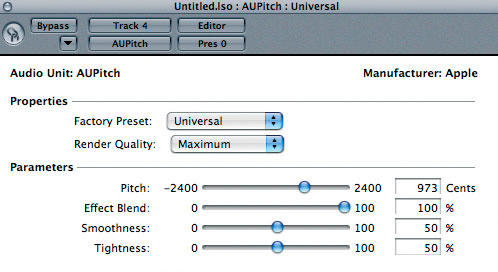
The new Tiger AUPitch plug-in promises better pitch-shifting performance, but does it deliver in practice?
I've been running Tiger on my studio G5 for a couple of months now and, apart from a couple of teething troubles I've mentioned previously, it's been a pretty easy ride. However, the Logic User Group at www.yahoogroups.com is still peppered with reports of problems. Most of these seem to be niggly little things, such as Hyper Draw not displaying controller data correctly or some Key Commands not working properly. Some, like the latter issue, were solved by reassigning keys away from those which Tiger likes to use — for example for Exposé and Dashboard. However, some of the others weren't reproducible on my system. This seems par for the course with any DAW these days and shouldn't stop anyone from making music, annoying though it can be.
After the installation of Tiger on my Studio computer I was keen to see if there were any improvements to the video performance of Logic with Tiger's much-toted Quartz 2D graphic acceleration and to check out, in a proper monitoring situation, the new pitch-shifting algorithms and plug-ins. The redrawing speed of Logic 's windows does indeed seem to be snappier on my 1.8GHz Dual Rev 2 G5, but this could just be due to Tiger itself — it's certainly nothing astounding. However, the pitch-shifting algorithms are much better.
New Pitch-shifting Algorithms
The regular Time Machine algorithms in the Arrange window's Audio menu and the Sample Editor have been improved again, making the fitting of audio files to Logic 's tempo a much more attractive option. It seems that the new Universal, Complex, and Percussive options in the Arrange window's Audio menu are the ones based on Tiger's new pitch-changing facilities. It's still not up to the quality of, say, Celemony Melodyne, but it's much better than it was. There's also the new Tiger-only plug-in, AUPitch, that can be applied to audio tracks.
Listening critically through my Naim NAP180 amplifier and PMC TB2 speakers, the results were impressive; you can make quite large pitch corrections using this plug-in before artefacts begin to become troublesome. I've been using it extensively to edit the fretless bass and saxophone recordings from a recent 'live in the studio' session. The recordings were pretty loud and aggressive at times and, occasionally, intonation suffered. Snipping out the offending notes and phrases, copying them to a new track and applying AUPitch sorted them out nicely. I've also used it to create some harmonies for backing vocals, and overall it's been the most obvious benefit I've had from my upgrade to Tiger so far — apart from Dashboard's weather widget, that is!
XS Key Updater
The XS key, Logic 's software protection dongle, is a source of delight for some and frustration for others. On the plus side, it allows you to keep Logic on your laptop and desktop Macs, with only a swap of XS key needed to activate each copy. On the negative side, there have been numerous reports of Logic not finding the XS key on launch and other flaky behaviour, which can cause the program to crash. Apple have released a possible fix for these problems in the guise of the XS key Updater repair program, which can be downloaded from http://docs.info.apple.com/article.html?artnum=301954. This program checks for corruption of the XS key's memory and fixes any problems it finds.
So, do you need to use the XS key Updater? Well, it won't do any harm and will confirm whether or not your XS key is in good health, which may help if you've been experiencing strange Logic-related crashes. What it can't do, of course, is fix a physically damaged XS key — to deal with this you'll need to contact Apple directly. There have been reports of Apple replacing damaged XS keys in the past — so it's worth giving them a call if you've accidentally treated it to the cotton cycle at 60 degrees in your washing machine!
Logic Mouse Tips
If you're using a two-button mouse, you can take advantage of the extra button in Logic. It can be set to open the Toolbox by selecting appropriately from the Right Mouse Button options in the Editing window of the Global Preferences. You can also assign the right mouse button to a specific tool by clicking with it on the required tool. Each tool can be saved in a different Screenset. Apple's new Mighty Mouse behaves like a traditional multi-button mouse, so you can now have the functionality and the looks. Not that Apple are calling it a multi-button mouse though...
If your mouse also has a scroll wheel, it can be used for scrolling up and down in a window. Holding down the Alt key while you do this zooms the tracks vertically, whilst holding down the Apple key scrolls along the Song's timeline. Holding down the Shift and Alt keys while scrolling zooms the window horizontally.


