

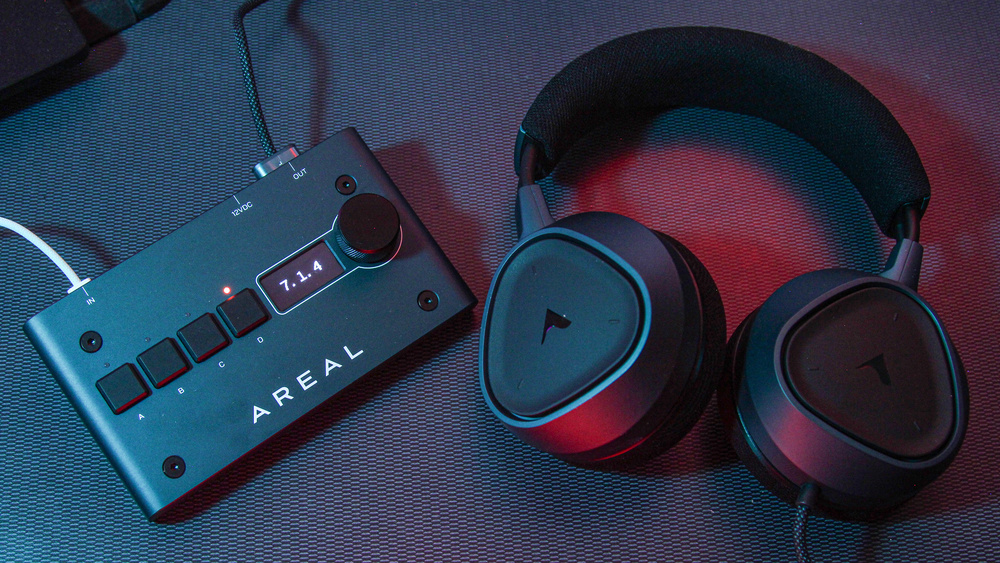
Have newcomers Areal solved the problem of monitoring Atmos on headphones?
It’s generally accepted wisdom that to mix music in Dolby Atmos, you need at least 12 speakers, in a 7.1.4 monitoring array. You also of course need a DAW interface with at least 12 monitor outputs. This is generally true because, even if you’re mixing in Atmos primarily on headphones, you will at some stage want to confirm your work over a full‑fat, speaker‑based monitoring rig. However, it has always been the case that working on headphones can get you quite some distance along the Atmos mix road. This is because the Dolby Atmos Renderer app that hangs off the end of the DAW can generate in real time a binaural version of your mix that can be routed to the headphone output of your interface. So if you have no access to Atmos monitoring, the binaural render can play the role of substitute.
The stock binaural render (or indeed the Apple Spatial one) are by no means equivalent to an Atmos speaker setup, but binaural does provide enough immersion and localisation to offer a viable option. Furthermore, the bulk of Atmos music consumption in the big wide world is rendered binaurally via Apple Spatial over headphones — so you really are going to want to hear how your mix works in that scenario. There are an increasing number of tools available that aim to render over headphones the spatial qualities of speakers in an Atmos mix room, with far more accurate localisation than a binaural render can offer. I reviewed one of these tools, APL Virtuoso 2, back in SOS April 2025 and was hugely impressed by its ability to fool the brain into hearing speakers where there are none. Now though, Virtuoso 2 (and its competitors such as Acustica Audio Sienna Sphere and Neumann RIME) have been joined by the subject of this review, the Areal SR1.
Welcome To The Desert Of Areal
Areal’s SR1 takes a completely different approach from the software‑based psychoacoustic algorithms of Virtuoso 2, RIME and Sienna Sphere. To that end, each closed, circumaural SR1 earcup contains not one but four discrete drivers; a large one in the conventional location firing directly towards the ear canal, and three other smaller drivers, which contribute above about 500Hz. These are located peripherally within the ear cup: one above the ear canal angled downwards, one in front of the ear canal angled backwards and one behind the ear canal angled forwards. The intent is, in combination with Areal’s proprietary Acoustic Image Mapping (AIM) technology, to create audible clues that the brain interprets as sound source localisation.
You might imagine that using multiple drivers in headphones to create an immersive soundfield is new. Remarkably, it’s not. Back in the heady, optimistic 1970s days of quadraphonic, US brands Koss, LaFayette (long forgotten) and others manufactured such devices. These vaguely steampunk 1970s headphones of course lacked any digital audio complexity and sophistication in their internal signal processing — they simply routed the four channels of quadraphonic on a one‑to‑one basis to their four drivers — but their basic technical premise is not dissimilar.
Sweet Can
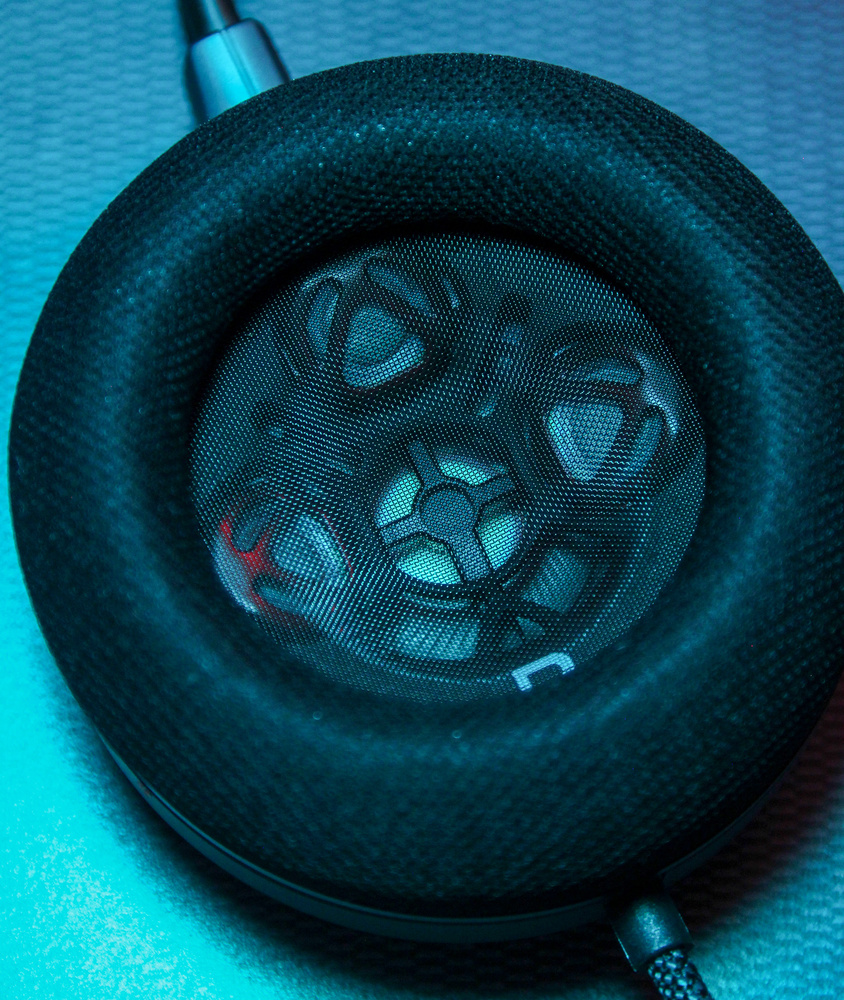 Each SR1 earcup houses four drivers: a full‑range one firing directly into the ear canal, and three additional drivers operating above around 500Hz, above in front of and behind the ear.It’s not easy being a headphone designer. You want to differentiate your headphones from the competition, but at the same time you are tightly constrained by the dimensions and shape of the human head and its ears. What’s a designer to do? All you really have to play with are the details; materials, surface profiles, colours and finishes. So my immediate admiration for the achievement of the SR1 designers when I took the headphones from their packaging is no small thing. I have a drawer in the studio that contains quite a few different headphones collected over the years and, in terms of look and feel, the SR1 has immediately gone straight to the top of the pile. The SR1 is unfussy in its detail and beautifully resolved in the way all its elements fit together. The surface finishes exude class and engineering intent, and the dark blue/green (teal?) satin of the hard parts is distinctive but not aesthetically ‘loud’. The soft parts of the SR1, its earpads and head band, are covered in a black textile that’s cool to the touch and not sticky, as faux leather tends to be. The earpads are magnetically attached and easily removable. Replacement or extra pads can be sourced directly from Areal.
In use, the SR1s are very comfortable and, while not the lightest of headphones, they’re also not noticeably heavy. The impressive quality of finish extends to the carrying case, which is undoubtedly one of the nicest I’ve come across. Said case also usefully includes space for the SR1 controller.
Controller
With such an unusual complement of drivers it’ll probably come as no surprise that the SR1s don’t connect via a simple stereo output. So the SR1 package includes a compact desktop controller that, in effect, is a class‑compliant 12‑channel USB audio interface. The SR1 interface/controller is a satisfyingly elegant looking piece of hardware, manufactured using a simple folded‑metal construction and finished in the same satin‑textured teal paint as the headphones. The top panel carries four mode selection buttons, a small display and a rotary volume knob. Pressing the volume knob also provides access to some setup and preference menus.
Around the back panel of the controller are a USB‑C socket, a 12V power input (the controller and SR1 are generally USB powered but an auxiliary supply can be attached if USB power isn’t adequate), and a smart‑looking, magnetically locking headphone output socket. The feel of the controller is reassuringly refined and professional. It smacks of a nicely engineered piece of kit. I’ll cover the controller’s facilities a little further down the page when I get to describing the SR1 in use.
Installation
Installing and using the SR1 with a Mac is really as simple as connecting the interface to a free USB socket, selecting it as the output device, slipping on the headphones, pressing Play and adjusting the volume. The situation with Windows is somewhat more complex because said OS doesn’t natively support channel arrays past 7.1. However, the user manual provides a comprehensive description of how to integrate the SR1 into a Windows setup.
Back in Mac world, there is a degree of complexity in the way the SR1 handles and interprets the audio routed to it, and that brings me to the function of the four push buttons on the top left of the SR1 controller. These buttons enable different channel arrays to be selected. From left to right the buttons select Upmix, Stereo, 5.1 and 7.1.4. Of those options, Stereo probably needs no explanation, but the other three perhaps do. Firstly, selecting the Upmix option takes a conventional stereo input signal and ‘upmixes’ it using Areal’s proprietary RISE (Realtime Immersive Stereo Expansion) technology. RISE made its debut in Areal’s Upmix Engine product, and has now been implemented in the SR1 controller to offer immersive headphone rendering of conventional stereo material. You can learn more about Areal upmixing here: https://areal.world/about/upmixing-explained. Secondly, the 5.1 and 7.1.4 options take audio inputs in those formats and, using Areal’s AIM algorithm to process it, route the appropriate signals to each of the headphone drivers.
Channel Hopping
Now, if the DAW attached to the SR1 controller is outputting 7.1.4 and the controller is set to 7.1.4, there can be direct numerical mapping of channels (assuming your DAW routing is configured that way, which it won’t be if, like mine, it’s normally connected to an Audient ORIA). However, if the computer is outputting (for example) 7.1.4 and the controller is set to 5.1, there is some signal management to do within the controller to ignore some channels. A similar issue arises if the computer is outputting, say, 7.1.4 and the SR1 is set to Stereo (or Upmix) because in that scenario, the SR1 will only reproduce the front left and right channels of the multi‑channel stream.
Areal have implemented a feature within the SR1 controller setup menus, accessed by pressing the volume knob, that handles this channel mapping complexity. The feature is called ‘USB Mode’ and its options are ‘Keep 12 Channel’ or ‘Remount USB’. In ‘Keep 12 Channel’ mode the SR1 controller remains fixed as a 12‑output interface regardless of which channel array is selected. This is the option that can potentially result in missing channels. In ‘Remount USB’ mode, which is actually the default, the SR1 controller disconnects from the computer when a different channel array button is pressed and automatically reconnects as an interface with the appropriate number of outputs for the new channel array option. So in a scenario, where, for example, a 7.1.4 Atmos stream is playing from Apple Music, switching the SR1 to Stereo with Remount USB selected will effectively tell Apple Music to stop playing Atmos and play a stereo downmix instead, because it now sees only two output channels (assuming the Apple Music Atmos settings menu is set to ‘Automatic’ and not ‘Always on’).
This is all fine in principle, but disconnecting and reconnecting an interface on the fly is not always a seamless operation and, in my experience, doing so with the SR1 could cause connection hiccups. Typically, when the SR1 disconnected, the Mac would reconnect immediately to an alternative output and I’d have to manually re‑select the SR1 as the playback device. Furthermore, if using the SR1 in an Atmos mix context with Pro Tools, switching output devices on the fly isn’t viable because, as all Pro Tools users will be painfully aware, sessions need to be saved, closed and reopened if the playback device changes. In the worst case scenario, as happened to me, pressing an SR1 channel array option button can crash Pro Tools. So in a DAW mix environment, leaving the SR1 controller in ‘Keep 12 Channel’ mode is probably wise.
In addition to the channel mapping settings, under the Audio Settings menu there’s a four‑band equaliser intended to adjust the overall tonal balance of the SR1 headphones to suit personal preferences. Next, the Channel Order options enable the SR1 to comply with either SMPTE or Film channel ordering (SMPTE goes L, R, C, LFE, whereas Film goes L, C, R, LFE). Third in the Audio Settings menu is an option to change the way the SR1 controller displays volume; dBFS or dBSPL are the options. And finally, the same menu provides an option to set the controller startup volume.
Moving on to System Settings, this menu provides options for display brightness, menu display time and sleep time (time before the display switches off). Lastly, the Info menu displays the installed firmware, offers a firmware update routine, and enables a factory reset.
Rockin’ In Areal World
Before I started listening to the headphones in 7.1.4 mode using my own Atmos mixes and favourite Apple Spatial releases, I spent some time using the SR1s for stereo playback. First impressions were of a very high level of passive isolation from the outside world, combined with a warm yet nicely detailed and informative overall performance. Clarity of, for example, reverb tails and compression artefacts was very good and well up to the level I’d expect for high‑end professional headphones. The SR1s also don’t suffer noticeably from the closed‑in and boxy character that can afflict closed‑back headphones. After a while I found the warm balance of the SR1 a little overdone, and used the controller EQ to attenuate the low end by a couple of dB from 150Hz downwards. This was effective in bringing the tonal balance more towards my personal preferences ,and I employed the EQ tweak for the rest of my listening.
Along with listening to conventional stereo, I also tried Areal’s Upmix option. I found Upmix a pretty subtle effect, which was, strangely, simultaneously a relief and a slight disappointment. The former because I really didn’t want to hear an overblown attempt to recast some well‑loved stereo music as spectacular immersive experiences, and the latter because, well, I was expecting Upmix to do a little more than add a subtle sense of air and space to stereo — which, to my ears is what it does. I’m also slightly at a loss as regards the justification for Upmix, at least in a mix studio environment. I’m not sure why I’d use it.
Moving on to the raison d’être of the SR1, I was most interested to hear how it presents the localisation of Atmos objects. The SR1 is successful to my ears in communicating the broad‑brush immersive and spatial qualities of Atmos. Things can sound huge and properly detached from the space between the ears. With some of my favourite Atmos mixes on Apple Music, the SR1 presentation was different from either my 7.1.4 monitoring system or the Apple Spatial binaural render. It’s hard to be specific on the differences because they varied depending on the qualities of the particular mix, but generally I had the sense that reproduction over the SR1 was less precise on front‑back or height localisation but wider on left‑right. With my own Atmos mixes, and one in particular that I’m working on as I write (a blues/folk piece arranged for voice, guitar, bass, cello, violin and keys), I found the translation from speaker 7.1.4 monitoring to the SR1 pretty effective for extreme front/back localisation, but less effective for audio objects positioned, say, half back, where things were somewhat less precise and explicit in their localisation. Furthermore, localisation seemed less good generally on the SR1 for audio objects raised above the head plane. In other words, while the SR1 can add a sense of height to audio objects, when it does so their front/back location is less explicit. Generally, however, while I’d be happy to mix in Atmos using just the SR1 alone, I’d expect to make changes once I heard a mix on speakers — and somewhat frustratingly (with Pro Tools in particular) the nature of Areal’s behaviour as a USB interface makes swapping between headphones and speakers rather more complicated than is ideal.
Obviously I’m describing how the SR1 sounded to me, and if there’s one thing I’ve begun to learn about immersive audio of any kind played over headphones it is that there is variation from person to person. With binaural audio it’s clear that personalised HRTFs (Head Related Transfer Functions) are significant in terms of equalising the experience for different people, and while the HRTF effect ought not to be so significant with the SR1, variations in ear pinna shape are likely, I suspect, to be a factor.
The SR1 is a fine achievement that the engineers and designers at Areal ought to feel immensely proud of...
So the SR1 to my ears is a success, both in terms of its conventional headphone performance and its ability to offer a solution to the Atmos‑over‑headphones riddle. It’s not a perfect solution, however, firstly because it can’t match the precise localisation of a well set‑up 7.1.4 speaker array (but then, neither does a binaural render) and secondly because, in use, the SR1 has some operational and system integration quirks that make it not quite the simple solution that it might at first glance appear. Those quirks aside, though, the SR1 is a fine achievement that the engineers and designers at Areal ought to feel immensely proud of, and if you’re mixing for Atmos and looking for a headphone solution I’d very much encourage you to sample the SR1.
Pros
- Genuine immersive audio over headphones.
- Really stylish design and engineering.
- Very good fundamental headphone performance and sound.
Cons
- Atmos object localisation not quite in the same ballpark as speakers.
- USB interfacing/channel mapping arrangement can result in a few operational quirks.
Summary
Areal have taken a completely different approach to immersive audio over headphones with the SR1, and they’ve made it work. Very much worth a listen.
Information
£1198 including VAT.
Polar Audio +44 (0)1444 258258.
€1299 (approx $1475).