

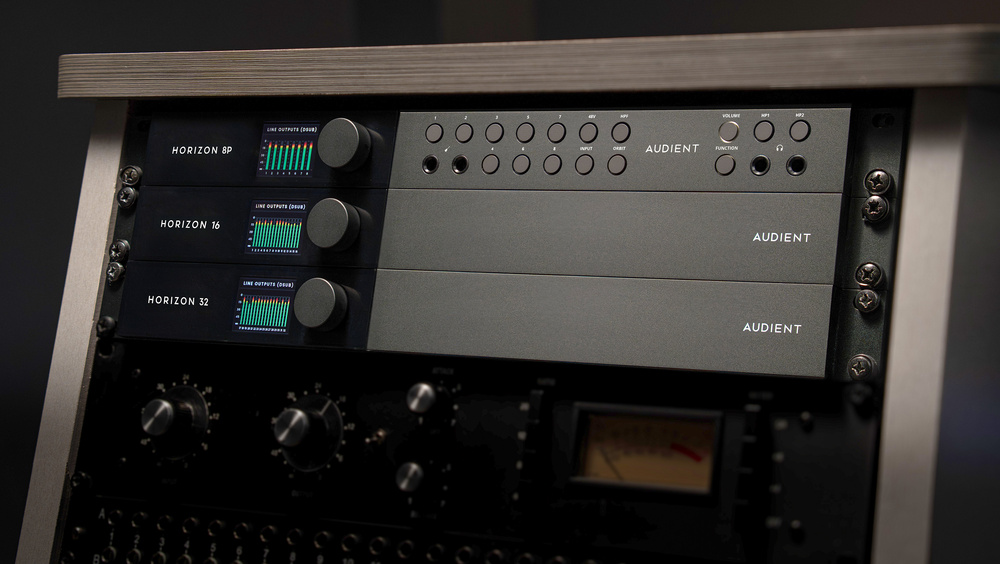
What do Audient’s all‑new Thunderbolt interfaces offer that isn’t possible over USB? Quite a lot, as it turns out.
At first, it looked as though Thunderbolt would change our lives. Driven by IT industry heavyweights like Intel and Apple, the new standard promised to eliminate all the frustrations of USB. Whether your audio life was blighted by inadequate bus power, limited bandwidth, poor low‑latency performance, inefficient drivers, or the impossibility of cascading multiple devices, Thunderbolt held the answer.
Fifteen years on, however, Thunderbolt interfaces are largely confined to the upper end of the market, and Windows support remains sketchy. Meanwhile, the two standards have converged, to the point where Thunderbolt 3 and later generations use the same Type‑C connectors as USB, and support USB device connection. USB 3 onwards offers plenty of bandwidth, power specs have been substantially beefed up and, crucially, it remains much easier and cheaper to develop USB interfaces than Thunderbolt devices. With chipsets and code available off the shelf, and no certification hoops to jump through, it’s little wonder that manufacturers have deemed USB “good enough”.
For most home studio owners, the remaining compromises of USB are indeed offset by the price advantages. But compromises do remain, usually dictated less by the protocol itself and more by the third‑party building blocks employed in interface design. If you want large I/O counts, full functionality at high sample rates and lightning‑fast low‑latency performance, your USB options narrow considerably. And if you want a scalable solution where multiple interfaces can be cascaded, they dwindle still further.
New Horizons
Audient may therefore have located an unmet need with the new Horizon series. The three interfaces in the range are all 1U rackmounting devices that connect to Apple Mac computers using Thunderbolt 3; at launch, there is no Windows support, although Audient say they will consider this in the future. Selling points include cutting‑edge A‑D and D‑A conversion, the ability to operate at very low latency, and above all scalability. Up to four Horizon interfaces can be cascaded using nothing more than Thunderbolt and BNC word clock cables, potentially delivering over 200 inputs and outputs simultaneously. And, although they are more costly than most USB interfaces, they’re extremely competitive when compared with alternative ways of achieving the same performance and I/O count.
Of the three Horizons, the 8P most closely resembles a typical high‑end USB audio interface. It provides eight analogue inputs, which are fed either from rear‑panel combi XLR/jack sockets or a DB25 connector. The first pair also have front‑panel jacks for plugging in guitars. These eight ins all feature the latest iteration of Audient’s “console preamp” design, which is fully digitally controlled and offers variable input impedance, a sweepable high‑pass filter, and a colossal 75dB gain range, augmented by a switchable ‑10dB pad.
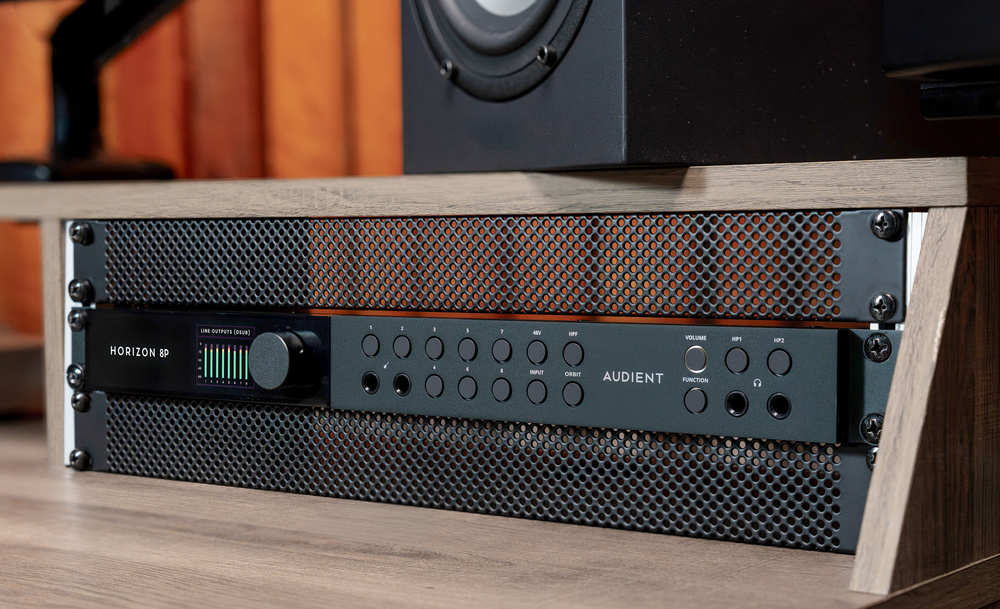 All of the Horizon units feature Audient’s colour Motion UI display and accompanying encoder. The 8P also has numerous buttons for preamp and monitor control.
On the output side, four quarter‑inch jacks are joined by another DB25 carrying eight further line‑level signals, plus two fully independent headphone sockets. And on the digital front, there’s word clock in and out plus two pairs of optical ports, which can deliver up to 16 ins and outs when set to operate as ADAT Lightpipe connectors. (You’ll have to make alternative arrangements for MIDI data, though.) Two Type‑C sockets handle Thunderbolt connectivity, and there’s an IEC inlet for mains power; alas, though, none of the Horizons ships with a Thunderbolt cable. The Horizons get pretty warm in extended use, but are passively cooled with no fan to intrude on your control‑room silence.
The Horizon 16 and 32 both have the same complement of Thunderbolt, word clock and ADAT ports as the 8P, and both also feature a single pair of outputs and inputs on rear‑panel quarter‑inch jacks. However, the real action takes place in the rows of DB25 connectors that populate their rear panels, which total 16 and 32 line‑level ins and outs respectively. At base sample rates, the Horizon 32 thus provides a total of 50 inputs and outputs: 32 over DB25, two on jacks and a further 16 on ADAT. That’s already more than the vast majority of USB interfaces can offer, but it gets better. The analogue I/O count is fully maintained at sample rates up to 192kHz; and because up to four Horizons can be cascaded, this makes it possible to achieve up to 136 analogue inputs and outputs without relying on external converters.
 The Horizon 16 and 32 both provide a single pair of ins and outs on jacks, with the remaining analogue I/O on DB25 sockets.
All three Horizon models feature Audient’s Motion UI display, and a rotary encoder with press action. The display isn’t huge, but it’s capable of a surprising amount of detail. On the 16 and 32, for example, it can simultaneously show level meters for any bank of 16 analogue inputs or outputs. A momentary press on the encoder cycles through the various metering possibilities, while pressing and holding enters a configuration menu.
On the 16 and 32, the rest of the front panel is blank, but that of the 8P is populated by 16 buttons. Most of these are used to place the focus on a specific input or monitor output, whereupon you can use the encoder to adjust input gain or output volume, and the remaining buttons to switch input source, impedance, phantom power or the high‑pass filter. In the firmware version I tested, the display jumped back to the meters view after a fixed four‑second interval, which was too quick for my ageing brain, but Audient have plans to offer a choice of behaviours in future. The last 8P button is labelled Function, and is assignable. The list of possible assignments shines a light on the Horizon interfaces’ surprisingly potent monitor control possibilities, of which more presently.
 The Horizon 8P’s eight analogue inputs are available both on combi sockets, routed through the preamps, and on a DB25 connector.
Full Control
All of this front‑panel control and much, much more is also available from your Mac, thanks to Horizon Control. This is the first manifestation of what will eventually be a universal software control panel unifying the look and feel of all Audient interfaces. Installation requires a visit to System Settings to reassure macOS that the necessary system extensions are benign. After that, Horizon Control will update connected interfaces to the latest firmware, if necessary, before opening to reveal a blank grey window. Connected interfaces need to be added manually before Horizon Control will acknowledge them, though luckily this is a set‑and‑forget operation. In a multi‑unit setup, the first Horizon you add is deemed the Primary interface and has certain special privileges.
Officially speaking, Horizon Control has three main pages labelled Mixer, Monitor [Controller] and Metering. During setup, though, you’ll spend the most time in the Settings pane, which, in turn, has two main views. One is used to set up the aforementioned monitor control, and the other presents an enormous routing matrix for each Horizon. Here you’ll see potential sources along the top, starting with the outputs from any monitor controller profiles you’ve created. These are followed by physical inputs, virtual inputs — aka playback returns from the DAW — and lastly the stereo outputs from the Horizon rig’s five internal mixers. In a multi‑Horizon setup, these mixer busses are the glue that connects the separate interfaces: you can’t route a physical or virtual input from one Horizon directly to an output on another, but all physical and virtual inputs feed into the mixers, and the five mixer outputs are available to be patched wherever you like on any of the interfaces.
A point worth mentioning here is that the order in which inputs are presented to your DAW is presently fixed. This is perhaps an issue for some Pro Tools users, because Pro Tools Studio can only address 64 inputs, and they must be sequential. So if, for example, you have two Horizon 32s connected, you might want Pro Tools to ignore the first unit’s digital I/O and address just the line ins on both units, but as I understand it, that’s currently not possible. (It’s not a problem on the output side, since all the outputs are virtualised and can be mapped to any physical outputs within Horizon Control.) The workaround at the moment is probably to upgrade to Pro Tools Ultimate, which supports up to 256 simultaneous I/O.
Plotting Routes
Plenty of scrolling is needed to get about the routing matrix, but the mixer really gives your mouse arm a workout. As well as its physical inputs, each Horizon contributes no fewer than 32 virtual (playback) outputs, presented by default as 16 stereo channels. If you unlinked everything, the 8P by itself would present more than 50 mono mixer inputs, and the 32 exactly 100. Since these are duplicated across the Main mixer plus four additional cue mixers labelled A, B, C and D, that means a single Horizon 32 could theoretically give you 500 faders to play with.
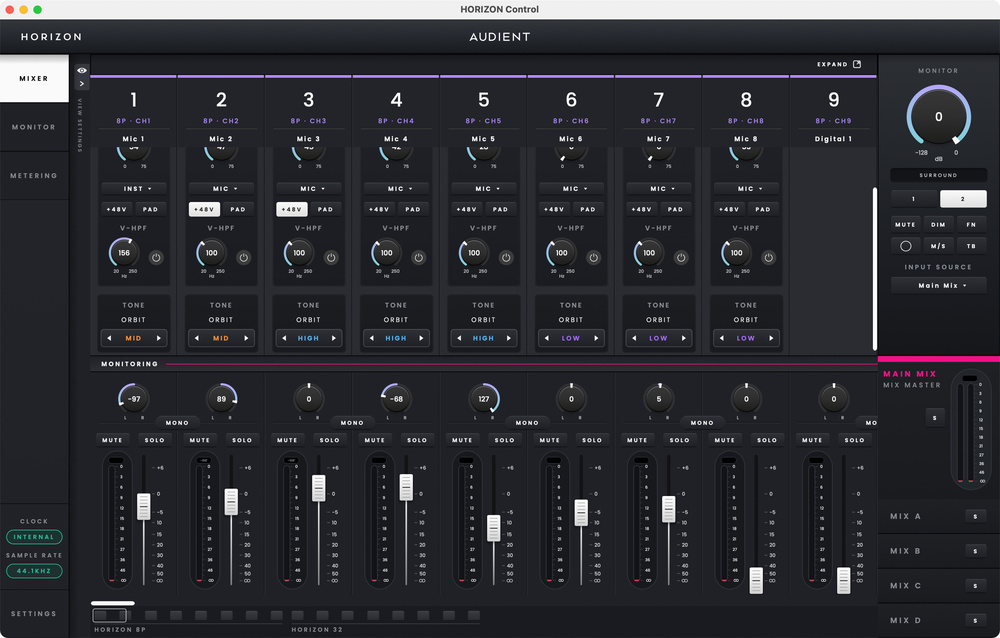 The mixer page of Horizon Control displays settings for the 8P’s preamps, as well as faders for all physical and virtual channels. Some scrolling is involved.
Thankfully, Audient have added a miniature overview of the entire mixer at the bottom, so you can navigate by clicking here rather than swiping endlessly across the main window, but even so, it can be a bit overwhelming. Plans are afoot to implement a narrow channel view and also to permit the user to show and hide inputs by category, so for example you will be able to collapse all the ADAT channels when not in use. Mixer channels for the 8P’s analogue inputs duplicate the input selection, gain, phantom power, filter and impedance (Orbit) settings accessible from the front panel, but they also allow you to adjust the filter cutoff and engage the pad.
Functionally, the main thing that distinguishes the Primary Horizon from any others in your setup is the availability of monitor control features. These are configured in the Monitoring page from the Horizon Control Settings. The idea is that you can create multiple Monitor Profiles, each with its own Speaker Layout. These are chosen from a list of 11 common setups starting with Mono, Stereo and 2.1 and ranging up to 9.1.4. Only one Profile can be active at once, and each of them manifests the appropriate number of channels in the routing matrix, so that they can be mapped onto physical outputs. As a simple example, if you only work in stereo but have two sets of speakers, you might create a main and a secondary Monitor Profile and map these to two different output pairs on your Horizon — the jack outputs have a helpful speaker icon next to them in the routing matrix indicating that they’re designed for this purpose, but there’s nothing to stop you using other outputs if you prefer.
Alternatively, many people work both in surround and in stereo, and use their main speakers as the left and right pair in an immersive array. In this context, you could create overlapping stereo, 5.1 and 7.1.2 (or whatever) Monitor Profiles, all of which have the L and R channels routed the same. At present, Monitor Profiles can be switched only in software. It might be nice to be able to use the 8P’s Function button to cycle through them, although there’s an obvious risk of confusion in a setup where you have lots of Profiles stored. As it is, there’s no way to do simple speaker switching from the front panel.
All Monitor Profiles have a digital volume control plus lots of useful switched functions. It’s possible to set a global Dim level and also a calibrated Reference level, which can be recalled using the 8P’s Function button if you so desire. There are also mute and mono options, including single‑speaker mono (hooray!). There’s even the ability to audition the Sides signal. Horizon Control also allows you to set up talkback switching and routing, again using the Function button.
A Monitor Profile, and the 8P’s headphone outputs, can be set to pick up the output from any of the five Horizon mixer panes, or it can be set to Host. In Host mode, the headphones can pick up any of the virtual output pairs, whilst a Monitor Profile takes as its source a series of virtual outputs starting at 1. So, for example, if you create a 5.1 Monitor Profile, you’ll need to route the multi‑channel output from your DAW or renderer to virtual channels 1‑6. The internal mixers are stereo‑only, so Host mode is obviously necessary for immersive or surround monitor control. At present, bass management must be handled externally, although I understand that there is currently unused DSP within the Horizon, so this might be a possibility for the future.
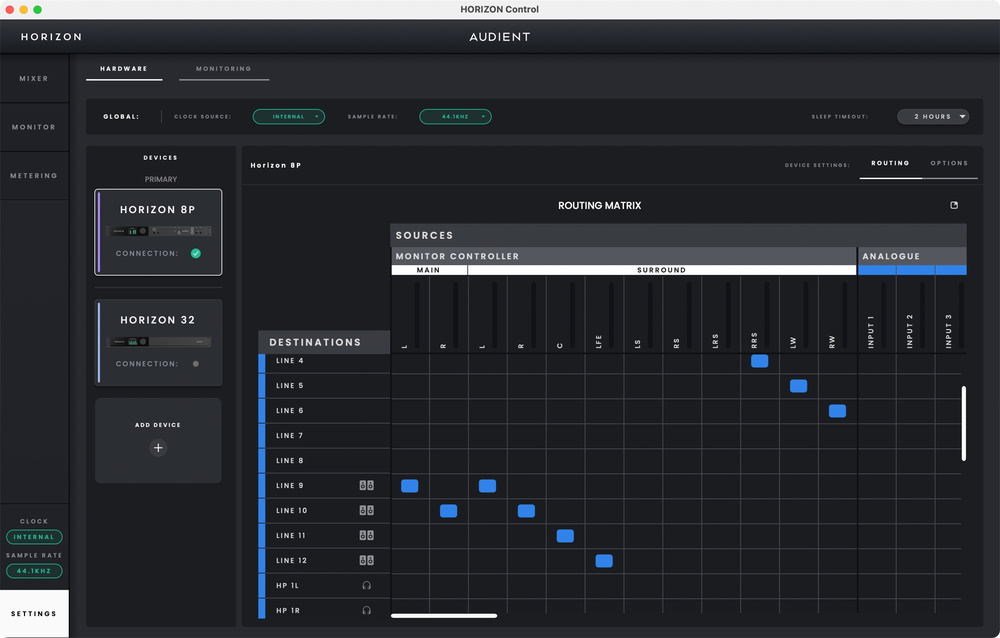 Monitor Profiles on the Primary Horizon unit add extra virtual outputs to the routing matrix, which can then be patched to your choice of physical outputs.
The more complex and powerful an audio interface is, the more important the design of its software control panel. With the potential to grow to 200 inputs and outputs, the Horizon system is about as complex and powerful as native audio interfaces get — and, in my opinion, Audient have done a stellar job with the design and implementation of Horizon Control. Two obvious competitors for the Horizon are UA’s Apollo system and Antelope Audio’s Orion. In the context of a large system, I found Horizon Control significantly more versatile and a good deal easier to use than either the UA Console app, or Antelope’s control panel. The open‑ended routing, mixing and monitor control is both intuitive and incredibly powerful. Where rival products sometimes seem to force you into adopting someone else’s idea of how everything should be set up, the Horizon system lets you do pretty much what you want. There’s scope for refinement, especially to minimise scrolling, but the basic concepts are spot on. It was also perfectly stable during the review period, with no crashes or weird behaviour. And if you’re thinking it would also be nice to have custom Speaker Layouts, remote control from an iPad, and so on, Audient have a firm roadmap with plenty of additional features planned.
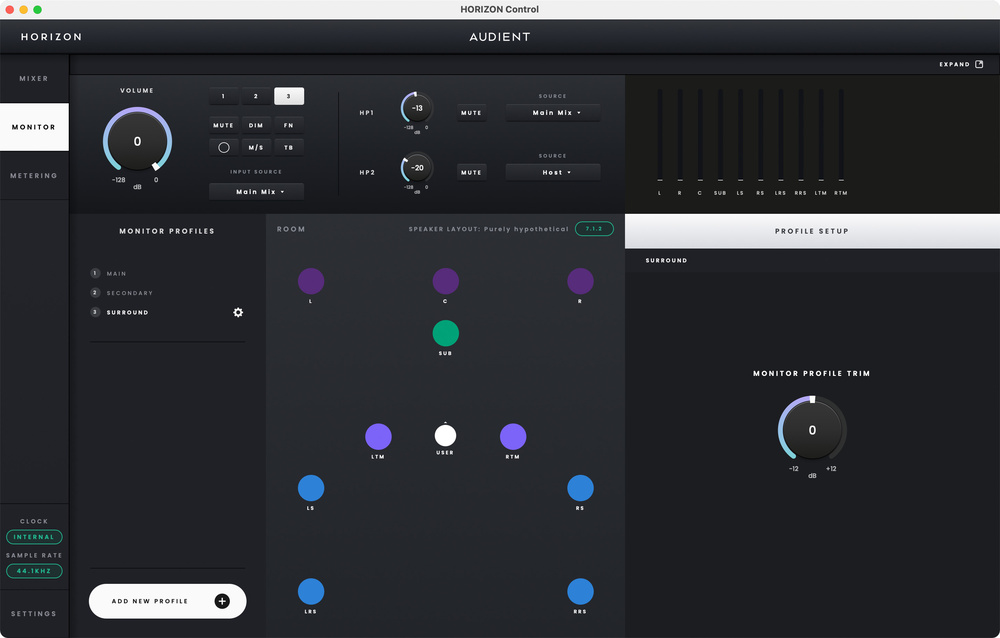 Horizon monitor control supports immersive arrays up to 9.1.6.
Those who are willing to pay a premium for a Thunderbolt interface understandably expect that cost hike to be reflected in superior performance.
Bolt On
Those who are willing to pay a premium for a Thunderbolt interface understandably expect that cost hike to be reflected in superior performance. As we’ve already seen, the Horizon series absolutely delivers on that promise when it comes to I/O count. I was sent all three units to review: the total number of inputs and outputs absolutely dwarfed the number of sources I was able to connect to them, but a random sampling of channels throughout the range all worked as expected. I have no reason to doubt Audient’s claim that it’s possible to get 200 inputs and outputs reliably working, although the clocking situation would be interesting given that 64 of them would need to be provided by ADAT expanders.
If you’re genuinely concerned about the possibility of outgrowing the 136 analogue inputs and outputs obtained by cascading four Horizon 32s — which is conceivable in some orchestral recording and post‑production scenarios — you might ask why Audient have chosen ADAT as an expansion option rather than a more ‘professional’ standard such as MADI, Dante or some other audio‑over‑IP protocol. On the face of it, that’s not an unreasonable question, but it shouldn’t be forgotten that the Horizon still needs to compete on cost. Going down this route would have made it substantially more expensive, and it would arguably have undermined the basic idea of the product. In a recording context, you’d typically choose MADI and audio‑over‑IP when you want to separate the A‑D and D‑A conversion from the audio interface. The point of Horizon is to do precisely the opposite, integrating as much conversion as possible into the interface itself.
One common argument for separating the two is that it allows you to upgrade the converters and the interface independently as necessary. It also ensures that you won’t get too badly stiffed if the interface manufacturer goes under or abandons their baby. So if you’re going to choose an integrated system like the Horizon, you want to be very sure that the built‑in converters are not going to be superseded any time soon, and that the interface as a whole will enjoy long‑term support. On the latter point, I think Audient have now been around long enough to convince most of us that they are not some fly‑by‑night affair, and their track record compares well with most rivals. And on the former, well, a look at the Horizon specifications will make many people wonder why they need to spend two or three times as much for state‑of‑the‑art standalone converters from other manufacturers.
Dynamic range on the line‑level I/O is quoted as 127dB on the input side and 132dB on the output side, across the board. THD+Noise on the line inputs is a vanishingly low ‑118dB, which equates to 0.00012%, and is even lower on the outputs at ‑122dB or 0.00008%. And Audient are at pains to point out that these are measurements taken from the interface itself, not merely recycled factory specs for the converter chips. Their “console preamps” have equally impressive numbers, with an A‑weighted EIN figure of ‑129dB and THD+Noise of ‑98dB (0.0011%). With a 75dB gain range and a maximum input level of +18dBu, they should accommodate everything from podcasters whispering into their SM7Bs to close‑miked drums with ease. Audient’s variable impedance control, named Orbit, offers a choice of 220Ω, 1.2kΩ or 2.8kΩ settings. As ever, this has most effect on transformer‑balanced mics and especially on moving‑coil dynamics, with the low setting generally offering more gain and a different low‑end response.
No less important than the calibre of the converters is their ability to fit into real‑world studios, and Audient’s designers have delivered the goods here too. For example, the line‑level I/O can be switched in banks between 0dBFS = +18dBu and +24dBu alignment levels. And although the 8P’s DB25 inputs share converter paths with the mic preamps, they are otherwise independent, so you can leave both sockets plugged up and switch on a per‑channel basis as needed. In a smallish hybrid studio, for instance, you might track through the eight preamps and then switch over to the line ins at mixdown in order to use outboard processors as hardware inserts.
Finally, I’m not sure it needs saying that conversion of this measured quality subjectively sounds good — but it sounds great. I’m not sure I’d go so far as to say that a veil was lifted when compared with my existing interface, but I certainly felt I could more easily focus on details in the mix.
There is one more respect in which we expect Thunderbolt to deliver a premium, and that is latency. This is one of the biggest selling points for the Horizon series, with Audient claiming to have broken the 1ms barrier at 192kHz. That’s a remarkable achievement, but to keep the playing field level, I did my own measurements at 44.1kHz. At a 32‑sample buffer size, Reaper reported a round‑trip latency of 2.5ms, and by moving to a 16‑sample buffer I was able to reduce this to 1.8ms. Loopback measurements confirmed that these reported figures were only about 14 samples out, this number presumably representing the processing delay through the Horizon mixer. These are superb results that better not only almost all USB interfaces, but the large majority of other Thunderbolt devices. Bravo.
Horizon Events
When Audient launched the ORIA a couple of years ago, it was clear that they had identified a gap in the market. In that case, they’d correctly spotted that hardly anyone was making a multi‑channel interface optimised for immersive audio playback, with integrated calibration, at a competitive price. Audient took the risk of filling that niche, and it’s paid off for them.
The Horizon series targets a much broader sector of the market, but even so, that sector also feels underpopulated. The most obvious point of comparison is Universal Audio’s Apollo range, which also connects via Thunderbolt and allows multiple interfaces to be cascaded. The Horizon 8P goes head to head with the Apollo x8p, whilst the Horizon 16 faces off pretty directly against the Apollo x16. The UA range lacks a 32‑I/O unit, but does include a Dante‑capable model as well as the Twin X, which provides a neat desktop monitor control option in a multi‑unit setup.
There’s relatively little to choose between the Horizons and the latest Gen 2 Apollos in terms of audio performance, except that the maximum I/O count is much greater with the former. Elsewhere, I think the most important factor is how much you value the Apollos’ built‑in DSP. UA’s platform enables a huge range of their Powered Plug‑ins to be run in hardware, offers preamp modelling as well as variable input impedance, and supports integrated monitor calibration through their Sonarworks add‑on. However, this does not come for free. Depending on how many ins and outs you need, the Audient option almost always works out more affordable.
That’s particularly true in the relatively common scenario where you just want a lot of line‑level I/O to pair with an analogue mixing console. If you’re in that position, you probably don’t need a monitor controller, you already have EQ and preamps at your disposal, and most likely you already have hardware outboard too, so DSP‑powered plug‑ins might be less of a selling point. The Horizon 32 is a killer product in this scenario, offering 32 channels of high‑quality conversion and low‑latency interfacing for half the price of a pair of Apollo x16s.
In this context, however, the Horizon 32 does have keenly priced competitors in the shape of MOTU’s 16A and Antelope Audio’s Orion 32+ Gen 4. These respectively offer 16 and 32 line‑level inputs and outputs, with very decent audio specifications. Neither can be cascaded over Thunderbolt, as far as I’m aware, but both feature enhanced digital expansion. The MOTU system allows additional 16As (and other devices) to be added over an AVB network, with up to 128 channels of total I/O possible, whilst the Orion 32+’s MADI ports support 128 additional channels at base sample rates. Both also offer USB connectivity, albeit with reduced functionality. As with the Apollos, there are territory‑specific price differences. In the UK and Europe, for example, the Horizon 32 costs less than two 16As and about the same as the Orion 32+ Gen 4, but the competing products are more affordable in the USA thanks to tariff differentials.
As I’ve already mentioned, the importance of well‑designed control panel software shouldn’t be overlooked. Universal Audio’s UAD Console app is extremely mature, stable and richly featured; unlike Horizon Control, its look and feel are somewhat modelled on those of vintage large‑format mixing consoles. There’s less freedom to configure things to suit a specific preference or use case, and I personally found Horizon Control easier to get to grips with, although this is obviously highly subjective. It’s been a while since an Antelope interface crossed my path, but historically I haven’t always found their software to be quite as slick or robust. I have no first‑hand experience of the CueMix Pro app that accompanies the 16A.
This feels like a truly professional product, and one that can easily be tailored to your own specific needs.
At any rate, having tried the Horizon system, I’m convinced. With its superb sound quality, intuitive yet flexible control software, lightning‑fast low‑latency performance and open‑ended approach to expansion, this feels like a truly professional product, and one that can easily be tailored to your own specific needs. In my own studio, for example, a single Horizon 32 has the potential to replace two or three other hardware units and a tangled web of BNC and optical cables. In fact, I can feel my credit card doing a little leap in my pocket as I write...
Pros
- Huge I/O counts at a very reasonable price.
- Superb low‑latency performance.
- Intuitive and versatile control software.
- Excellent audio specifications.
Cons
- Only ADAT and S/PDIF digital expansion.
- At launch, it lacks some features available on rival products, such as remote control.
- No Thunderbolt cable included.
Summary
With state‑of‑the‑art audio performance, vanishingly low latency and enormous expansion potential, the Horizon series exploits the potential of Thunderbolt to the full.
Information
Horizon 8P & 16 £2199, Horizon 32 £2799. Prices include VAT.
Audient +44 (0)1256 381944