

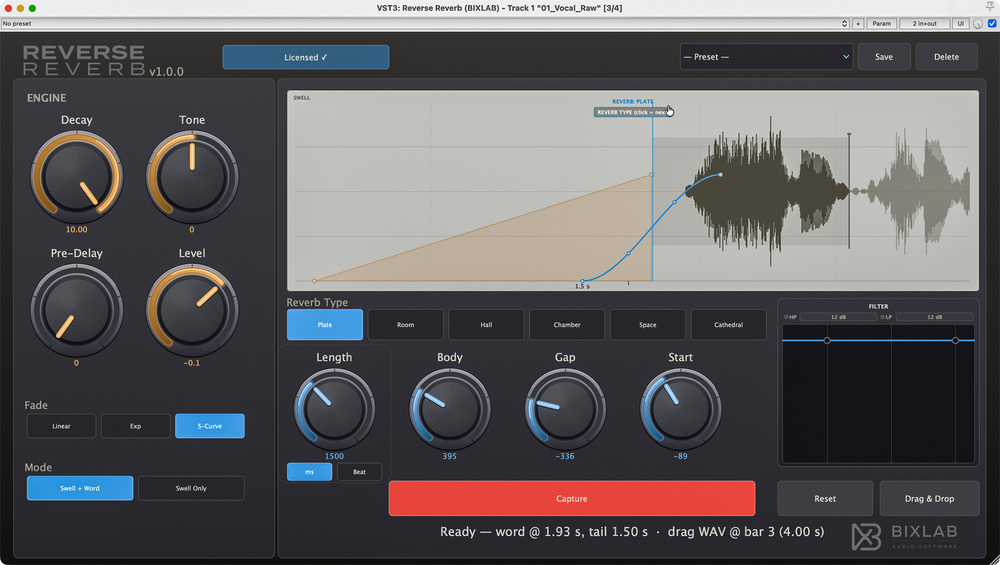
Reverse reverb is such a powerful effect, and one that can potentially add interest to mixes in so many genres that I don’t think it’ll ever really fall out of fashion! But conventionally, the steps required to create it can be a bit fiddly: duplicate the audio, reverse it, apply a fully wet reverb, render the effect, reverse the rendered clip, trim it to taste, align it to ‘hit’ when the original clip starts... and then maybe apply some fades and volume automation. And if you want to try it again with different reverb settings? Well, you have to go through that whole process all over again...
Bixlab’s Reverse Reverb plug‑in aims to simplify this, so you can create reverse reverb effects quickly, preview the results, and tweak various aspects to taste before you commit. It’s available for Mac and Windows and compatible with VST3 and AU plug‑in hosts, and copy protection is by a simple emailed licence key.
Operation is trivially easy. You insert...
You are reading one of the locked Subscribers-only articles from our latest 5 issues.
You've read 30% of this article for FREE, so to continue reading...
- ✅ Log in - if you have a Digital Subscription you bought from SoundOnSound.com
- ⬇️ Buy & Download this Single Article in PDF format £0.83 GBP$1.49 USD
For less than the price of a coffee, buy now and immediately download to your computer, tablet or mobile. - ⬇️ ⬇️ ⬇️ Buy & Download the FULL ISSUE PDF
Our 'full SOS magazine' for smartphone/tablet/computer. More info... - 📲 Buy a DIGITAL subscription (or 📖 📲 Print + Digital sub)
Instantly unlock ALL Premium web articles! We often release online-only content.
Visit our ShopStore.