

Though they can sound magical, it’s often hard to make granular effects work in a musical context — or rather, it was hard until now!
Perhaps more so than any other type of effect, granular processors have the ability to transform audio into entirely new sonic landscapes — the results can sound truly enticing. The down side is that making sure the effect actually works in a real musical context can be a challenge. Thankfully, that’s a challenge to which Minimal Audio have risen to with their latest plug‑in, Lucid.
Granular Discipline
Lucid incorporates various tools that help you keep generated granular textures both in key and perfectly sync’ed with the host project. While lots of granular effects offer basic pitch and sync options, Lucid elevates the concept by letting users lock grains to precise musical scales, transpose intervals on the fly, and apply per‑grain timing and phase randomisation.
For timing, grain generation and processing can sync to the DAW grid, snap to audio transients, or scrub live audio buffers. Global controls govern the main engine, while per‑grain variation is introduced through Jitter, Spray, and Blur parameters, giving each generated fragment distinct timing, pitch, and phase characteristics. Two machine authorisations are included per licence, supporting all major 64‑bit plug‑in formats (VST, VST3, AU, AAX). Lucid is available standalone, via rent‑to‑own, or as part of the Minimal Audio All Access Pass subscription. There’s also a seven‑day free trial option.
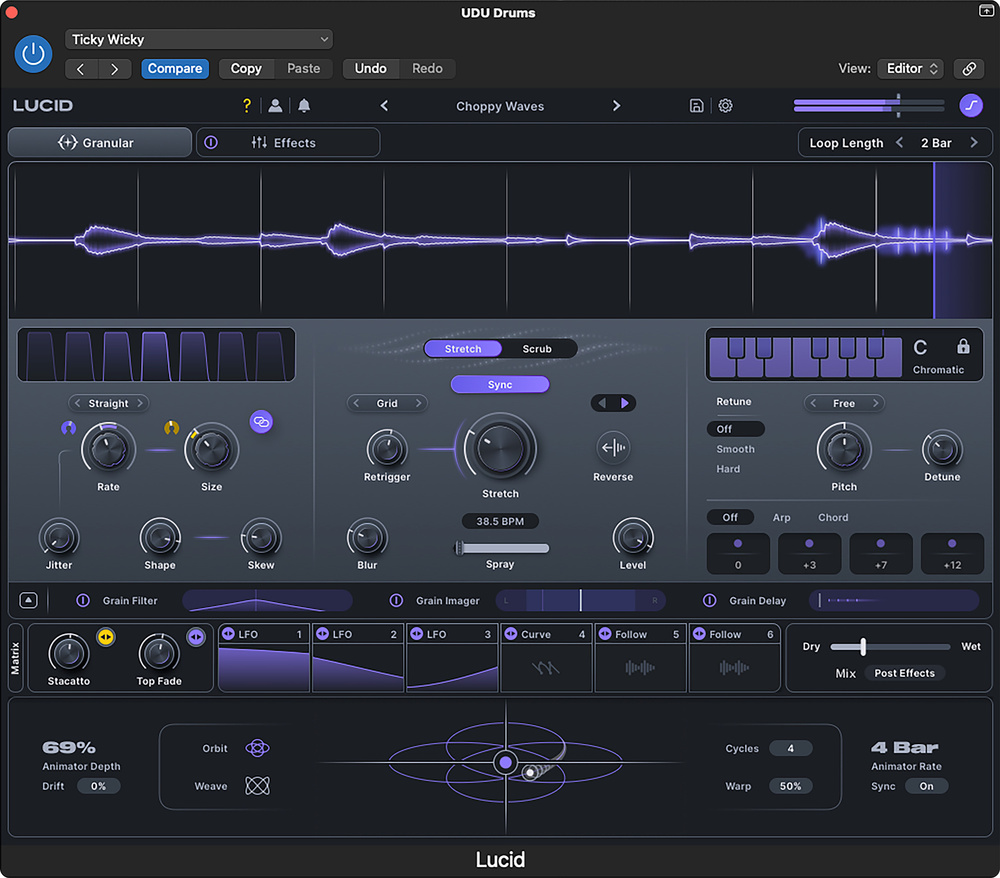
All the primary controls are to be found in the Granular view. A second tab accesses the Effects view, and there you’ll discover a generous selection of effect types that can be assembled as an ‘FX rack’. A real‑time waveform display runs along the top of the interface to show active grain playback. The upper‑left panel controls grain generation, including the grain Shape, Size, and symmetry (Skew). Rate and Jitter controls adjust their density and variation, and helpfully there’s also a lock button to link Size and Rate parameters.
The upper‑centre section controls grain timing, and you can select Stretch or Scrub modes. Scrub Mode lets you move the playhead around inside the captured audio waveform rather than just time‑stretching it linearly, and the available scrubbing range and...
You are reading one of the locked Subscribers-only articles from our latest 5 issues.
You've read 30% of this article for FREE, so to continue reading...
- ✅ Log in - if you have a Digital Subscription you bought from SoundOnSound.com
- ⬇️ Buy & Download this Single Article in PDF format £0.83 GBP$1.49 USD
For less than the price of a coffee, buy now and immediately download to your computer, tablet or mobile. - ⬇️ ⬇️ ⬇️ Buy & Download the FULL ISSUE PDF
Our 'full SOS magazine' for smartphone/tablet/computer. More info... - 📲 Buy a DIGITAL subscription (or 📖 📲 Print + Digital sub)
Instantly unlock ALL Premium web articles! We often release online-only content.
Visit our ShopStore.