

The real battlefield of any mix is the midrange, where multiple different sounds often fight to be heard. This plug‑in aims to keep the peace...
Newfangled Audio’s Fixate:Midrange, which is marketed by Eventide, is essentially a problem‑solving plug‑in that tames resonances and muddy build‑up in a mix. It’s not dissimilar in concept to plug‑ins such as Oeksound’s Soothe, Soundtheory’s Gullfoss and Waves Audio’s Curves Equator — but in this case, there’s a deliberate focus on the midrange, the idea being that this is where you’ll often find multiple sounds competing for the same slice of audio spectrum, and where our ears are most sensitive.
Fixate In The Mix
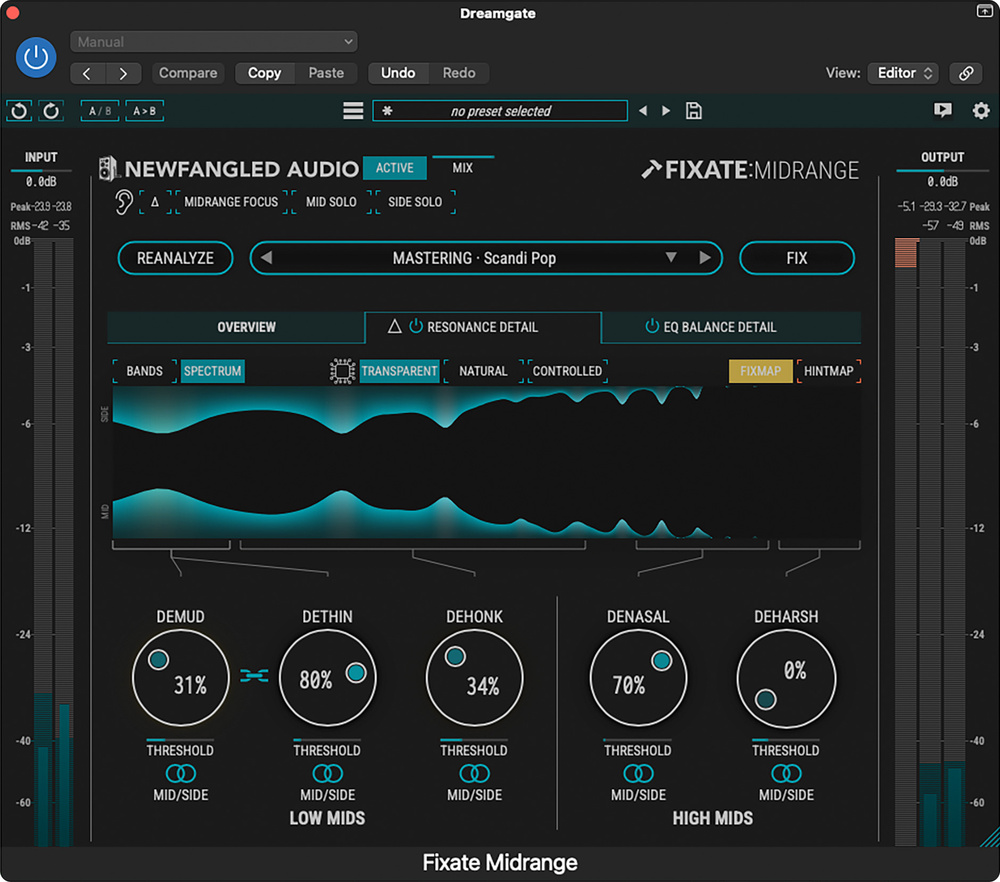
Essentially, what we have here is an automated EQ, but one that can shape the overall spectral balance. Fixate:Midrange analyses the incoming audio using a psychoacoustic model that’s based on human hearing, then dynamically targets the areas associated with common problems. The interface is mercifully simple, including only six controls: Demud, Dethin, Dehonk, Denasal, Deharsh and Spectral Balance. Each has a variable threshold and a width control that allows it to go from mono, via normal stereo, to Mid‑Sides processing. When set to Analyse, the processor adjusts the five resonance bands (and the Spectral Balance) automatically, to source‑appropriate amount and threshold settings. Then, when playing back with Fix engaged, the controls glow orange if that particular frequency band is activated.
The correction can be set to Transparent, Natural or Controlled, and tabs allow the display to show an Overview curve, Resonance Detail or EQ Balance Detail. There’s also a long horizontal slider that adjusts the depth of the applied EQ curve, with Original at the left and Fixed at the right. A real‑time resonance display shows where energy concentrations are occurring, and turning on Hintmap adds visual indicators showing potentially problematic regions that require attention as orange shading. Fixmap shows where active corrections are taking place, again in orange, and both views show the Sides signal at the top of the display and the Mid signal at the bottom.
While there are presets created for different types of material, including a long list of mastering styles, typical mixes can be entrusted to Automatic mode. A Delta button allows only the difference signal between the original and processed sounds to be auditioned, which can be useful, and there are also solo buttons for the Mid and Sides signals. A further button, Midrange Focus, allows the user to monitor just the midrange to better reveal problems.
Switching to the EQ Balance Detail view shows a Spectral Balance curve along with a 15‑band EQ with draggable points that can be used to adjust the overall spectral balance, should you wish to modify the settings the plug‑in has adjusted for you. The plug‑in adjusts this EQ curve dynamically when analysing a source and then settles down to an average position. Users can also load reference EQ profiles for vocals, mastering, guitars, drums or other source types, and the plug‑in attempts to tweak the material to match the general spectrum of the target profile in the manner of a match EQ.
This plug‑in can help smooth out vocal issues, such as the tendency to sound harsh on some notes, pull back unwanted boxy resonances in acoustic guitars, and so on.
Verdict
Sonically, the better balanced the source material is, the less obvious‑sounding are the results. But even on less optimal material, when more assertive correction is needed, the overall impression is of transparency rather than of any obvious tonal change. While it is obviously still important to arrange and orchestrate compositions to create a natural balance in the midrange, some tonal conflicts are at times inevitable. So having a tool like this that can help you tame unwanted build‑ups and resonances, automatically in a natural‑sounding and unobtrusive way, is very welcome indeed. And it’s not just useful for complete mixes either — this plug‑in can help smooth out vocal issues, such as the tendency to sound harsh on some notes, pull back unwanted boxy resonances in acoustic guitars, and so on. I was very impressed by the company’s Articulate plug‑in, and Fixate:Midrange has only enhanced Newfangled Audio’s standing for me, as it’s achieved a similar balance between sound quality and ease of use. Recommended!
Summary
An original take on the idea of resonance suppression and automatic EQ, Fixate:Midrange is a superb tool for ‘decongesting’ full mixes and doubles up as an effective processor for various individual sources too — not least vocals and acoustic guitar.