

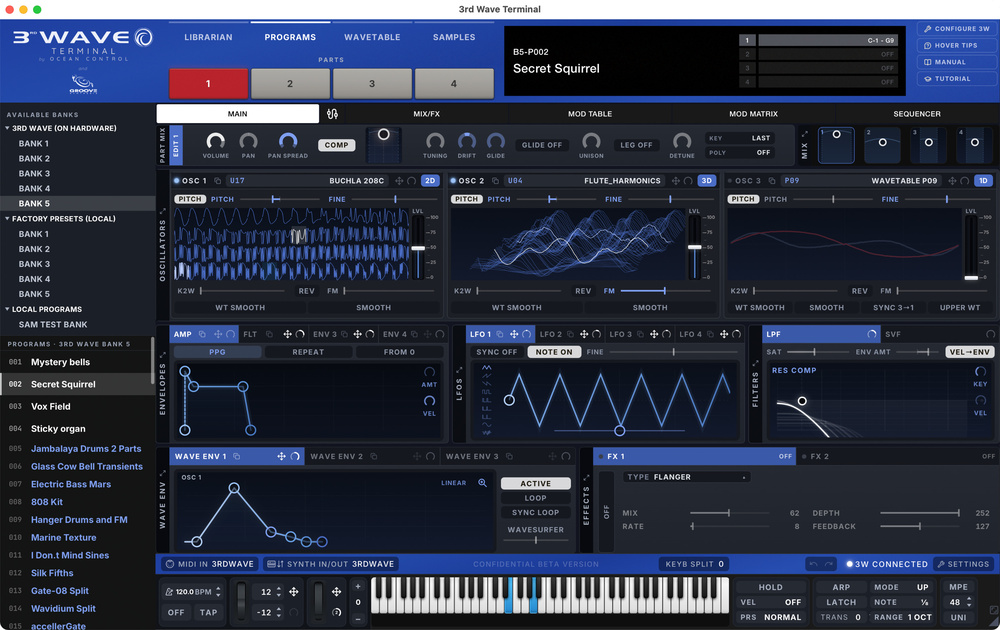
Has Groove Synthesis’ powerhouse polysynth now got the software editor it deserves?
We live in a golden age for synthesizers. Whether you favour analogue or digital, integrated or modular, keyboard or desktop, there has never been such a wealth of riches available. It takes a lot to stand out in this glittering crowd, but Groove Synthesis’ 3rd Wave has certainly done so.
In case you’ve been living under an E‑mu Vintage Keys module for the last three years, the 3rd Wave is a modern instrument that is both visually and sonically inspired by the legendary PPG Wave. It can recreate PPG programs to an absurdly high degree of accuracy, but it’s far, far more than an emulation. Indeed, it’s far more than merely a wavetable synth. If Rory Dow’s 2023 review doesn’t get your mouth watering then you have a lot more self‑control than most SOS readers!
The 3rd Wave hasn’t only proved inspirational to SOS authors. It’s also generated strong feelings from musicians, among them Star Citizen composer Pedro Macedo Camacho. In fact, so enamoured is Pedro of his 3rd Wave that he has taught himself to code and, with grateful assistance from Groove Synthesis, developed a comprehensive software editor and librarian. Titled 3rd Wave Terminal in homage to the PPG Waveterm, it’s initially available as a standalone app for macOS and Windows.
Hand Waving
Unlike some early digital and hybrid synths, the PPG Wave offered a pretty generous complement of hands‑on editing controls. The 3rd Wave goes much further, with around four times as many knobs as the PPG, but on such a sophisticated instrument it simply wouldn’t be feasible to provide a dedicated control for every parameter; and in any case, crucial features such as selecting different wavetables can’t easily be implemented without some menu surfing and list browsing.
What’s more, as on all inspiring synths, it’s possible to run out of space. The 3rd Wave hardware can store five banks of 100 Programs, which sounds like a lot, but still leaves you facing awkward choices about which factory Programs you can live without when you want to store your own creations. Similar considerations apply when you want to load your own wavetables and samples, especially as there are only 16 user wavetable slots (the 48 factory wavetables can be overwritten, but doing so naturally alters any Programs that use them).
Hence there are two potential benefits to a software companion for the 3rd Wave. One is the ability to offer a complete, editable overview of all its parameters, including those that aren’t immediately accessible from the front panel. The second is the chance to build up an effectively unlimited library of Programs, samples and wavetables, and share them easily with other users worldwide. Pedro has set out to do both of these things, and much more besides.
In The Frame
The 3rd Wave hardware has a Type‑B USB socket on the rear panel. This allows a connected computer to see its internal storage as an attached drive, and it also serves as a MIDI interface. Communication between the 3rd Wave and the software editor is primarily handled using MIDI SysEx messages, but you’ll need to update the instrument to the latest firmware in order to use the editor. This is done by dragging and dropping the relevant file onto the drive, before selecting the relevant option from the Global menu. The editor itself is a trivially small download, and automatically checks for and downloads updates whenever it’s opened. Pedro is continuously improving the app, so this happens most days!
The user interface presents three strips — along the top and bottom and down the left‑hand side — that are always present regardless of what you happen to be doing. The browser view to the left displays all the banks and Programs that 3rd Wave Terminal is aware of, the lower strip hosts a small on‑screen keyboard and related parameters, whilst the topmost section is where you switch between different views. At any one time, the main...
You are reading one of the locked Subscribers-only articles from our latest 5 issues.
You've read 30% of this article for FREE, so to continue reading...
- ✅ Log in - if you have a Digital Subscription you bought from SoundOnSound.com
- ⬇️ Buy & Download this Single Article in PDF format £0.83 GBP$1.49 USD
For less than the price of a coffee, buy now and immediately download to your computer, tablet or mobile. - ⬇️ ⬇️ ⬇️ Buy & Download the FULL ISSUE PDF
Our 'full SOS magazine' for smartphone/tablet/computer. More info... - 📲 Buy a DIGITAL subscription (or 📖 📲 Print + Digital sub)
Instantly unlock ALL Premium web articles! We often release online-only content.
Visit our ShopStore.