

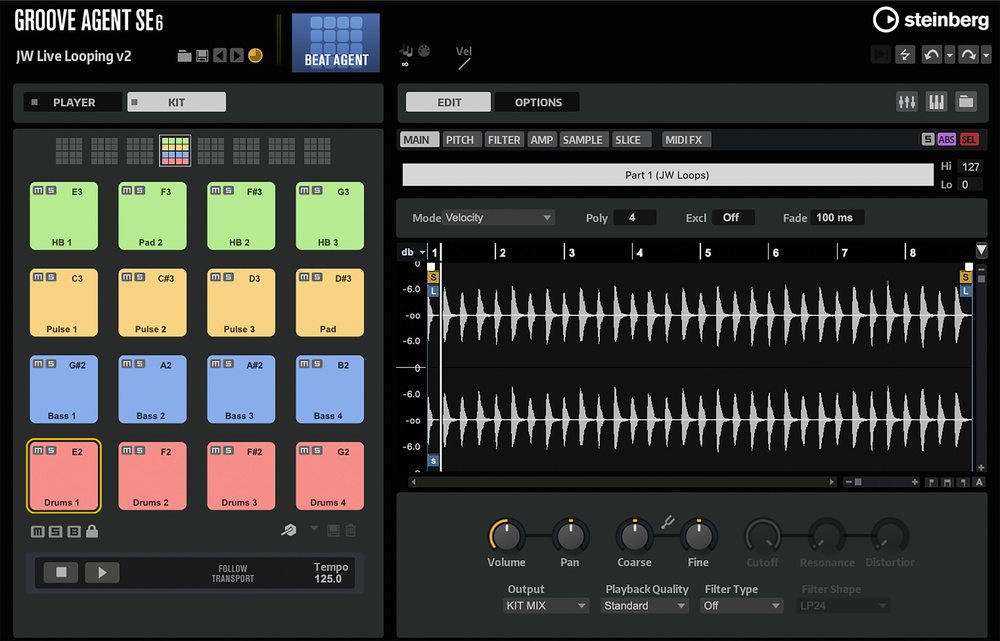
 Groove Agent’s Kit pads can easily house a collection of extended loops suitable for real‑time triggering.
Groove Agent lets you get creative with real‑time loop triggering.
Whether you’re improvising in the studio or performing on stage, if you like the creative possibilities of triggering audio loops live, then any current version of Cubase has all you need for your experiments. In fact, it makes possible a number of different workflows, but for a straightforward approach you need look no further than the bundled Groove Agent SE instrument (or the full version, if you have that). All it takes is a little configuration, and you can easily build some custom loop sets, including the option to trigger ‘scenes’ (subsets of your loops that trigger together) from a single MIDI note.
Loop Collective
To start, you need to collect together some audio loops that you feel have suitable musical potential. All versions of Cubase ship with some audio loop content that could serve as your starting point but if you have access to third‑party construction‑kit‑style loop sets, these may well have drum, bass, synth and other loop options designed to work well together.
You can use any length of loop, but two‑, four‑ or even eight‑bar loops will work pretty easily, and if you want to add a few one‑shot samples into your collection (kick drum or cymbal hits or sound effect samples, for example), these can also be put to good use. No, not every loop you might randomly import will gel nicely with the others, but finding some interesting potential combinations is part of what makes this style of music creation fun to explore.
Pimp My Pad
If your Groove Agent instance loads with a default preset, it’s best to clear the sample contents before you bring in your samples. To do that, select all the pads in a specific 16‑pad page, right‑click, and from the pop‑up menu choose Remove All Samples. Then, in Groove Agent’s Kit page, import your audio loops and samples — you can drag and drop each loop from your collection onto an individual pad. This can be done from the Project window (if you already have the loops in your Cubase project), from the Project window’s right‑zone Media panel, or from your operating system’s file browser. Note that dropping a sample onto the top, middle or bottom of a pad influences the behaviour of the import process. Importantly, if adding a single sample/audio loop to a single pad, drop it in the middle to avoid it being sliced or layered with other samples on the same pad.
Groove Agent will tempo‑match the loops as you import them and, for pitched sounds, you can also pitch‑shift imported samples (using the Coarse pitch control in the Main and Pitch...
You are reading one of the locked Subscribers-only articles from our latest 5 issues.
You've read 30% of this article for FREE, so to continue reading...
- ✅ Log in - if you have a Digital Subscription you bought from SoundOnSound.com
- ⬇️ Buy & Download this Single Article in PDF format £0.83 GBP$1.49 USD
For less than the price of a coffee, buy now and immediately download to your computer, tablet or mobile. - ⬇️ ⬇️ ⬇️ Buy & Download the FULL ISSUE PDF
Our 'full SOS magazine' for smartphone/tablet/computer. More info... - 📲 Buy a DIGITAL subscription (or 📖 📲 Print + Digital sub)
Instantly unlock ALL Premium web articles! We often release online-only content.
Visit our ShopStore.