

As ever, Creative Labs' latest PC soundcard promises a lot of features for £200. But does it deliver the kind of performance that musicians need?
 The Creative Labs range of soundcards tends to elicit plenty of strong feelings. On the one hand there's no denying their incredible value for money, and the innovative way they have introduced new features such as Soundfonts and Firewire to a mass market. This has won them a devoted following among games players and home users, keen to enjoy every aspect of the multimedia experience.
However, there are also plenty of disgruntled musicians who feel that Creative made misleading claims for features on models specifically targeted at them, such as the recent '24-bit/96kHz support' on the Audigy cards, which in reality only provided 16-bit performance, and the fixed-rate 48kHz engine, which caused problems with sampling and made bit-for-bit digital transfers from other gear impossible (see 'Soundblasters Through The Ages' box). The SOS forums are awash with heated Soundblaster debates, as are many others.
|
Fully aware of this controversy, Creative Labs have now launched a new soundcard to tempt the musician: the Audigy 2 Platinum EX. At its heart is a completely new Creative DSP chip, the Audigy 2 CA0102: although this is similar to the Emu 10k2 used in the Audigy, it has a significantly better signal-to-noise ratio and supports file formats up to 24-bit/192kHz. Compared with the original Platinum EX, version 2 also adds various other new features of particular interest to musicians, including more quarter-inch jack sockets instead of phonos for line I/O, full-size MIDI sockets, and an extra Firewire port on the breakout box. So does it involve the serious musician in fewer compromises than its predecessor?
|
Overview
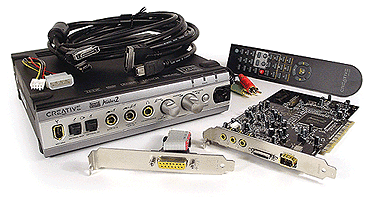
Like the original Audigy, the Audigy 2 is available in three versions: as a basic soundcard, in the Platinum version with an internal drive bay module, and as the Platinum EX under review here, which features an external desktop I/O module. This time, the EX is the only one of the three that is likely to interest musicians, since it alone can handle 24-bit/96kHz recording and playback using low-latency ASIO 2.0 drivers (the others only manage 16-bit/48kHz).
|

The soundcard itself features just three stereo 3.5mm jack sockets on its backplate for the six line outputs suitable for connection to a 5.1 or 6.1 surround system, along with two ports labelled AD Link 1 and 2, which connect via a hefty but generous two-metre long 'figure of eight' cable to the external module. Those requiring joystick support can attach the supplied ribbon cable and extra backplate with a 15-pin Gameport connector, but a pair of standard MIDI sockets are featured on the module, so musicians needn't sacrifice a PCI slot position unless they need the second port.
To keep computer interference to a minimum, most of the low-level audio circuitry is contained in the external module. Its front panel features an SB1394 (Creative Firewire) socket, Toslink optical in and out, Mic/Line 1 and Line 2 inputs plus headphone socket all on quarter-inch jacks, with a rotary gain control for mic gain that converts to line operation in its 'off' position, and a detented master volume rotary encoder with a handy push mute function. There's also a button to enable/disable the CMSS 3D function that creates a 6.1 surround 'virtualisation' from such sources as MP3 and Dolby Digital 5.1, and which now supports headphones.
The rear panel has a pair of Line In 3 phono sockets — the EX is the only Audigy 2 model with these sockets, to provide up to six-channel simultaneous recording — along with the MIDI In and Out mentioned earlier, co-axial S/PDIF in and out, a further proprietary 3.5mm digital out primarily for use with Creative's own Inspire 5.1 digital speakers, the two sockets that connect to the umbilical, and a second SB1394 port. The two SB1394 ports are handy for connecting external hard disks, and test results indicate good performance, if a little below that of a true IEEE 1394 controller.
New Features
It's almost an understatement to describe the Audigy 2 as fully featured, but since this is a music magazine I'm mainly going to concentrate on the features that might be of use to musicians. As far as I can see, surround sound remains popular mainly for those playing games and immersing themselves in home theatre installations, but not to the majority of musicians, who simply can't afford all the extra monitors of sufficiently high quality to mix in surround to a commercial standard. However, should you wish to indulge, the Audigy 2 provides more options than any other soundcard, including the CMSS 3D mentioned earlier, along with decoders for Direct Sound 3D, EAX 1.0, 2.0, EAX Advanced HD and Dolby Digital 5.1. New to the Audigy 2 is decoding support for Dolby Digital Surround EX 6.1 — a 5.1 enhancement offering an additional rear centre speaker signal encoded onto the existing left and right surround channels, which can be found on the soundtracks of many of the newest DVD releases including The Phantom Menace and Lord Of The Rings.
If you have a suitable DVD-ROM drive, the card also supports the MLP (Meridian Lossless Packing) technology that allows DVD-Audio discs to replay up to six channels of 24-bit/96kHz audio, while its D-A converters support 24-bit/192kHz stereo operation. As an aside, all digital outputs are disabled during DVD-Audio playback to comply with its copy-protection scheme. This is certainly a cheap way to add DVD-Audio capability to your PC, but for the musician a more important feature is that the Platinum EX model can record six simultaneous input channels at 24-bit/96kHz (the other Audigy 2 models only manage four).
The Audigy 2 is also the only soundcard to have currently passed the "stringent testing criteria set by THX Labs", but while this looks impressive on paper, it's difficult to discover exactly what it means in practice, since no-one seems prepared to admit what specifications are actually required to pass this certification.
The EAX Advanced HD Audio Effects are available in five categories (environments, special effects, advanced EQ, Studio and Karaoke), and provide more parameters to adjust than many dedicated rack units, particularly when it comes to the improved reverb algorithms. Although primarily intended for mass-market use with games, as witnessed by the multi-environment, environment morphing, environment panning, environment reflection, occlusion and obstruction features, up to four effects are now available for individual send/return use within a suitable ASIO host application (more on this later).
However, other EAX features are more relevant, including SVM (Smart Volume Management), which attempts to keep all the songs on the playlist of the new Creative Media Source Player at a consistent volume level, its handy Time Scaling (stretching), and the Audio Clean-up tools, which proved surprisingly effective and now support real-time removal of background noise and clicks, even from MP3 files, making them ideal for anyone who does a lot of transfers from one medium to another, since you can remove extraneous noises while the transfer is taking place.
|
Drivers & Utilities
The Full installation defaults to a whopping 300MB, but the Custom option lets you choose which items to include, although I suspect you'll still need at least 100MB to access all the Audigy 2 features. The Drivers Only install is only 34MB, although as I found with the original Audigy, this option installs the absolute minimum to use the card's recording and playback facilities, and not its surround, effects, or other features. There's also an extra option to install the Creative Media Source, a further 40MB collection of jukebox, remote control, and personalised audio CD or MP3 CD applications.
While the box states that the Audigy 2 will run on Windows 98SE, ME, 2000 SP2 or XP, you'll currently need Windows 2000 SP3 or Windows XP SP1 if you want to try the new DVD-Audio feature; Creative promise updated drivers shortly for other Windows versions, but check on the Creative web site before you buy. Another important caveat is that some 98SE users may experience poor system performance using the WDM drivers installed by default. Should this be the case Creative explain how to replace them with VXD versions, although you'll lose 24-bit/96kHz support.
Once you reach the desktop you'll find around two dozen shortcuts to the various Creative utilities, most of which already be familiar to Soundblaster users. The Surround Mixer does have a clearer layout than previous versions, but the Speaker settings are still to be found in a separate utility, while the EAX Control Panel for all the DSP effects is a third application. If only these were combined with a signal flow diagram it would remove so much user confusion.
|
Audio Performance
The Audigy 2 Platinum EX's subjective sound quality is certainly good — still not as focused as my Echo Mia, but significantly closer than the original Audigy, although many of my demo tracks were derived from CD audio at 44.1kHz, and since the Audigy's audio engine still operates at multiples of 48kHz, these had undergone sample-rate-conversion.
 This time round, Creative provide these suggested Surround Mixer settings to get the best results from Rightmark's Audio Analyser, and these settings also provide the cleanest recordings. The 50% Line-In 3 setting equates to 0dB gain.Many misleading results (largely due to unsuitable settings in the Surround Mixer) were posted on various web sites for Audigy audio performance using Rightmark's Audio Analyser, so this time Creative have taken the precaution of including a set of instructions on how best to connect up a loopback lead and set up the Creative Surround Mixer (see screenshot, right). The supplied instructions not only help you to use RMAA, but also to set up the Audigy 2 more wisely for general recording purposes.
My test results were impressive, and in 24-bit/96kHz format the Audigy 2 managed a good background noise level of -99dBA, low distortion and crosstalk, and a commendably flat frequency response that was -1dB down at an excellent 4Hz and 45kHz. This seems to be because in this mode the normal fixed 48kHz engine is totally bypassed: if you stray from Creative's recommended settings, the characteristic mild top-end ripples due to sample-rate-conversion reappear. At 24-bit/48kHz these were a tiny 0.3dB from peak to trough, rising to 0.5dB when using 16-bit/44.1kHz. Another point to note is that although the effects engine is 32-bit internally, if you attempt to add real-time effects to a 24-bit/96kHz input signal, it will be dropped to 16-bits and sample-rate-converted to 48kHz on the way in, and emerge at 24-bit resolution and get up-sampled to 96kHz on the way back out.
The most important new aspect for musicians relating to the Audigy 2 is its ASIO 2.0 24-bit/96kHz drivers, complete with 'zero latency' direct monitoring. This only applies to the Platinum EX model: the others are restricted to 16-bit/48kHz, just like the Audigy 1. Non-ASIO applications see an MME-WDM 'SB Audigy Audio' driver, which lets you record and play back with your choice of sample rate, although it only supports a single stereo input and output, just like the Direct Sound drivers, and is only 16-bit as before.
Inside suitable applications like the bundled Cubasis VST CE you'll find a choice of two main ASIO driver options. Both provide an ASIO Control Panel that offers buffer latencies from the default 50ms up to 500ms and down to 2ms. However, 'SB Audigy ASIO' is fixed at 16-bit/48kHz, while 'SB Audigy ASIO 24/96' is fixed at 24-bit/96kHz. A third 'Creative ASIO' option can be ignored, since it's a confusing alias for 'SB Audigy ASIO'.
 When using the new ASIO 24-bit/96kHz drivers, the I/O options drop considerably.In 16-bit/48kHz mode you get a total of 18 inputs and 14 outputs. On the output side you get Wave/MP3, Front L/R, Rear L/R, Center/LFE, and Rear Center, plus two extra stereo busses labeled FX Slot 1/2 and FX Slot 3/4. FX Slot 1 is permanently wired to the Audigy DSP reverb and slot 2 to its chorus, while slots 3 and 4 are whatever two other effects you Add in the EAX Control Panel, so you can now set these up as individual send effects from each track, and record the final effected stereo signal using the Post EQ Front L/R input option. It takes some getting your head around, but is a very worthwhile addition for musicians. Inputs are Line/Mic 1, Line 2, Line 3, and S/PDIF, plus various Pre and Post EQ options to capture the effects and final surround signals as audio tracks.
Switching to 24-bit/96kHz operation causes the I/O complement to drop to six inputs and eight outputs. The casualties are the digital I/O and the various DSP effect options, since these would require twice as much DSP power when running at 96kHz (just like plug-ins).
The ASIO drivers certainly provided low latency on my PC, running NI's Pro 53 at an excellent 2ms (96-sample buffers) at 48kHz, and the same at 96kHz (192-sample buffers). I had to raise the Play Ahead setting to 45ms after switching to the MME drivers, but the Direct Sound ones managed the lowest 10ms setting with no glitching. Working in Sonar I also managed a good 10ms effective latency, and there's no denying that these drivers work well once you've got your head around the various limitations.
Conclusions
There's no denying that the Audigy 2 Platinum EX is an impressive product at an excellent price, and Creative are to be congratulated in pushing consumer soundcard quality ever closer to that of 'professional' soundcards designed for musicians. I'm sure plenty of potential users will be excited by the ability to play back DVD-Audio from their existing DVD-ROM drive, and to finally to get both 24-bit/96kHz ASIO support and better audio quality.
However, there are still rather too many caveats for my liking, and too much potential confusion. Only Windows XP and 2000 users get the full feature set, and some buyers will be frustrated that the DSP effect options disappear when you use the 24-bit/96kHz ASIO drivers, or not realise that if you add effects to 24-bit/96kHz recordings on the way in, the signals are truncated to 16-bit/48kHz, treated, and then up-sampled afterwards.
Although the basic Audigy 1 card can now be bought at a bargain £40, I suspect that some people will be caught out buying the basic Audigy 2, not realising that its ASIO drivers are still limited to 16-bit/48kHz. This time round, only buyers of the £200 Platinum EX will get 24-bit/96kHz ASIO 2.0 driver support, and at this price there are plenty of other temptations for the musician, including Terratec's DMX 6Fire and ST Audio DSP24 Media 7.1, or more straightforward cards like Echo's Mia, M Audio's Audiophile 2496, and Terratec's EWX 24/96. The alternatives may not be so well featured as the Audigy 2, but they will also be less frustrating for serious musicians.
| |
|
 £199.99 including VAT.
 Creative Labs +44 (0)800 376 7934.
|