

Roland have enhanced the VGA monitor graphical interface of their flagship 24-track recording workstation to make it easier to use, and have also thrown in a few extra features for good measure.
 Photo: Mark EwingI reviewed the first version of the VS2480 back in SOS September 2001 and the machine was very capable and stable, redefining the capabilities of the Roland VS range. There was little to pick fault with, although the implementation of the graphical user interface on an external VGA monitor was clearly one area that deserved attention to realise the full potential of this impressive recording platform. The new version 2 software addresses the whole external VGA monitoring and control issue, finally releasing the promised potential, and it also adds some useful new functionality.
Anyone buying a new VS2480 will already have the new software installed, and existing users can download an upgrade file for their unit from Roland's web site — however, you'll need to have a PC with a MIDI interface to make use of this file.
Screen Control
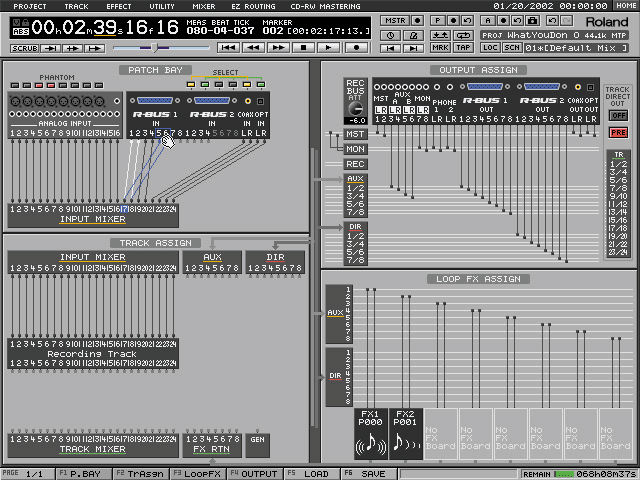 EZ-Routing screen.By far the most significant facet of the version 2 software is the implementation of control through an external VGA screen via an attached mouse. However, the machine will not automatically respond to such control requests. It first has to be told whether it should respond to operations carried out using the internal LCD or those carried out from the external VGA — this is done from a new Utility menu entry.
After setting up the VGA output parameters (the LCD monitor I was using wasn't impressed with the default 60Hz clock rate!) the machine responded well to the mouse. A conventional array of menu headings decorate the top of the screen: Project, Track, Effect, Utility, Mixer, EZ-Routing, and CD-RW Mastering. Configuring the appropriate aspects of the system is as simple and intuitive as clicking on the relevant menu header and then the listed function. Everything seemed to be grouped logically and I had little trouble finding my way around — in fact, I found it easier than using the LCD screen and soft function buttons.
 Channel View dialogue pop-up.The transport functions and timer display bar located at the top of the screen provide a wealth of information and dedicated buttons with which to control the system. Having said that, you don't have to rely on the mouse exclusively — the physical buttons on the machine still operate and can be used in conjunction with the mouse and screen to facilitate fast operation. Below the transport panel are a row of virtual knobs which can be toggled between pan and parameter modes with the click of the mouse. Similarly the metering section can be switched between the various blocks of channels and outputs. Finally, just above the playlist display is a row of time values showing the current In, Out, To and From edit settings.
The Playlist panel contains lots of buttons and displays to configure and manipulate the various tracks with the mouse, and a line of buttons along the bottom of the screen provides direct access to six relevant functions. There is also an edit status display box and a read-out of the hard disk capacity. Calling up the Mixer screen provides various options for displaying the parameters associated with one or more channels, and these functions can either be controlled from the physical knobs on the machine, or with the mouse on the screen — the latter takes priority. This method of control works extremely well, as does the EZ Routing screen, which finally lives up to its name thanks to simple drag-and-drop manipulation of signal paths.
New Tools
 Mixer screen.One of the most useful new tools enables the volumes of Phrases to be adjusted. In Roland parlance a Phrase is a recorded audio region, so this facility essentially allows previously recorded material to have its level adjusted and fade-ins and fade-outs added. This operates through the Track Edit menu where a third page accesses the Phrase parameters of a selected track. The new options are: phrase level, fade in and out times, and fade in and out curve shapes. The phrase level can be adjusted upwards by 6dB or down to silence, with 0.1dB resolution.
The default fade time is 0.01 seconds, although the handbook warns that such short fades can result in an audible 'blip'. I found that fade times of 0.1 second provided a glitch-free cut, and fades of up to 60 seconds are possible. The fade shape can be either linear or exponential, the latter working better where a simulation of a manual fader operation is called for, and the former working better for splice edits. The shape options are obviously very limited compared with many audio workstations, but are a worthwhile addition for tidying up individual tracks.
 Phrase editing screen.Another modification related to recorded Phrases is the ability to trim the in and out points visually on the VGA screen with a mouse. The operation is entirely intuitive, as the mouse pointer changes shape when it is placed near the start or end of a phrase in the Phrase editing menu display screen, allowing the appropriate edge to be dragged as desired. A new Grid mode function can also be switched on to ensure edit points are quantised to the beginnings of measures or beats. This option is tucked away under the Global Parameters menu and can be set so that only the 'To' points snap to measures and beats, instead of all edit references (In, Out, To, and From). Although this can be a handy facility, there will always be one edit that works better if offset from a measure or beat, and this can be achieved without having to go back into the Global menu, since pressing and holding the Clear button disables Grid mode temporarily.
To help support the new functions, several new shortcut button combinations have been added. For example, pressing Shift and Utility swaps the controlling display screen between the LCD and VGA. There are also a couple of new shortcuts to make general working easier, such as pressing adjacent channel Edit buttons to toggle the corresponding channel link function on and off, and using Shift and a channel Edit button to recall that channel's Track Edit screen directly.
Another useful update has been implemented in the automation facilities. Automation data associated with a project can now be stored in any one of nine Automix memories within the current project, allowing different mix passes to be saved, named, restored and edited as required.
Second Impressions
The version 2 software appears to be a very worthwhile step forward for the VS2480, primarily adding the promised graphical user interface to provide a very intuitive and clear method of controlling the machine. I personally found the VS2480 considerably easier and quicker to use through the VGA screen. The other new functions which have been implemented also deserve praise. The CD-ripping and phrase fade parameters extend the capabilities of this workstation significantly, for example, and the introduction of the nine automix memories will make achieving the perfect mix a little easier still.
New CD Ripping Facility
Another newly introduced facility on VS2480s fitted with a CD-RW drive is the ability to import audio directly from Red Book CDs into 44.1kHz projects. This new function has been added to the CD-RW Mastering menu on a second page, where a list of tracks available on the audio CD is presented along with a number of boxes in which the user can specify details about the capture process.
With the appropriate track on the CD identified, the first two input boxes define the destination tracks in the project to which the CD material will be copied. The left and right channels can be allocated independently unless the project is recording in CDR mode, or a CDR-mode phrase already occupies the destination tracks, in which case tracks are allocated in stereo pairs.
A third box allows the position of the material to be set in relation to the track time. The first option is to set it to 00:00:00:00, or in relation to the last phrase of the destination tracks, with a two- or four-second gap if desired. To avoid transferring unwanted sections of an audio track from the CD, the fourth and fifth boxes allow the user to specify the start time and duration of material with reference to the absolute or track time of the CD.
Once all the necessary information has been entered, pressing OK presents two warning screens concerning copyright and licensing messages, after which the transfer begins. Transferring to a CDR-mode project will take less than half the real time of the track, whereas a MAS mode project imports about 20 percent faster than real time. All other project modes are 50 percent slower, because of the need to data compress the audio.
Pros
- Attractive and informative screen display.
- Improved access to functions through the screen.
- New CD-ripping and track fade facilities.
- Improved automation functions.
Cons
- None.
Summary
This comprehensive multitrack workstation becomes even better and easier to use with v2 software. Apart from the introduction of a couple of significant new functions, the main step forward is in the implementation of the mouse and VGA screen control interface, which enhances the usability of the machine considerably.
information
Roland UK +44 (0)1792 515020.
test spec
- Roland VS2480 OS v2.0