

A patchbay can make your studio much quicker to use, but can also be a nightmare to set up, so here's advice on which to choose and how to connect it up for the best results. Plus, tips on building and fitting racks for your gear.
 In my two previous studio installation articles (SOS September and November 2002), I've looked at soldering and wire preparation techniques, basic signal types and ground loops. In this part, I would like to build on these concepts by covering the theoretical and practical aspects of patchbays.
Audio Patchbays
Patchbays, also known as patchfields or jackfields, hail back to the bygone days of manual telephone exchanges. In those days, to place a telephone call, the user called the operator who then physically connected the call by means of patch cables in a jackfield. In the UK, the connectors were designed by the General Post Office and termed GPO jacks. Variants of these original types later gained the additional designation of 'B type', 'GPO B' or 'BPO'. This type of connector is still used today in full-size professional audio jackfields and serves the same purpose as the telephone exchange: manually routing signals from one location to another.
It is important to note that, although a GPO jack has a similar quarter-inch sleeve diameter to the domestic (or A-type) jack found on instruments and guitar leads, the ring and tip are very different, and the two are physically incompatible. In addition to not forming a correct electrical connection, plugging a domestic jack into a GPO socket may well cause damage to the socket. The contacts become stretched and weak as a result. This also reduces the switch contact pressure and causes intermittent normalling, more of which in a moment. Conversely, because the ring and tip of B-type connectors are smaller than those of domestic types, plugging a GPO jack into a domestic jack socket will usually result in only the sleeve connecting.
 Although A-type (bottom) and B-type (top) jacks share the same sleeve dimensions, they are physically incompatible. A B-type jack inserted into an A-type socket will usually only result in a faulty connection, but an A-type jack can damage B-type sockets by stretching the internal contacts.
In more recent years, as mixing consoles offered more and more inputs and outputs, the traditional GPO jacks started to consume too much panel space and a need arose for a smaller connector. This requirement gave birth to the bantam or TT ('tiny telephone') jack. These are physically much smaller than the GPO type, but are constructed in exactly the same manner — as the saying goes, if it ain't broke...
Although the bantam jack is long established, a core of audio professionals (myself included) still prefer the older GPO connectors. I personally dislike two aspects of bantam jacks. Due to their small size and resulting packing density, it is easy to skin your fingers when inserting bantam jacks, and I also feel that the larger contact material used in GPO types maintains a greater contact force over time, although I have not proven this. Perhaps my BBC background has biased me. One thing that definitely makes a difference to either type of connector is regular cleaning. The GPO connectors are often made of brass, which tarnishes quickly. A regular clean with a non-abrasive metal cleaner works wonders. As with all contacts in your signal path, the better the contact, the better the audio quality.
 The internal structure of bantam (top) and B-type (bottom) jack sockets.
Choosing the most appropriate connector type for your installation is quite straightforward. For home studios, domestic A-type connectors are appropriate. These are much cheaper than the other types and are directly compatible with instrument leads and jacks found on much semi-professional equipment. This compatibility will allow you to mix and match patch leads with instrument cables for maximum flexibility. Even if you have to use an instrument cable in a balanced jackfield, with this type of connector the plug sleeve will correctly unbalance the signal path concerned by shorting the cold signal leg to ground via the sleeve. In semi-professional and professional installations, bantam or GPO connectors should be used. These offer much better long-term reliability and compatibility with hired professional cable looms, for example.
Sockets & Normalling
 Here you can see how a jack inserted into a patchbay jack socket breaks the switch contacts.Let's now take a detailed look at patchbay sockets, which have more connections than the three you would expect for basic balanced connections. The bantam and GPO have five, whilst an A-type can have six. The reason for this is that each type offers switched contacts that form a through path with no plug inserted. The contacts are referred to as 'normals'. Electrically they are 'make' (the contact is made) or 'normally closed' contacts. When a plug is present, the switch contacts open and the through path is broken. In this mode, the connector is often called a 'break jack'. These switched contacts enable us to wire default signal paths that are complete without the use of patch cords. It is interesting to note that the professional connectors do not offer a switched ground contact, hence only five tags. The extra switched ground contact on the A-type connector may be used to good effect in avoiding ground loops, particularly in unbalanced installations.
The term used to describe default signal paths through a jackfield is 'normalling' or 'normalising'. This concept is at the very heart of flexible jackfield design and will be examined in detail in a moment. Before we do that, it is important to discuss the physical layout of the jack sockets within a field. To determine the optimal layout, we first need to decide which equipment will normally be connected together, and also which will not usually be connected by default.
As an example, we will assume that we have the following elements to include on a jackstrip:
- Mixing console stereo outputs.
- DAT recorder inputs.
- DAT recorder outputs.
- Console stereo monitor returns.
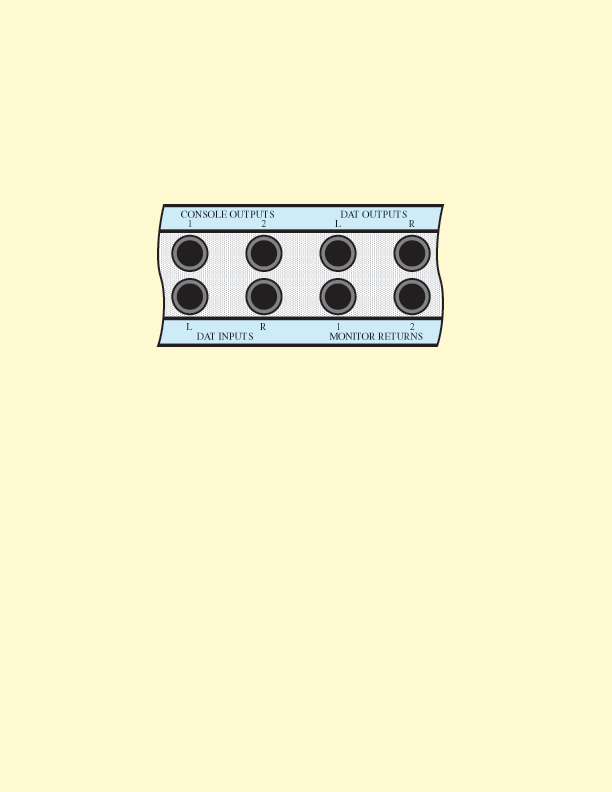 Figure 1. A typical patchbay layout for connecting between a mixer and a master DAT recorder.
Usually, you'd want to connect from the mixer outputs to the DAT inputs, and from the DAT outputs to the mixer monitor returns. On our jackstrip, it is convenient to arrange the connectors as in Figure 1. When designing strips, as a general rule I like to have outputs on upper rows and inputs on lower rows. This will not always be possible if you're going to use strips of patchbay sockets most efficiently, but using this layout rule where possible will give a very neat and logical layout and allows jacks to be normalled using very short wires. The normalling wires should be long enough to allow repairs and modifications to be carried out without having to replace the normalling wires, yet short enough to not pick up interference. They should also be held on to the sockets using hook-on joints as described in the first part of this series — other wires may then be added using lay-on joints without the normalling falling off.
 You can quickly twist together wires by clamping them in an electric drill chuck.
If you need to normal jacks that are up to around 150mm apart, the normalling wires may be twisted using an electric drill. To do this, first cut the individual wires to the same length. Next, place one end of the wires in a vice, or hold with pliers. Finally, place the other ends in a drill chuck and then twist while keeping them taught. You will find that it is best to over-twist them slightly, as they will unravel a little when you release them from the chuck. With lengths beyond 150mm, when connecting between different strips for example, screened cable should be used for the normalling. In this situation, always remember to allow enough cable length to enable each strip to be withdrawn from the patchbay individually. Routing long normalling cables 'as the crow flies', will cause major problems later!
 Figure 2a. Half-normalled.With a layout finalised, you can then decide how best to normal the jacks together. In the above example, although the DAT machine may be used for mastering most of the time, occasionally you may need to use it with another machine, to make copies for example. If the machines were not wired via a patch panel this would be difficult, and would involve the plugging and unplugging of machines — if you have ever been in this situation, you will know how quickly you can end up with a mess of knitted cables. Even if they are wired via a patchbay, you will not be able to separate the DAT machine from the mixing console outputs if the normalling is not done correctly. In this scenario, the console outputs should be connected to the switch contacts on the DAT recorder input jacks. In this way, when a plug is inserted in the recorder input jack, the console is automatically disconnected and replaced with the signal on the patch cord.
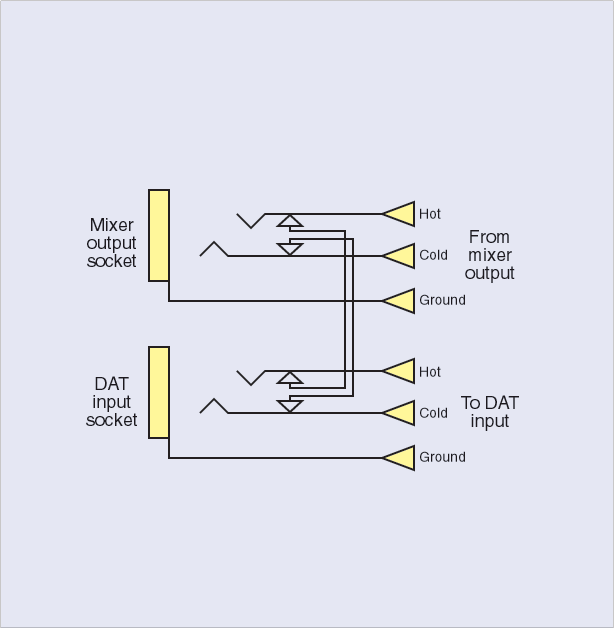 Figure 2b. Fully-normalled.Let's imagine for a moment that we still need to use the console output for something else while the copy is being made. For this, we need the console connected directly to the contacts on it's jack socket. The normalled jack sockets will therefore look like the diagram in Figure 2a. In this system, the console output jack is often referred to as a listen or sniff jack. In other words, any patch cord plugged in carries the console output signal and does not interrupt the signal to the DAT machine. The DAT recorder input jacks are called 'break' jacks because the patch cord will break the console signal away from the DAT input and allow it to be used for other things. As only one of the two jacks has the effect of breaking the signal, this scheme is termed half normalling. Signal paths modified by the use of patch cords are referred to as being overpatched.
 Figure 2c. Double-normalled.For some installations, typically microphone lines and inputs, the user may prefer that a jack plugged into either socket automatically breaks the normalling. This can be achieved as shown in Figure 2b, and is referred to as fully normalled. Finally, for wiring used in critical paths or live broadcast applications, it is sometimes desirable to have to insert plugs in both output and input sockets to break the default path. This avoids a loss of signal if a plug is accidentally inserted in the wrong socket. This is called double normalling, and is shown in the Figure 2c.
To keep the vast number of cables within a patchbay tidy, it is vital that the cables are run in an organised fashion, both within the rack and also along the jacks. It is important to avoid having the weight of the cable pulling on the jack sockets. To assist with both of these points, jackstrips usually include a metal bar that runs across the rear of the panel between the rows of jacks. This is known as a lacing bar, tie bar, or cable strain relief bar. The cables should be tied to this bar and neatly fanned out to each jack in turn, and always remember to mark the individual cables at the rear of the sockets to aid installation, modification and fault finding.
Earthing Schemes
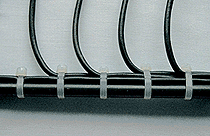 Cables soldered to patchbay sockets should be supported on a tie bar to avoid strain on the solder joints.It is very easy to create massive earth loop problems with multiple cable screens connected at both ends. To avoid this on patchfields, the ground tag of similar signal jacks, for example group outputs, may be connected together and taken back to the console as one thick wire, without the individual signal cable screens being connected to the jacks. This type of tactic can make a huge difference to the finished system's noise level, and is well worth the extra effort involved. Commoning grounds in this way avoids the possibility of lots of cable screens forming loops by being connected to each other via external equipment. This often happens when hire equipment is connected to the patchfield using looms which have all grounds connected.
If you are constructing a simple unbalanced jackfield using two-pole A-type sockets for outboard equipment, the ground connections can also be made via the normals. Now when a piece of equipment is overpatched, the ground is overpatched with it, therefore avoiding unpredictable ground combinations. On the subject of earth loops, a word of caution. If you are using a multi-pair cable with foil screens but without individual jackets (most installation cable will be of this type), be very careful to dress the cables so that the foils do not unravel and short to one another. If they do, unavoidable ground loops will result.
Parallels, Tie Lines & Labelling
Parallels are a collection of jacks connected in parallel with each other, as shown in Figure 3 — a good use for an odd collection of redundant jacks on a strip. They are used to feed multiple inputs from one output. This technique is useful, for example, when making copies using multiple machines.
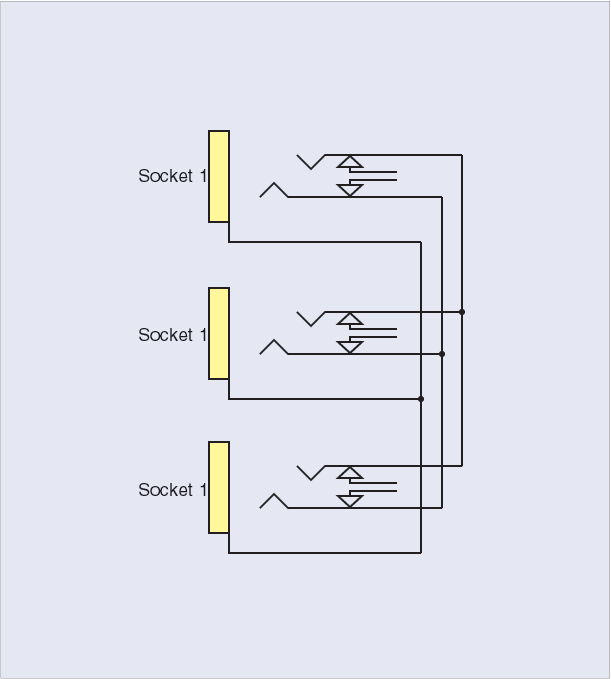 Figure 3. A set of parallel sockets.A parallel should consist of a minimum of three jacks, but should contain no more than five or six. If you need to feed more inputs than this from one output, you should use a dedicated distribution amplifier instead. The reason for this is that the resulting impedance of the many inputs may degrade the performance of the output concerned. Parallels, or indeed any other direct connection method, must never be used to combine outputs. Due to their low impedance, outputs will not behave correctly when treated like this. At best, distortion will result and, in the worst case, an output may be damaged.
Tie lines are simply a collection of cables, or a multicore cable, which run between two or more areas of the studio. One end of the cables is terminated onto jacks, whilst the other may be connected either to a piece of equipment, to a wall- or floor-mounted connector box, or to another jackfield. Tie lines are great for quickly routing signals. When planning your studio, always think about tie lines. Even a cable from one side of the room to another will help you avoid a mess of instrument cables strung across the room to the patchbay.
Finally, any good jackstrip will provide a way of identifying the individual jacks. On cheap strips this may simply consist of a white painted area in which to write. Although better than nothing, this method does not allow for easy updating or correction of errors. A far better solution is provided by paper strips in slide-in carriers. This type is found on all professional jack strips and is easy to change as required. A bonus of this type is that a computer can be used to neatly print the strips, which are then cut down to fit the carrier.
Putting Together A Rack
 Figure 4. Dimensions for building your own equipment rack.Patchbays, as well as much of the equipment in your studio, will need to be mounted in some form of rack, so let's now have a look at constructing a rack in your studio. Once again, quality and designs vary. For a simple home set-up, a homemade rack can be perfectly acceptable. For semi-professional or professional installations, good-quality racks will provide the best combination of flexibility and cost.
It is possible to construct racks in a number of different ways. Even a simple wooden cabinet, with wood screws and washers used for mounting equipment, is better than having expensive equipment in a disorganised heap on the floor. A very cheap, albeit time-consuming, method is to use proprietary square-tube systems which have knock-together corners. The two front uprights may then be drilled and tapped to take rack bolts directly. A simple MDF top may then be fitted to keep the dust out.
A faster method, again employing square-tube or wooden construction, is to use pre-punched metal rack strips. These are inexpensive and supplied in lengths of around 46U (a typical outboard effects unit is 1U). To use them, you should build a framework or open-backed cupboard to the dimensions shown in Figure 4, then cut the strips to length and fix them using wood screws or nuts and bolts.
Professional equipment racks are available in a range of sizes. They are normally very expensive, but can be found secondhand. These offer a huge range of options including:
- locking removable side and front panels.
- wheels.
- rear support for heavy items such as power amplifiers.
- captive power distribution.
- fan-assisted cooling.
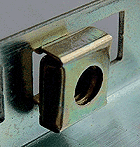 Caged nuts clip into spaces in a rack strip so that they remain in place while equipment is being mounted into the rack, but can also be moved should the rack contents change.
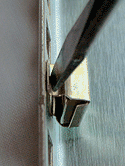 Although there are dedicated tools for inserting caged nuts, a large flat-blade screwdriver will usually do the job just fine.If using rack strips or ready-made racks, equipment is held into the rack by the use of rack nuts, also known as caged nuts, and rack bolts. The nuts offer great flexibility, as you only need to purchase enough for the job in hand, usually four per rack item, and fit them as required. If you later change the layout or make a mistake, the nuts may be sprung out and reinserted in a new location. Rack bolts can be fitted with flat or cupped plastic washers to protect the face of the gear. Although a dedicated cage nut tool is available, the nuts may be easily fitted and removed using a flat-blade screwdriver.

A number of suppliers offer security bolts for rackmounted equipment. These are a good investment and will foil casual theft during a house break-in, for example. The bolts use a modified Allen-type key and are all but impossible to remove without it. It is even extremely difficult to drill them out, as the bolts are made of stainless steel and have a centre 'pip'. Just remember where you hid the key — once again I have the T-shirt on that one...
When placing items other than jackstrips in a rack, thought should be given to spacing between equipment. Many items will require air flow to maintain a sensible operating temperature. Take care to mount these at least one unit (1U) height apart and avoid blocking any ventilation slots. The unused rack space may be filled with readily available blank panels which are made in a variety of colours and finishes. Perforated ventilation blanks are also available to further aid cooling of difficult units such as power amplifiers.
When fixing units to a rack, our old adversary the earth loop also rears it's ugly head once again. The act of screwing grounded metal-cased equipment to a common metal frame causes loops to be created via the power grounds. Although this will not normally cause problems in balanced systems using my suggested earthing strategies, unbalanced installations can suffer badly. If the equipment is fitted with a ground-lift switch, try using this first. The switch should disconnect the audio path of the equipment from its chassis and therefore cure the problem. If a ground lift is not available, it is possible use insulators and plastic washers to isolate the equipment casing from the rack. This approach should be viewed as a last-ditch fix, however, and will often indicate problems in the basic earthing scheme. If all other suggestions have been tried, the only cure will be to use transformers in the input and/or output wiring of the unit. As usual, under no circumstances should a power ground be disconnected.
Thanks to Bryant Broadcast & Data Communications (www.bryant-broadcast.co.uk) for supplying materials used in this article.
Alternative Patchbay Options
It's also worth mentioning those patch panels that consist of jacks on the front wired to jacks on the rear. These panels may be used with pre-wired looms to form simple jackfields without resorting to the soldering iron, and are therefore quite popular. The key to success with this type of panel is the word 'simple'. Where one machine or a bunch of tie lines need terminating, this type of pre-wired system can be very useful. In larger systems where much normalling and cross-wiring is required, pre-wired systems will not offer enough grounding flexibility to guarantee good results in all situations. I have come across systems of this type which work fine until external equipment is introduced, or an unusual patch configuration is required. The system then degrades into a mess of earth loops, and therefore hum and noise. For complex installations there is only one viable approach: a carefully planned and executed custom patchfield using the methods discussed.
Another alternative patchbay system is the Krone system. This consists of pre-wired patch components terminated to solderless IDC (insulation displacement connection) connection blocks. This type of system is usually only used in larger installations, but can offer all the flexibility of fully soldered systems, without the use of soldering. As such, a large system can be configured and indeed modified very quickly. The downsides are the use of special multicore cable for the IDC connections, and cost — although less labour intensive, the component costs are much higher than for 'raw' patch panels. For home or project studios, I would argue that the raw approach is much more cost effective; however, for extremely large installations Krone systems may be better due to the reduced labour costs involved.
Although the audio patchbay will be the most common in a small studio, patch panels are also available for other signal types. These will typically include various forms of video, digital audio and data. The video types and unbalanced digital audio will typically use MUSA or twist-and-pull BNC connectors, while balanced digital audio will mainly use XLR connectors. Data jackfields may use various types, such as D-Sub connectors or eight-pole RJ45, the latter being similar to the connectors found on telephone handsets. Due to the wide signal bandwidths used, MUSA jackfields are normalled using dedicated screened metal 'U' links. BNC fields frequently use very short BNC-to-BNC links