

 MIDIJoys can convert a game joystick, mouse, trackball or trackpad into a dual-axis MIDI controller.
We transform the humble and inexpensive games joystick into a simple but effective MIDI controller, and find a word processor that will have minimum impact on the clean music partition of your PC.
Given that so many musicians these days are using hardware MIDI controllers to provide them a real-time, hands-on softsynth experience, I'm surprised that so few seem to be pressing other controllers — such as those used with games — into service. Many PC musicians already have a suitable interface for such controllers, in the form of the 15-way game-port connector found on many motherboards, and also on many consumer soundcards, such as the SoundBlaster range. Games controllers also tend to be very inexpensive.
Stick With It
Granted, many games machines employ digital joysticks that simply send left/right/up/down messages (plus the essential 'fire' message, of course!), and these are not as useful to musicians as fully variable controls, but game-pads that employ a group of discrete switches could still be utilised as a remote transport bar with controls such as Play, Stop, Record, Fast Forward, and Rewind. All you need is a software utility to convert their data into a suitable format.
Even easier to use for the same purpose is a dedicated PC keypad (these are often available as extras for laptops), since many modern MIDI + Audio sequencers already use the appropriate keypresses for their default transport control functions. Others can have their functions re-allocated to different keys if required. This means that no conversion software is required.
There are also plenty of analogue joysticks available. These are popularly used for flight simulator-style games, and many have a rather more 'precision' feel to them than the digital variety, as well as being far less flimsy. I've found analogue joysticks really useful for music purposes, since you can modify two parameters simultaneously, for wonderfully expressive possibilities. Part of my interest in doing this is due to my Korg Wavestation SR. Many of its sounds respond to MIDI controllers 16 and 17 but, unlike the other Wavestation models, it doesn't have a built-in joystick to generate the controller data. You may not have a Wavstation SR, of course, but you should be able to assign the X and Y joystick axes to two suitable parameters on nearly all software or hardware synths.
Games-to-MIDI Conversion
Windows has directly supported both analogue and digital game controllers for many years. All you need, as mentioned earlier, is a small PC software utility to convert the incoming game-port information into MIDI continuous controller data, to pass on to your softsynth or sequencer application. One example is VMIDIJoY. This was originally written in 1998, but was most recently updated in 2000 — although it seemed to work in the more recent Windows XP when I tried it. It converts joystick X, Y, and even Z axis movements into your choice of MIDI controller data, and also supports up to four buttons, which can be defined as MIDI pedals or notes. It even has some rudimentary arpeggiation features.
MidiJoys (shown above), from SoundTower (www.soundtower.com), is rather more ambitious but even older, being originally written in 1997. Again, it seems to work inside Windows XP. MidiJoys not only supports one or two game joysticks, but also standard mice, trackpads and trackballs. Amongst other facilities, it provides three extra windows with software sliders dedicated to volume, pan, and your choice of additional controllers.
Both utilities can output data directly to any of your existing MIDI ports, and you can use Hubi's Loopback or a similar routing utility to send this data directly to your sequencer for recording purposes. Although I've heard some grumbles that the joysticks aren't scanned fast enough to cope with fast sweeps without jumping, I haven't found this to be the case.
If you don't have a suitable joystick but you're into a bit of soldering, you can create your own hardware controller. Each game-port supports up to four rotary or slider controls and four buttons, giving plenty of scope. Tomi Engdahl has an excellent web page detailing all the ins and outs of the PC analogue joystick interface, both from the hardware and software points of view. Go to www.epanorama.net/documents/joystick/pc_joystick.html.
Other pages at this site detail the wiring of a huge variety of analogue and digital game controllers, but if you want to build your own, essentially all you need are some switches and 100K potentiometers. Skot McDonald of Vellocet shows one user's rackmounted creation on his VMIDIJoy page (address given earlier). Such devices may not provide as many controls as a dedicated hardware unit, or the ability to send SysEx and NRPN data, but they offer a cheap way to start twiddling!
Abiword: The Write Stuff For Musicians
It may seem strange to be introducing a word-processing application — which Abiword is — here, but I make no apologies, since what I'm about to discuss is actually more relevant to music making than you might think. Most musicians now accept that it's best to keep their music partitions as streamlined as possible, installing only those applications they need for their music making. Taking this approach means that there are fewer opportunities for conflicts, no unwanted background tasks, and a significantly greater likelihood of audio recording and playback running as smoothly as possible. However, while working in my music partition I've often found it useful to be able to create documents with an application somewhat more capable than Microsoft's Notepad, or even WordPad, despite the many enhancements in its XP incarnation.
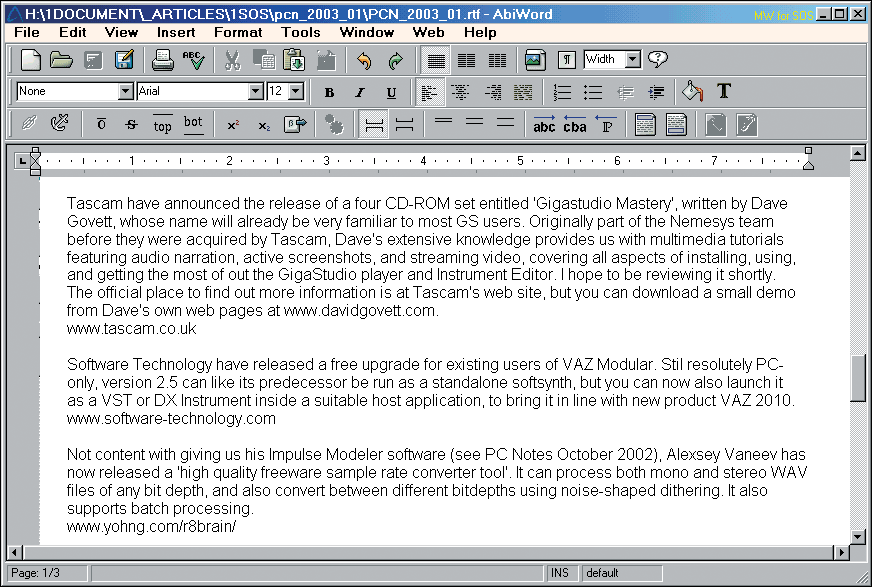 Want a reasonably powerful word processor for your music partition that doesn't bloat your Registry or install unwanted background routines? Take a look at Abiword.Some of you may remember my run-in with Microsoft's Word (reported in PC Notes June 2001), when it suddenly began posting error messages instead of booting up, even after a total uninstall and clean reinstall. Word has also caused its fair share of problems for musicians by adding default background tasks such as FastFind, and since the Cleansweep application also reported that it made over 2000 additions to the Registry, I decided to cut my losses and move over to Corel's Word Perfect, a much leaner and cleaner installation. I've been much happier with Word Perfect, but its huge number of features still seemed overkill for the majority of my word-processing needs.
Enter AbiWord (www.abisource.com), an 'Open Source' application that is not only distributable as freeware, but is developed in a public fashion by people all over the world, to run on Windows 95, 98, NT 4.0, XP, Linux, and other operating systems. I discovered it after an extensive search for freeware word processing applications, and it's proved ideal for me — it loads many more file formats than WordPad, and also provides an invaluable word count function. However, for me one of its best features is the lack of 'bloat': the latest preview version 1.0.3 is a tiny 3.86Mb download, and, apart from half a dozen new file associations, it seems to place next to nothing in the Registry either.
I've been using AbiWord almost exclusively for over a month now, and apart from a couple of rough edges, and very limited table functions, it suits me down to the ground. Best of all, I've even been able to install it safely on my music partition, safe in the knowledge that it won't interfere with my audio performance or bloat my Registry. Highly recommended!
Tiny Tip: BIOS Beep Codes
In SOS June 2002, as part of my PC Musician article on Fault Finding, I covered BIOS Beep Codes and stated that you should refer to your motherboard manual for the particular sequence of beeps relevant to your PC. However, I thought it would be useful to provide a short list of the most common ones for IBM/Award PCs, neatly gathered together.
- No beeps: no power, faulty motherboard or CPU, or badly seated peripherals.
- One short beep: Everything is normal (you should hear this every time you boot up, after the POST routines).
- Two beeps: POST or CMOS error (perhaps your battery has failed).
- One long beep, then one short beep: Motherboard problem.
- One long beep, then two short beeps: graphics card not properly seated or faulty.
- One long beep, then three short beeps: similar to above, but may indicate faulty video RAM.
- Three long beeps: faulty keyboard.
- Continuous long beeps: badly seated or faulty RAM.
- Continuous high/low beeps: overheated CPU.
These codes should account for most PCs, except for those with AMI BIOS chips (seemingly far less common than those fitted with Award chips), and those with older Phoenix BIOS chips, which featured a complex system of four sets of short beeps interspersed with pauses. However, now that Award Software and Phoenix Technologies have merged, we can perhaps expect to see the simpler Award scheme take over.