

Groove Control loop libraries allow you much more flexibility than traditional sample CD-ROMs, if you know how to get the most out of them.
 Groove Control is a system developed by Spectrasonics whereby their loop-based sample libraries are presented in such a way that the replay speed can be changed over a large range without affecting the audio pitch or quality. It does this by building the loops from individual beats or sliced loops which are triggered by short MIDI sequences (which usually look like chromatic ramps of MIDI notes) provided on a separate disc shipped with the samples. In concept, this isn't too different from Propellerhead's REX format, but there are a couple of technical differences that I'll look at elsewhere in this article. There's also a quantise-related feature in some versions of Steinberg's Cubase entitled Groove Control, but before I get going in this article, it's important to point out that this feature is nothing to do with Spectrasonics' sample-based products, or indeed with any of the techniques described in this piece!
The key benefit of the kind of 'slice and dice' approach offered by Groove Control is that, because the audio does not need the assistance of real-time DSP algorithms or other pitch/time processing, the sound quality remains constant regardless of the manipulation, while transient detail (often lost when samples are time-stretched conventionally) is preserved. Unlike REX files, the user can't create their own Groove Control loops, as Groove Control is not the result of a single software program. Rather, it is a means of presenting 'sliced' samples on a library CD-ROM that can be used flexibly and easily, the hard work having been done by the programmers. All the user has to do is load the loop into a sampler as normal, then load the corresponding MIDI file into the audio sequencer track driving that sampler.
Whereas some of Spectrasonics' non-Groove Control sample libraries are arranged so that a different key on the keyboard triggers a different layer of the loop, Groove Control works rather differently. Groove Control already uses different notes to trigger different slices of loop, so to use multiple layers you need to set up the different parts on different MIDI channels of a multitimbral sampler (or, with something like Emagic's EXS24, open one or more extra samplers on other tracks) and use those to run the additional layers. When you import a Groove Control MIDI file, it opens with all the available layers on separate sequencer tracks, so it's easy to go through them and pick the ones you want to use.
Groove Control sample libraries are compatible with most serious hardware and software samplers, including Akai, Emu EOS, Emagic EXS24, Unity DS1, Steinberg HALion and Tascam Gigastudio. They may also be used with samplers that support one of these formats, such as the Yamaha A5000, which can import Akai-format samples. Owners of Emu ESI-series samplers and Digidesign SampleCell, however, cannot use Groove Control libraries.
Using Groove Control
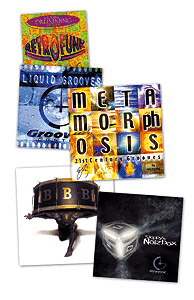 While all available Groove Control libraries work on the principle of triggering sequences of samples from pre-programmed MIDI files, the sampled content varies from library to library. For example, the Retrofunk CD-ROMs offer sliced-up live drum loops which can be reassembled for a realistic performance, whereas the Skippy's Big Bad Beats CD-ROMs provide a selection of live and electronic sound layers which can assembled to fit your track.Groove Control libraries come on sample CD-ROMs, which are loaded in the same way as other samples, plus a data CD-ROM containing the MIDI files (relating to the sample programs) saved as popular sequencer-format songs and also as regular MIDI files. If your sequencer supports drag-and-drop MIDI-file import, you only need to drag the standard MIDI file from the Data CD (or more likely from the hard drive folder where you copied it) into the sequencer track you wish to use it in. This is how I work in Emagic's Logic, and it is much faster than importing the Logic Song version and copying/pasting. It makes sense to arrange the data files in folders by product so that they can be easily located using pop-up menus. This keeps the files handy in your sequencer where you can always find them quickly.
There are occasions when it helps to (globally) tune drums or percussion to match the key of the song and this may be achieved simply by changing the coarse and fine tuning controls of the sampler while the sequence is playing. You may also want to try tuning the drums down for a ballad or up for a rock song. Construction-kit Groove Control libraries such as Liquid Grooves, Ethno Techno, and Skippy's Noizbox have a high degree of tuning flexibility, since all the multitrack elements of a groove are separated and so can also be tuned and transposed independently.
Changing The Feel
As supplied, the Groove Control data determines the feel of the drum groove, as it essentially provides the timing engine that drives the groove along, but you don't have to use everything the way it comes or be limited to simple tempo changes. For example, it's trivially simple to change the feel of the pattern by using the quantising and swing features of the sequencer. Quantising can suck all the feel from a track, so experiment with percentage quantise to make live performance loops a little bit tighter without killing their live feel. Once you have a feel you like, you can use the Groove Control MIDI pattern to create a custom quantising template for sync'ing up other elements within the song that need to sit in the drum groove. Your new template shows up as an extra option in your sequencer's quantising window.
 The contents of a typical Groove Control MIDI trigger sequence, resembling a chromatic scale. Each note of the scale triggers a different sample slice of the Groove Control loop.You can layer and combine nearly any groove (at any tempo) from any of the Groove Control libraries and then adjust their feel to match each other, creating a wide variety of possible rhythmic permutations. Using non-multitimbral soft samplers, you can work by opening several samplers on different sequencer tracks and loading the relevant Groove Control elements into each one.
One trick that can completely change the feel of a rhythm is to use different quantise values for different rhythmic layers. For example, assigning some parts to eighth-note quantise with other layers set to 1/24th notes can create hip-hop feels and grooves. And you don't have to quantise the whole loop — try quantising sections or just a few beats of a loop and see how the feel changes. Both these tricks are apparently favourite techniques of the Groove Control programmer behind the Skippy's series of libraries.
If your sequencer has a legato or force legato function, this can sometimes help the MIDI file sequence sound smoother if you want to add swing to a pattern, as now alternate beats will need to be longer or shorter. Logic can do this in real time with the sequence's Gate parameter or you can choose Force Legato for selected notes in a sequence. Another technique to improve smoothness is to extend the sampler release time, allowing more ambience at the end of each of the slices, which prevents the manipulated loop from sounding 'choppy'.
Simple MIDI Tricks For Better Live Drum Arrangements
While one of the strengths of the Groove Control libraries is that they allow you to create a lot of really off-the-wall effects, the libraries which appeal most to me are those which major on comparatively natural-sounding live drum loops — in my case the Retrofunk and Backbeat collections. What I particularly like is that the Groove Control process allows me to make numerous adjustments to the drum sound, simply by making small changes to the MIDI file, so that I can fit the loop perfectly into each section of my arrangement and also change it appropriately as one section progresses to another.
There's a lot of mileage to be had out of simple alterations to the gate times of the Groove Control MIDI file's notes. As is discussed in the main text, each sampled slice in a Groove Control Loop needs to be long enough so that gaps don't appear between slices at slow tempos. This usually seems to be done using a combination of careful looping and reverb processing to get a natural result, so that the hits sound slightly more ambient at slower tempos, and I've found that I can often use this to my advantage. A simple technique is just to increase the gate times of the MIDI trigger notes during a song's choruses, giving them a more open feel than the verses — similarly, you can shorten the gate times on selected notes of the verse to increase this contrast. For a greater sense of dynamic, you can also gradually increase the gate times during the pre-chorus bridges.
By default, the MIDI trigger notes usually have their velocities set to 127, but there's a lot you can do by modifying this. If you want a little more hi-hat in the mix, for example, you can often get the result you want by just increasing the velocities of the hi-hat slices. I find that some of the kick-drum parts and snare fills often benefit from a few velocity tweaks once they're within my track, so that they don't sound lumpy next to other parts in my arrangement. Mike Senior
Tweaking Groove Control Sounds Using Layering
I love the way that you can fly Groove Control elements into a composition which is already fully formed, but I have found myself wanting to layer new samples alongside individual slices of a loop to make them sound exactly how I want. In my case, I work within an entirely hardware setup, so it's not very satisfactory to simply trigger another sound over MIDI alongside the Groove Control loop, if only because the vagaries of MIDI timing can cause the layered sound to vary undesirably from hit to hit. This is particularly the case with kick drums. Therefore, I've found that it's best to sample whatever extra sound you want to add in, and then assign it to Groove Control keygroups so that its triggering is always phase-locked with the relevant loop slice. If the phase match isn't quite to my taste, I just edit the start point of the layered sample to change this. In my case, using an Akai sampler, I copy the layered sample as necessary so that different keygroups can be individually phase-matched. Mike Senior
Groove Control Kits
Groove Control patches can also be used as playable drum/percussion sample kits. Each 'slice' is allocated to a different MIDI note and most Groove Control grooves have clean enough slices to use them like individual drum samples. This way you can create your own loops that won't be identified as sample library material by the growing league of sample train-spotters out there!
Note that the layout of a Groove Control groove doesn't conform to any kind of standard (like, for example, a GM drum kit) where certain sounds are always mapped to specific notes. Indeed, even if the same sound occurs twice in a loop, you'll find it is triggered by a different MIDI note in the controlling 'ramp'. Every loop has different slicing requirements and often includes strange sounds, so a standard mapping system would be quite impractical. Still, it's no big deal to check out the different keyboard notes to see what sound they trigger, then make a note of the ones you wish to use in your new home-grown loop. You can use all your regular sequencing techniques or even drive the sounds with existing MIDI files once you've moved the MIDI notes to the right value to trigger the Groove Control sounds.
Make Percussion Parts More Stereo
All the Groove Control libraries I've seen have a variety of mono percussion loops, and any of these can be made into a wide stereo part very easily, because of the way Groove Control works. This technique works best with single instrument parts, such as tambourine, shaker and bongos.
All you have to do is open two copies of the relevant sampler program, and pan them hard to opposite sides of the stereo image. Now shift all the samples in one program along by a few keygroups (wrapping around to the first few keygroups again for the final samples) — it usually works best if you try to make sure that keygroups which contained accented samples still contain accented samples, albeit different ones.
Now trigger both programs from the same MIDI file. The result will be that the small sonic differences between the slices on opposite sides will give a wide stereo spread to the sound, but the timing will still be spot on. Mike Senior
Weirder By The Moment
Interesting effects can be achieved by abusing the timing of the Groove Control loops. For example, you can take various layers or elements of a loop and get them to start playing at different times relative to each other. For example, moving an element by a few 16th notes forwards or backwards can generate an interesting 'counter' groove or polyrhythm. This type of rhythmic displacement is very difficult to learn to play in real time, but quite easy to program! I've done this kind of thing on occasions and come across results that have inspired ideas for a whole new song.
Different elements within a loop can be treated separately by first copying the sequence to two sampler channels set to play the same Groove Control patch. By deleting all the kicks in one track and deleting everything but the kicks in the other, you effectively get separate outputs for the kicks enabling you to use different plug-ins or hardware effects to process the elements differently.
With a regular loop CD, the balance of the elements that make up the drum groove is fixed, but as Groove Control is driven by a MIDI file, you can use normal sequencer editing techniques to change the levels of individual beats or slices. You can even go further and start to change the MIDI pattern itself. Sometimes this leads nowhere, but on other occasions, you can come up with a loop that has a whole new personality. You can delete, move or add any of the elements that make up the rhythm by using the grid edit page of your sequencer. This way you can change kick patterns, remove some sounds entirely, or replace sounds with others from elsewhere in the loop. You can even change the loop length to make it work in a different time signature.
 This diagram shows why different hi-hat slices within a Groove Control drum loop aren't necessarily interchangeable, and also why they are often best kept with the main drum beat they follow for natural results.
Note that if the original source loop is dry and isolated, the slices can be moved or deleted easily. However, if the source loop is complex or ambient, you will probably need to use not only the main slices containing the drum hit but also the following slices that contain the ambience associated with that hit. For this reason, if you want to remove the kick from a live drum loop, it's often best to do this by replacing the kick slices with alternative slices that sound regularly in the pattern, like a hi-hat for example, instead of simply leaving gaps where you removed the kicks. You can also change the feel of a loop simply by selecting, say, all the snare hits in the loop and then moving them forwards or backwards by a few tens of milliseconds.
Sequencers like Emagic's Logic include a double speed or half speed transform function which can be very effective in turning Groove Control elements into half-time or double-time parts. You can do this in Logic by simply option-clicking the corner of the track and dragging it to the required length. It's also possible to create a deliberately chopped or stuttering sound by changing the MIDI gate time of the Groove Control sequences or by setting your sampler ADSR sustain to zero, then adjusting the Decay time. This technique can be used more subtly for drying up ambient drum loops or for tightening up tambourine parts.
But there's no need to stick with subtle treatments: you can use the filters in your sampler to radically modify the sound, use the envelopes to adjust the sound envelopes, or make extreme tuning adjustments to some or all elements of the loop. Another fun thing is to modulate the pitch of the samples using a pitch-bend wheel, because, unlike regular loops, Groove Control loops stay at the same speed regardless.
Using Groove Control With Limited Sample Memory
A quick tip for anyone using the Groove Control libraries with a hardware sampler which has limited sample RAM — even fully loaded, my S2800 doesn't hold more than 16MB, which isn't enough to load some of the larger Akai CD-ROM volumes. The trick is to load up individual programs from the volume. Once you've decided on a loop you like, you'll usually find that many of the sample slices duplicate roughly the same sound. In these cases, you can shuffle MIDI pitches around so that you only trigger one of the similar slices, allowing you to remove the redundant ones. You'll sacrifice a little of the sonic nuance (which is certainly not a problem in a lot of pop tracks), but you can often reduce the amount of sample memory the program requires by at least half, in my experience. Mike Senior
Creative Mixing
When you've exhausted all the possibilities discussed so far, try blending elements from different loops that don't initially work together, then quantise them into submission. A good starting point is to take loops from completely different genres, such as rock drums, industrial electronica and oriental percussion. Once you quantise and start tuning and tweaking, the result is often something totally unexpected — I've heard waltzes morph into reggae using this technique.
On some of the recent Groove Control libraries, the isolation of individual sonic elements is so good that you can, for example, interchange snare tracks from different grooves, or even tune and envelope shape the overheads separately from the room mics, or treat them differently using plug-ins.
 Layering grooves is a very parallel process, but you can also work serially by using just a few beats from the beginning of one groove, a few beats from the middle of another totally different groove, and a few from the end of a third unrelated loop. You can do this by grafting together MIDI and audio parts or just by editing the MIDI data driving the loop, and you can end up with a radically different feel.
Eric Persing of Spectrasonics is a great fan of randomness in music-making, and here are some of his favourite ways of getting serendipity to shine on you:
- Play a Groove Control MIDI sequence with the wrong program. Keep changing the patches or the sequence until you find something that you like as a starting point, then tweak it to taste from there. This can lead you in new directions that get you out of your rhythmic rut.
- Try randomising, reversing, inverting or transposing the MIDI data in the Groove Control track. All kinds of interesting rhythms will present themselves.
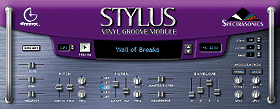
- The new Stylus virtual instrument has a random modulation option which outputs random values for each slice triggered. These can be assigned to filter and panning and used in extreme ways for special effects, although you can also use them in more subtle ways to make it seem that the groove is 'improvising'.
- Use Logic's Touch Tracks to control different Groove Control sequences. You can mix and match the grooves simply by playing in real time and, of course, the timing of the grooves will always be locked providing you set your touch tracks to trigger only on whole beats or at the start of a measure.
For more information on currently available Groove Control products, check out the following web sites:
How Do Groove Control Libraries Differ From REX Files?
Both Groove Control libraries and Recycle provide grooves that are cut into slices and then triggered by a matching MIDI file. Groove Control developers add ambience and lengthen the slices so that the groove can be slowed down considerably without spaces appearing between beats and producing a 'chopped-up' sound.
Perhaps the biggest difference is that, with Recycle, you can do the slicing work yourself. Groove Control material, on the other hand, is always ready-made. This means you lose the flexibility of creating your own Groove Control loops, but at least you know that what you buy is going to work to a certain standard.
It's also important to note that the REX format has to be supported by the application in which you wish to use REX files, and the feature set of that application then dictates the extent to which you can manipulate them. For example, Cubase can import REX files as audio tracks so that you can change their tempo, but it isn't easy to change their pitch or feel, whereas the Dr REX player in Propellerhead's Reason is somewhat more flexible in this regard. Groove Control, on the other hand, is rather more consistent, because the controlling file is a standard MIDI file that can be imported into any MIDI-capable application — you can even use it with hardware sequencers.