

After putting all our bowed-string synthesis theory into practice on a Korg 700 last month, we found that the result was only acceptable as a string sound with a lot of wishful thinking. Can we improve on it?
 Having investigated the audio properties of bowed instruments two months ago, we proceeded last month to craft a simple imitation of a violin on that most basic of analogue synthesizers, the Korg 700. If you tried this, you will have found that while being reminiscent of something vaguely stringy, the patch sounded nothing like a 300-year old instrument constructed from bits of dead trees and dead cats, all held together by bits of dead horses. This is not surprising... the Korg 700 was one of the earliest commercial synthesizers, designed from ideas developed in the late 1960s that were originally destined for inclusion in a combo organ.
Casting an eye over some of the other synths we've programmed over the past year or two, I can't see that the Roland SH101, ARP Axxe or Minimoog will offer us much more for this sound than the Korg 700. So, as I've done on a number of occasions in the past,
 Figure 1: MS20 violin oscillator settings.
I'm going to look to a rather more flexible analogue monosynth to see whether we can improve upon last month's result. This is the Korg MS20, whose twin filters, dual envelope generators and semi-modular modulation capabilities should offer possibilities unavailable on the other synths.
Patching A Violin Sound On The Korg MS20
As always, we'll start with the oscillators. Deciding on the settings for these is simple; we know that a sawtooth wave is the initial waveform produced by all bowed instruments. Consequently, we choose the sawtooth setting for VCO1, set the pitch to 4' (remember, the violin is a relatively high-pitched instrument), and set the oscillator output to '10' in the Mixer. For reasons that are immediately obvious if we do anything else, we set the VCO2 output to zero, meaning that its waveform, pitch and footage settings are irrelevant. We will also add a little portamento, just as we did last month. You'll remember that this produces a quick, almost imperceptible sweep between notes, which goes some way to imitating the fingering of a human violinist. Put all this together and you obtain the first part of the patch, as shown in Figure 1.
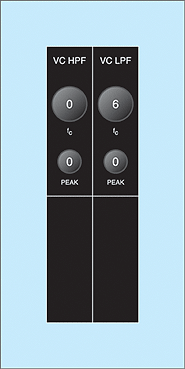 Figure 2. MS20 violin filter settings.At this point, you may ask how this differs from the Korg 700 patch. In truth, it doesn't. You can compare the settings on the two synths and, despite looking very different, they perform exactly the same functions. So let's move on to the filters. Surely, the MS20 will show its true strength here.
Strangely... it doesn't. If you experiment, you'll find that reducing the low-pass filter cutoff frequency reduces the brightness of the Korg's rather electronic-sounding oscillators (which is good) but that raising the high-pass filter until its effect becomes noticeable guts the sound, leaving you with a rather annoying buzz (which is bad). What's more, adding even the slightest amount of 'peak' (which is Korg's name for filter resonance, or 'emphasis') makes the patch sound electronic in nature. All of which means that my preferred filter settings are very simple, as shown in Figure 2 (right).
 Figure 3. MS20 violin envelope settings.I spent a fair amount of time trying to improve upon these but, although theory suggests that we should raise the high-pass filter and add resonance to imitate the body resonances of the violin, the MS20's filters do not seem to be well suited to this. It proves — yet again — that not all synths are capable of all types of sound.
Let's move on to the MS20's main envelope generator which, just to be arcane, is Envelope Generator 2. This produces a five-stage contour, of the HADSR type (Hold, Attack, Decay, Sustain, Release). Thinking about suitable values for each of these stages, we clearly don't want any Hold, because this is a delay before the Attack stage; once we press a key, we want the sound to begin. The rest of the envelope settings are less concrete. If you refer to the Korg patch library, the violin chart suggests that the values in Figure 3 (above right) are appropriate. Certainly, they are not inappropriate; the non-zero Attack and Release values ensure that the note does not have an organ-like character. However, I think that we can do a little better by creating a slight bump at the start of the sound, as determined by the settings in Figure 4 (below). You can see these two contours in Figure 5 and 6 (below right), and I'll leave it to you to decide which is the more suitable.
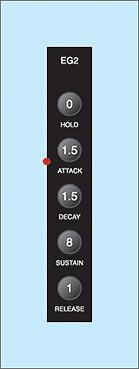 Figure 4: MS20 violin HADSR setting.If you create the patch shown so far, but set everything else on the panel to zero, you'll obtain a vaguely stringy sound that lacks any form of life or interest. We encountered the same problem last month, and to some extent alleviated it by adding delayed vibrato. Unfortunately, unlike the simpler and (ultimately) less capable Korg 700, the MS20 has no delayed vibrato, nor does it seem to offer manual control over pitch or modulation depth. Sure, you can add vibrato using the Modulation Generator and the FM knobs in the main control panel, but the result is quite unnatural. So now we're going to use the MS20's patchbay to improve things.
Semi-Modular Synthesis
 Figure 5.Before we start shoving cables into inputs and outputs, let's remind ourselves about the difference between a semi-modular synth and its fully modular brethren. On the latter, the various sound-shaping modules are not connected to each other so, to obtain the sound you want, you must link things together in a way that directs the audio path through the modules that you want to use, and provides control signals as appropriate. This might sound like a lot of work, but a modular synth repays this by being far more flexible than a pre-patched synth with the same complement of modules. And, of course, you can also add bits and bobs as and when you need them (or can afford them), thus extending the capabilities of your synth as it grows. In contrast, semi-modular synths have a fixed number of modules that are pre-connected internally, thus allowing you to create sounds without patch cords. However, this class of instruments also allows you to alter the routing of some of its internal signals, connecting this output to that input, thus extending the range of sounds that you can obtain.
 Figure 6.Some semi-modular synths are as powerful as their modular equivalents. For example, if you bought all the modules needed to recreate the architecture of the semi-modular ARP 2600, it's unlikely that you would improve much upon the original. On the other hand, the MS20 is far more limited because its audio signal path is predetermined, and you cannot interrupt it using cords. Despite the impressive appearance of the right half of the control panel, you can use this only to create new modulation routings; no matter what, the signal generated by the VCOs passes through the VCFs to the output VCA. Nevertheless, the MS20 offers everything that we need to create delayed vibrato.
Think about the fundamental nature of delayed vibrato. The modulation is in essence the same as normal vibrato, but it starts with zero amplitude and then, after a period, increases smoothly to some suitable depth. Figure 7 shows the synth architecture needed to create this effect.
 Figure 7: Delayed vibrato.So now we'll configure the MS20 in this fashion. Referring to Figure 8 (below), look at the patch panel, and you'll see a box annotated 'MG' (Modulation Generator). This offers two outputs, one for saw and triangle waves, the other for pulse waves. We can direct a triangle wave of suitable frequency (as determined by the knobs in the MG section) to the input of the patchable VCA in the patch panel. This is the lower of the red patch cables in the diagram.
Next, we need to determine what the LFO is controlling, and we do so by taking the output from the VCA to the 'Total' input at the top left of the patch panel. This is the upper of the red cables shown in Figure 8. Any signal presented to the Total input will modulate the pitches of VCO1 and VCO2, as well as the cutoff frequencies of the low- and high-pass filters, with the modulation amplitudes determined by the positions of the top row of knobs in the modulation sections. Given that we have no wish to create a wow effect, we set the first of the three 'MG/T.Ext' knobs for gentle frequency modulation (I have used a value of 1.5) but the second and third to zero so that there is no filter modulation.
 Figure 8: MS20 violin modulation.
Hang on... what does 'MG/T.Ext' mean? If no cable is inserted into the Total input, these knobs control the amount of Modulation Generator signal applied directly to the oscillators and each of the filters. But if a cable is inserted, the internal patching is broken, and the signal carried by the cable — which, in this case, is the modified output from the Modulation Generator — is used. This breaking of the internal patching and the inserting of new CVs is the very essence of programming semi-modular synths.
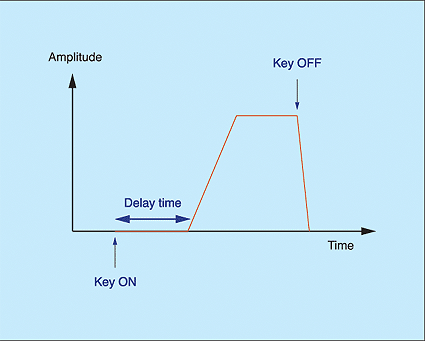 Figure 9.The modulating waveform is now passing through the VCA and onward to control the pitch, so we now need to decide what we're going to use to control the amplitude of the modulation signal.
Happily, the MS20 offers the perfect CV generator for delayed vibrato: the HA(S)R contour generator called Envelope Generator 1. This has three controls; the Hold time, Attack rate and Release rate. I have added the (S) in my description to make it clear that the contour remains at its peak level once the Attack is complete and until you release the key (see Figure 9).
All we have to do, therefore, is patch the output from EG1 to the input of the VCA. Except that we don't... As the graphics on the MS20's panel show, this has been done internally for us.
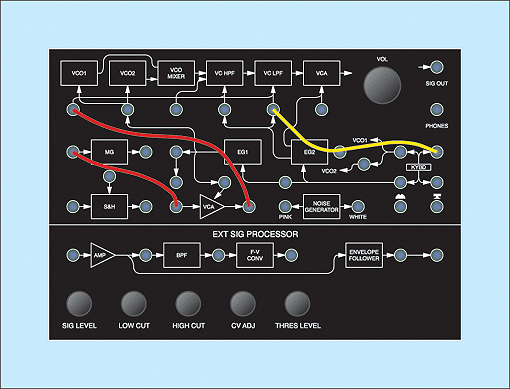 Figure 10: Adding keyboard/filter tracking.Before moving on from the modulation panel and controls, take a peek at the 'EG2/Ext' knob in the low-pass filter panel. This currently has a value of zero. Indeed, all four filter modulation knobs are at zero, so nothing on the synth is controlling the filters' cutoff frequencies. This agrees with what we know about the violin but, in a departure from the theory, Figure 10 shows the patch panel with a third (yellow) cord inserted. This leads from the Keyboard CV output to the 'LPF Cutoff Freq' input, meaning that cutoff frequency will track as you play up and down the keyboard, becoming brighter at high pitches, and duller at low pitches. The amount by which this happens is determined by the aforementioned 'EG2/Ext' knob, and I find a value of '5' to be most agreeable.
 Figure 11: Adding pitch-bend using the wheel.So, what's left to do? There is just one, simple modification that I think improves the playability of this patch. Although we have taken modulation duties out of human hands and handed them over to the combination of an MG and VCA, the MS20 has no pre-patched pitch-bend capability. We have to add this using yet another cable, which I have shown in green in Figure 11. This links the control wheel — which, in true modular fashion, is connected to nothing until you insert a cord — to the 'Freq' input for VCO1 and VCO2. Of course, this still does nothing until you turn the appropriate knob to determine the amount of pitch-bend applied, and in this case it's the 'EG1/Ext' knob in the FM section. This is pre-patched to EG1 unless you insert a cable into the socket, at which point the internal connection is broken, and the signal carried by the patch cord is passed. I find that a value of '2' is most useful since, by coincidence, this attenuates the wheel's signal so that the pitch-bend is ±2 semitones, which is musically pleasing.
So there we have it... and Figure 12 shows the complete MS20 violin patch in all its glory. Played sympathetically, it can be slightly evocative of the original instrument and, although nobody is going to mistake it for Stephane Grappelli or Yehudi Menuhin, it works reasonably well in slow, solo passages.
 Figure 12: An MS20 violin patch.
Modular Synthesis
Despite the work we have put into the MS20 patch, I have a sneaky feeling that we can do better, so I'm now going to turn to an altogether more powerful synth to create something that can sound far more like a real violin.
The Analogue Systems Sorceror is unique among modern keyboards in that it is a modular synthesizer built into a keyboard, complete with a joystick and extensive MIDI/CV capabilities. Because it is truly modular, you can even select the modules that you insert into its frame. The patch I intend to construct with it this month requires the following modules:
- RS220 X-Y (joystick) controller.
- RS330 keyboard controller.
- RS380 modulation controller.
- RS90 VCO.
- RS230 CV buffer.
- RS160 mixer.
- RS110 multi-mode filter.
- RS210 fixed filter.
- RS180 VCA.
- RS320 spring reverb.
The architecture of my patch can therefore be shown as in Figure 13.
 Figure 13: The modules used for an AS Sorceror violin patch.
Let's start by looking at the audio signal path connections we'll need. Firstly, the sawtooth output from the VCO passes to one of the signal inputs on the multi-mode filter. Next, we take the high-pass filter output and direct this to the fixed filter bank, then onwards from there to the VCA, and finally to the spring reverb before the audio reaches the outside world. I've shown these connections as blue cords in Figure 14.
 Figure 14: The audio path for the Sorceror violin patch.
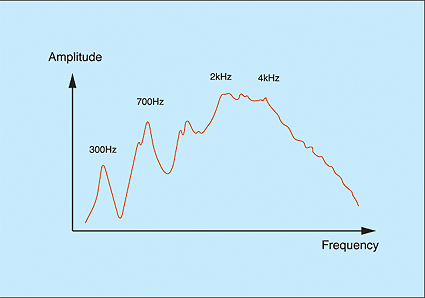 Figure 15: The frequency response obtained when energising the violin body using a string, bow, and bridge.You may wonder why — in addition to the fixed filter bank — I have used the high-pass option in the multi-mode filter. The answer lies in Figure 15, which I've reproduced from my original analysis of the violin's frequency response. This shows a couple of predominant low-frequency resonances, a plateau across a few thousand Hertz, and a gentle roll-off at high frequencies.
As discussed last month, a Formant Filter is perhaps the best tool for recreating this, but we can generate the general shape quite efficiently using a fixed filter bank to create the plateau and the low- and high- frequency roll-offs, while the high-pass filter — with its resonance set just a tad below self-oscillation — creates a single, large, low-frequency resonance. Using the trick I described last month, we can set the filter's cutoff frequency to about one-and-a-half octaves above middle 'C', which will lie in the region of 700Hz. Then, we need only adjust the eight filters in the RS210 to obtain the response shown in Figure 16 (right). Note that, unlike the parallel band-pass filters that I used last month, the high-pass filter and fixed filter bank in this patch are in series. This means that we do not add the responses together, we multiply them to obtain the combined response.
 Figure 16: Using a fixed filter and a resonant high-pass filter to imitate the violin's frequency response.Now let's look at the control CVs, as shown in Figure 17. Unlike the audio path connections, these look like the beginnings of a bird's nest, and will require some explanation.
Let's start with the red patch cords. These show that the output from the LFO in the Modulation Controller is directed to the patchable VCA within the same module. The output from this passes to the Mixer, and then to one of the pitch CV inputs of the VCO.
Clearly, the LFO is generating vibrato, so why does it pass along such a convoluted path? To answer this, consider the green cords. These show the path of the CV generated by the 'Y' direction of the joystick. This voltage passes first to the CV input of the CV buffer, whereupon it is split and sent to two destinations: the CV-IN of the VCA controlling the LFO depth, and the CV-IN of the VCA.
Looking at the first of these routings, we can see that the vibrato depth is controlled by the 'Y' direction of the joystick, just as it would be if we used a modulation wheel on a conventional synth. That's simple, and neat. But the second path is more surprising... it shows that the level of the audio signal (ie. what we're hearing) is also controlled by the 'Y' direction of the joystick. Unlike other synth patches we've discussed in Synth Secrets, there's no contour generator shaping the sound. If you want to hear something, you must press a key and move the joystick!
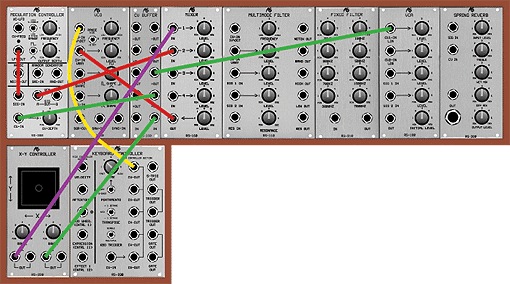 Figure 17: The control voltage connections.
You should not underestimate the importance of this. For the first time, I've placed real control of the sound in your hands. If you use the joystick well, you can articulate the notes with feeling and real sympathy for the instrument you're imitating. If you use it badly, the patch will sound... well, bad.
There are two other cords in Figure 17. The yellow one takes the keyboard CV and passes it to the standard 1V-per-octave CV input of the oscillator so that we can play the keyboard and obtain the expected pitches from our 'violin'. The purple one takes the CV generated by the 'X' direction of the joystick and mixes this in the Mixer with the modulation signal from the RS380. This means that you use the joystick to bend notes as well as articulate them and add vibrato.
 Figure 18: The AS Sorceror violin patch.
If we now add the CV cords to the signal cords, we obtain the visual spaghetti that is Figure 18 (above). Nevertheless, if you follow all the paths, you can see that it not only works, it makes sense.
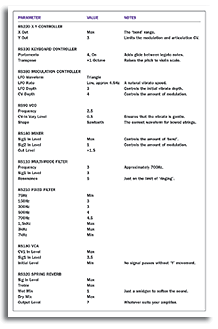 Synth table.Unfortunately, all we have done up to this point is determine the architecture that will create the sound; we haven't even started working on the knobs' settings. In fact, it's a bit like taking a Minimoog and expecting it to sound like a violin, simply because its modules are connected together. So let's finish this month's article by adding some values to the knobs in Figure 18. Bear in mind that these are to my taste on the days that I wrote this, and that you might find other values more to your liking. What's more, tiny changes in the values of the knobs can make significant differences to the resulting sound, yet I have listed them to the nearest half. So, with these caveats in mind, take a look at the table of values on the right. To obtain the complete patch, combine the routings depicted in Figure 18 with the settings in the table.
Press a key... and shock! horror!! Nothing comes out. Of course not, silly. I forgot to move the joystick forwards. Doing so introduces the note slowly, and adds vibrato progressively as it does so. Hey... this is good stuff! In fact, it's the closest that we have yet come to recreating the sound and feeling of a real violin. The reason for this is simple... using the joystick in this manner allows us to articulate notes in a far more 'human' fashion than is possible using envelopes. We can introduce notes slowly or quickly as desired, and with pitch-bend. Furthermore, we can imitate the bowing speed and pressure during the course of the note and, with careful use of the joystick, even add other effects as the note progresses. All in all, this proves that it's not the complexity of the patch that creates the performance. It's... well, the performance. And while that may seem obvious, it's surprising how often it seems to be forgotten!