

We provide some tips for making your masters sound as loud as commercial tracks, without sacrificing too much sonic quality along the way.
 I've attended more than one discussion with eminent professional mastering engineers, and the quest for 'loudness at all costs' is one of their main concerns, specifically because the processing involved in achieving this is often detrimental to other aspects of the music. On the other hand, they are pragmatic enough to acknowledge that their work has to compare in loudness with other commercial releases, otherwise there will be a noticeable level disparity when their records are played alongside others. For that reason, rather than simply providing a 'one size fits all' recipe for loudness maximisation, I'm going to look at some of the strategies you can apply and, where applicable, discuss the detrimental side-effects that might be experienced. But first of all, what is loudness in the context of a digital recording?
Digital Loudness
As with analogue recording systems, digital recorders can 'under-record' a signal if the peaks in the music being recorded aren't allowed to peak at digital full scale, so making proper use of the available headroom is clearly a basic concern. In reality you need to leave a few decibels of safety margin, but try not to leave more than you have to. Most digital workstations include a process known as normalising, which searches the file for the loudest peak, then increases the gain of the whole file so that the loudest peak just reaches digital full scale. Normalising can be used to bring up the level of audio files that come from under-recorded sources, but, though the normalisation process restores the optimum peak level, it doesn't recover any resolution lost by recording at too low a level. Furthermore, normalisation alone can't guarantee that a track will sound loud, because our hearing systems respond more strongly to average signal levels than to peaks. Note that normalisation shouldn't be applied to a file before you undertake whatever other processing is needed, as every stage of processing will involve further level changes to some degree. If you must normalise, it is usually better to do it later on in the process, but it may not be necessary to use it at all if one of the later processes involves the type of mastering limiter that also allows the user to set the peak level value.
 Many commercial CDs have been heavily clipped, but this can be at the expense of seriously compromised sound quality.To create a loud track, it follows that we need high average levels, but, as most of you will know already, the highest peak levels in a typical mix come from percussive sounds, such as drums, and from high-energy bass sounds. To get an artistically pleasing balance, the other elements of the mix, such as pads, lead instruments and vocals, may be mixed at a much lower level than these high-energy elements. However, the first steps to loudness come well before you get to mastering — for maximum power, you need to choose suitable drum and bass sounds that are intrinsically 'loud sounding'. Perhaps the best way to illustrate what I mean by this is to take the example of a synth bass line that uses a fairly pure sine wave as its tone source. Played over a big speaker system, this may deliver an impressive sensation of low end, but heard over smaller speakers the power may be all but lost, as such speakers are incapable of reproducing very low frequencies with any degree of efficiency. Assuming that we can't turn up the level of the bass sound any more, as it's already near to digital full scale, what else can we do to make it louder?
We already know that our ears respond to average sound levels, so if you can lengthen a percussive or fast-decay synth sound, it will be perceived as being louder than a very short version of the same waveform. A couple of brief experiments will also confirm that, given notes of the same basic pitch, length and amplitude, those with more harmonics will always sound louder than a pure tone. If you like the 'impression' of a pure bass tone, you can be subtle about adding harmonics by processing it via a distortion plug-in, a tube simulator or even a guitar effects pedal. There are also dedicated processors such as Waves' Maxxbass plug-in, which reduce the level of the fundamental and increase the level of higher harmonics to achieve a bigger sound using less headroom. Intrinsic to the concept of a powerful bass sound is the fact that our ears compensate for a missing or attenuated fundamental frequency by implying it from the harmonics that are present. That means you can get a very powerful bass sound without it containing a huge amount (or indeed any!) of its fundamental frequency, something that's exploited very neatly by the Maxxbass process. On the other hand, you may simply want to explore your synth sounds and sample libraries to see if there are any alternative sounds that are subjectively 'bigger' that still fit your musical ideas.
Drums need to be treated slightly differently, because they always start with a percussive attack, but there are some bass guitar and synth sounds that also have a 'spike' on the front, in which case some of the following observations still apply. There's a limit to how much a drum beat can be extended in length to make it sound louder, but there are ways to do it. Going back to the source, acoustic drums that use less damping produce longer notes than the same kit with heavy damping, so it follows that the damped kit will sound quieter than the undamped one. It's also true that a drum sound recorded in a live environment will sounder louder than one recorded in a dry room, because the early reflections reinforce and lengthen the basic sound, even though the peak levels may be similar. If you don't have a suitable live room to record drums, or if you're working with dry drum samples, an early reflection or ambience reverb program can be used alongside careful compression to achieve a similar effect.
That leaves the 'spike at the front' element to deal with, because the higher the attack spike, the greater the dynamic contrast between the peak level and the average level, which translates into less perceived loudness. Fortunately, there are several strategies that can be employed here, the most obvious of which is to use a fast limiter to reduce the peak level, which in turn will allow you to increase the overall level of the sound within a track with worrying about clipping. You can also achieve a similar thing using a compressor plug-in set to a fast attack time, with a fast release of between 10 and 50ms. Using a high ratio (greater than 10:1) and setting the threshold to produce between 3dB and 6dB of gain reduction, you should be able to use the compressor's make-up gain to push up the overall level by the same amount, thus gaining several decibels more level and, hopefully, not compromising the sound in any noticeable way. This strategy can be used on individual drum sounds, specifically kicks and big snare sounds, or you can apply it to a complete drum loop. Be aware, however, that ready-made drum loops taken from sample CDs may already have been processed in this way, so there will be a limit to how much gain you can 'claw back' before the sound quality suffers.
Another way to limit signal peaks is to use some kind of soft clipping device, such as a tube emulator or even a distortion device on a moderate setting. All distortion-inducing plug-ins and effects reduce the peak levels of the signals being processed, but rather than controlling the overall gain as compressors and limiters do, they work on individual cycles of the waveform, which introduces harmonic distortion. Providing distortion is used in moderation, it can make drums sound brighter, punchier and subjectively louder, while keeping the peaks under control. In some situations you might get a better-sounding result using distortion instead of limiting, as the drop in peak level is partly compensated for by the fact that the added distortion makes things seem louder. There's also no reason not to follow up the distortion with fast limiting if you're really going for the biggest sound you can get. In either case, though, try not to overprocess the individual sounds, as you'll be applying more processing when you get to the mastering stage.
Guerrilla Mastering
 Here a 'smile' curve has been created using the channel equaliser in Steinberg's Cubase SX.So far I've focused on issues you might need to address when composing and mixing your songs, but there's a lot you can do at the mastering stage to make your mix sound bigger. Not all the things I'm about to suggest are considered good mastering practice (especially if you use them all at once!), but all can be and have been applied in pop and dance music production. The simplest of all processes is the 'smile' EQ curve (so called because, on a graphic equaliser, the faders form a curve a little like a smiling mouth), where the mid-range is gently scooped by a few decibels. This approximates the way our ear/brain combination perceives the same music when it is played louder, as our perceptual frequency curve changes at different levels, causing low and high frequencies to predominate over the mid-range at higher SPLs. Any reasonably flexible equaliser will help you achieve this, and the most effective area to cut seems to be between around 200Hz and 1kHz. Alternatively, you can use a product (such as the SPL Vitalizer) that creates a 'smile' curve automatically using relatively few controls. In addition to making the music sound more punchy, the smile curve can also enhance clarity and prevent mid-range muddle.
After (or before if you prefer the way it sounds) comes overall compression, which can be single-band or multi-band. In terms of maximising loudness, multi-band compression is probably best, as dynamic changes at one end of the spectrum don't influence processing at the other end (specifically, changes in low-frequency level don't modulate the higher audio frequencies), but because what we're going to do here is fairly subtle, it doesn't matter too much if you only have a full-band compressor. The trick is to compact the overall dynamic range in a fairly gentle way by setting a low compression ratio (between 1.1:1 and 1.2:1) then adjusting the threshold until you get a gain reduction of three or four decibels. You'll need a fairly fast attack time for this, and the shortest release time you can use without getting audible pumping, so start with a 5ms attack time and a 50ms release time, and then adjust the release until you get the most natural sound. Don't worry that the 5mS attack time will let some transients through, because the next stage is to use limiting to sort this out.
While you can use a compressor as a limiter when you're mixing, I've never found they work very well for mastering, so use a dedicated limiter plug-in such as the Waves L1, the Emagic Adaptive Limiter or the TC Works mastering limiter, all of which are arranged in such a way that the output can be normalised and limited at the same time. Hardware users will find similar facilities in units like the TC Finalizer and the Drawmer Masterflow. As a rule, aim for no more than 6dB of gain reduction, but listen carefully for side-effects, as in some cases you may be able to achieve more than this and in some cases less before the sound quality suffers. The main things to listen for are gain pumping and a dulling of detail or loss of clarity.
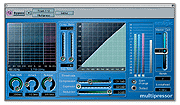 A good setting to start with when using multi-band compression for mastering.By this time your music should be significantly louder than it was originally, but you can go still further by using a tube or tape emulator plug-in (such as Dsound's VL2 for TC Powercore) to apply soft saturation to the remaining peaks. This has a somewhat different effect to applying the same treatment at the individual track stage, as what's being treated now is a mixture of sounds and all will be affected together. Processes of this kind may be best applied before limiting, but as the order of processing produces slightly different subjective results, you should experiment to see what works best for the track you are currently mastering.
The final weapon in the guerrilla mastering arsenal is that of good old-fashioned clipping. Conventional wisdom has it that digital clipping should never be allowed, as it usually sounds awful, but it is equally true that short bursts of clipping can be tolerated without doing the audio any noticeable damage, simply because the events are too short for our ears to register as distortion. As a very general rule of even more general thumb, periods of clipping should be kept to under one millisecond (around 44 samples maximum at 44.1kHz sample rate) and if two or more periods of clipping follow each other in quick succession then the maximum period of clipping needs to be made shorter to prevent audible side effects. The only way to tell how much clipping you can get away with is to listen — and if you're lucky, your audio software will also warn you of clipping and tell you how many consecutive samples were clipped. If you are recording acoustic music, then using clipping as a means of squeezing a decibel or two extra gain out of it may not be a good idea, but when it comes to high-energy dance music, clipping is frequently employed either at the mixing or mastering stage (possibly both!) and, as with most things in audio, if you can't hear it working (or if it makes something sound subjectively better), then it's fair game.
A Final Word Of Caution
While I have described a few tactics that might make respectable mastering engineers cringe, I think they'd agree with me when I say the most important part of the process is listening. You must treat your mixes with respect, part of which involves using a good monitoring system.
With all the processes described, it's a good idea to experiment by deliberately overprocessing so that you can hear what side-effects to look out for. Also be aware that excessive processing can actually detract from the subjective power of a piece of music, so don't process all the impact out of your mixes and don't be guided by how flat the waveform levels look on screen. The only result that matters is the one that's heard, so use these tools with care and restraint and you'll be surprised what you can achieve. You'll know you're successful when you get all the level you want but your music still gives the impression of having plenty of dynamic range.