

BBE Sonic MaximiserPlug-inPublished in SOS March 2003 Reviews : Software: ALL BBE Sonic Maximizer
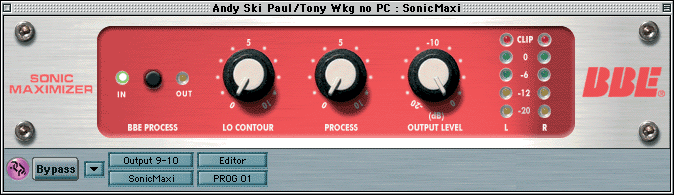
BBE Sonic Maximizer The hardware BBE Sonic Maximizer is one of the longest established enhancer-type products, but it works very differently from the Aphex Exciter that preceded it and produces noticeably different results. Rather than add harmonics, the basic BBE process changes the relative timing and phase relationships of the harmonics occupying different sections of the audio spectrum. The theory behind this is that loudspeakers introduce an opposite phase-smearing effect, which the BBE process largely counters. A three-band processing system is employed, where the mid-band is delayed very slightly relative to the high frequencies and the low-frequency band slightly more so. A second process is included which is a type of dynamic equaliser, modifying the high- and low-frequency content of the program material in response to the program material dynamics. The result is to add a little extra clarity, but without the harshness that can be experienced using some harmonic synthesis methods.
The beauty of the BBE process is its simplicity of control: there are only three knobs, and one of those sets the output gain. This is actually very useful as the process can increase the overall level slightly, so matching the output and bypass levels makes it much easier to evaluate what difference the process is actually making. A single Process control knob adjusts the degree of enhancement while a separate Lo Contour knob allows the bass end to be adjusted separately so as to maintain a proper balance with the processed high end. There's a Bypass button on the plug-in itself as well as output level metering with clip indicators. Testing the plug-in showed that it produces essentially the same results as its analogue rackmount counterparts, so if you already know and like the BBE process, you should take no convincing. Compared with other enhancers, the clarifying effect is quite gentle: perhaps the easiest way to describe the effect is as a subtle blend of traditional enhancement and EQ. It doesn't seem able to clarify the mid-range to the extent that is possible with something like the SPL Vitalizer or Aphex Exciter, but it's definitely possible to improve recordings without making the result sound unnatural. The Lo Contour control is also more powerful than it might first appear to be, as it allows mixes and tracks to be given a lot more low-end punch without muddying the sound. While the BBE wouldn't be my first choice for rescuing 'tragic' mixes, it is handy for providing a final polish and will appeal to those users who feel that many of the alternative enhancement techniques are too heavy-handed. Paul White
Voxengo Curve EQ 'EQ ripping' is a technique that aims to match the frequency response of your tracks to those from CDs featuring world-class production. Of course there's a lot more to creating good music than frequency response, and unless your music is written in a similar style and with similar instrumentation such techniques can be doomed to disaster, but it can be a useful educational process if nothing else. Over the last few years several products have offered this function, including Steinberg's Free Filter and Delaydots' Spectral Shaper, but here's a new one to try. Voxengo's Curve EQ is a 'linear phase spline equaliser' with a 2048-point filter kernel, which essentially means that you can draw highly complex responses using its graphic interface. This is very easy to use, with draggable points on an FFT display that let you alter any part of the audio spectrum over a ±30dB range. Extra points can be added by double-clicking anywhere on the graph, while existing points can be deleted in the same way, or grabbed and dragged elsewhere a readout of the current cursor position in Hz and dB helps you pinpoint your efforts. To the right of the FFT display is an Output level slider with a huge ±48dB range to minimise in/out level differences, and there is a cluster of somewhat anonymous buttons beneath. A Monitor button lets you view the real-time FFT response of the input or output signals, or both, for either the left or right channels, or both mixed together. Even handier is its OutAvg setting, which averages the response over 12 seconds, resetting itself after every EQ change. This option makes it far easier to judge the overall trend when examining response curves. The buttons labelled C, M and S control the EQ ripping feature. Pressing C starts the capture process, which you can stop at any time, and once captured you can apply it to another file by using the Match button. Since the EQ difference can sometimes prove more extreme than you want if the destination file is missing some frequencies, the / and * buttons let you attenuate or amplify the response differences, and of course you can also use them as a general-purpose EQ 'gain' control for your own hand-drawn designs. The 'rst' button resets the entire response to its flat default, while Exchange and Copy let you perform A/B comparisons. The latest version 1.5 adds 'vintage processing', with seven useful variations of odd and even harmonics to add warmth and presence to your sounds, three saturation modes to fatten them up with guitar amp/tape simulation, and even a selection of six internal filter algorithms with extremely subtle differences. However, for me the most interesting new addition was Gear Match, which lets you impose the modelled frequency-response characteristics of any two items of gear including tape, six types of tube, three varieties of compressor, and two enhancers. In combination these new features add a great deal to the package, providing a huge range of treatments ranging from subtle to extreme. CPU overhead rose to a substantial 18 percent with stereo 44.1kHz files on my Pentium III 1GHz with all its features enabled, and like all plug-ins that analyse the incoming signal, Curve EQ also imposes a fixed delay. At 3072 samples this adds a hefty 69mS at 44.1kHz, and although this is automatically compensated when you use it on audio tracks, it sadly makes using Curve EQ rather impractical with soft synths a version without the EQ ripping feature and optimised for real-time use would make sense. Developer Aleksey Vaneev also confirmed that it's not possible to use VST automation, since Curve EQ works with 2048-sample chunks. Apart from these limitations, Curve EQ worked well, was easy to set up, sounded pretty good, and the 16 presets supplied show the versatility of this form of 'free-form' EQ. I managed to create some very extreme comb responses for special effects for instance, while the modelling features add punch, sparkle, and character. A range of skins is also available for download, although I would like to see a redesign and labelling of the rather anonymous buttons, particularly for the latest features. Martin Walker
Wave Arts Power Couple Although most major MIDI + Audio sequencing applications include bundled EQ, dynamics and reverb plug-ins, they don't always sound too great, so many users are on the lookout for alternatives. Wave Arts' first product was the impressive Masterverb DX, which I reviewed back in SOS February 2002, commenting on its smooth sound and low CPU overhead, and Mac/PC VST versions have since appeared. Their second is Trackplug, which combines EQ, compression and gating into one handy plug-in. The new Power Couple is a bundle containing both plug-ins at an reduced price. Masterverb is now up to version 3.03, so here's a quick update on what's new. The most obvious improvements are the more refined graphics and stereo peak-reading output level meters, but the engine has also been enhanced with an additional Diffusion control. A 50 percent value gives identical results to previous releases, while lower values provide more discrete early reflections, and 100 percent gives an extremely smooth build-up. The Decay Time can now be extended to 60 seconds for special effects. The sound is still as smooth as silky as ever, the CPU overhead remains just as low (about 3 percent of my Pentium III 1GHz at 44.1kHz), but the new features definitely provide more versatility and polish. Trackplug is supplied in both stereo in/out and mono in/out versions, and combines a 64-bit EQ with up to 10 click-and-draggable bands in its graphic window, and a comprehensively featured 32-bit compressor/gate. Each EQ band can be high-pass or low-pass, high-shelf or low-shelf (all with fixed slopes), band-pass or notch with variable bandwidth, or fully parametric. Even better, the EQ can be placed pre- or post-dynamics, and it's incredibly easy to use just click and drag an existing point to change frequency or gain, shift-click to adjust bandwidth where applicable, and double-click to add more points. Knobs and buttons are also available for most functions if you prefer, and it sounds sweet, even at extreme settings. The compressor/gate section starts with a common Peak/RMS detector for greater efficiency, along with an optional 1ms, 2ms or 5ms look-ahead delay to help catch transients. Next in the chain is the gate, and finally the compressor, each with its own Enable button. If either of these is active the input meter displays both minimum and maximum signal power, so you can monitor dynamic range. Each also has its own meter, displaying both minimum and maximum amounts of compression and gating using different colours. Taken together, the three meters show a surprising amount of useful information. Both compressor and gate have their own Threshold, Ratio, Attack and Release controls, along with a selection of soft, medium and hard knee shapes, while there's also a Dynamics Input Gain for the incoming signal, and a manual make-up gain for the compressor, which can also be used in conjunction with the Auto Make-up Gain button to make level adjustments easier. Like the EQ, the dynamics section has its own graphic display with draggable points for compressor gain, along with both thresholds and ratios. At the end of the chain there's a further Output Gain control with a ±24dB range, and finally a stereo pair of peak-reading output level meters. Trackplug provided smooth and transparent results with all the sounds I threw at it, including vocals, solo instruments, drum kits and complete mixes, and is far quicker and easier to set up and use than patching in separate plug-ins. It helps that 47 presets are included, ranging from suggested starting points for various instruments and styles through to extreme treatments, along with a range of useful EQ settings including noise filtering and special transformations like resonant comb filtering. Like Masterverb, Trackplug is very economical with CPU, and with my Pentium III 1GHz took just 1 percent with both compressor and gate in circuit, and about 0.3 percent for each EQ band. With all 10 bands, gate, and compressor activated, the grand total came to just 4 percent for the stereo version, and 2 percent for the mono one. These figures are low enough to mean you can patch Trackplug into patch into plenty of channels without worrying. It sounds great, is extremely flexible, and together with Masterverb makes the perfect Power Couple. Martin Walker
Nomad Factory Liquid Bundle Liquid Bundle is another offering from Bernie Torelli's Nomad Factory stable, makers of the very impressive Blue Tubes Bundle (featured in the November 2002 issue of SOS). This bundle consists of five different effects: a delay, a compressor, a flanger, a chorus and a reverb. These, along with their siblings in the Blue Tubes Bundle, are now available for Windows, Mac OS 9 and Mac OS X, in both VST and RTAS formats, while Audio Unit ports are also planned for Mac OS X. Like Blue Tubes Bundle, the plug-ins all benefit from well-designed user interfaces, which are both easy on the eye and simple and straightforward to use. Liquid Chorus is a no-nonsense stereo chorus, with LFO Rate and Depth controls for the main chorus effect, and independent rate and width controls for the Rotation section, which provides panning and rotary-speaker effects. Mix and Main Level controls are the only remaining parameters. I was immediately taken with the sound of Liquid Chorus, which has a distinctly warm and analogue character. It can be set slow and deep, or fast and nervy, but even at its most extreme settings it never becomes tiring or unusable.
Liquid Delay is a stereo delay/echo, with independent delay time, feedback and gain controls for the left and right channels. There are also independent left and right Direct Gain controls, for balancing the wet/dry mix, and independent low-pass filters for both channels, to soften the delayed signal a little. It couldn't be much simpler to use, and it works as advertised. Liquid Flanger is laid out much like Liquid Chorus, with LFO Rate, Depth and Feedback controls, and the same Rotation effect, plus width control (although the rotation rate is tied to the main LFO in this case, rather than being independent). Mix and Main Level controls make up the remaining parameters. Unsurprisingly, Liquid Flanger has a lot of the same character as Liquid Chorus, although the effect is more pronounced. With the feedback setting at full it can be a little over-powering, but subtler settings produce some excellent whooshing, swirling sounds, which can be fine-tuned via the width control to occupy as much or as little space in your mix as you like. Finally, Liquidverb is a no-frills reverb, with Mix, Gain, P-Dly (pre-delay), Damp and Size settings, as well as High and Low EQ controls. There are also Stereo Width and Pan controls. Liquidverb seems best suited to large rooms and halls, with long, luxurious decays. The smaller room settings are usable, but sound a little more artificial to my ears. The High and Low EQ controls proved very useful both for brightening up some of the darker rooms, and for taking some low end off the larger hall sounds, to help them sit in a mix more comfortably. To sum up, if you're looking for jaw-dropping, mind-bending special effects, you're likely to be disappointed by Liquid Bundle. These plug-ins all seem to have been carefully designed not to make startling noises when you turn everything up to 10. While this may not sound like much fun, the net effect is that Liquid Bundle is extremely easy to use in the context of a mix. In other words, its very easy to dial up sounds that sit comfortably alongside other sounds and very difficult to make outlandish, jarring noises that stick out like a sore thumb. My only complaint is that the Chorus, Flanger and Delay plug-ins would all benefit from the option to sync their time parameters with the tempo of the host sequencer. Many plug-ins offer this option nowadays, and it seems an unfortunate omission from a bundle which, at $199, is not inexpensive. However, Nomad Factory tell me that they plan to incorporate this feature in a forthcoming, free update for registered users. Paul Sellars
Bernard Torelli of Nomad Factory has been very busy of late. Nomad's two major products, Blue Tubes Bundle and Liquid Bundle have been ported to the Mac platform, where they will run as VST plug-ins under both OS 9 and OS X, with Audio Units support planned for the future. Blue Tubes Bundle is also available in the RTAS format for Pro Tools, and better still, the v1.5 update includes four new plug-ins. The full suite now comprises 'vintage' EQ, chorus, phaser, compressor, limiter, echo/delay, noise gate and Tube Drive. Liquid Bundle offers five further plug-ins look out for a review in SOS soon. Published in SOS March 2003 | Saturday 4th July 2009 July 2009
Click image for Contents
SOS News Headlines
WIN Great Prizes in SOS Competitions!
|