

The latest in Roland's line of MC-series workstations is their best (and most expensive) yet, incorporating synthesis, sequencing, real-time control, and sampling. But in an increasingly software-driven world, can a Groovebox still cut it?
 Photo: Mark EwingRoland's Groovebox concept just seems to keep on grooving. The company launched the first of the family, the MC303, in 1996, which means that the line has now been going for around seven years — a long time in modern technology. Since then, we've seen the MC505 (a pumped-up 303), the JX305 (an MC505 with a keyboard), the MC307 (a cutdown 505), and now the MC909, the biggest and most sophisticated of them all. For lots of reasons, the Groovebox approach has struck a chord with thousands of musicians, and this latest one lines up some new and exciting features — including sampling for the first time in an 'MC'. But as computers become more ubiquitous and software more user-friendly, can a device such as the MC909 still persuade hi-tech musicians to stick with hardware?
The Groovebox That Ate Manhattan
Less of a Groovebox and almost more of a Groovedesk, the MC909 is an impressive-looking machine. Crammed into that 50x39cm frame are a 64-voice polyphonic, 16-part multitimbral synth engine, a stereo 16-bit sampler, and a comprehensive pattern-based 16-track sequencer with real-time pattern selection options. There are also fully editable effects, a programmable arpeggiator, and many performance/real-time control facilities, including two D-Beam non-contact controllers, and a turntable-emulation slider. Dominating it all is the best LCD we've ever seen on an instrument of this type, offering large, clear graphics and a software-like interface. It all adds up to what is surely one of the most deluxe composition and music-production tools currently on the market, and one which not only interfaces with computers but in many ways does its best to behave like one.
|

Like the MC303 and 505, the 909 has a SmartMedia card slot so that user Patterns, Programs and Samples may be stored on a suitable card, or so that the 909's memory may be backed up. Unlike on its predecessors, however, the 909's card slot is located on its front panel. Any card up to 128MB can be used (although none is supplied as standard with the 909). In addition, 128MB or 256MB of internal RAM, augmenting the built-in 16MB, can be fitted for the sampler.
Though robustly built, and quite weighty at around 13lbs (6kg), the 909 has a metal casing that feels a lot less substantial than that of the MC505, with a distinctly 'plasticky' feel to it.
The User Interface
Before starting on the specifics, it's worth pausing to examine the MC909's user interface.
The OS is arranged in pages, such as Pattern Play, Patch Edit and Sample Edit. Pages are selected via dedicated buttons in the various sections of the front-panel, then the 'F' keys under the backlit display access tabbed sub-pages or edit functions. A menu on many pages (accessed via the helpfully labelled Menu button) lists other options. The pages are well laid out and clear, with good graphics. Some pages even resemble software plug-in displays, and there are often choices between list-type and graphic editing of parameters.
Once in the right page, you can turn the front-panel controls to alter many on-screen parameters, and use the cursor buttons and value dial to access and adjust parameters that lack a real control. The main adjustable parameters, especially in terms of Patch editing (for example, filter type, cutoff and resonance, and the envelopes), are immediately accessible on the front panel, and may also be used at any time without reference to the screen. The controls and display are very well integrated, and the only thing that would make life even easier is a touch-screen or the ability to connect a mouse.
Synthesis
Anyone who's owned a Roland synth from the last decade or so will recognise the MC909's sample-based synth engine and its programming system. Specifically, the 909's synth is modelled on that of the newest XV-series instruments.
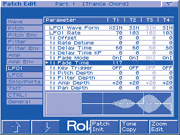 Patch Editing: The LFO1 page, where detailed LFO settings for every Tone in a Patch can be seen in list form. At the bottom of the page is a graphic representation of the currently selected Tone's LFO1 waveform. The one showing is 'XSin', one of the more complex waveforms from the 15 available.Exactly 800 factory Patches are provided, the majority of which are of the 'synth' type, with a smaller selection of traditional and realistic ones, but for those who want to go beyond the presets, there's more than enough programming potential. Essentially, an MC909 Patch comprises up to four 'Tones', each a single-oscillator synth in its own right. As you would expect, the more Tones are used, the less polyphony is available.
The heart of the Tone is your choice of one of 693 sampled factory waveforms, or a custom sample, imported or created with the onboard sampler. Actually, two samples can be loaded into a Tone, to accommodate stereo samples, although this reduces polyphony further. Indeed, 64-note polyphony is beginning to look skimpy for a Groovebox whose Patches can contain four Tones, each of which could be stereo.
Without delving into the OS, much editing can be undertaken quickly with the front-panel synthesis controls (located to the left of the LCD). Worth noting is that the Tone Switch and Tone Select buttons allow you to tweak all parameters for some or all of the Tones in a Patch (for example, to set the same amplitude envelope for all Tones) or work on individual Tones selectively. The Tone's signal path follows the familiar analogue subtractive synthesis paradigm:
- A decent resonant filter with three varieties of low-pass, a high-pass, a band-pass and peaking characteristics.
- Three envelope generators, for filter, amplitude and pitch, with hands-on sliders that make editing a doddle, traditional ADSR (Attack, Decay, Sustain, Release) curves for filter and amp EGs, simple AD controls for pitch EG, and additional time and level controls for up to four stages via the Filter Edit page. Envelopes can be edited as simple parameter lists or as large, dynamic graphic curves, parts of which move in response to slider tweaks.
- Two MIDI-sync'able LFOs, routable to pitch, filter, amplitude and/or pan, with a surprising quota of 15 waveforms, esoteric as well as straightforward, for greater scope in modulation effects. You can even morph between waveforms. The display for the LFO is also great — you get a good clear graphic of the waveform, which is especially informative when morphing between the standard waves.
 Further programming options include FXM — frequency cross-modulation — which modulates the Tone's waveform with another, fixed waveform. It's essentially a distortion circuit and helps add some dirt and excitement to samples. How good the effect is depends very much on the Tone's waveform. In addition, you can customise how Tones interact, via 10 preset 'Structures'. A Structure changes the signal path of the wave generators, filters and amplifier sections of pairs of Tones, providing such useful options as chained filters, ring modulation and a booster circuit (more distortion and overdrive). Oddly, there's no discussion of Structures in the manual (details can be found in the MC505 manual, however!), although the graphical display is clear enough in showing the signal flow.
Once Tones have been tweaked, tuned, and panned, and had velocity sensitivity set if required, there are a couple of parameters, related to portamento and mono/poly operation, applicable to an entire Patch. These include 'Unison Fat', which, when Unison mode is engaged, produces effective detuning or harmonising effects that can sound like out-of-tune analogue oscillators beating against each other. Unison pops a Patch into mono mode, even if it was designed to be polyphonic.
This is all good stuff, though some may wonder how many more times Roland will be able to recycle and spruce up what is still basically a sample-based synthesis system, complete with short samples and the occasional dead loop. Is it not time to think about some analogue modelling? On the plus side, you can install an SRX-series wave-expansion board in the 909. These boards are still sample-based, but they add a completely new sound set that integrates with the instrument. Available boards at the moment include Concert Piano, Symphonique Strings, Supreme Dance, Complete Orchestra, Ultimate Keys, Dynamic Drum Kits, and World Collection — although note that in some cases Patch data on the boards will not apparently be read by the 909.
Drums
 MC909 drum Patches (Rhythm Sets) have much in common with normal Patches. Every voice in a Rhythm Set can comprise up to four Tones, and each Tone contains a mono or stereo sample, processed by a similar synthesis path to a normal Patch. There's no LFO, but everything else is in place, though some parameters apply to all Tones at once. Unique to the Rhythm Set is the Wave Mix Table, which customises how a Tone reacts to velocity. Thus various elements in a rhythm voice can be made to sound, or fade in and out, at different velocities, simulating the properties of a real drum or offering more options for pure sound design.
MC505 users may notice that the 909 Rhythm Sets have fewer voices each — 16, one for each of the 'Velocity Pads' — so no 'octave-shifting' of the pad bank is needed in order to access the full kit. However, the 909 has 64 factory Rhythm Sets, and room for 128 user Sets, very much in excess of the 505's complement. In addition, any or all sequencer tracks can play back a Rhythm Set (the rhythm track was fixed on the 505). We found the factory kits a little samey and self-consciously 'modern', with no particular subtlety, but given the numerous user memory slots, and the ability to bring in your own samples, it's easy to create custom kits.
Sampling
Adding sampling to an all-in-one desktop composition tool is a very logical step (previously taken in this market only by Yamaha's RS7000), and creates an even more all-round, self-contained performer. If the 'next generation' adds digital recording tracks (perhaps to SmartMedia card?), the picture will be complete.
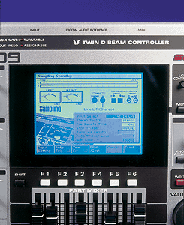 This is what you see when you're setting up to record a sample. Here you can set input source, auto-trigger level, and pre-sample time for capturing audio that occurs before sampling proper begins. Input level can be monitored via bar-graph and VU-style meters.Happily, the MC909's sampler, a powerful phrase sampler rather than a proper 'studio' device, doesn't feel in any way bolted on — a lot of thought has gone into integrating this instrument's components. It offers fixed sampling and bit rate (44.1kHz, 16-bit), with no options for changing sample rate later — though with RAM as cheap as it is, there's little need for 'downsampling' to save space.
This device is flexible and thoughtful right from the beginning of the sampling process. There's a surprising range of input choices — analogue stereo and co-axial or optical S/PDIF digital inputs, with the analogue input offering stereo or mono recording, at line or mic level. A resampling option takes the 909's output as its source, so you can sample anything from a one-bar loop to a complete Song (RAM permitting). It's even possible to sample a mix of the MC909's output and audio entering via the audio inputs.
Automatic and manual sample-initiation options, with control over threshold trigger level, and so on, are provided. One option captures up to one second of audio from before sampling starts, so you should never miss any wanted audio. One very clever trick is 'audio-divide' sampling. With this, you can sample audio that you know has gaps in it
— consecutive percussion hits on an audio sample CD, say — and set the 909 to create a new sample after each gap. The gap is user-definable to the tune of 0.5, 1, 1.5 or 2 seconds; if gaps are less than 500ms, the 909 doesn't necessarily catch every individual sound. A manual version of this facility is also available: once sampling has started, the 'Divide' F-Key under the display creates a new sample every time it's pressed.
Round The Back
 On an instrument as feature-packed as this, you'd expect a busy rear panel. The 909's kicks off with six analogue outputs on standard jacks — a stereo main mix pair, and four individual outputs for routing parts of the mix (for example, drum sounds) to an external mixer if desired.
Analogue inputs for the sampler are on a stereo pair of jacks, and S/PDIF digital I/O is thoughtfully provided in both optical and co-axial formats. MIDI In and Out sockets come next, then the USB connector that allows interfacing with USB computers to back up the MC909's memory contents, and to export MIDI files and AIFF or WAV samples from the computer to the 909 (see the separate 'Computer Interfacing' box elsewhere in this article). That leaves just the headphone socket and IEC mains socket for the internal power supply.
Sample Editing
Samples can be looped (with forward and reverse options, but no 'boomerang'), normalised, and truncated at beginning or end. They can also have a tempo assigned to them, which you really should do with rhythmic loops and grooves. You can change a loop's tempo in real time as it plays in a Pattern, and the real-time time-stretch algorithm needs to know the original tempo. Control over the type of time-stretching is also provided, as 10 options offering varying weightings towards slow or rapid phrases. We found that using '5' produced good results with many different samples. There's no way, incidentally, to reverse sample playback.
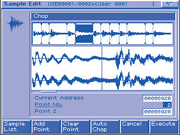 The excellent Sample Edit page, showing an overview in the top half of the window and zoomable edit display in the lower. Here, the 'Chop' process is being used to divide a sampled loop into segments.The excellent Chop feature offers some of the functionality of software such as Propellerhead's Recycle, in that it divides a loop into segments, to be saved as individual samples. There's even an option to turn a chopped loop into an instant Rhythm Set, so a sampled loop with drum sounds you like can be quickly made into a kit and have new rhythms programmed for it. The Chop process can be automated, searching for 'chop' points in terms of level or beat (referring to the sample's tempo). If there's a down side, it's that there is a limit to 16 slices per sample, so it's best used for one-bar rhythmic loops or similar. We successfully 'chopped' sections of sung vocal, then turned them into an instant Rhythm Set, which meant we could trigger them in any order.
Another neat facility is 'Combine' — almost 'Chop' in reverse. Up to 16 separate samples are welded together, consecutively in linear fashion, to produce a longer sample. Space, in milliseconds or beats, can be inserted during the Combine procedure to help create rhythmic effects. It's a neat way of creating loops and breaks without actually sequencing.
At all stages of the sampling process, we were impressed by the display: it's the best we've seen outside sampling software on a computer, with an overview on the top half of the display and a zoomable edit window below. Having said that, we were occasionally bugged by the display lagging slightly behind operations as it redrew. There also is no 'Undo' for sample edits.
Samples must be saved before power-down, or you'll never hear them again. On an unexpanded machine with the supplied 16MB Flash sample RAM, this is simple: name the sample, choose a location and save it. Stereo samples need two consecutive memory slots, but with 2000 slots, this shouldn't be a problem. When you power up, you'll need to load into the MC's main working RAM any samples required by Patches or Rhythm Sets you plan to use. Fortunately, this process can be automated: turn 'Sample Default Load' on in the System Menu.
Potential problems start if you have an expanded MC909. A 128MB or 256MB DIMM RAM module can be fitted, but this extra RAM itself needs to be backed up on power-down. If you're not using a computer, the only way to do this is via SmartMedia card: save the samples from your expanded RAM to this, and they, too, will auto-load. Thus, if you budget for sample RAM expansion, you may need to budget for an extra SmartMedia card too. Still, there is one insoluble problem: the biggest SmartMedia card is currently 128MB, and they can't be hot-swapped. If you have 256MB of samples, there's nowhere for 128MB of them to go. We spoke to Roland about this, and they mentioned a possible OS update to allow cards to be hot-swapped, enabling two to be used for one sample-loading operation, but obviously we don't have that solution yet.
|
Pattern Creation
The 909 takes the familiar pattern-based sequencing approach, and up to 200 user Patterns can be created. These may have up to 16 tracks each (double the MC505's eight) and can be up to 998 bars long, with time signatures ranging from 2/4 to 9/16. Sonic variety may be added by recording synth control and/or mix tweaks in real time over the top of Patterns, which can then be chained into Songs (up to 50 Patterns per Song). This 'automation' data shows up in one of the 909's editing modes and can be edited. Note that you cannot record knob tweaks and mix alterations dynamically over a complete Song, which is arguably when it would be best to do this.
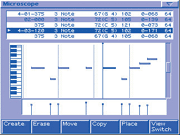 A software sequencer-like display and and edit list are available for detailed MIDI event editing in Microscope mode. Note the velocity stalks in the lower portion of the display.The basic building block of the Pattern could be as far as you need to go, if you work in a linear fashion: a 998-bar 4/4 Pattern running at 120bpm would last 33 minutes 15 seconds — long enough for most purposes! Roland have been generous with sequencer memory: the 909 has enough for about 1.3 million MIDI notes (the MC505 accommodates 95,000 notes, a respectable number in itself). Yet another enhancement is the 909's timing resolution: 480 pulses per quarter note is a big improvement over the 505's 96ppqn.
The recording process is remarkably straightforward, largely thanks to the LCD. Pressing the Record button accesses the recording Menu, and here you can choose between real-time, standard step-time and classic Roland drum-machine style step-time recording, dubbed TR-Rec. Input for the sequencer can come from an external MIDI keyboard, or from the front-panel row of 16 very good velocity-sensitive pads. These are used to trigger samples, pound out drum parts, and even play chords and riffs with melodic sounds. Their layout isn't ideal for the last purpose, however.
Comprehensive input quantising (with percentage weighting options) is available during real-time recording, and Patterns loop while you record different parts into them. Note that you can't have different track lengths within a Pattern. Also, if you've recorded multiple tracks over a repeating loop and you don't like the last track you recorded, using 'Undo' erases the whole recording, because it's treated as one action. Undo in general is not as easy as it could be, because it takes about four button pushes to enable. Trying to Undo in Pattern Edit mode is particularly annoying.
Both standard and TR-Rec step-time recording are well implemented, with helpful, clear graphical displays. The only thing we found annoying was the fact that TR-Rec mode can't be used without the rest of the Pattern running, so we usually chose to 'solo' the part being recorded.
One more option is available from the Recording page: recording to the Tempo/Mute track. The tempo track is a useful thing, allowing tempo changes to be recorded on the fly (by turning the Value dial, which changes the tempo in the display), or inserted at precise points in the Microscope editor (more on this shortly). This works well. However, what are track mutes, which you'd normally expect to record as part of a normal Pattern, doing on a separate track? We can confirm that if you try to record track mutes as a mix action during recording into a normal Pattern track, they don't record. Another oddity is that although tempo changes can be recorded into Patterns, they can't be recorded into a Song. Moreover, tempo changes in a Pattern aren't recognised once the Pattern joins a Song chain. This is a fairly serious omission: there's no tempo track for a complete Song. If the MC is sync'ed via MIDI, though, it will obviously follow any tempo map on the master device.
Editing
The 909's approach to Pattern editing is an eye-opener, bringing that LCD into play in such a way that you feel as if you're working with a software sequencer. Two editing modes are available: Microscope edit handles individual events, while Pattern Edit addresses multitrack chunks of data of one bar or more.
To take these in reverse order, under Pattern Edit bars can be copied or erased, inserted or deleted, and transposition and quantise processes applied. The post-quantise facilities are the same as the input-quantising ones, with the addition of 71 well-designed preset groove-quantise templates. Velocity and note duration for an entire pattern can be changed, data (perhaps overdone controller information) may be thinned, and whole patterns can be shifted forward or backward in time. Usefully, muting tracks before applying many processes causes those tracks to be left unaltered.
Microscope editing has been an important part of Roland hardware sequencers since the MC500 MicroComposer, but on the MC909 it's like looking at the piano-roll editor of a software sequencer. Scrolling through a Pattern is simple, and the various cursor and parameter edit tools make moving through note, velocity and length data easy; whatever can be highlighted can have its value changed. Individual events can be copied and pasted, and a comprehensive data filter lets you focus on notes or controller data. The whole window can even be zoomed in or out. And though you edit velocity values in the Microscope data list, you see the effect of edits by the changing heights of 'stalks' in a dedicated part of the window — rather like Digidesign's Pro Tools software, in fact!
Song Creation
The process of chaining Patterns into a Song is one of the least satisfying aspects of the MC909's operation. It's necessary to go into 'record', select the required Pattern, using the display and the value dial, then press the Enter key. You repeat the process until the required Patterns are in the required locations. You can't have the Song playing back at the same time, though you can audition Patterns for each step by pressing the transport's Play key. It's also possible to customise mix and effects settings for each Song step, and edit the chain in a list editor. Though it's efficient, the whole process is rather static and cerebral, with none of the spontaneity would arise from, for example, hitting buttons to chain Patterns in real time.
By the way, we tried to cause the 909 to exhibit timing inaccuracies, something that its forebears are said to suffer from, by overloading a Song with busy Patterns full of 32nd notes and controller data, but could hear no problems.
Computer Interfacing
The 909's USB interface is an elegant solution to the problem of moving samples and MIDI Files around, and backing up the Groovebox's memory. AIFF or WAV files can be moved to the 909 (then 'imported' by the sampler section, with non-16-bit/44.1kHz samples being converted in the process), and SMFs can also be dragged across. Files can be moved in either direction: 909 Patterns are saveable in SMF format for export to computer, and 909 samples may be saved as WAVs or AIFFs.
One negative point is that the link isn't completely hot-swappable; connecting and disconnecting must be done from a special page, and you can only make or break the USB connection when the 909 is powered down.
Mixing
 The straightforward Part mixer on screen.The software representation of the 909's mixer is fairly straightforward: 16 channels, each with level fader, pan pot, key shift control (±48 semitones of transposition), reverb send knob and mute switch. Its physical manifestation, immediately below the display (see right), is slightly less comprehensive, though simple button pushes allow its eight real sliders to control every suitable mixer parameter (ie. track level, pan, reverb send level and key shift) for all 16 tracks. The 16 illuminating buttons below the faders work as mute buttons (as well as being part selectors for editing the Patches on each track), and using a mute button in conjunction with the Shift key solos a track. All mixer controls can be automated within a Pattern, though complex mixes require several passes, due to the relatively limited number of dedicated controls.
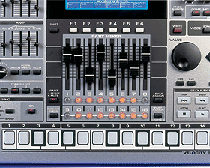 To mix external audio from the inputs alongside 909 audio, press the 'Mix In' button. That audio might be coming from a digital multitracker in the studio or another synth on stage (but the inputs can't accommodate a turntable output without an additional interface). The input can be treated with internal effects, and (most amazingly) can be transposed in real time via the Velocity Pads. Sadly, the latter option can't be recorded as part of a Pattern and the output can't be sampled, but it's a fun trick to have.
Effects
Three processors, plus a compressor and mastering processor, are provided. The three main processors comprise a send/return reverb and two multi-effects (MFX1 and MFX2) which work broadly as inserts, though they can be inserted into all 16 mix channels at once if desired. The compressor behaves like the MFX processors, in that you can put all 16 channels through it, but all with the same setting. We would have loved to see an independent compressor for each channel. However, the one you do get is nicely specified and effective, with attack, release, threshold, ratio and gain parameters, plus a simple two-band EQ. There are no user memories or factory presets for effects, and no way to copy settings between Patterns, which is something of a letdown on a machine that is so sophisticated in other ways.
 When editing the onboard reverb, the graphic at the top left alters to reflect changes in room 'size', which is neat if fairly pointless, but the time and density graphic below it provides useful feedback of reverb response.These complaints aside, the effects are a good set, as one would expect from Roland. The 24-bit reverb has borrowed a handful of algorithms from the company's stand-alone SRV processors and XV-series synths, and produces smooth, realistic spaces one wouldn't normally expect from a product such as this. There are only four algorithms, but each is fully editable, and again, the display comes into its own here, with graphical feedback as to reverb size, reflection density, and so on (see above).
The MFX processors offer the same selection of 38 effects, though MFX2 also boasts an additional set of MIDI-sync'able delays. Simple processes such as EQ, enhancer, auto-wah, modulation effects and low boost are augmented by creative essentials such as a COSM amp modelling, step filter, a humaniser (which imposes formants on the input to produce vowel-like sounds — it's great on percussion), lo-fi noise and a slicer (which rhythmically chops the sound). Modulation effects include phaser, chorus and flanger variants, and being from Roland, they're of good quality.
There doesn't seem to be much front-panel hardware for effects control: just three knobs and five buttons. However, these controls do allow you to quickly mute/unmute and select for editing any of the effects, select an effect type, and then tweak two parameters (usually the most often used ones, such as flanger rate and feedback) for each. Others are accessed via the display.
The mastering effect is a fully specified multi-band compressor providing control over crossover frequencies between bands, plus attack, release, threshold, ratio and level. As great as this feature is — and it works better than some budget stand-alone compressors we know — we still kept wishing we had access to the MC505's killer Low Boost knob!
Arpeggiator & Chord Memory
The MC909's arpeggiator (essential on such a machine) is a very good polyphonic example that moves beyond traditional chord-breaking and into automatic pattern generation, with 128 preset patterns and room for 128 of your own. Each pattern can be as simple or complex as you like, up to 32 steps long, there's an excellent arpeggio editor page, and arpeggiator output can be recorded into a Pattern track.
If you like the idea of setting an arpeggio going and then transposing it in real time, the MC909 provides some help. It has a Chord Memory, with which you can generate a whole chord by playing one note; 64 factory chord forms are provided, and you can create 128 of your own. These chords can be arpeggiated, and engaging the Hold button causes the arpeggiated chords to play indefinitely, allowing you to change chords without having to work out how to play them on the pad keyboard.
Performance
Although it sits perfectly well in the studio as an all-in-one composition machine, the MC909 has been designed just as much for live use. To this end, it has several performance-orientated features.
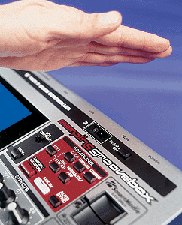 The MC909 features two D-Beam controllers.One unique selling point that many Roland 'groove' products have is the D-Beam non-contact controller, and working on the basis that more means better, the MC909 features two. When enabled, these beams can be used to control, by nothing more than waving your hands in the air, a number of preset or assignable 909 parameters. The option that got the most use here is the new 'Solo Synth'. When assigned in this way, the D-Beams can play a separate synth voice, independently of the rest of the instrument, for soloing over your Song. The Solo Synth voice doesn't pass through the mixer or effects (so there'll be no spooky reverb) and it can't be recorded into the sequencer or routed to its own audio output. However, with the left-hand D-Beam dedicated to volume and the right-hand one to pitch, this is the closest you can get to realistic theremin effects without actually buying one yourself (indeed, a theremin-like voice is pre-assigned to the Solo Synth). In practice, getting the knack of where to put your hands is trickier than the real thing, since the beams aren't that big. Selecting the 'chromatic' option helps.
The D-Beams can also control filter cutoff frequency andresonance, and two turntable-emulation parameters (more on these in a moment). You can set pretty much any parameter in the MC as a destination.
The next really obvious control feature of the 909 is the Turntable Emulation section. Here a huge fader — like that seen on DJ hardware — lets you apply positive and negative changes to playback speed and/or pitch. Changes are also applied to any sample loops in a Pattern, courtesy of real-time time-stretching. The sound quality of stretched audio is generally pretty good, and the real-time aspect is most impressive. A tempo display tells you how much you've changed tempo, and two buttons labelled Hold and Push let you instantly grab the fastest or slowest extreme of the emulation shift. Typically, this feature is for DJs attempting to roughly sync the MC909 to audio from decks during a live mixing session. Tap tempo is also available, but there don't seem to be any BPM-detection features. Turntable emulation is fun for non-DJs, too, but if you don't need the feature and are wishing the slider was a pitch-bend or mod wheel, there's good news, as it can perform either of those functions. Note, though, that it works in the opposite way to most synth wheels: up is down and down up!
|
Other real-time play functions, namely RPS — Real-time Phrase Sequence — and Pattern Call, have been inherited from earlier MCs. With the former, you can arrange a collection of up to 16 Pattern tracks — drum parts, bass lines, riffs and the like — from your own Patterns or the 440-strong library of factory RPS patterns, to trigger live from the pads, alongside a Pattern or Song, if desired. Pattern Call is similar except that each collection offers 16 complete Patterns to trigger from the Pads. It's all a bit 'auto-accompaniment', but it can help stretch out a track or groove in a live situation. Sadly, you can't currently record the results of a RPS or Pattern Call session within the 909. Also missing is the 'MegaMix' option of the 505, where different Pattern tracks from other Patterns could be selected by the mixer faders during Pattern playback. One control feature we also missed is a footswitch or footpedal input; the MC505 has one, which is useful live. On the up side, the front-panel controls transmit MIDI data, so the 909 should be capable of acting as a controller for software instruments, such as Reason; a second use that could help to justify the expense of a 909.
Conclusion
As often happens with an instrument of this scope, it's possible to write a long review and still feel you haven't covered all its features, or gone into the ones you have covered in sufficient depth. This is a monster of a Groovebox, it sounds excellent, and it certainly represents the peak of the genre at the moment. Yes, it's a bit on the complex side, but no more than it has to be in order to offer this many integrated facilities. Furthermore, much of the pain that could ordinarily be caused by such a multi-layered beast is removed by the superb display and the logical, software-like user interface it makes possible. The 909 is not perfect — there are a couple of odd 'issues', such as the mismatch between the maximum sample RAM fittable and the maximum size of SmartMedia card on which to back up the samples — and it's expensive. Nevertheless, this is a hugely appealing instrument.
Can it compete with the software option, given that a laptop computer and virtual studio software is a very viable way to go, and also given that the MC's £1500 price tag would easily buy that laptop and software, possibly with change? We think it can if you don't want a computer in the studio (those people still exist!), if you gig to any extent (dedicated hardware is probably still safer), or if you just love the immediate feel of a large chunk of high technology on your lap!
| |
|
 £1499 including VAT.
 Roland UK Brochure line +44 (0)1792 515020.
Competition
There is currently only one piece of hardware that's direct competition for the MC909 — Yamaha's RS7000 (reviewed in SOS October 2001 and still available at £1159). The RS7000 is a great instrument, packed with features and comparable in many ways to the MC909. It doesn't fit in as much sample RAM, and it doesn't have anywhere near as good a display, but it's a fair bit cheaper and has SCSI (as well as a SmartMedia slot) for very easy sample backup without the need for a computer. It also has multiple sample rates. We can't hope to do a point-by-point comparison in the space available here, but the two machines are close enough in spec that you certainly should if you are in the market for a deluxe groovebox.