

GEM have made all kinds of keyboards, from organs to home keyboards to synth workstations. Their latest incorporates physical-modelling technology, samples of famous instruments, effects, and plenty of real-time control options to form a 320-note polyphonic monster.
Italian synth manufacturers have never been afraid to tangle with home-keyboard technology, and have frequently made instruments that appear simple while concealing a great deal of power under the bonnet. For example, Elka's Synthex suffered from its home-keyboard tag in its day, but it has now become a sought-after synth classic.
 Photo: Mark Ewing
Like their fellow Italians Elka, GEM started in a similar way, building organs and home keyboards, but took the idea of the latter further forward with the WX2 workstation some 10 years ago. This was followed by the successful S2 and S3 synths, which were somewhat reminiscent of Korg's i-series workstations, featuring terrific sampled sounds, editing, built-in effects and libraries. More recently still, the company's Pro 2 digital piano has been used by Keith Emerson, showing that GEM are looking closely at the pro end of the market, while still remaining faithful to their home-keyboard origins.
The Promega 3
The result of a four-million-dollar investment in new technology, the new Promega 3 offers a combination of both sampled and physically modelled sounds, but in a very user-friendly package. Driving the new keyboard is GEM's new DRAKE technology, which stands for DSP RISC Advanced Keyboard Engine. Several modelling techniques are used as part of this, for example Natural String Resonance (which models all the different harmonics that you hear from a piano's soundboard when a string is struck by the hammers), and Damper Physical Model, which models the action of a real piano damper footswitch, so that instead of merely acting as a switch to trigger static damped and non-damped samples of a piano sound, the damper pedal operates continuously. Continuing the list of modelling acronyms, there's also Advanced Release Technology, which accurately reproduces the damping effect of a real piano rather than relying on envelopes to produce the effect on static samples. Finally, there's FADE (Filter Algorithm Dynamic Emulation), which accurately reproduces all the dynamic and harmonic changes of a sound, rather than velocity-switching though three or four different samples of a note. You get the picture — in many key areas, static, sample-based piano sound generation has been replaced by more natural-sounding modelling techniques.
|

The keyboard itself is an 88-key, 320-voice polyphonic affair with mono aftertouch (yes, you really can play up to 320 notes at once!), and its sound engine comprises four independent Sections (making it effectively four-part multitimbral). There are 60 onboard sounds, 128 performance presets (64 preset, 64 user), two onboard DSP effects units (offering 15 reverb types and 15 multi-effects, or ProEFX, as they're known here), and an eight-band graphic equaliser. As you can see from the picture above, it all adds up to a retro-styled keyboard (reminiscent, I thought, of Yamaha's late-'70s/early-'80s CS and SK keyboards, thanks to that raked control panel) which bristles with real-time controls. Covered in knobs and sliders, the panel may initially look forbidding, but it's very easy to understand, and the large and friendly controls would be easy to see, even under challenging stage conditions. Setting up sounds, effects, performances, and real-time control of performance parameters while playing ought to be a total doddle — and so it proves to be.
Controls
Let's have a look at the controls in further detail. There are two power switches, one at the rear, and a Standby button on the lower front left, next to the two headphone jacks. The main power switch effectively 'boots up' the Promega 3 from scratch, during which it spends some time decompressing its internal sound memory ready for playing. The Standby button at the front puts the keyboard into 'sleep' mode, where the uncompressed sounds remain in memory so that the startup time is faster.
On the far left of the main control panel, we have the customary pitch-bend and mod wheel controls. These can be also routed to control other parts of the sound in real time, covering pan, wah or filter controls as appropriate. The pitch wheel can bend notes up to an octave in either direction. Next up are two volume sliders: the master volume, and input volume for routing any stereo source from the inputs on the back through the Promega itself (see the 'Round The Back' box towards the end of this article).
The next section, 'Edit & Controls', allows you to set up the Promega in accordance with your own playing requirements via a series of page menus. Four buttons cover Sounds, MIDI, Controllers and keyboard split point. The Sounds page allows control of a low-pass filter and stereo pan of any of the four instrument sections. The MIDI pages cover channel MIDI selection (with one for each instrument, and a master channel for controller and effects messages), as well as program changes, bank select MSB and LSB, MIDI modes and data bulk dump.
The Controllers pages cover pitch, the mod wheel, pedal assignments, audio output, and microtuning and performance modes (using the bank and performance number buttons). There are three options for pedal settings: DAM (for Damper), PD1, and PD2. The pedals can be simple footswitches, or continuous controllers, and the Promega automatically senses which type you have connected. You can set the footswitches to turn Instrumental sections on and off, step up or down through performances, and activate soft or sostenuto playing. Continuous controllers (including the mod wheel) can be assigned to volume, expression, the filter, stereo panning, and a wah-wah effect. In addition, both the pitch and mod wheels can be assigned to any Section of the Promega, and you can use each individual section's slider to switch the relevant controllers on or off. Also included here is the output assign; you have a choice of Master or Auxiliary outputs. The microtuning options run to seven different (mainly classical) types: 'Equal', 'Piano 1' and 'Piano 2' (these offer European 'stretch' tunings for piano aficionados), 'Meantone', 'Kirnberger', 'Tartini-Valotti', and a user-defineable setting.
 Photo: Mark Ewing
The last control in this section is Split Point, which is very simple — you set up a split by holding down the note at which you want the split to take effect.
Effects
|
There are two DSP effects processors on board, dealing with reverb settings and ProEFX (multi-effects). All of the treatments (see the full list on the opening pages of this article) are editable and can stored as Performance settings (though only as such). The Reverbs offer control over Depth (ie. reverb return level), Pre-delay, Reverb time, and Send level, while the ProEFX are covered by effects Send level, effects Return level, and two parameters that change depending on the selected treatment. These are generally standard fare, dealing with (for example) modulation frequency and depth, phase and feedback amounts for the time-based effects, and threshold and ratios for treatments like compression. The excellent manual gives a full description of each parameter, while the large Level slider makes it easy to set values.
Sound Thinking
|
The Promega 3 has essentially four instrument Sections: Pianos, Vintage Keys, Orchestra/Pad and Bass/Other, and these can be layered or split across the keyboard. Large rotary knobs let you select the sounds, and a red LED lights up to show your choice. The individual Sections have controls allowing you to turn the Sections on and off completely, and set up the split points for the Section (these controls are confusingly marked 'To Left'). You can also switch off the sends from the Sections to the reverb and ProEFX engines with the Effects buttons, and set the playback octave with the '+' and '-' buttons. Finally, there's a level slider allowing you to balance the overall output of any given section against the others. When you select a Performance preset, the LEDs on the sound-selection rotary encoder and in the other buttons in the section change to reflect the new settings, and the level fader moves too — yes, each section's fader is motorised!
Completing the front-panel lineup, there's the eight-band graphic EQ with indicator LED bar-graph meters at the right-hand end of the keyboard. The equaliser is controlled by rotary pots and has frequency bands at 63Hz, 125Hz, 250Hz, 500Hz, 1kHz, 2kHz, 4kHz and 8kHz respectively, with ±10dB of cut or boost. Individual settings are stored as Performance memories, but you can also use the graphic as a master EQ for the whole instrument by pressing the 'lock' button. Pressing 'Reset' zeroes the EQ settings.
Other controls, accessed via the lower panel in the centre above the keyboard, comprise Touch (four velocity curves are offered: 'soft', 'normal', 'hard' and a user-defineable setting), Local off, the Demo button and the controls relating to management of the Performance Memories, of which there are 64 preset and 64 user patches. You can name the user patches using the notes of the keyboard itself, including upper- and lower-case letters.
|
|
Reviewer's Playtime
But how does it sound? Words like 'big' and 'massive' came to my mind while I was playing it, but also terms like 'subtle' and 'multi-faceted'. The sounds are excellent and eminently useable musically. You won't find any GM sounds here, either — this is one for the individualists amongst us.
The pianos cover a wide range, from warm, massive-sounding acoustics, to superb electrics and excellent DX emulations. Many have the modelled damper facility, where you get harmonics ringing on, just as on the real instruments, and it's the first time I've heard damper clunk on the clavinet and harpsichord sounds in a synth or keyboard. But you don't just get top-of-the-range piano sounds here. There are plenty of upright piano sounds too, and the honky-tonks are a revelation; they're rough and grungy and really convey the impression of a beaten-up instrument on its last legs. In the Vintage Keys section, you get to hear the benefit of the apparently extensive sample-gathering mission GEM undertook when assembling the library for the Promega. The Clavinet and Rhodes piano sounds, for instance, come from instruments once owned by Stevie Wonder (apparently, having been purchased from a US hire company, both now reside in Italy at GEM headquarters).
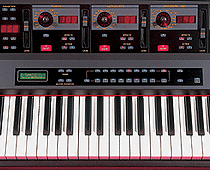 Photo: Mark Ewing
While the string and brass sounds are more synthy than sampled in texture, they'll work well in arrangements and compare well with the offerings of the opposition. The synth pads and basses are very useable indeed, coming to life even more when you apply the built-in effects. There are also a few extras — the top two octaves of the bass sounds offer a selection of ride cymbal, hi-hat, and odd percussive sounds, the upper ranges of the electric basses feature slides and bends, and of the four organ sounds, the church organ has many octaves doubled, just like the real thing.
This brings me to the last two sounds: 'Choir-O-Tron' and 'String-O-Tron'. Yes, GEM have given you sampled Mellotron sounds on the Promega 3. Now, as a former Mellotron owner, I'm always interested in how manufacturers capture (or indeed, fail to capture) the nuances of this most individual of instruments. The good news here is that the sounds have a lot of the sonic impurities of the original. Although looped, the samples are long enough, and quirky enough, to give a real flavour of the real thing. There's none of the 'engineered-out' character you hear on some vintage modules.
However, while the sounds work well in their original ranges, they're less convincing once you get away from the original octaves, simply because not enough samples have been included. It would have been great if playing down the keyboard with the 'String-O-Tron' patch selected had revealed Mellotron cello sounds, for example, but all you get are the string sounds transposed down several octaves.
I did occasionally notice very subtle looping artifacts on the sustain portion of some sounds, but it's fair to say that you won't notice them in most contexts. More obviously, some sounds exhibit pitch quantisation when you use the pitch-bend wheel over an entire octave (ie. the sounds change in semitone steps rather than as a continuous sweep), although this doesn't happen on all sounds, and it's more apparent on single notes rather than chords, and when you bend notes over a large range. It would appear that this is down to whether the original sound is derived from a sample or physically modelled. However, such quibbles aside, the sounds work well.
Summary
For me, GEM have managed to strike a perfect balance, offering you exceptional, playable sounds and easy means to control and edit them. Working with the Promega 3 is intuitive and fun as a result. Admittedly, you can't build sounds from the ground up, but with such a well-recorded palette to start with, you don't miss this facility. The real strength of the Promega 3 comes when you start mixing and matching sounds, and here, the simple user interface comes to the fore again. Combining sounds and textures normally means wading through pages of menus. Here it's simple: switch the relevant section on, adjust the level and add effects to taste, then store. If you can't come up with massive sounds on this instrument, you're simply not trying. The whole is much, much greater than the sum of its parts, and at the price, I'd say GEM have to be on to a winner.
| |
|
 £1999 including VAT.