

Propellerhead Software's flexible studio package can take you in all kinds of new creative directions if you know how to get the best out of it. Let us be your guide...
 Propellerhead's Reason electronic music studio software is ideally suited to experimentation and discovery. Interesting and individual problem-solving and sound-creation techniques can quickly be evolved, and in this two-part series we pass on some of the ones we've come across while using this great software.
If you haven't already created a Reason default Song that will open when you launch the program or when you start a new Song, you really should. As well as saving you lots of time in the long run, because you can include favourite devices and settings you won't have to think about when you start a new project, a default Song puts your stamp on the Reason environment and gives you a personalised work space.
Start a new Song and include in it the devices and settings of your choice. Now save the Song to your hard drive. In general Preferences, from the Edit menu, click on the Custom button, then on the folder icon at the right. Navigate to the Song you have chosen as your default. Its name will appear next to Custom. In v2, the default Song does not have to be called 'Default song.rns', as it did in previous versions of Reason, but if you move the Song you've chosen as a default, Reason will not be able to find and load it automatically.
 In General Preferences, you can set which Song will open as a default when you launch Reason or begin a new project. Create a special Song that has your favourite devices and personalised settings and use this as your default.So what should be in your default Song? Here are some ideas:
- Start with a mixer (good practice for any Reason session, as automatic connections will then be at their most logical), and a favourite set of devices. Some basic effects — certainly reverb and delay — should be ready-patched into the mixer aux loops. Synths/samplers should be connected to Matrix pattern sequencers where desired, and if you use Redrum, pre-load a favourite starting kit.
- Load favourite basic Patches into one or several devices. Our default Song has an electric piano Patch loaded into a Subtractor. If you do this, enable the MIDI icon on the sequencer track assigned to your favourite playing device. We have the icon in the Subtractor track, so the electric piano is playable as soon as the program has launched.
- Set up the sequencer size so that you can see all the device track names and display tracks at a comfortable level for getting a good overview. In v2, you can tear off the sequencer as a separate window and save that in your default Song, if that's how you prefer to work.
- Make sequencer tracks for any devices that do not automatically get them, such as the mixer and effects, if you tend to automate them.
- If you have a MIDI controller box, make basic MIDI Remote Mapping assignments of the sort you'll use a lot — for example, simple synth tweaks such as filter cutoff frequency and resonance, and mixer control assignments such as levels and pans. Make them part of the default Song and you'll have them on every project.
- Fold the Hardware Interface, since you won't usually be needing to change its settings.
Pack It In
If you have folders crammed with Reason device Patches, samples and REX loops, consider making your own Refill, using Propellerhead's Refill Packer utility (downloadable from their web site). This centralises your Patches and samples as of the Packing date, and the personal Refill will show up amongst all Refills when you select the magnifying glass icon in a Browser window. Refills store your samples in 50 percent less space, using lossless data compression; you can then archive the originals and regain space on your hard drive. Don't do this if you plan to swap Songs with anyone, since they would need your Refill to play your Songs back. If you've upgraded to v2 of Reason, you'll also need to download the latest version of Refill Packer.
Chaining Remix Mixers
As Remix is a 14-channel mixer, if you run sessions with more than 14 devices you'll be familiar with what happens when a second mixer is added to the rack. The second mixer is automatically 'bussed' to the first, with the aux sends and stereo Master Out of the new mixer linked to the Chaining Aux and Chaining Master inputs of the mixer above it. The second mixer's aux system is now linked to the first, so that the second mixer can share the effects assigned to the first, and the Master fader of the first mixer now controls the overall level of the second mixer too. (In effect, when you add mixers using the automatic connections, you're simply making a bigger mixer with the same four effects loops.) Subsequent mixers are connected to the previous one in the chain in the same way.
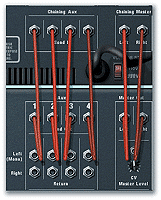 Remix uses the Chaining Master inputs and outputs and the Chaining Aux sockets to make its automatic connections between the first and second mixers you create.
But have you tried modifying Reason's automatic connections between mixers, to add flexibility? Various benefits can be gained. For example, you don't have to buss chained mixers' auxes to those on the main mixer — it might suit you to have a different set of effects available to the second mixer. If the subsidiary mixer has already been automatically connected to the main mixer:
- Tab to the back panel of the rack.
- Disconnect the cables linking the submixer's sends to the Chaining Aux inputs on the main mixer.
- With the submixer selected, any newly created effects will be automatically connected to its auxiliary send/return loops.
You can see from this that using the Chaining Aux connections between Remixes is not compulsory. But what about the Chaining Master connections? Do you have to use them? Obviously, mixers need to be connected to each other in some way, or you wouldn't be able to hear the outputs of devices linked to subsidiary mixers in the overall mix. But when you use the Chaining Master connections, convenient as they are, soloing doesn't work properly. For example, if you solo a channel on any mixer in a chain, only the other channels on that mixer will mute. Channels on chained mixers stay unmuted, and the channel you want to solo is not, therefore, truly soloed.
The best solution, as far as we are aware, is not using the Chaining Master connections to link mixers. Instead, route the subsidiary mixers' main stereo outs to actual input channels of the main mixer. Now when you solo a channel on the main mixer (automatically muting the other channels at the same time), the input to which the submixer has been routed will mute, in effect muting the whole submix. This method allows solo to work properly on the main mixer.
However, you still can't solo quite so easily on any chained submixers. To solo a channel on the submixer in this situation:
- Solo the channel in question on the submixer.
- Then solo the channel to which the submixer has been routed on the main mixer.
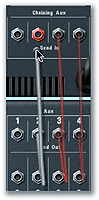 Break the connections between the second mixer's Aux Send outputs and the first mixer's Chaining Aux inputs, to free the second mixer's aux sends and allow it to have its own set of four effects.
It's two mouse-clicks rather than one, but it works — and it's better than the many mouse-clicks you'd need to manually mute all the other channels to get the same effect. This idea is good if you're soloing in order to tweak a sound while it plays back, or tailor EQ or effects treatments with the sound in isolation. However, if you want to solo channels in real time during a mix, the two-stage process is not as spontaneous as just clicking one Solo button, and may not be fast enough to get the effect you want. It will almost certainly be best to draw in the necessary Solo on/off events in a controller lane of the main sequencer.
You may be (sensibly) using chained Remixes as submixers for related audio. For example, you might dedicate one Remix to carrying a rhythm-section mix composed of individual Redrum voices, the outputs from several Redrum devices, rhythm loops being played by Dr:rex, and/or any percussive material being played by NN19 or NNXT, plus maybe even your main bass sound. In this case, connecting 'submixers' to the main Remix via input channels, rather than the Chaining Master connections, is ideal: a set of submixes on separate mixers, each connected to the main mixer via an input channel, can be muted and soloed to your heart's content using the main mixer's Mute and Solo switches.
 Connecting the stereo Master Out of the second mixer to an input channel of the first, instead of connecting the mixers via the Chaining Master sockets, has various benefits, including improved solo operation.
Of course, you can mix and match connection methods to fit your needs. For example, you could connect via the Chaining Aux connections and input channels (rather than Chaining Aux and Chaining Master sockets), if you would like submixers to share the first mixer's effects, but still want the improved solo operation of input-channel connections. However, there is one problem with the method just described — a similar problem arises with Redrum, when you're sharing two of Remix's send/return effects with Redrum's two effects sends (again, via the Chaining Aux inputs). If you mute the main Remix channel to which the submixer or Redrum device has been routed, you'll still hear the effect return — a faint 'ghost' of the signal being effected — even though the channel signal has been muted. You can avoid the problem, in the case of chained mixers, by not using the Chaining Aux inputs, and instead setting up separate effects for the submixer, but you can't really avoid it with Redrum's effect sends. You could route drum sounds instead to their own mixer channel, via the Redrum individual outs, and effect them there, not using Redrum's effect sends at all; alternatively, during a mixdown, automate the turning down of the problem aux send controls.
There's also an opposite issue: imagine you solo the channel on your main Remix to which a Redrum or a submixer, sharing the main mixer's effects, has been routed. Soloing the channel results in everything else on the main mixer being muted — including the effect sends. And since these effect sends are connected to either the Redrum or the submixer (via the Chaining Aux connections), the effect sends of Redrum or the submixer are muted too. The result, in this particular set of circumstances, is that the soloed channel will have no effects. Again, the way around it for the submixer is to give it its own effects, and not connect via the Chaining Aux sockets. There's really no tidy solution for Redrum, other than not using the Redrum send/return system, as explained above. These situations are not problems or bugs per se, but side-effects of the way mixers work. Neither Redrum nor a submixer is actually part of the main Remix, so individual voice or channel sends on the slaved devices shouldn't be expected to behave as if they were.
Rebirth Loops In Reason
Reason's Rebirth Input Machine allows Rebirth users to run Rebirth in sync with Reason and even mix its audio output via the Reason mixer. However, the Rebirth audio never becomes a permanent part of the Reason Song. If you want this to happen, the easiest way is to export Rebirth loops as audio files (WAV or AIFF format), then import them into an NN19 or NNXT sampler. For more control over the tempo of loops once they're in Reason, if you own Recycle you can process audio files exported by Rebirth with Recycle and load into a Dr:rex.
Subtractor Gated Synth Effects
 To get a gated synth effect, start with the rack shown above, setting the Filter, Filter Envelope and Amp Envelope as shown.A technique every Reason user should know about is rhythmic triggering of synth envelopes via a gate source (often gate pulses from the Redrum channel Gate Outs). It's difficult to describe the great effects that can be achieved in this way, but the technique can be used to add rhythmic interest within a note, and can range from a subtle pulsing to a Shamen-esque gated-synth effect — all achieved with the minimum of actual playing, as the triggers do most of the work for you. Work through this tutorial to get an idea of what's possible.
- Make a new rack containing a mixer, a Redrum drum machine and a Subtractor synth.
- Load 'Techre Harp.zyp', from the Polysynths folder in the Subtractor folder of the factory Refill, into Subtractor.
- Make some modifications to the Patch. Set Filter 1's Frequency to 90 and Resonance to 55. At the Filter Envelope, set Attack to zero and Release to 50, with a 70 setting on the Amount knob. Set an Amp Envelope Release of 45. These changes make the Patch work better with the triggering technique.
- Now Tab the rack around. Click on the Gate Out socket of Redrum channel eight. Drag the cable that appears to the Amp Env Gate Input on Subtractor. Click on the Gate Out socket of Redrum channel nine and drag the cable that appears to the Filter Env Gate Input on Subtractor. Finally, click on the Gate Output socket of Redrum channel 10 and drag the cable to the Mod Env Gate Input of Subtractor.
 Then connect the Redrum Gate Outs for channels eight to 10 to the Subtractor Amp, Filter and Mod Env Gate Inputs. Redrum patterns will now trigger these envelopes. (Note that the audio cables have been disconnected here for clarity.)Tab to the front of the rack. Select Redrum channel eight by clicking on its Select button and program the following Step buttons: 1, 4, 7, 10, 13, 15. Alternatively, program your own pattern. It doesn't have to be complicated and could almost be random clicks, as it and the following two patterns will not trigger drums, but Subtractor's envelopes.
- Select channel nine and program a new pattern by clicking buttons 3, 6, 9, 12, 14 and 16.
- Select channel 10 and program buttons 2, 6, 10 and 14.
- Click on the Browse Sample button in channel one of Redrum and load a kick drum sample of your choice. Program a simple four-beat pattern on steps 1, 5, 9 and 13. (This provides a rhythmic backbeat while you try out the gated synth effect.)
- Go the sequencer window. Click the In column of the Subtractor track to make the MIDI plug icon appear.
- If you try to play notes on your keyboard at this point, you won't hear anything. This is because normal note triggering is overridden when the Amp Env Gate Input is being used. You need to first click the 'Play' button on the sequencer, which makes the drum machine start playing and producing the gate triggers. You'll hear the bass drum playing the simple pattern, and when you hold down a chord the rhythmic envelope triggering will begin.
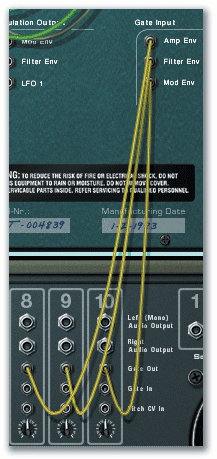
Though you're just holding down a chord, with no rhythm in your playing, the chord is triggered in the rhythm of the first drum pattern you programmed earlier, on Redrum channel eight. Other rhythmic interest is provided by the Filter Envelope triggering in the second pattern, on channel nine, and the Mod Envelope triggering in the pattern programmed on channel 10. The result is instant rhythmic and tonal complexity with minimum effort!
 Connect the Gate Out of one channel to the Gate In of another, to make the first channel's part also play on the sound assigned to the second channel. All these channels will play the part programmed for the first.Play different chords, and broken chords, and hold them, changing chords in response to what you hear, and you should soon get into it. Try lead lines, too. It's a very inspiring technique, so maybe set the sequencer to record, as you may come up with good stuff as you get carried away! Add some reverb and tempo-synced delay for even better effect.
There are some things to bear in mind with this technique. Firstly, although different Patches will work, if you want the Mod Envelope triggering then the Patch must include a Mod Envelope routing, and results will be obtained depending on where this envelope is routed. You may need to tweak the Amp and Filter Envelopes too — you'll probably need a short attack and a medium release. If the Patch you choose really doesn't seem to trigger correctly, try setting decay mode instead of gate mode on the relevant Redrum drum channels with the two-way switch next to the Length knob; decay mode is the lower position. The Length knob adjusts the length of the Redrum gate pulse, so you can tailor it to what your Patch requires.
Remember that you don't have to trigger all the Subtractor envelopes, though we've used all three in the above example. Also, you can program a normal drum pattern and choose any channel from that to connect to a Subtractor Gate Input. Say your hi-hat on channel six is playing 16th notes: connect the Gate Out socket of that channel to the Subtractor's Amp Env Gate Input and the chords and notes you hold on the keyboard will trigger in a 16th-note pattern that echoes the hi-hat perfectly. Now send the snare channel to the Subtractor's Filter Envelope Gate Input and you'll get a reinforcing filter 'thwack' every time the snare hits. There are lots of other possibilities, especially as Gate Outputs don't have to be routed to Gate Inputs — it's equally possible to route Control Voltage (CV) Outputs to these inputs.
REX Rules
- Checking REX loops in a Song: You can load loops into Dr:rex as a Song plays back — great for quickly running through loops deciding whether you like the feel of any of them with the rest of your Song. The best way of doing this is using the arrows next to the Patch name display to step through the loops in a bank during playback.
- Slice auditioning: When you hold down Option/Alt and move the mouse pointer over the Dr:rex waveform display, the pointer turns into a speaker, indicating that the slices in the loop can be auditioned by clicking on them.
- Using the Dr:rex LFO: Choosing pitch as an LFO destination in Dr:rex can produce useful effects, especially when the LFO is set to sync to Song tempo. Individual slices can be made to change pitch in a weird way. Routing the LFO to pan allows you to gradually move a loop back and forth across the stereo field. The speed of the movement depends on the setting of the LFO Rate control, and the pattern of panning differs according to the LFO waveform you've selected. For example, the square wave makes a definite repeating left-right swap, while the triangle does a gradual 'fading' pan from left to right and back. Click the Sync button for tempo-sync'ed panning. You can set up very sophisticated, varying panning effects by doing nothing more than choosing different LFO waveforms — try automating the changing of waveforms to produce different patterns in different parts of a track. From Dr:rex's front panel you can't set the LFO to modulate level, for tremolo. However, this can be done via the rear-panel sockets. Try modulating the LFO level with a drum loop, for interesting compression-type 'pumping' effects.
A Fistful Of Redrum Tips
Punchy Bass: Give a bass synth Patch (say, from Subtractor) a defined, percussive attack when you need it to really punch through, by layering it with a Redrum sound. This trick works if you're not using the Mod Envelope for anything else. Take a cable from the Modulation Output to the Gate Input of a channel in Redrum. Load a suitable kick into that Redrum channel. Make sure the Subtractor's Mod Envelope has all its sliders set to zero. This causes the envelope to produce a 'blip' at its Modulation Output, rather than its standard CV curve. Now every time you play a note on Subtractor (whether via a pattern in the Matrix or in the main sequencer), it will trigger the kick sound in Redrum. Tailor the kick to suit with Redrum's channel sound controls.
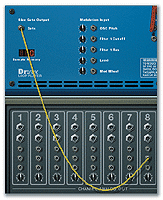 A Dr:rex Slice Gate Output connected to a Redrum channel Gate In, thus triggering the Redrum sound on that channel.
Easy 'Pseudo-ethnic' Drum Effects: The fact that individual drum hits assigned to Redrum's channels six and seven can be made to change pitch under velocity control led us to this interesting pseudo-ethnic pitched drums technique. First, load House Kit 02 from the factory Refill, or load a couple of congas or something similar into Redrum channels six and seven. Turn the pitch-bend Rate knob on these channels fully right or fully left, so that no pitch-bend is applied to the sound and it simply plays back at the starting pitch of what would normally be the bend and doesn't swoop up or down.
Next, set some velocity sensitivity for the channels, by turning their Vel knobs a little to the left or right. Both sound good, but they create different effects. The sound will be best if you tune the congas down a bit, by turning the Pitch knobs to the left. If you do this, turn the Vel knobs right. If the sounds are tuned up (Pitch knobs right), turn the Vel knobs left. Now program simple, complementary drum parts with varying velocities (use all three levels) for both channels. Try the following pattern (H=hard, M=Medium, S=Soft): on channel six program 1H, 4M, 7H, 9M, 12H and 15M; and on channel seven program 2M, 3S, 5S, 6M, 8M, 10S, 11M, 13M, 14S, 16M. You could alternatively program parts from the keyboard into the sequencer — then you can get a wider range of velocities into the part.
When you play back the Pattern, different drum pitches are produced by each velocity level. This sounds great with low-pitched latin or ethnic percussion sounds. If you turn the Bend knob in each channel slightly to the left then a swoop effect is created on each hit. This is good for simulating talking drums, tribal drums and tabla effects.
Quick Step Programming: If you need to program the whole row of Redrum's 16 step buttons (say, to create a 16th-note hi-hat Pattern), don't forget you can hold down the mouse button and just drag across the buttons to light them all quickly, rather than clicking every one separately. Then you can add dynamics (different velocity levels) where you want them as the Pattern plays through. If you intend to use varying levels of velocity, get into the habit of using their keyboard shortcuts. Shift-clicking on a step button enters a Hard dynamic value, while Option/Alt-clicking enters a Soft dynamic. There's no shortcut for a Medium dynamic, but if the Dynamic switch is left in the Medium position, simply clicking as normal on a step button will assign a Medium dynamic value.
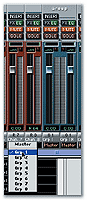 Two mono Rewire channels panned hard left and right, to bring a stereo signal from Reason into Cubase VST, are being routed to one of Cubase VST's Group channels, via the pop-up shown. This will make it easier to apply VST effects to, and change the level of, the Reason stereo audio.Easy Drum Layering: You can't copy Pattern parts between drum channels in Redrum, which is a bit inconvenient if you like to layer up two or more drum sounds playing the same part. You can get around this limitation by connecting the Gate Out of the source channel playing the part you want to double to the Gate In of the target channel. The part now plays on both sounds, because the hits on the first channel are sent from the Gate Out and trigger the sounds on the second channel via that channel's Gate In. Any number of channels can be linked in this way.Reinforce REX Loops: Just as Redrum's Gate Outputs allow you to trigger parameters on other devices with Redrum gate pulses, so you can trigger a Redrum voice from another device. A gate signal from any device that has one could be patched to a Redrum Gate In, to provide an alternative source of rhythmic patterns for Redrum voices. Dr:rex, for example, has a Slice Gate Output, from which a pulse is sent for every MIDI note that triggers a loop 'slice'. If you patch this to the Gate In of a Redrum channel playing a percussion sound, the sound will echo the rhythm of the sliced REX loop perfectly. Try a hi-hat, tambourine or even a cowbell for this.
Rewire/Cubase Mono Mix Channel Workaround
When you're connecting Reason to Cubase VST via the Rewire protocol, apart from the first two channels you send, all Reason's Rewire outputs will appear as individual mono channels in the Cubase VST mixer. If you're routing a stereo pair — from a Reason submixer or stereo device — two Rewire channels will be required, and two channels in the Cubase mixer. This might be a problem if you'd like to apply a VST plug-in effect to a stereo NNXT patch, say: you'd have to create one instance of the effect for each channel, rather than just creating a single stereo effect, and then tweak two lots of parameters to keep the effect the same for both channels. There's no way to link two VST mixer channels for stereo operation, although the level fader and mute/solo buttons for two consecutive odd/even mixer channels can be controlled together by holding down Option/Alt on the computer keyboard while operating the control.
The best idea may be to route both sides of a stereo pair of Rewire channels to one of the VST mixer's eight stereo Groups. The routing option is available at the bottom of the mixer channel. Once routed to a Group, the Reason stereo audio can be processed by one set of insert effects, and have its level controlled by a single fader.
That's all for now, but stay tuned for Part 2 when we'll pass on some sequencer tips and take a look at the new devices added to Reason in v2.
Derek Johnson & Debbie Poyser are the authors of The Fast Guide to Propellerhead Reason.
Automating Pattern Chains In The Controller Lane
The usual method for automating Pattern changes in Pattern-based devices is via the Pattern controller lane in the main sequencer, where changes are recorded and may also be edited or drawn in. If you are drawing in Pattern changes, every time you need to change Pattern you have to click to summon a pop-up menu list, choose the desired Pattern, then draw it for the desired duration.
But there's a quicker alternative. Use the Matrix/Redrum sequencer track's Selected Pattern controller sub-lane. If you display the Pattern controller lane above this sub-lane, then drawing data into the controller sub-lane will cause a Pattern label to appear in the Pattern lane, and you'll see this Pattern label change according to the controller value you have drawn into the controller sub-lane. Dragging the controller data up or down changes Pattern, without you having to select a pop-up menu or choose anything. You know which Patterns are being selected by your controller drawing because you can refer to the Pattern lane above it.
Changing Matrix Modulation Speed
If you've created a Matrix just to control another device with the Curve CV, you can use the Step Resolution knob to alter the apparent speed of the modulation the Matrix is providing. For example, if you've created a bipolar curve to control the pan position of a Remix mixer channel, setting a higher step-resolution value will cause the left-right panning to increase in rate. If your Matrix is producing notes/gates and a Curve CV, however, you won't be able to adjust the rate of the Curve CV without affecting the note/gate data too.
Automation Shortcut
When you want to edit or draw automation for a device control, get to the right controller lane fast by simply Option/Alt-clicking the control. (The device must already have a sequencer track.) Don't forget that you can cut, copy and paste controller data to save drawing lots of it.