

Suffering from signal degradation or mains hum on your audio lines? The chances are that you're having problems with impedance matching or earth loops. However, with a little understanding and some careful planning, these gremlins can be successfully eliminated.
 Back in SOS September 2002, I introduced the whole subject of studio installation with a discussion of basic working practice and a guide to soldering techniques. This month, I'm going to be looking at some more important aspects of studio design and construction, showing you how to deal with all the different signal types in your studio, and how to plan a successful wiring scheme which minimises problems such as earth loops.
Source Impedance & Matching
Understanding what is meant by source impedance is essential when deciding how to interface various equipment. From an electrical standpoint, optimal interfacing is referred to as 'matching'. Good matching is obtained when the output of a signal source is connected to an input having a suitably high input impedance, such that no degradation to signal level or frequency response occurs. The term impedance may be thought of as AC resistance or resistance under signal conditions. In audio equipment, and signal cables in particular, impedance will vary with frequency. With poorly matched equipment, this varying impedance can cause frequency response problems. Lets examine how this happens.
 Figure 1. A perfect signal source in series with its source impedance.Figure 1 represents a perfect signal source in series with a source impedance. The impedance of different pieces of equipment will vary over a huge range. The output of an effects unit or electronic keyboard may be in the order of 100Ω, for example, whereas the output of some acoustic guitar pickups may be around 1MΩ. Figure 2 shows how an input can degrade a signal source. In this case, a signal such as a guitar is connected to a mixer input having a typical input impedance of 10kΩ. The most obvious degradation occurs to the signal level, and can be calculated using Ohm's law — almost none of the electrical signal is delivered to the mixer input. A less obvious problem occurs because of capacitance in the input and connection cable. Any excess capacitance will cause the input impedance to drop further with frequency. In use, this has the effect of reducing the high frequencies and making the guitar sound muddy.
 Figure 2. A demonstration of how incorrect impedance matching can degrade a signal.Fortunately the solution is simple: use a DI (direct injection) box, between the guitar and the mixer input. The DI box offers the instrument a high-impedance, low-capacitance input, giving maximum signal level and a flat frequency response, and it has a low output impedance that is not affected by the mixer input load. Taking a little time to think about impedance matching as you design your studio system will result in the best performance from all your equipment. Now let's examine the most common signals that you're likely to encounter in current home, semi-professional and small-scale professional studio situations.
Audio Signals
Low-level Balanced Microphone: This covers signals from all good-quality studio and stage microphones. Although the signal level can be very small, from microvolts to millivolts, microphones also have low source impedance of typically 600Ω or less. In practice, these signals may be sent down very long cables, much longer than would be found in any small studio layout, without degradation, so long as good-quality shielded cable is used.
Unlike most dynamic stage microphones, many studio types require a source of power, typically 48V, to be sent to them down their cable. This is known as 'phantom' power and is normally provided by the preamps on your mixing console or input stage. Care should therefore be taken not to connect a microphone input to any item which does not expect power to be present — an effects unit, for example, may be damaged if you feed phantom power to its output. From a matching standpoint, microphones should only be used with dedicated microphone inputs.
Unbalanced Instrument Level: Signals from various string instruments such as guitars and bass guitars will fall into this category, whereas those from electronic instruments such as keyboards and drum machines fall under the category of 'unbalanced line-level'. Instrument-level signals are particularly fragile, as they are not only very small, but also have a high source impedance. They therefore require special treatment if they are not to be seriously compromised. If these signals are sent down any appreciable cable length, noise will be introduced and the higher frequencies will be attenuated. This type of signal is best connected to a mixing console via a DI box, which should balance the signal and reduce its impedance, allowing it to be used without degradation and with longer cables if necessary.
Balanced Line Level: These signals are found on most, if not all, professional audio equipment including outboard effects units and tape machines. Due to the level being quite high, typically greater than one Volt, and the source impedance being low, often in the order of 10Ω in modern equipment, balanced line-level signals are very robust. They may be sent over long cables without loss of quality. Most well-designed balanced outputs will happily tolerate being unbalanced (one leg being connected to ground) to enable connection to unbalanced inputs. The unused leg must always be grounded to obtain the correct output level.
Unbalanced Line Level: This type of connection is found on many semi-professional and hi-fi products. The most common connector types used are jack or phono plugs. Although the source impedance is usually quite low, unbalanced signals do not benefit from the inherent noise cancellation that a balanced topology offers. Cable length, therefore, should be kept as short as possible and should be physically routed to avoid sources of electromagnetic interference such as power supplies (especially wall warts!), computers and loudspeaker cables. Unbalanced signals may be connected to balanced inputs by connecting one leg of the input (normally the 'cold' or 'minus' leg) to ground. This is not ideal, however, as earth loops can easily be created in this way.
Headphone Level: Headphone signals are unbalanced, but have a higher level and lower impedance than line-level signals. Each cable will, by necessity, carry the two signals of the stereo pair. Signals of this type can be used with impunity — long cable lengths are possible without problems. Also, as the signal levels are in the order of a few Volts at most, headphone signals may safely be brought out on patch panels, for example.
Loudspeaker Level: Loudspeaker signals are not to be taken lightly! An amplifier delivering 100W, not unusual by any means in a monitoring environment, will be producing around 28V RMS, and delivering 3.5A RMS (5A peak) or so into the loudspeaker. As we discussed in part one, bell wire just won't do. As a minimum, a flexible mains cable rated at 6A could be used. Many high-quality cables are sold for use with speakers, although their purported benefits are nebulous at best. As a loudspeaker designer and manufacturer, I am constantly asked to recommend a cable type. Over the years I have auditioned many cables and, although I have certainly heard differences between the various types, none would seem to stand out as being superior. In fact, I would say that some of the most expensive cables produced the worst results! My personal preference is simple 2.5mm solid twin-and-earth house wiring cable, although it is a little unwieldy because it is not flexible. However, it is cheap and works surprisingly well. Differences heard between various loudspeaker cable types may have been the result of differing electrical parameters such as resistance, inductance and capacitance. Indeed, excessive cable inductance can produce unpredictable square wave responses. The severity of these effects will depend upon the design of the power amplifier.
Digital Signals
TDIF: This stands for Tascam Digital Interface, and it was originally developed by the company for use on its digital tape recorders and so forth, but the format is now used on a variety of equipment. The cables are terminated in 25-pin D-Sub connectors and carry four two-channel signals plus a selection of clocks. As such, it is a convenient format to use, because much connectivity is achieved with one cable. There is one downside however: various manufacturers have implemented the clock timings differently. In a system with products from a number of manufactures, this can result in odd and even channels being swapped between equipment. We'll look at this later when we discuss digital clocks.
ADAT Optical: A digital format created by Alesis and used in a range of products. This has no electrical connection between the various devices. Instead, the eight digital signals are packaged into one bit stream and converted into a modulated light source. This light is carried between the equipment using a flexible fibre-optic lightpipe. As the devices have no electrical interconnection, it is impossible to produce earth loops.
S/PDIF: Standing for Sony/Philips Digital Interface, this is the most popular digital interconnection system. Although the balanced AES-EBU signal is favoured in professional circles, S/PDIF is available on almost all digital equipment from CD players to soundcards. Once again, the two-channel signal is packaged into one stream. S/PDIF is an electrical interface and uses unbalanced phono cables as interconnects. Due to the resulting high-bandwidth digital stream, these cables must be low-capacitance types. Audio phono-to-phono leads will not work or, if they do, will severely degrade the signal and cause digital errors with resulting corruption of the audio. On the other hand, I have successfully fed S/PDIF all around a 15000 square foot studio complex using tie lines made from high-quality video cable.
The S/PDIF data stream is so similar to AES-EBU that in many instances it is possible to feed S/PDIF directly into equipment having only AES-EBU facilities. Two problems can arise when trying this. As the S/PDIF signal is around half the amplitude of AES-EBU, the receiving equipment may not be able to lock to it. This varies with manufacturer. The second problem is that the ancillary bits (non-audio bits used in the stream to describe things such as emphasis) are not completely compatible. Although, in theory, >this can result in emphasis being incorrectly set and copy bits being misinterpreted, in many situations no problems will occur. If you are faced with this interconnection dilemma, the best advice I can give is to try it and see if it works. It's also worth mentioning here that S/PDIF can also be transmitted via lightpipe, in much the same way as with the ADAT optical standard, and this will avoid any electrical connection between the units in question.
AES-EBU: AES-EBU was developed by the Audio Engineering Society and the European Broadcasting Union, hence the acronym. Although officially two different formats (AES and EBU), they are so similar that they are often referred to together. The main feature of this signal is that it is balanced. It also has a low enough impedance that, if necessary, it may be passed down regular audio cabling including studio tie lines — indeed, this was one of the original design criteria — although this is still not ideal. AES-EBU cables are normally terminated in XLR connectors.
Control Signals
 Figure 3. An opto-isolated current loop, as used for MIDI interfacing.MIDI: Standing for Musical Instrument Digital Interface, MIDI is used to interconnect all manner of musical instruments and studio equipment. MIDI cables are terminated in five-pin DIN plugs. The MIDI signal is a relatively high-speed serial data stream and does not incorporate any error correction. Ever had unexplained or 'stuck' notes when using long MIDI cables? These are caused by data errors. The electrical transmission method is actually quite robust, and uses a technique called an 'opto-isolated current loop', shown in Figure 3. The signal from the sending device lights an LED (light emitting diode) in the receiving unit, and the light from this is picked up by a photo-sensitive transistor. There is no direct electrical connection between the two devices, only the passage of light, hence the term opto-isolated. Because the signal is quite fast, you should use high-quality cables, and keep the cables as short as possible. Never be tempted to try a DIN-DIN audio cable (quite rare now, especially outside hi-fi applications) instead of a dedicated MIDI cable.
RS232: This is the basic serial communication system used by computers and computer peripherals. Although unbalanced, it is quite robust and often incorporates software error correction. Although mainly intended for short-distance connections, I have used RS232 to communicate between devices 100 feet apart without problems by utilising high-quality, low-capacitance cable. The cables are terminated in nine-pin or 25-pin D-Sub connectors.
RS422 (Sony Nine-pin): This is another computer communication standard and is similar in many ways to RS232. The electrical transmission method differs from RS232 in that it is a balanced system. This allows greater cable lengths to be used, in some situations up to a kilometre. In the studio, the most familiar use for RS422 is the interconnection of video machines, workstations and synchronisers. As the cables are once again terminated in nine-pin D-Sub connectors, the term Sony nine-pin has become common.
Synchronisation & Video Signals
Timecode: Timecode is conveyed electrically in two main forms: either as part of the RS422 signal or as a modulated audio signal called linear or longitudinal timecode (LTC). Linear timecode is often found on multitrack machines, PC interface cards, and so forth. The sound of the timecode signal is unique — a warbling, screeching, rhythmic cacophony. Once you have heard it, you will be able to recognise it instantly. As it is an audio signal, it may be treated in the same way as other audio sources, and can therefore be routed down tie lines and via patch panels. One word of caution however: linear timecode contains lots of sharp edges in its signal makeup. Due to this, care has to be taken to ensure that it does not bleed into other audio paths causing audible problems. Unwanted bleed occurring between signals is called crosstalk, and it commonly happens in any of four ways:
- Timecode is used at too high a level.
- Timecode bleeds between channels in a piece of equipment.
- Timecode bleeds between adjacent unbalanced or poorly screened cables.
- Timecode bleeds via earth loops.
Word Clock: This is a simple digital clock signal which is used to synchronise the digital data rate between equipment.
Composite Video: This is the basic form of video signal, as found on camcorders and domestic equipment, and it typically uses a yellow phono connector. In professional use, the signal is the same, but the connectors used are normally push-and-twist BNC types. The term composite means that the signal is complete, in that it contains both the video information and the synchronisation clocks. Other more complex forms exist, such as RGB, component, and digital video. Composite, however, is still the most common in smaller studio setups. The signal is unbalanced and normally has an impedance of 75Ω. Good-quality cable is essential to avoid picture degradation, but cable lengths can be very long without severe problems.
Black & Burst: Also called black burst and composite sync, this is used to synchronise various items of equipment with each other and with video equipment. It is basically a composite video signal with the picture faded to black.
Avoiding Earth Loops
Earth loops, also known as ground loops and hum loops, are the bane of every studio installer's life. Due to the sheer number of signal sources and destinations, earth loops are easy to create and, without thought and planning, almost impossible to rectify. Earth loops are created when the ground leg of a signal travels, via other wiring and equipment, back to its source. This loop picks up mains hum, digital noise, clicks and pops from any available source. Noise is introduced when the unwanted interference sources induce a current in the loop. In the real world, the loop cannot have zero resistance and therefore (according to Ohm's law) a noise voltage is developed across the loop resistance. This noise voltage is added to the genuine audio signal. From this description it should be easy to understand that all sorts of noise can be introduced in this way, as long as the source is able to induce a current in the loop. Because of this, I prefer to refer to earth or ground loops, rather than 'hum' loops.
Although balanced systems are more tolerant of interference, an input's Common Mode Rejection Ratio (CMRR) will dictate how well the induced noise is attenuated. Often, in balanced systems, earth loops are not immediately obvious, as hum may not be apparent. Because CMRR will worsen with increasing frequency, low-frequency noise, such as mains hum, may be effectively removed, whereas noise with a higher frequency content may still be evident. Timecode and PCs are particular offenders in this scenario, and may often be heard 'screaming' away at low level in the background. Unbalanced wiring can be hugely affected by ground loops. Any induced noise appears directly at the input with none of the balanced system's cancellation improvements.
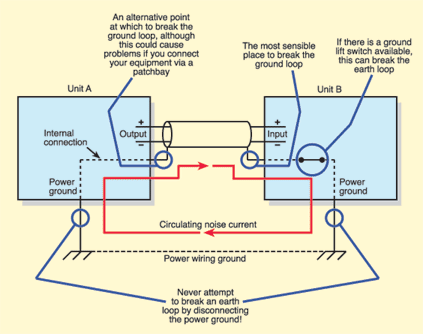 Figure 4. A typical earth loop, and a variety of possible ways of breaking it.
 Figure 5. An illustration of how an earth loop can be created with a stereo connection, even if the connected equipment uses no power ground.The only sure way to avoid earth loops is to avoid any connection scheme which allows the signal earth path to connect back to itself. A typical earth loop is illustrated in Figure 4, and the path will often take a route via the mains earth of the equipment concerned. With balanced equipment, breaking the loop is very straightforward. There are a number of possible earthing schemes in balanced systems and each scheme will dictate where the earth loop is broken. My preferred method is to connect cable shields at equipment outputs and not at equipment inputs. If ground loops are experienced when introducing hire equipment into a system, 'ground lift' switches may also help. However, it is vitally important that the loop is not broken by removing a mains earth connection, because this may result in the equipment becoming dangerous. Some installers choose to connect grounds at inputs rather than outputs, but this will give rise to problems at patch panels — balanced outputs will not be unbalanced correctly when connected to an unbalanced input (the balanced signal pair and their ground will not both available on the output socket), and therefore the signal level may be compromised.
 Figure 6. A method for avoiding earth loops with multi-channel unbalanced equipment.For unbalanced systems or part-balanced, part-unbalanced systems, the problem is much worse. Fortunately, many units sporting unbalanced connectors, typically phonos, do not require mains power grounds and therefore only have two-conductor power cable. This means that, with a single signal connection, no ground loop can arise. However, if you make a stereo connection, two phono cables will create a loop around themselves, as shown in Figure 5. Although this is not normally a problem if the cables are short, the kinds of lengths found in typical studio installations may well induce noise. This is simply cured by removing one shield connection at the equipment input.
Unbalanced loops can become a real headache with multi-channel equipment such as many soundcards. If each cable had its shield connected at both ends, a large number of loops would be created. A simple trick to avoid this is shown in Figure 6. Here, none of the shields are connected at the unbalanced inputs. Instead, a single thick wire is connected between one output ground and one input ground. In this way, each signal is shielded and the two units have the same ground reference, but no loop is created. I have also used this method when constructing patch panels for mixing consoles. In many situations, particularly where the unbalanced equipment uses a power ground, the only sure-fire cure is by using a signal transformer (as shown in Figure 7) or a balanced interface unit.
 Figure 7. A signal transformer allows you to pass signals between unbalanced equipment without creating an earth loop through their respective power grounds.Finally, in some situations, noise can be reduced to workable levels by inserting a resistor (100Ω, 0.25W) between the cable shield and the signal ground. This causes the noise voltage to be developed mainly across the resistor instead of in the wiring, thus reducing the resulting noise signal. This is a last-ditch solution, but is sometimes helpful. To avoid ground loops in complex systems, some or all of the above may be necessary. Also some experimentation may be required. The only hard-and-fast rule is: do not cure loops by removing the power ground!
Planning & Documentation
 If all else fails, a resistor connected in series with the signal ground in the cable can often reduce earth loop hum to acceptable levels.In the previous instalment, we briefly discussed cable marking. In a mobile or gigging environment, marking your cables will greatly simplify problem solving and identify which cables belong to you. In the studio environment, the marking of cables not only helps with problem-solving, but is also essential to good planning and installation. Imagine the mess you would get into with just twenty unmarked cables and it becomes easy to see why marking every cable that you install is vital. Careful planning, including cable designations, will save a huge amount of time and will also identify errors and omissions at an early stage. It is very tempting in a home-studio environment simply to wire all the pieces of equipment together one at a time and call it done. This normally results in an inflexible and poor-performing dog's dinner. A home studio may be one of your largest investments and, as such, should be built with as much care and thought as possible. I suggest that you proceed as follows...
Make An Equipment List: This should include every item that will be used, and also those that may be added in the near future. Although this needs careful thought (and a crystal ball!), the type of studio you are building will itself suggest a number of possibilities. For example, a home studio will occasionally be the recipient of a new effects unit or voice module, whilst a project studio may see hire equipment and additional players come and go. It is best to include a short list of probable extras now, as planning and wiring for them from the beginning is much more convenient than having to wire in extra items part of the way through a recording project. Whatever type of studio you are planning, always consider how you will interface extra equipment with your system. Bring key signal points out to a convenient patch panel, including the I/O of your mixer and/or workstation, and your MIDI and timecode systems.
Make A Location List: Especially if you have more than one room to deal with, a list of where each piece of kit will be can be really useful. It will enable you to deduce what cables are required and what their length will be, and it may also identify problems that would otherwise not come to light. Decide, early on, what route will be used to get cables from A to B. Once this is known, the route's length can be ascertained. This will save 'guestimating' each cable length separately, and the information in the location list will be useful later.
| Cable No. | Function | From | To | Cable Type |
| 1 | left send | mixer | Yamaha SPX90 | single-pair screened |
| 2 | right send | mixer | Yamaha SPX90 | single-pair screened |
| 3 | soundcard out1 | PC | mixer | unbalanced screened |
| 4 | soundcard out2 | PC | mixer | unbalanced screened |
Make A Connection List: Even in a small system, the number and type of connectors can be bewildering. Making a quick list will clarify the situation and help reduce sometimes expensive mistakes.
Make A List Of Cable Types: This will enable you to calculate the type and length required for each cable type, either ready-made or as raw cable.
Make A System Schematic: This need not be too complicated; a series of simple boxes with all required connections drawn between them is a starting place. For reference, give each cable a number — this number can be used as the basis for the line list (see below) and, in turn, for cable marking.
Make A Line List: This is the key document for a successful installation. It may be simply written on paper or typed into a computer spreadsheet. The general form should be as follows:
If you also include columns for cable length and connectors, it will be easy to make up a final list of all the cables and connectors you need, for the final purpose of purchasing them. If you make sure to follow each of the above stages methodically, you should avoid many of the pitfalls which beset the home studio user. Trust me — it really is very annoying when you find that you've purchased 16 XLR connectors too many, but not enough mains plugs...