

Akai's MPC sampling workstations have been a studio fixture for nearly 15 years, and the MPC4000 is the most powerful one yet. But the world of sampling has changed dramatically since the MPC2000XL was released. Can an MPC still cut it in the 21st century?
1988 was a memorable year for partnerships. Sherwood Stewart and Zina Garrison won the mixed doubles at Wimbledon, Leon M Lederman, Melvin Schwartz and Jack Steinberger won the Nobel Prize for their demonstration of the doublet structure of leptons through the discovery of the muon neutrino. And Roger Linn (he of drum machine fame) and Akai (they of mass-market sampling fame) launched the MPC60, a sampling drum machine-cum-sequencer concept which immediately inspired fervent devotion among anyone lucky enough to be able to afford one. This was not so much a product as a way of life, claimed users, a view that was only reinforced by subsequent versions of the product — mdash; namely the MPC60 MkII, the MPC3000, the MPC2000 and the MPC2000XL.
 Photo: Mark EwingMPC stands for MIDI Production Centre, and if you've ever thought that these machines are just an Akai sampler in a different-shaped box with some rubber pads on top, then it's helpful to keep this in mind. The Akai manual encourages the lucky purchaser to think of the latest carrier of the MPC gene, the MPC4000, as three separate modules — mdash; a sampler, a sequencer and a set of pads/controllers. This is not just a shorthand way of explaining the main areas of the MPC4000's operation — mdash; it summarises why the MPC concept adds up to more than a sampling drum machine. So yes, the pads and other real-time controls can be used to trigger and manipulate the onboard samples, but they can also be routed to a MIDI Out and simply used to play an external module or interact with an external sequencer. Similarly, the MPC4000's sequencer is equally at home recording your tappings on the pads or information arriving at one of the two MIDI ports. And when it comes to the opposite direction of travel, the MPC4000's four, separately addressable MIDI outs, give you 64 channels of information with which to control external modules alongside the internal sampler. The sum of the parts, then, is a machine that can act both as a self-contained music-production station and as the hub of a more complex MIDI sequencing setup. Rather as you might use a typical computer-based system, you could say. And you'd be right — mdash; this is the kind of ballpark in which the MPC is designed to swing its bat. Except that devotees have always argued that their MPCs have offered at least three major advantages over computer-based solutions. One: they provide dedicated features that make light work of manipulating drum sounds and loop-based material. Two: they give you the reliable MIDI timing that is usually associated with hardware sequencers. Three: as a standalone piece of hardware, they are much more suited to the rigours of live work.
However, while those arguments were certainly valid a few years back, the MPC4000 enters a world where such claims are somewhat harder to sustain, Software solutions are not only more powerful, more flexible and much cheaper than their hardware equivalents, but significantly they are now regarded as just as reliable. And thanks to powerful, affordable laptops, the challenge from software has even been extended to the live domain — mdash; an area where traditionally where hardware has always had the advantage.
Let's Get Physical
With these issues in mind, let's get to down to business. The MPC4000 follows hot on the heels of the Z8 and Z4, Akai's latest generation of rackmounted samplers (see SOS July 2002), and as on the Z series, the major news on the MPC4000 is its ability to sample at 24-bit resolution, with sample rates of up to 96kHz. Significantly too, the MPC4000 also possesses 99 percent of the Z-series' sound-manipulation capabilities, making it much more of an all-round sampler than its forerunners. For example, where previous MPCs only dealt in Drum programs (ie. with one sound assigned to one key), the MPC4000 can also load and create keygroup programs, which is essential if you want to work with melodic sounds. Other headline features include a 20GB hard drive (pre-filled with over 4GB of sounds) a four-buss stereo effects card as standard, the six 'Q-link' real-time performance controls, and remote-control and file-management features accessed (ahem) via the bundled AKsys PC/Mac software (see AKsys box). Like the Z series, the MPC4000 can be upgraded with off-the-shelf 168-pin DIMMs, and the 'from factory' memory allocation, as on the Z series, is a rather measly 16MB on UK units. Owners of previous MPCs will also see that the sequencer section has also benefited from a course of steroids, with grid-style editing, both of sequences and continuous controller data, plus an increase in the maximum resolution to 960ppqn and the ability to create phrase libraries from sequence data.
The Japanese law of hi-tech design normally means that increases in power and features are accompanied by an exponential decrease in the physical size of the instrument concerned. But in this case, quite the opposite is true. Weighing in at 10.5kg and measuring 526mm by 453mm (that's 20 inches by 16 in old money), this is not so much a tabletop machine as the whole table! The positive side of this transformation from middleweight to Sumo-size is that the MPC4000 feels like it would happily survive life on the open stage... and come home with the lousy T-shirt to give to its Mum. Certainly, any negative thoughts I expressed on the flimsy feel of the Z8 don't apply here.
Of course, we boys know that size isn't everything, though where it usually does count is in the LCD department. The MPC4000 sports a generous 320 x 240-pixel backlit affair which betters even the Z series in terms of viewability. As well as having its own contrast control directly to hand, it is also tiltable (if that's the proper word for it), which is a tremendous boon to anyone working under stage lighting conditions.
As with previous MPCs, the 16 soft rubber velocity- and pressure-sensitive pads are arranged in the traditional MPC four-by-four formation. Each measuring an inch square, they are comfortable to play, with adjustable sensitivity to suit any tap style. A series of buttons above the pads enable you to switch between six banks of pad assignments, thereby giving you fast access to 96 sounds. The pads can also be used to trigger sequences and as mute buttons for tracks within a sequence.
The rest of the knobs and buttons are arranged logically enough, with dedicated buttons for all of the unit's main functions and 'soft-function keys' immediately under the LCD to guide you through their various screens and submenus. Bottom right are the transport style controls for the sequencer. Along with the expected Play, Stop, and Record, these controls include fast locate buttons enabling you to advance quickly through steps, bars, events and to the beginning and end of sequences and songs. My only problem here was that I kept inadvertently pressing the Play Start button with the heel of my hand while working on other sections of the front panel — mdash; potentially embarrassing on stage if you set off the sequencer when you're not supposed to!
On the left of the front panel are the six 'Q-link controls' in the form of four knobs and two sliders. If you read the Z8 review or are familiar with Akai's digital multitrackers, then you'll remember that these are 'soft' controls that can be programmed to give you real-time control of a whole host of parameters, including volume, pan, filter cutoff, resonance and more, either of the individual programs or of all the sounds at once. You might also remember that the ability to manipulate sounds in real time was one area where I thought the Z8 scored rather highly, but the MPC4000 has a couple of extra Q-tricks up its sleeve, which I'll reveal later.
Sampled Delights
The full details of what the MPC4000 sample-and-synthesis engine has to offer is best grasped by reading my review of the Z8. However, here are some edited highlights of what MPC4000 owners can look forward to:
- Effects: The EB4J effects board is standard issue for the MPC4000. It offers just over 50 excellent, though somewhat 'safe' (96kHz/24-bit) effects, including high-quality reverbs, delays, chorus, flanger and auto-panner, in an easily configurable four-buss format. You can sample and resample with effects.
- Filters: Akai have clearly been feeding their filter section added fibre. The new generation of six-pole filters is much grittier than anything heard before, and given that you can control resonance and cutoff in real time via the Q-Link controls, there's a lot of fun to be had here.
- New modulation matrix: This now works much more like an olde-worlde synth matrix patch panel, with more than 30 modulation items freely assignable as either a source or destination. Furthemore, one source can be assigned to multiple destinations.
- Sample editing: The MPC4000 shares all the sample-manipulation functionality of the Z series, including looping, stretching, shifting, slicing and dicing. However, considering that the MPC4000 will be used primarily with drum samples and rhythm loops, certain operations could benefit from more intuitive implementation. For example, the beat-slicing function, while powerful, is unnecessarily convoluted. Most users would find it easier to export their samples into Recycle, and then re-import the bits back into the MPC — mdash; which pretty much defeats the object of the built-in feature.
The Sampler
 As I've already said, the sampling and synthesis element of the MPC4000 is driven by the same engine that powers the Z4 and Z8. As they share 99 percent of their functionality, the machines also have a common method of operation, give or take certain details in the graphical layout of some of the display screens. Although it might seem entirely logical for Akai to use a common platform for several products, this is a comparatively recent innovation — mdash; in fact, the development of the MPCs and Akai's S-series samplers did not follow a convergent path. That policy seems to have changed. So just as the MPC4000 has acquired the ability to work in Keygroup mode (see below), so the Z machines have acquired the ability to work in Drum mode. The few significant areas where the MPC4000 differs operationally tend to reflect the specific nature of the beast. For example, the MPC400 defaults to Drum Program mode by default and sound-to-pad assignments are saved as part of Programs (see above). The order of functions and the way certain pages are laid out on screen also reflects the 4000's drum bias. Curiously though, one function that the MPC4000 doesn't seem to have inherited from the Z-series samplers is the automated sampling mode, specifically designed for speedy assimilation of one-shot sounds on sample CDs.
The Sequencer
The sequencer section is powerful and detailed, yet also extremely easy to use, whether in real or step time. Its two main currencies are, not unreasonably, Sequences and Songs. A Sequence can consist of between 1 and 999 measures and up to 128 tracks, while a Song can consist of up to 250 steps, each step representing an instruction to play a particular sequence and the number of repeats for that sequence.
Setting up a sequence to record involves the usual procedure of first specifying some core values such as numbers of bars, the time signature (where you can choose from a wide range of options including odd time signatures) and tempo (in a 30-300bpm range). Tap tempo is also an option.
Other programmable fields include auto-correct (quantisation), swing factor, metronome, sync and so on. However, all values can be altered post-recording — mdash; you can even change time signature mid-way through a sequence.
Each of a sequence's 128 tracks can be set to record MIDI data generated either from the pads/Q-link controllers or from one of the MIDI Ins. In either case, there two flavours of track to work with: drum or instrument. Editing a drum track brings up the kind of grid-style interface you'll find on software sequencers, while instrument tracks (intended for melodic parts) are edited on a piano-roll interface. The sequencer offers further screens for advanced graphical editing of MIDI controller data, with dedicated pages for pitch-bend, channel pressure and poly pressure. Step editing is carried out through a MIDI event-list type layout, which may be less graphically rich, but enables detailed editing of sequenced events including the kind of micro-timing shifts that you need to execute to impart human feel to sequences.
One of the most powerful new aspects of the Copy and Paste function is the ability to highlight groups of notes then use them to build up a phrase library which can then be imported into other patterns. Songs, too, can be converted into sequences, which is not only convenient when you've finished a song, so that you can create a single MIDI file, but is necessary if you want to apply the more detailed editing functions available within the sequence screens (for example, when adding or editing MIDI controller data).
AKsys For MPC
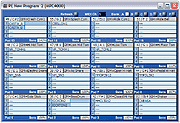 The new pad editor for the MPC4000 version of AKsys is still under development, but here's an early look at what it's going to be like.I'm getting a distinct sense of déjà v here. I covered AKsys v1.7 in SOS November 2001, and also briefly covered its v2.1 incarnation in the Z8 review. Now we're up to v2.3 (or v2.36 for Mac users). In a nutshell, AKsys enables you to hook up your Akai sampler (be it a Z8, Z4, S5000, S6000 or MPC4000) to a USB-equipped PC or Mac via the USB slave port on the MPC's back panel to give you remote control of file management, plus the ability to drag and drop samples to edit and create Multis and Programs. You can also use AKsys to turn your computer into a hub for up to 32 samplers, enabling you to transfer data back and forth between them and/or the computer and generally manage your files with all the benefits of a 'big-screen' user interface.
However, while MPC4000 owners will no doubt welcome the opportunity to join the AKsys users club, there are a few points to note. First, unlike on the rackmounted samplers, no virtual control panel is yet available to allow you to control the unit from the computer desktop, although Akai claim one is "in development". Mind you, this does defeat the object of having such a big piece of hardware to play with in the first place.
Second, AKsys doesn't offer any specialist support for editing sequences, aside from top-level file-management activities. Nor does the Program editor currently support MPC4000-specific activities such as assigning samples to pads. Once again, Akai say this is coming shortly, and that when it does it will make light work of putting kits together (they sent me the screenshot above as proof).
Finally, there's no integral sample editor (though this goes for AKsys as a whole, not just on the MPC4000). Akai's (not-unreasonable) take on this is that there are already enough third-party sample-editing packages out there. In spite of these restrictions, to my mind MPC owners are not likely to feel too cheated, given that they will probably prefer working directly with their hardware anyway. Even if you just call upon it for basic file-management and transfer duties, AKsys is an excellent utility.
Live-ing It Large
The MPC4000's pads can be used not only to trigger sounds but also to trigger sequences and to determine what the next sequence will be while the sequencer is playing, which is great for DJ-style improvisation. The MPC4000's Q-link controls add further real-time tweakability, thanks to their comprehensive parameter mapping options. Knob twiddling and slider, er, sliding can also be programmed within the sequence. This is achievable in one of two ways: either you set the Q-link control to Track, in which case it transmits MIDI controller data which can then be recorded directly into a track, or you can use the Q-link Sequence function which involves a dedicated screen that enables you to record knob and slider positions in 16 steps (quantisable as 64th, 32nd, 16th, eighth or quarter notes) and play them back in sync with a sequence or song. This enables you to set up some pretty wild effects which would be impossible to do manually. In Mixer mode, the Q-link controls again change their identity; the set on the left then becomes a channel strip controlling volume, pan and effects send for each part within a Multi.
While all this knobbery is great for putting some real-time pizzazz into samples and sequences, I couldn't help feeling that six controls is still not enough — mdash; give me more and I'll find the extra hands to make use of them!
Upgrades & OS Revisions
The first thing I did after signing Postman Pat's chitty for delivery of the review MPC4000 was to note the OS on the machine (v1.16) then search Akai's web site for evidence of any recent updates. As it happened, they had just posted v1.20, which I duly downloaded. Uploading it to the MPC4000's Flash ROM was simplicity in itself thanks to the OS Loader utility that is part of AKsys — mdash; a small matter of making a USB connection between my iMac and the MPC4000, then dragging and dropping the unstuffed OS file onto the utility icon. Hey presto, on repowering the MPC4000, the new OS was in place.
The new OS brings a number of new features (a full list is available at the Akai web site), including support for more USB storage devices, such as MO drives, HD drives and USB Flash. Support for more sample formats has also been added. Thanks to these upgrades, the MPC4000 is now compatible with the formats written by the following machines: Akai Z4, Z8, S1000, S2000, S3000, S5000, S6000, MPC2000, MPC2000XL, MPC3000, and Emu EIII. Emu E4 and Roland formats are to follow.
Most significantly, the OS update also fixes a number of bugs that were proving particularly irksome to a number of MPC users, including slow disk save speeds and problems with the Solo, Track Mute and Mute functions.
As explained in the release notes, the new functions added in v1.20 mean that any programs saved or created with the latest OS are incompatible with an MPC4000 (or for that matter a Z8 or Z4) equipped with earlier versions.
While on the subject of OS updates, I should point out that although Akai's software team are clearly on a mission to make sure that bugs get fixed as soon as possible, there's evidence that early MPC4000s were being released to shops with an OS that was not fully up to scratch. For example, there are claims on the SOS forums that certain screens automatically caused the machines to crash. While we have all come to accept as a way of life that software is often released before every wrinkle is ironed out, it seems astonishing that Akai in particular would risk compromising their reputation in this way, considering the damage this suffered after the launch of the bug-ridden S5000 and S6000 series. On the other hand, my review machine did behave properly for 99 percent of the time. The copybook was blotted, however, by one system crash which forced me to reboot the machine. Even the most minor glitch is one glitch too many if you're expecting to rely on this machine for live work.
Verdict
For anyone who is already an avid fan of the MPC concept, the list of MPC4000 features is likely to set them seriously pondering the practicalities of auctioning off vital organs or selling family members into slavery to make the upgrade. And undoubtedly, there's a lot on offer here. First, the MPC4000's sampling and sound-manipulation capabilities are streets ahead of what's been on offer before (and all at 24-bit/96kHz resolution to boot). Whereas previous machines have always fallen slightly short of offering the full capabilities of Akai's rackmount samplers — mdash; for example it wasn't until the arrival of the MPC2000 that the designers saw fit to include looping — mdash; there's nothing significant you can't do with the MPC4000 that you wouldn't be able to do with a Z-series machine. Second, the sequencer is much more powerful than its forebears, and thanks to its graphical interface, it has the ease of use usually associated with software-based sequencers. A particularly creative function is the aforementioned Phrase facility, which allows you to grab sections of a sequence and turn it into a standalone phrase. Third, there are the six Q-link controls which, like those on Akai's Z-series samples, take live manipulation of sounds and samples — mdash; and indeed external devices — mdash; to a new creative level. And last, but in practical terms probably one of the most desirable additions, the presence of an internal hard disk is generally all round much more convenient, particularly if you're using the unit live.
Having said all this, there's no getting away from the fact that these professional features weigh in at a professional price. And while you can see how that price is arrived at — mdash; a Z-series sampler plus a hardware sequencer, plus pads, plus a case big enough to house a family of six — mdash; I think that Akai may have a hard job convincing anyone who isn't already sold on the MPC as a way of life to part with this amount of cash at one blow, given that these facilities are now available in the form of software for much less outlay (assuming you've already bought your computer, of course).
Even the traditional argument that a piece of dedicated, all-in-one hardware like this is so much more reliable and convenient for live performance is beginning to lose ground, evidenced by the fact that musicians are taking to the stage armed with nothing more than a laptop and doing everything an MPC4000 can do, apart from physically triggering sounds and sequences by hitting rubber squares.
So after seriously looking forward to getting my hands on the 2002 version of this classic machine, I was left with mixed feelings. One can't deny that, as with the Z4 and Z8, Akai have done the business in terms of building on what went before, with a bigger, better, more powerful package. But I can't help feeling that the MPC4000 package, at its high price, now looks a little 'out of time' (no pun intended). As they say at the end of those 'previously unreleased tracks and alternative takes' compilation CDs, this is one for enthusiasts only.
MPC4000 Specifications
The review model represented the bog-standard UK-spec model with one notable exception. It was fitted with the maximum of 512MB of RAM instead of 16MB (the standard on UK models, which is rather less-than-generous considering their price). The good news is that the new Akai models all use 168-pin DIMMs, so at least memory expansion is relatively cheap these days.
SAMPLER
- Sampling formats: 24- or 16-bit at 44.1kHz, 48kHz and 96kHz.
- Polyphony: 64 voices (32 voices at 96KHz).
- Envelope generators: Three digital envelope generators.
- Filters: Two-pole filter (x3) with resonance (32 filter types).
- LFOs: Two multi-wave LFOs.
SEQUENCER
- Maximum events: 300,000.
- Resolution: 960 parts per quarter note.
- Sequences: 128.
- Tracks per sequence: 128.
- MIDI output channels: 64, via four separately addressable MIDI ports.
- Song mode: 128 songs, 250 steps per song.
- Drum pads: 16 (velocity and pressure sensitive) in six banks.
- Sync modes: MTC, MIDI Clock, SMPTE.
- Effects: Four-channel 24-bit/96kHz effects board as standard.
EXAMPLE SAMPLING TIMES
WITH 16MB OF RAM
- Mono/44.1kHz/16-bit: Three minutes.
- Mono/44.1kHz/24-bit: Two minutes.
- Mono/96kHz/16-bit: One minute, 30 seconds.
- Mono/96kHz/24-bit: 55 seconds.
WITH 512MB OF RAM
- Mono/44.1kHz/16-bit: One hour, 34 minutes, 42 seconds.
- Mono/44.1kHz/24-bit: One hour, four minutes, 28 seconds.
- Mono/96kHz/16-bit: 44 minutes, 25 seconds.
- Mono/96kHz/24-bit: 29 minutes, 37 seconds.
Connections & Options
 The MPC's no-nonsense rear panel (note the RIAA-preamped phono input for direct turntable connection on the left). Shame there's only one stereo output as standard, though.A quick shufti round the back of the 4000 reveals another MPC first — mdash; a dedicated input for a turntable with RIAA preamp and ground terminal. A switch toggles between this and the other method of feeding audio into the MPC4000: a pair of balanced line/mic inputs. These are combo jack sockets capable of taking either XLRs or quarter-inch jacks. Input levels are controlled by a split rotary control on the main panel with a gain switch to switch between mic and line sources.
Disappointingly, the MPC4000 in its standard guise offers just a single stereo main output, although the sockets themselves are doubled up, with one main out available on balanced XLR jacks and another on quarter-inch jacks (again balanced). I guess such an arrangement is useful in a live situation, where you might want to simultaneously feed signals to the PA as well as your own monitoring system. Nevertheless, many prospective MPC buyers will have preferred the extra socketry to have been addressable as an alternative output. Otherwise, audio output expansion has to come in the form of one of Akai's optional cards, with a choice from the IB48P (which offers eight separate analogue outs) or the IB4ADT digital interface board (which gives you eight outs plus two ins on ADAT connections). Further digital I/O expandability can also be added via the IB4D board, which offers S/PDIF I/O plus a word-clock input and terminator switch. I have to say that in this day and age, it's surprising that this basic digital connectability isn't offered as standard, particularly when SCSI is.
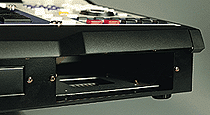 The CD-ROM/second hard drive expansion bay.MIDI is rather better represented, with two MIDI Ins and four independent MIDI outs. External storage devices can be hooked up via the built-in SCSI, but like the Z4 and Z8, the MPC4000 also offers external connectivity via USB, with the USB port found on the front edge of the unit next to the headphone sockets and its associated volume control. As mentioned in the Z8 review, the move to USB is a welcome one, given the cheapness and wide availability of USB peripherals, even though when compared to SCSI, what you gain in plug-and-play convenience, you lose in data-transfer speeds. And with large, 24-bit/96kHz multisamples (like the included 'Splendid Piano') you do tend to notice that lack of speed. Like the Z8 and Z4, the USB socket will also take a QWERTY keyboard, which proves a much more convenient way of naming files than any other means.
To complete the physical check up, the front-edge panel also provides the means to access one of two internal drive bays. The first of these — mdash; of the 3.5 inch variety — mdash; is occupied by the 20GB factory disk, though it will also take a Zip drive. Next to this is a five-inch drive bay primarily intended for installation of an ATAPI-type CD-ROM drive (see below), though if you prefer, you can also use this space to fit a second 3.5-inch hard disk.
Pros
- The full functionality of a Z-series sampler.
- Hard disk as standard.
- The ability to lift sections of sequences to create new phrases.
- The elegant user interface — mdash; particularly for the sequencing section.
- Four MIDI Outs.
Cons
- Digital connections really should be standard.
- OS still slightly flaky when a machine like this demands it should be bombproof.
Summary
Undoubtedly the most evolved and accomplished version of Akai's four-by-four pads concept by far. The question is whether musicians believe an evolved MPC concept is still a convincing proposition in an increasingly soft and virtual world.