

Q & A
Solutions to Reader Problems
Published in SOS April 2004
Printer-friendly version Printer-friendly version

Technique : Miscellaneous
 
Q What kind of headphones are right for me?

Having read Hugh Robjohns' enlightening article 'Mixing On Headphones' in SOS December 2003, I'm considering the purchase of two sets of phones: the AKG K240DF (flat response) for mixing, and the K271 (coloured response) for musicians to wear when monitoring their own signal, giving them the best sound for inspiration and encouragement. Would these models be suitable for these applications?

Alex Schroeder

Technical Editor Hugh Robjohns replies: I'm not entirely sure I understand quite what you are getting at here in terms of a distinction between headphones with flat and coloured responses. As closed-back headphones go, AKG's K271 headphones are actually pretty uncoloured, with a frequency response that's relatively flat. In any case, I don't personally believe musicians require a deliberately coloured response in their monitoring headphones in order to perform well — just a good loud, clean signal.

qa AKG 240DFqa AKG K271.s
AKG's open-backed K240DF and closed-backed K271 headphones — but what job is each designed for?

Surely the significant difference between these two types of headphones (and their equivalents offered by other manufacturers) is that the K240 is an open-backed design, while the K271 is a closed-back headphone. A closed-back design is absolutely essential if the headphone is to be used to provide a cue feed for the recording musician when overdubbing, to minimise any acoustic spill from the headphone being picked up by the microphone(s). The design of the K271 is also a little unusual in that it incorporates a switch to mute the output when the headphone is not being worn — a very useful feature in a studio full of headphones!

It is generally true, however, that most closed-back headphones do tend to sound a little coloured (boxy, even) in comparison with open-backed headphones — and perhaps this is the focal point of your observation. Unfortunately this characteristic is a largely inherent side-effect of the closed-back type of headphone construction. Having said that, though, some of the more recent closed-back designs provide exceptionally good quality, often on a par with the best open-backed designs — Sony's MDR 7509 is one very good example of this technological advance that springs to mind.

Perhaps the other point to comment on is that your version of the venerable AKG K240 is the DF model (as opposed to the Studio or Monitor versions). These three versions offer broadly the same high-quality performance, but have been optimised for slightly different applications. The original Monitor version has a high-ish 600(omega) impedance and a sensitivity of 88dB SPL/mW. In this case, the high impedance is to enable several pairs of headphones to be used in parallel driven from a single power amplifier. The Studio version that followed was re-engineered to provide a lower 55(omega) impedance that, combined with a 3dB greater sensitivity (91dB SPL/mW), enables higher sound pressure levels to be achieved from a given power amplifier's output — and hence also required up-rated diaphragms to accommodate the higher peak volumes and wider dynamic range.

The DF version shares the same 88dB SPL/mW sensitivity and construction as the original model, but has been equalised (through design and selection of the drive units) to comply with the IRT's recommendations for delivering a perceived frequency response equivalent to that experienced when listening to reference loudspeakers in a diffuse field situation. In other words, these headphones have been optimised to try to make mixing and signal-processing judgements far more accurate and reliable — something that is notoriously difficult with headphones.

Q How can I get rid of the clicks and pops from my soundcard?

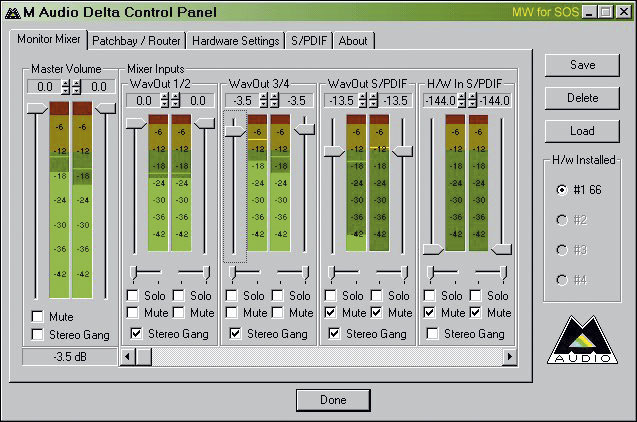
I've recently upgraded to an M Audio Audiophile 2496 soundcard, and I'm having some problems. Firstly, I cannot change the level of the line input. So if the CD player outputs audio at too high a volume, I get clipping and distortion, no matter where I set the sliders in the Delta control panel applet. I've tried it with three different CD players, and they all appear to be too loud for the card. M Audio's solution is to either route the CD player through a mixer (which obviously will introduce loads of unwanted noise) or buy a CD player which has some sort of on-board volume level control.

qa M Audio control panel.s

qaM Audio Audiophile 2496

M Audio's Audiophile 2496 soundcard and, above, its software control panel.

Secondly, I get the dreaded 'clicks and pops' when recording. I've done everything I can think of to eliminate these — upgraded the BIOS, upgraded all drivers (the soundcard itself, display adaptor, motherboard and so on), sorted out the IRQ conflicts, I've tried the card in all four PCI slots as well, and still I get loads of pops and clicks when recording, or playing audio from a CD or DVD, and to a lesser extent when playing back audio from applications.

I have been told by various people that the card may not work correctly with ACPI machines. They suggested re-installing Windows 2000 in Standard PC mode, which I'm not prepared to do, and couldn't in any case, as I didn't get any Windows 2000 discs with the machine.

So, can you tell me if I'm doing anything wrong here? I don't want to have to spend money on a new CD player, then a copy of Windows 2000, the re-install my OS just to get the thing working. My next step is to send the card back and exchange it for a different one — one that works, hopefully!

SOS Forum post

PC music specialist Martin Walker replies: There are quite a few issues involved in your current predicament, so let me deal with them one by one. Soundcard line-level inputs usually have a fixed sensitivity, so you do need to adjust incoming analogue signal levels at the source, as M Audio suggest. Only soundcards featuring additional mic or guitar inputs generally provide analogue level controls.

Line-level sensitivity is either set at -10dBV, suitable for the majority of line-level consumer sources such as MIDI synthesizers, or is switchable to a less sensitive +4dBu setting to deal with professional audio gear. However, M Audio's Audiophile 2496 is slightly different from most, since its outputs can be switched to either -10dBV or a higher level labelled 'consumer' that provides a maximum output level of +2dBV. The inputs on this model are fixed at the same 'consumer' level, which mean that they too accept a maximum input level of +2dBV.

The sliders in M Audio's Control Panel applet operate (like nearly all software level controls ) in the digital domain, in other words, after the signal has passed through the A-D converters and been converted into a digital signal, and cannot therefore be used to set recording levels. Instead, they are primarily intended to create a monitor mix from several input and playback signals. In fact it's important to leave these controls at maximum (0dB) other than during monitoring duties, since otherwise you'll be throwing away digital resolution.

Quite a few stand-alone hi-fi CD players are renowned for putting out a 'hot' signal, which is sometimes even enough to cause harshness when connected to the CD inputs of typical hi-fi amps, especially when playing audio CDs whose peak digital levels are close to the maximum 0dBFS.

If you had a +4dBu input sensitivity option on your soundcard this might just be enough to avoid the distortion you're currently experiencing (some other budget soundcards, such as Terratec's EWX24/96, do provide this option), but you still wouldn't be able to tweak the input sensitivity to optimise the recording level. You could solder up a simple output level control for your CD player using a potentiometer and some screened cable, but there's a far easier approach available to you.

The vast majority of musicians with a PC now record tracks from Red Book audio CDs by a far simpler method — by using the Windows 'digital CD audio' option with their PC's CD-ROM drive. This digitally extracts ('rips') the CD audio without passing it through any A-D converters, which ensures optimum audio quality. Its tick box is normally activated by default, but you can check by looking in the Properties page for your PC's CD drive in Device Manager.

As for ACPI versus Standard Mode, quite a few older M Audio cards seem to prefer the latter, particularly it seems with Windows 2000, where it has been known to completely cure otherwise ineliminable clicks and pops, and even enable lower soundcard buffer sizes to be used, for lower latency. I discussed this back in SOS March 2002 (www.soundonsound.com/sos/mar02/articles/pcmusician0302.asp), and until recently many PCs from specialist music retailers installed Windows in Standard mode for this reason.

On the other hand, Windows XP seems far happier when running in ACPI mode, even with M Audio soundcards, and since this also enables other technologies like APIC (for more interrupts) and hyperthreading to be used, most XP users should stay in this mode.

Although you don't have your Windows 2000 CD-ROM, as this OS is already installed on your PC you could perhaps legitimately borrow one and use it to install Standard Mode, since there's a good chance that this could be the easiest way to solve your current problems. Installing Windows XP should also do the trick, although this approach obviously involves a lot more effort and expense. However, if you can still exchange your soundcard for another model, this could also be a possible solution.

Q How can I address the uneven bass response in my studio?

I've been encountering some problems with standing waves in the room were I do my mixing. The bass response is very uneven and I'm considering investing in some acoustic treatment, but I don't really know were to start. What are my options?

Tom Glover

Technical Editor Hugh Robjohns replies: Standing waves are a very common problem where low-frequency sounds reflect between walls and ceilings to interfere with the direct sound from the monitors. Where the reflections and direct sound meet in phase the level is increased by up to 6dB, but in areas where they arrive out of phase the level is reduced often as much as 20 or 30dB — this is what causes the lumpy and uneven bass response you describe.

This problem is an acoustic one, and electronic equalisation of the monitoring signal can't help because the in-room frequency response is different in every part of the room. The only way to deal with this issue is, as you say, to treat the room's acoustics properly to reduce the amount of reflected low-frequency sound, but since low-frequency sounds have long wavelengths, the acoustic treatment required tends to be physically large as well.

The solution is to install bass absorbers, generally referred to as 'bass traps', to soak up low-frequency energy and stop it from reflecting back into the room from the walls and ceiling. Although these absorbers would appear to reduce the amount of low frequencies in the room, the perceived level of bass normally increases when bass traps are installed, because the cancellations of bass frequencies in the room no longer occur! Another point worth mentioning is that while it is easy to install too much absorption in the mid- and high-frequency areas, resulting in a boxy-sounding room, there is almost no restriction to the amount of low-frequency absorption other than cost and aesthetics. Most rooms benefit from more rather than less! It is also possible to combine bass trapping with mid- and/or high-frequency absorption in the same physical unit.

There are many commercially available acoustic treatment products from companies like Auralex, Primacoustic, Max Wall and Real Traps, amongst others. Most of these companies offer free planning services too, where they estimate the required amounts and placements of their products from a scale plan you supply of the room you want to treat. However, these solutions can quickly become expensive, and the efficacy of the typical corner-mounting foam bass traps is not particularly good. More efficient (if bulky) designs are available which are also fairly easy to build yourself using paper-backed rigid fibreglass panels, mounted across the room corners, built into the ceiling, or hung spaced from walls. A Google web search on bass traps will produce many useful sources of information and construction details.

However, most of us make use of relatively small spare rooms for out music studio and so less bulky alternatives are required. These include Helmholtz resonators, which tend to operate over fairly narrow frequency ranges (so multiple units of varying sizes are required), and membrane absorbers or 'panel traps.' The latter are far more space efficient and can be constructed to work over a pretty wide frequency range. An excellent source of information on panel traps is available at www.ethanwiner.com/basstrap.html [the home page of Ethan Winer who, by happy coincidence, is also the author of this month's Sounding Off — Ed].

So, although few home studios have installed much in the way of acoustic treatment, this really is the secret to creating accurate monitoring and, by extension, transportable mixes, particularly in terms of the bottom end of the mix. It seems odd that people will invest thousands on computers, mic preamps, mixers and monitors, but baulk at spending a few hundred on decent acoustic treatment! But good bass trapping will more than recoup its cost in the improvements to your mixes when you can hear exactly what is going on!

Q How do I get more polyphony from Roland's D-Series synths?

I've recently been considering buying a second-hand Roland D-series workstation to get those classic D50-type sounds, although I haven't decided whether to get a D20, D10 or D5 yet. A while ago I borrowed an old D-series synth from a friend and was using the keyboard in multitimbral mode, hooked up to my computer sequencer, but I seem to remember experiencing some problems with the sounds, and I'd like to get some advice before I shell out any cash.

I found that some notes seemed to cut out when I was running a lot of MIDI channels, and I had problems with some sounds randomly getting louder or quieter. Is this because the keyboard was old and faulty, or am I just expecting too much from what is now old technology?

Vincent Davis

qa may87
Roland's D50 dominated the cover of SOS May 1987. It went on to dominate the late-'80s synth scene too!

SOS contributor Tom Flint replies: The problems you are having with sounds cutting out are almost certainly down to a lack of polyphony. These days synths are blessed with capability for 64, 128 or even more simultaneous notes, but the good old D-series synths only have 32 notes of polyphony divided between their eight multitimbral parts.

The important thing to know about the D-series variety of synthesis (known as Linear Arithmetic or LA synthesis) is that it allows a sound to be made up of as many as four separate sound elements, named Partials, which are either synth waveforms or PCM samples. Some sounds are created using just one Partial, others require all four, but the more Partials that are used, the more polyphony the sound will consume when played.

Bearing this in mind, steps need to be taken to ensure your compositions are not compromised by a Partial shortage. The first step is to reserve a minimum number of Partials for each of the eight parts, so if, for example, you have a huge lush string sound comprising all four Partials, and played as a chord (holding several notes down at once), you can make sure that the part which plays that sound has the most reserved Partials. On my keyboard, I have one channel permanently set with a reserve of 10 Partials for the most hungry sounds, another channel has five, two are given four, one has three and the rest get by with just two reserved Partials each. Since making this arrangement, I have only had to make sure I am careful when assigning sounds to channels. Single-Partial sounds are played on the channels with just two Partials. Other sounds are assigned according to whether they are single-note lines or chords.

To change the Partial reserve for each channel, press the Tune/Function button and then use the two Display keys to scroll through the menu options. Here you will find level and pan settings for each of the eight Parts and for the rhythm Part, followed by the Partial reserve settings for each Part. The value keys allow you to set the reserve to anything up to 32, although you have to bear in mind that you are always dividing a maximum of 32 Partials between eight Parts.

The second way you can control your keyboard's consumption of polyphony is by editing the sounds, or Tones, as Roland confusingly call them. The D20 had all the essential information you need for editing and programming, such as the Tone banks, editing menus and Partial structures, printed on the top of the keyboard itself. Unfortunately, Roland decided to leave off a little more of this helpful information on the cheaper keyboards in the range, so getting hold of a manual will be advisable if you intend to buy one of these. Select the Part you wish to edit and then press the Edit button to get the Edit Select page. Follow this action by pressing the Upper button, and you can then navigate and edit the various synth parameters using the Display and Value keys. Once in this mode, take a look at the four Partial Mute keys (labelled P1, P2, P3 and P4). The four corresponding LEDs show how many Partials are being used to construct the Tone. By pressing each Partial Mute button, and muting the Partials in various combinations, you can find out if there are any unnecessary Partials used in your chosen Tone. I often end up editing a Tone so that I am using just one of the original Partials, having decided that the essence of what I need is to be found in that particular Partial alone. Naturally, this frees up polyphony very quickly.

You also mention that some of the Tones you've been using suffer from random changes in volume, and there are several possible reasons for this. It is possible that the randomness could be down to a Tone being particularly sensitive to velocity (you can change the velocity sensitivity for each part), but you will be able to diagnose the problem by looping the same passage of music and carefully listening to see whether the same notes are consistently decreasing or increasing in volume.

If, on the other hand, the changes in volume seem irregular or random, it's likely to be caused by the way the Tone has been constructed. Many of the sounds on the D-series synths are programmed with two identical Partials, using slightly different tunings in order to create an artificial, chorus-like 'thickness'. The inherent phasing effect this produces can cause the kind of random volume changes you are experiencing. You can address this problem by carefully adjusting the tuning, panning and levels of the Partials, or muting one or more Partials altogether, paying attention to the way the Partials are combined to modulate each other. You will inevitably lose the 'thick' sound, but will end up with a Tone with a consistent level. Another possible cause of your phasing could be the LFO settings of each Partial going in and out of sync. Once again, its worth experimenting with the editable parameters before resorting to Partial muting, unless you need to slim your sound down anyway.

Q Where should I put my subwoofer?

I want to add a subwoofer to my monitoring system, but how do I work out where to place it in the room?

Brad Kay

Technical Editor Hugh Robjohns replies: Adding a subwoofer to a monitoring system is not a trivial matter, and great care is required if the potential advantages are to be realised. Firstly, every room will suffer from low-frequency standing waves unless properly treated with adequate bass trapping (see the Q&A on the subject, above). Standing waves cause a very lumpy bass response in the room, where some bass notes are boomy and much too loud and others may not be audible at all, and the balance changes dramatically as you move around the room! Bass trapping essentially soaks up some of the LF energy at the room's corners, preventing it from being reflected back into the room to interfere with the direct sound from the speakers.

qa Hugh with subwoofer.s
Hugh Robjohns searches for a suitable position for SOS reader Dave Wraight's Genelec 1091 subwoofer during a recent Studio SOS visit.

If the monitoring system has a restricted bass response (perhaps because they are small nearfield monitors) then these troublesome standing waves may not be excited and thus they may not cause too much of a problem. Introducing a subwoofer to the system will generate lots of very low-frequency energy which may well excite a range of low-frequency standing waves, with the result that the monitoring quality and accuracy is reduced, even though you have extended the theoretical bandwidth of the system (and spent lots of money!). So, before purchasing a subwoofer, invest in proper bass trapping at the very least.

If the room's acoustics have been sorted out, then the next challenge is to place the subwoofer in the optimal position. The most pragmatic way to achieve this is, having connected the subwoofer and set approximate levels, to place it temporarily where you normally sit when mixing. You can then crawl around the floor near the walls listening to the quality of the bass. You are trying to find the place where the bass notes are the most even and balanced — where none are excessively loud or quiet. When you have found the best place, reposition the subwoofer there and align it as the manufacturer advises in terms of its level, crossover frequency and, if provided, phase or delay.

Ideally, a subwoofer will only generate low-frequency sound, and as humans are rather poor at locating the source of low frequencies, it should be possible to place the subwoofer almost anywhere in the room without side-effects. Sadly, the reality is that most budget subwoofers generate large amounts of harmonic distortion, so even if you restrict the operating bandwidth to 80Hz, the subwoofer may well generate audible harmonics at 160, 240 and 320 Hz, all of which can be easily located. This will tend to cause distracting spatial images, and will reduce the transparency of the mid-range part of the spectrum. High-quality (but expensive) subwoofers — such as those from ATC or PMC, for example — tend not to suffer from this problem as much, but even so it is generally advisable to place the subwoofer somewhere between the main monitors so that any harmonics generated are located roughly where the intended source is panned.

Do not place the sub exactly at the mid point, though (assuming the main speakers are placed symmetrically in the room), as this will coincide with a fundamental standing wave and produce poor results, as your crawling around on the floor will hopefully have revealed!

Depending on the design of the subwoofer, you may find altering the distance from the rear wall as effective as moving the sub a few inches to one side or the other in optimising the eveness of the sound.

Published in SOS April 2004
Thursday 28th August 2008
Login here
Sub PIN or Email
Password
Remember me
Stay logged in
Lost password?
Request a reminder
Not registered?
Register Now for FREE
No https access?
Login here
September 2008
On sale now at main newsagents and bookstores (or buy direct from the SOS Web Shop)
SOS current Print Magazine: click here for FULL Contents list
Click image for Contents

Screenshots too small? Click on photos, screenshots and diagrams in articles (after August 2003 issue) to open a Larger View window for detailed viewing/printing.