

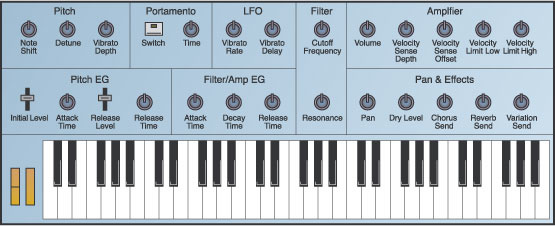
 Figure 1. Here's an overview of the most important XG synthesis parameters, set out as they might be for a traditional hardware monosynth.
There are lots of XG-format synthesizers in home studios, but their General MIDI heritage discourages many owners from using them. However, there's life in your XG module yet if you're willing to explore its hidden depths.
It's been almost ten years now since Yamaha extended the concept of General MIDI to create their XG format. The original GM standard was created so that people could use the same MIDI file with different synths, yet get a similar result — a feat achieved by creating standardised voice and effects sets and using some fixed controller allocations. It was perhaps a good thing in principle, but because the GM format lent itself so readily to karaoke-style backing track playback it quickly gained a reputation for cheesiness.
Yamaha's XG expanded the GM concept by increasing the number of voices, effects and synth parameters available, but still designated exactly how the MIDI protocol controlled them. Therefore, although an XG synth can play back GM-format files if you like, it has much more creative potential available than you might expect given its GM heritage. In this small series, I'll show you how to get the best out of your
XG sound module, invigorating your sounds by exploring all the different parameters on offer, some of which may initially be hidden from view.
I'd best be clear from the outset that I'm not going to discuss how to create the most realistic emulations of specific instruments. If you're after realism, then for most sounds you might as well leave the XG synth well alone and reach for a sampler or a dedicated physical-modelling synth instead. Alternatively (heresy of heresies) you could record a real instrument... If you treat the XG module like any other synth, rather than as a replacement for a real instrument, then you're much more likely to find sounds which are rich and expressive. In fact, if you use your more glamourous synths and sound sources to provide the majority of your sounds, then you'll have much more freedom to use all the XG module's available polyphony and multitimbrality for creative purposes.
A Quick Look At The XG Voice
There are a huge number of Yamaha XG synths in service, including a legion of hardware keyboards and rack modules, the soundcard-based chips in the DB50XG, SW60XG and SW1000XG, and the SYXG50 software synth — apparently licensed to over 10 million computers worldwide! Although XG is meant to be a standard, Yamaha also allowed room for development, so not all XG synths are equal in their numbers of voices, effects patches, or editing parameters. However, all XG synths share the same basic synthesis engine, which means that you can pull most of the interesting XG synthesis stunts on even basic units such as the MU10. The voice architecture is a familiar one: a sampled waveform passes through a low-pass filter and an amplifier; modulation sources comprise two envelope generators and an LFO; and the sound can feed any of the global Chorus, Reverb and Variation effects.
 In order to get the funkiest sounds from the XG sound set, you need to realise what editing parameters are available to you. Take a look at Figure 1 (above), which shows an overview of the most important XG synthesis parameters, set out as they might be for a 'one knob per function' synth. The oscillator can be transposed up or down in semitone steps with the Note Shift parameter, and can also be detuned in fractions of a Hertz. A Vibrato Depth control modulates the pitch using the LFO, which is itself configured using the Vibrato Rate and Delay controls — the latter adjusts the onset time for modulation after each note has been struck. Portamento mode can be engaged with a switch, and the speed of the pitch glide between notes is adjusted using the Portamento Time control. In addition, the more well-specified XG sound modules also allow you to adjust the attack and release characteristics of the Pitch EG (Envelope Generator), for mad pitch sweeps at the beginnings and ends of notes.
The low-pass filter has the usual Cutoff Frequency and Resonance controls, and is modulated from the main envelope generator, which also controls the amplifier output level. This sharing of one envelope generator between both the filter and the amp is one of the main limitations of the XG sound architecture from a sound-design perspective, but it still doesn't hold you back too much in practice, and at least you get full control over the envelope time constants. The amplifier has its main Volume control, and its velocity response can be extensively tweaked using the two Velocity Sense parameters. You can also set up low and high velocity limits, although these parameters are again only available with more up-market XG units.
After the amplifier, you can pan the voice and set its send levels to each of the three XG effects. The Dry Level parameter is particularly handy, as turning it down lets you hear sounds only through the effects, without having to switch the global Variation effect mode to Insert. That pretty much wraps up the basic synth parameters, although there are a bunch of extra advanced modulation options which we'll come back to later in this series.
Real-time Control
Obviously, there's a lot of mileage to be had from your XG sound set just by experimenting with different settings of Figure 1's synthesis parameters. The filter and envelope-generator parameters are particularly powerful here. As an example, take the default piano patch, increase the filter's resonance and main EG attack time to maximum. You immediately have a slow glacial pad sound with individual harmonics eerily surfacing and submerging. Turn things even weirder with a shallow, delayed vibrato from a super-slow LFO. With the Dry Level parameter off and the reverb send up high, you end up with something like Example 1 (you can download all the audio and MIDI files mentioned in this article from the righthand Media sidebar's ZIP file).
There is certainly a lot of potential in abusing the XG format like this, but the thing that really brings XG sounds to life is real-time control. For a start, all XG sounds respond as you'd expect to MIDI Pitch-bend messages, and Mod Wheel messages (Continuous Controller number one) always increase the vibrato depth by default. In addition, the Expression message (Continuous Controller number 11) provides control over playback level, within the overall setting of the Volume parameter. And, of course, all the XG editing parameters can be controlled over MIDI as well. (See the 'Help — I Can't Find All Those Extra Parameters!' box for details on the exact MIDI messages you need.)
To hear how these real-time controls can liven up a performance, have a listen to Example 2a. This is a basic hard-quantised electric bass line with no controller information added at all. Now have a listen to Example 2b, where I've added in some pitch-bend and portamento information. For the best results, adjust the portamento time to suit individual passages, and use the switch to remove it where it's not needed. In Example 2c I've added a bit of filter modulation to give the part some attitude, as well as fading up the send to the distortion on selected passages for extra emphasis. Finally, for Example 2d I've layered in some Mod Wheel messages to give a little vibrato on some of the sustained notes, and tweaked the main envelope generator's attack time in a couple of spots just to soften a couple of entries. Although each of these layers of controller information on its own only adds a small extra dimension to the sound, the combination of them all transforms the line from something mechanical into something which lives and breathes.
Any synth can benefit from careful (and perhaps rather more subtle!) use of the available controllers, but arpeggiations repay the effort particularly well. Have a listen to the basic arpeggiation of Example 3a. Adjusting just the main envelope generator's attack and release times already has a dramatic effect in Example 3b. Riding the reverb send in Example 3c enhances the sudden changes in sound, and Pitch-bend and Mod Wheel messages make for a wacky ending. Finally, Example 3d combines the arpeggiation with the bass line of Example 2, layering in a few Expression messages to provide some ebb and flow, and adjusting the LFO rate with NRPNs during the fade-out.
Help — I Can't Find All Those Extra Parameters!
Depending on your particular flavour of XG synth, you'll have to take different approaches to accessing the available synthesis parameters. Although Yamaha's higher-spec hardware units, such as the MU50 or MU100, provide a large selection of controls through their operating systems, there are also a number of XG products which have no immediately accessible controls — take the no-frills MU10 sound module, for example, or the popular DB50XG PC soundcard daughterboard. Fortunately, even if there are no visible controls, all the parameters are usually still lurking there under the bonnet (with the possible exception of the Pitch EG and velocity limits, as I mentioned in the main article), and can be accessed using MIDI messages.
If you're working on a computer and you don't fancy generating these MIDI messages directly, then the simplest solution would be to get hold of the XGEdit graphical editing utility, which is available directly from www.yamahamusicsoft.com. You can try it out as shareware for 21 days, after which you need to pay a registration fee of $40. The alternative, especially if you're working with a hardware sequencer or programmable MIDI control surface, is to take a look at Figure 2, where I've shown all the MIDI messages you'll need to access the parameters shown earlier in Figure 1. All the MIDI messages are given in hexadecimal notation, and the decimal Continuous Controller numbers are also given in brackets in case your sequencer deals with these in decimal. The letter 'n' is used to represent the single hexadecimal digit which indicates the MIDI channel in MIDI Continuous Controller messages. For the SysEx messages, 'mm' is a hexadecimal byte designating the multitimbral part to which the message applies, while 'xx' sets the value of the parameter. Where there are two 'xx' bytes for the Detune parameter, the least significant precedes the most significant.
 Figure 2.As you can see in Figure 2, there is often more than one message that will access a particular parameter. Out of preference you'll want to use the topmost message, as it will keep the MIDI stream as uncluttered as possible, but I've included all the options in case you want to use a different one.
Also, remember that you don't necessarily need to use the whole of an NRPN message every time you change a value. If you're only using one NRPN parameter, then you can send one complete NRPN message, only using Continuous Controller number six messages after that to change the parameter value. In the rare case that you decide to use more than one NRPN parameter, however, use the complete message every time to avoid problems.
Although the SysEx messages are much more greedy of MIDI data bandwidth (each one has 9-10 bytes), they are useful because they let you access every available XG parameter. Furthermore, you can direct parameter changes at all the available multitimbral parts within the XG module, regardless of the MIDI channel which these parts have been set to receive.
Exploring MIDI Delay Effects
The keys to many of your XG module's creative possibilities are its polyphony and multitimbrality. Because few XG-equipped home studios are using their XG module for the bulk of the work, this means that you can usually afford to be as wasteful as you like with the synth's available horsepower. Once you take this idea on board, a whole selection of extra sound-design options become available to you.
The first important way you can use this potential is by experimenting with MIDI delay effects. Let me explain what I mean. Imagine that you have a MIDI sequence playing via one of the multitimbral parts of your XG synth. If you now create a copy of that MIDI sequence, delay it, and send it to the same multitimbral part, you'll get a simple single-repeat delay effect. You could set up as many other copies of the original MIDI sequence as you wanted, for any desired pattern of delays, but things are still fairly limited, as each delay will play back at the same level and with the same sound.
However, you can make things much more interesting if you assign each delay repeat to a different multitimbral part, instead of to the same one. In Example 4a, I've used a kind of marimba-like sound to play a simple percussive rhythm chord part, which has been delayed and sent to six other multitimbral parts playing the same sound. I've adjusted the volume balance of the delays to make the repeats decay appropriately. By adjusting the filter settings for the later delay repeats, and also increasing the reverb levels, Example 4b shows how the delays can be made to recede into the distance in a pleasing way.
Although this kind of delay effect is not particularly new, this way of implementing it offers a lot of advantages. Firstly, if you use a MIDI delay effect, you can save your Variation effects block for other treatments, which is great if you want to use, say, distortion in your multitimbral setup. The second advantage is that you can make any pattern of delays that you like, with interesting and irregular rhythms that still track the tempo of the track. But the best reason for using normal MIDI delays, in my opinion, is that you can stop long strings of delay repeats clashing with harmonies that change from bar to bar. You can either edit the offending notes to match the new chord, or you can simply delete them. Compare Example 4b to Example 4c, where I've removed some of the rough edges in this way, as well as tweaking the envelope settings of the repeats slightly to make them less percussive.
So much for traditional delay effects; let's take things in a more interesting direction now. First off, in Example 4d I've set different pan positions for each delay, selected a slightly different sound for delays four and five, and tweaked the main envelope generator settings to give a kind of reverse envelope on the final two repeats. Example 4e uses the effects sends to differentiate the delays from each other further, with distortion being dialled in for the slow-attack repeats. I've also turned the Dry Level parameter for delays four and five down to zero, so that you only hear them through the effects. Finally, to really get things sounding weird, I've turned on the portamento for the last pair of delays, so that they're just atmospheric distorted whoopings in Example 4f. Finally, Example 4g combines this with Example 2 and Example 3.
Yamaha XG Web Resources
- YAMAHA XG HOME PAGE
If you're interested in finding out more about the capabilities of the XG format, then this site should be your first stop. Go to the Download area and follow the XG Reading Page link for a PDF detailing the entire specification of the XG format, and there's also a document here containing guidelines on producing XG-compatible MIDI files if you fancy porting songs and patches to other modules. There are also links in the Download area for various sequencer-specific and stand-alone XG parameter editors.
- YAMAHA SYXG50 DOWNLOAD PAGE
If you're not an owner of one of the 45 million XG synths that are apparently out there, then here's an opportunity to try out what XG has to offer. The SYXG50 PC-only software synth can be downloaded from this web page as shareware, and it's free to use for the first 90 days, after which there's a small registration charge of $50. It's only 16-part multitimbral, but it can handle up to 128 voices of polyphony if your computer has enough muscle.
www.yamaha.co.uk/xg/html/midplug/m_syg50a.htm
- YAMAHA MANUAL LIBRARY
An immensely useful resource for any Yamaha product, but particularly for XG synths. If you have no manual (for whatever reason), then it's worth downloading the relevant PDF files from here. Not only will you find out which synth parameters are supported, but you'll also be able to use the detailed MIDI implementation to work out how to adjust those parameters which have no immediately accessible controls.
www2.yamaha.co.jp/manual/english/index.html
- YAMAHA SW1000XG HOME PAGE
This site is dedicated to Yamaha's SW1000XG computer soundcard, one of their most popular XG-equipped products.
- MIG MUSIC SITE
Home of the excellent XG Layered Dance Sounds collection, as reviewed in SOS May 2001.
- MICHAEL'S XG PAGE
This great user site has a particularly good tips section which you get to by following the Programming button. This includes downloadable MIDI files containing patches from Yamaha's QS300 synth, if you're after some instant XG sound ideas. There's also a good basic XG Guidebook PDF file, various sequencer setup files, and some SysEx tools. Furthermore, you might want to look into the Links section to check out some of the original MIDI files that XG users have been creating.
Swells & Special Effects Using Note Repetition
An extension of the idea of MIDI delays is to use extremely closely spaced notes to generate interesting swells and interference effects. As notes pack closer together in time, you begin to perceive them less and less as individual events, and more as a uniform texture. It's difficult to generalise about this technique, because there are a lot of different effects you can create with it, depending on the voice settings and note spacings. However, I find that the closest note spacings tend to give you harsh metallic buzzings, while wider spacings create more inoffensive chorused textures. However, whatever sound you go for, it's worth using note velocities to create swells and decays which match the dynamics of your music.
To give you a taster of the kind of thing you can do with this technique, have a listen to Example 5a. I've copied a single chord to produce about 120 regularly-spaced instances every bar, and I've created a velocity ramp to create a crescendo into an accented change of harmony. Adding some chorusing at the beginning of each swell, and then decreasing that level with the velocity crescendo makes the sound slowly pull into focus as the swell progresses, as you can hear in Example 5b.
To round off this Part 1 workshop, Example 5c brings together everything since Example 2, and I also couldn't resist adding a lead line with one of my favourite XG sounds, SineLead. This has had pitch-bend, modulation and expression controllers added, and a simple one-voice MIDI delay. I've put XG-format MIDI files (in the ZIP file) for this example on the SOS web site as well, if you want to look at how these sounds work with your own sequencer and sound module. Stay tuned for Part 2, where I'll be looking at some of the more imaginative ways you can layer XG sounds.
Go to: Creative Synthesis With Yamaha XG (Part 2 of 3)
Element Reserve
If you're using layered pads or arpeggiations, it's easy to start eating up your XG module's polyphony, which may interfere with the playback of important parts. if you notice note-stealing going on, then I'd suggest setting up Element Reserve on the most important tracks to avoid problems. This parameter guarantees the selected multitimbral part a certain number of voices of polyphony. The hexadecimal SysEx string you need is F0 43 10 4C 08 mm 00 xx F7, where 'mm' is the part and 'xx' the number of voices of polyphony you want to reserve.