

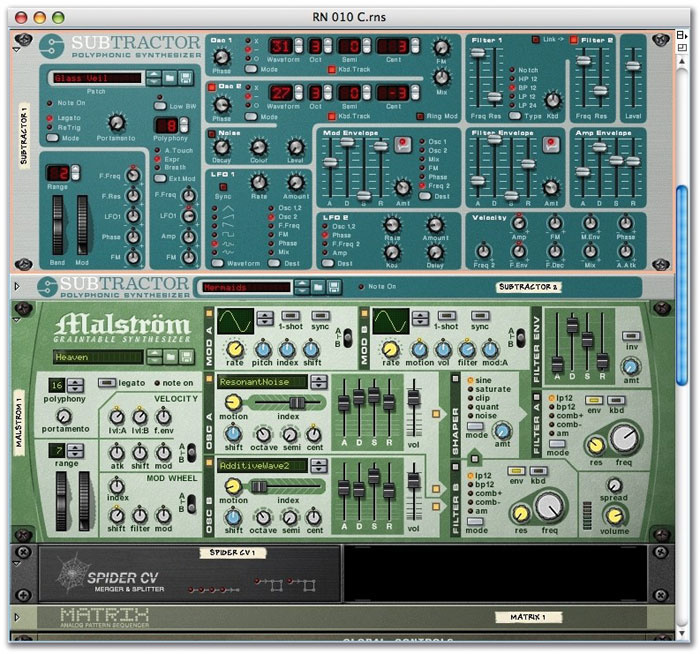
 A front view of the initial 'layer' I set up. Unfortunately, Reason is too big to show this well.
We've got a lot to look forward to with the imminent release of Reason v3, but there's still a world of exploration available in v2.5 — so don't stop creating while you're waiting.
While there won't be many Reason users who don't have additional software for working with sound — sample editors or even Propellerhead's own Recycle — it's nice to know that for some jobs you don't need to move outside the Reason environment. For example, I often create really big sounds with multiple devices in Reason, sample the result and load the samples back into NN19 or NNXT — and I don't need any extra software.
My method is to create the necessary layers by assigning patches to multiple devices, then trigger them all from one Matrix pattern sequencer, via a Spider CV splitter. The example illustrated on the left features two Subtractor s and one Malström. Each has a pad-like sound from the factory sound bank loaded into it. A Matrix has its gate and CV outs split to each equivalent input via the two splitter circuits of a Spider CV. Try it: write some notes into Matrix, and all three devices will sound. If you'd like a larger 'layer', remember that the output of the Spider CV can itself be split by another Spider CV, with no delays of any kind.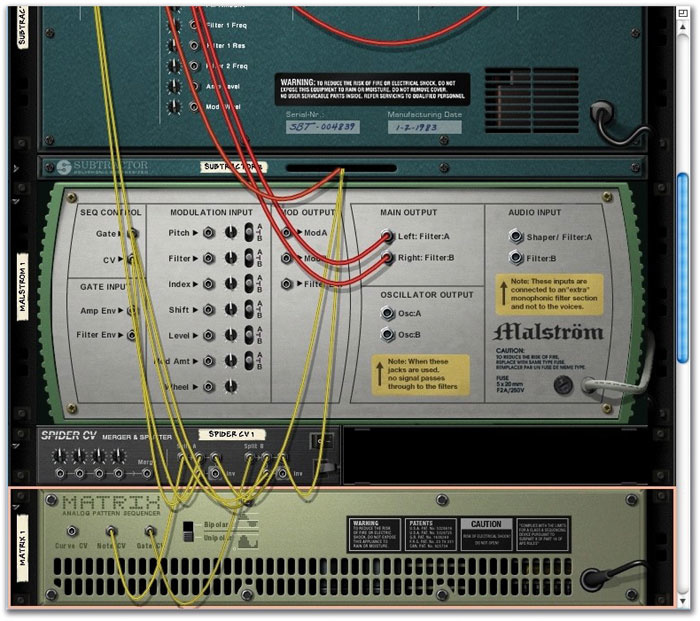 The back panel view, showing the Matrix linked to three synths via a Spider CV.
The next step is to work out how long each sound takes to decay — it might be really fast for a layered bass sound, or a number of seconds for a pad or something more abstract. Then decide how many samples you'd like to make. Will it just be a number of C-notes over three or four octaves, or a sample every fifth, or would you prefer to have one sample per semitone — or something in between? Be aware at this point that you probably won't be able to loop the final result, so too few samples might result in releases cut short if they have to be played over too large a key range. For most sounds, even those with obvious intrinsic movement, the most I usually need is one sample every minor third — C, E-flat, F-sharp, A, C, and so on. When NNXT automatically creates key-range zones for each sample, a few steps from now, the most they'll be shifted is one semitone up or down.
However you do it, set the notes you want to be triggered by Matrix. This device should be set on a low resolution — half notes — and the 'pattern' should be as long as you need to create the whole multisample. You might even need two or more patterns (to be chained on playback) if you're creating something more detailed. Play with tempo, too: you want to create Matrix events that trigger the desired notes and let them decay to silence before the next note is triggered.
Next, create small playback loops in the main sequencer — a 16th-note in a 4/4 time signature is the smallest achievable in Reason. Each loop needs to be of the right length to play back just one note of the pattern you've just written in the Matrix. The example illustrated required a tempo of 60bpm, and each note took two 4/4 bars to decay. One 32-step Matrix pattern gave me enough space for eight samples, which suited the finished NNXT patch just fine. From the File menu, select 'Export Loop As Audio File', give the 'loop' a meaningful name, and save it somewhere you can retrieve it easily. Do the same for the rest of the note triggers.
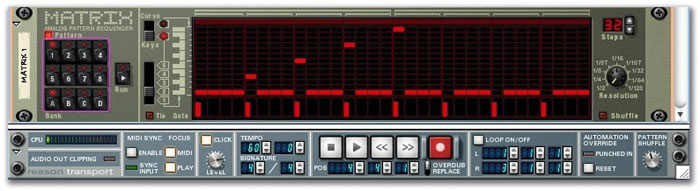 The notes, a minor third apart, which I used to create my multisample. At this tempo and resolution there are two bars between each trigger.
Export Duty
Once you've exported all the notes you need, open a sample device. For an instrument patch, the best bet is NNXT: navigate its file browser to the location where the exports are saved, highlight them all and load them en masse. Leave the samples all highlighted and choose 'Set Root Notes From Pitch Detection' from the Edit menu, swiftly followed by 'Automap Zones'. Bingo: instant multisample correctly pitched and split across the keyboard.
It won't often be the case that you'll be able to loop these samples. You may also wonder about effective use of the envelope generators, and what happens when you want to hold a note for a long time. The answer is to create notes that are quite long and 'envelope them down'. Other compromises include the fact that all samples exported will be in stereo, though this means that your layered devices can be panned before export.
Going Loopy
It is just about possible to loop a raw sample within NNXT, but it requires nerves of steel. Tell NNXT to 'Select Zones via MIDI', and play the sample to be looped; this will select it, and its specific parameters, automatically. Now set the Play Mode knob to FW-Loop (but bear in mind that that the FW-BW option can help disguise clicks in this rough-and-ready example), and use the Loop Start and Loop End knobs to fine-tune the loop.
These knobs are calibrated as a percentage of the sample length, with single decimal-point accuracy, though the tool tip (if activated) provides you with a 'frame' accurate (sample accurate) readout. In the circumstances, this is of academic interest! In its favour, the process provides audible feedback — you hear changes as you dial them in while a note is held — but you have no real control over 'zero crossings' (loop points should be at zero crossings in the sample to avoid clicks.) If the thought has occurred to anyone at Propellerhead, full-on loop editing in NNXT would be a nice upgrade for the future.
Some Observations
Effects can be part of your layered sample, but be wary of delays and reverb tails lasting longer than the sound you want: ideally, the whole sound, including effects, will decay naturally, to avoid producing unwanted artifacts when the exported sample is reloaded into NNXT. Anything that adds to the perceived movement of a sound may cause problems if you're planning to create a multisample with a smaller number of individual samples: for example, delay and modulation effects, which could become obviously 'wrong' when shifted up or down by a large amount, might be better left for adding to the finished patch.
 The final NNXT patch. The eight samples are Grouped together, and NNXT has automatically detected their pitch and split them across the keyboard range.
If the final NNXT patch is too bright, tame it by using the filter cutoff frequency as a glorified tone control. Take it down to about 100Hz (watch the tool tip value), with the LP12 or LP24 characteristic. Leave resonance in its default position. In the velocity-routing section, turn filter frequency (and level, while you're at it) to about 60 or 70 percent. Using a soft touch on your controller keyboard will now play the new patch quietly, and with a soft edge, but as you play harder, the sound becomes louder and brighter as velocity opens up the filter and increases level. Simple but effective.
In the current version 2.5 of Reason, layering multiple devices for real-time performance is possible, as is writing a part for the resulting layer in the sequencer, but there are compromises and a little bit of faffing involved. Reason v3 will make this easier, with its fabulous Combinator 'device' (though it's more of a new framework for other devices than a device itself). Practically anything in the rack can be bunged into Combinator and the result addressed as if it were a single device. However, this will soak up more CPU overhead. Likewise, creating sets of multisamples from Subtractor and Malström patches and layering them in NNXT can also tax your CPU, so the technique described above will still be valid even when v3 is released, as it uses fewer resources to produce a similar result. Even with a powerful computer, anything that saves processing juice is a good thing, especially when you're running Reason as part of a suite of other software
Quick Tips
In the main sequencer, editing individual velocities of the notes that all play at the same time in a chord seems to be impossible. Try to change one velocity and all the others are changed with it. The solution is simple: highlight the note for which velocity is to be edited, hold the Shift key, and drag on the velocity bar. Only the bar assigned to the highlighted note will be changed.
Sometimes the most obvious tricks pass us by: don't forget that highlighting MIDI data or grouped sections in the sequencer or edit views and Alt-dragging it to another track copies that material. Alt-dragging the data to an empty space in the sequencer actually creates a new track. You have to make the device assignment yourself, and remember to change the track name to avoid confusion. This is a strategy you might wish to employ when editing a performance recorded in real time, saving the original just in case you find yourself over-editing and wishing to regain access to the 'feel' of the original.
Another tool that's easy to forget is the Change Events dialogue, available under the Edit menu when you're working in the main linear sequencer. Alter Notes can help provide a little extra spice when you're working with looped material. Simply convert or copy any Redrum or Matrix pattern tracks to notes (or copy patterns to tracks) under the Edit menu, Group the performance, if it's not already Grouped, and apply the Alter Notes routine. It's great for providing variation in Redrum patterns and can occasionally help with melodic material. Similarly, using the Scale function (50 percent doubles the length of the pattern and 200 percent halves it) can help change the feel of material you're already working with. Giving a copy of your main drum pattern a half-tempo feel, to play alongside the original, is an easy way to add more interest to some patterns.
When inputting velocity-bar trigger steps in the Matrix, remember that you can accurately draw in the same level for each step by watching the little line that appears when drawing the trigger. Just ensure that it matches the top level of the other triggers.