

 Photo: Mark Ewing
M-Audio have applied the same economies of scale to this digital piano that they have to controller keyboards, with the result that the Prokeys 88 retails for well under £500, with the cut-down Prokeys 88SX costing even less.
Last year, when I reviewed their top-of-the-range Keystation Pro 88 master keyboard, it seemed to me that M-Audio could progress no further from the inexpensive mini-controllers with which they made their name in the controller market. But then I walked onto their booth at NAMM last year to find that they had taken the next logical step, putting some sounds into the silent weighted 88-note keyboard, including, of course, that of a grand piano (the main reason to have an eight-octave keyboard in the first place).
The only problem I have had using weighted wooden keyboards live is finding a piano sound to match the quality of the keyboard. Software instruments like Ivory and The Grand are great, but they take a lot of room and processing power on a computer, and it can take a while to boot them up before they can be accessed.
Enter the Prokeys 88, the most useable stage piano I have ever tried. Its dedicated Grand Piano button at the top right is just the first of many features which make it a most reliable live workhorse. Even if you have your master keyboard well programmed, pressing Program followed by two or three digits on a keypad is too hit-and-miss a procedure when you need a grand piano under your fingers right now. On the Prokeys 88, nothing could be simpler. Hitting the Grand Piano key, which you could find in a coal cellar at midnight, calls up not only the first piano sound on the instrument but also your reverb and chorus settings of choice. And any complicated splits or layers you've set up are automatically overridden, so you don't have any embarrassments when performing.
Simple Splits & Layers
Not that it is difficult to set up what you want on the Prokeys 88, even if that is two sounds layered in the right hand in different octaves, an acoustic bass doubled with a ride cymbal sample (for that jazz rhythm feel) and another sound ready to go on another layer. One of my own staple live numbers was recorded using piano, acoustic bass and drums, with strings and a Hammond organ overdub. Live, I usually have to go for a reduced arrangement featuring just the piano, but on the Prokeys 88 it took me less than a minute (without the manual) to work out how to produce a reasonable facsimile of the recorded version on my own in a live situation. I split the keyboard at G2, select the acoustic bass and ride cymbal instruments to layer below the split, so that by playing octaves with my left hand, the little finger is playing the bass and my thumb the piano, adjust the balance between the two, then layer piano and strings under my right hand, adjust that balance, increase the reverb a touch and finally have the organ ready to switch to on the other layer for the Jacques Loussier section in the middle of the piece. And even when I don't have time to do this before I start the song, each step can be done on the fly when I need it.
Clearly, to make all this possible, the designers at M-Audio have to have thought hard about the whole business of playing keyboards live. They know that you will always be playing when you are trying to set things up, so you can only spare one hand for half a second. Setting the split point is the only time you need two hands. As you press Split to set this, you simply hit the highest key you want for the lower sound. Whichever instrument was last used is called up automatically, and its button starts flashing for three seconds (M-Audio call this the Edit Mode) during which you can change it by pressing the button for another instrument. If that instrument is a bass (acoustic or electric) you can double it with the jazz ride cymbal.
One of the problems with splits is that it is usually a bit tricky to control the relative levels of each instrument. Often you have to hold down a key (or combination of keys) and use a data-entry knob or slider, so two hands and some thinking time is required. Not on the Prokeys 88. There is a dedicated Split Level slider to adjust the balance of the second sound, the right-hand sound's level being controlled exclusively by the Master Volume slider. Similarly, there is a dedicated slider for the layer sound volume. Choosing the layer sound works in the same way as the split sound. When you hit the Layer button, the previously selected sound is called back up and its button flashes for three seconds, during which time you can select another sound if required.
Unusually, the Prokeys 88 allows you to have the Split and Layer features active at the same time. Layering only applies to the right-hand side of the Split (in the upper register, where you are much more likely to want two sounds combined, like piano and strings or FM piano and warm pad). The only sounds which you can layer to the left-hand side of the Split are one of the two Bass sounds and the Jazz Ride cymbal. This means in total you have four different sounds available simultaneously in this one configuration.
Built-in Sounds
The Prokeys 88 isn't designed to be a synth, so there are only 14 sounds on board — but they're well-chosen, and sound good. These were my favourites...
- 'Piano 1' (Grand Piano): Suitable for everything from the gentlest classical playing through to fairly dynamic jazz, the top end and lower registers of this sound are particularly authentic, and it has been multisampled very well; I couldn't point out where the samples change across the keyboard with any certainty! In the middle range (the most challenging area when sampling a grand piano), there is a slightly artificial character to the sound when it's listened to very critically, but in performance this is more than made up for by the playability.
- 'Piano 2': This is a brighter alternative, as offered by most stage pianos, but it's not so in your face as, say, a Roland. It nevertheless works extremely well layered with the Prokeys' string or pad sounds, and I found myself using it most of the time, as it suffers less from the artificiality in the mid range I noticed in the first sound. When played gently, it has the sweetness you need for classical pieces, but it can really accentuate the dramatic when you suddenly dig in.
- 'E Piano 1': Clearly a Rhodes (although they are careful not to say so on the front panel or in the manual) and at the more pleasant, tinkly end of the Rhodes range.
- 'E Piano 2': Now this is more like it. Referred to in one of the manual's hints as a Wurly, it has all the growl and bite of the Wurlitzer when you really dig in, whilst being gentle and inoffensive when you just tickle it. Very expressive indeed.
- 'Clav': Instantly recognisable as such (many attempts are not) but a little lacking in bite and growl (perhaps because there is no way to switch in the auto-wah effect so often associated with this sound). If your main thing is sounding like Stevie Wonder or George Duke, then you may want to make alternative arrangements, but this is perfectly serviceable for the odd funk number in the set.
- 'Organ 1': Very serviceable once the chorus is switched in, with a good pronounced key-click for percussive licks which stand out.
- 'Organ 2': A thicker version when used with the higher chorus setting, which I prefer for accompanying, this sound is fine for most applications except for the spin up/down issue I go into in more depth towards the end of this review.
- 'Strings': The Prokeys 88's finest sound, perfect on its own or sitting behind the piano in a layer for that Vangelis-type effect. The strings have enough attack to carry a tune, but not so much that they drown the piano when in a support role.
- 'A Bass': A splendid upright acoustic with all the warmth and character you could ask for. Authentic and useable right up into the upper registers, where it slowly morphs into a very pleasant harp-like sound.
- 'E Bass': Solid and workmanlike with excellent harmonics in the right hand. I could have done with a few more of the straight notes at the top end of an electric bass's real register before the harmonics started, though.
In addition to these sounds, you also get two FM electric pianos, some vibes, an electronic pad sound, and the jazz ride cymbal sample mentioned elsewhere in this review.
Sustain & EQ
Fortunately, the dynamic allocation of voices on the Prokeys 88 is pretty amazing. Nowhere in the manual does it say what the polyphony of the instrument is, but I found it pretty difficult to run out of voices, even when using the bundled metal sustain pedal (a particularly nice touch at this price point). I would say that there is a minimum of 32-note polyphony, so that even with layering you can always have at least 16 notes holding, but it feels like more. This is doubtless due to an intelligent voice-stealing algorithm which probably prioritises holding the highest and lowest notes (the most noticeable) rather than just the least recently played.
When you use the sustain pedal while changing instruments, you soon notice something pretty amazing. Notes you played with the old Instrument continue to sustain with that timbre, and only new notes use the new Instrument sound. So you can actually have more than four different Instrument timbres sounding simultaneously. You can throw in an electric piano or vibes arpeggio in the middle of a piano/string piece without your sustained piano/string chord being interrupted, all the while keeping the rhythm going with your layered bass and ride cymbal in the left hand.
There's no sonic strangeness when you change reverb or chorus programs, either; the first sonic indication you have that the program change has happened is when the new sound actually plays. Of course, the effects structure of the Prokeys 88 is not as complex as some synths. Although you can have two effects simultaneously, these are always chorus and reverb, so the DSP chip never needs to reconfigure the effects algorithms (which is usually what leads to weirdness from the effects circuits on other keyboards). The amount and type of effect can be changed for and stored with each sound, and this is remembered even after powering the Prokeys 88 off and on.
Another area where the Prokeys 88 demonstrates the value of dedicated knobs is the immediacy and intuitiveness of the EQ. If you think that the piano sound is not cutting through enough, you just grab the Treble knob and give it a twist to the right. Similarly, if everything sounds a bit thin, the Bass knob is always live to make adjustments. Of course, these two controls are not as refined as the EQ on a mixer or sequencer plug-in — they allow up to 12dB of cut or 6dB of boost — but then they don't need to be.
MIDI Controller Functions
Although the stage piano aspect is the Prokeys 88's main raison d'être, you would expect it to behave as a pretty effective controller keyboard as well, given its M-Audio heritage. Although it does not offer the wealth of sliders and knobs for remote MIDI control of modules and plug-ins that some of M-Audio's other controllers do, it nevertheless features a dedicated section for MIDI controllers with the ability to generate program changes above and beyond the 14-instrument capability of the internal sounds as well as Start, Stop and Tempo buttons for MIDI/audio sequencer control.
 The right end of the Prokeys' control panel.Photo: Mark Ewing
A dedicated Program button works in combination with a three-digit number typed in on the keypad or use of the '+' and '' keys to access a specific Program directly, or to step through those available. More unusually, Bank MSB and LSB buttons allow the same with the huge number of program banks that MIDI supports (although not all MIDI devices). Fortunately, the Store button allows the current Program, Bank MSB and LSB numbers to be stored to an Instrument button, so that you can keep up to 14 different external program selections instantly available in your set, for use on their own or as an automatic layer to the Prokeys 88's onboard sounds. The Start and Stop buttons control the transmission of the MIDI Clock from the keyboard, and to restart a song from the top, you can hit Stop twice which returns the song to the start ready for playback. The tempo buttons allow you to enter the speed at which the MIDI Clock is running, or, if you hold down both tempo buttons simultaneously, you can tap the footpedal four times to set the speed if you don't have a numerical idea of what you want (this can also be done during a piece of music to change the tempo in real time, which is great). Pitch-bend and mod-wheel data is transmitted (even if the internal sound selected is set to ignore them) as is data from the sustain pedal supplied, and any optional pedals you attach to the sostenuto-pedal and volume-pedal jacks at the back of the Prokeys 88.
Like all M-Audio controller keyboards, the Prokeys 88 has a USB MIDI interface as well as the traditional five-pin MIDI In and Out jacks, and the unit can also be used as a MIDI Interface for your computer to send and receive from other MIDI instruments to a connected USB computer instead of the Prokeys 88 itself by holding down the Program and Bank LSB buttons together (as indicated on the front panel). A single USB port is available on a plug and play basis under both Mac OS X and Windows XP and M-Audio supply a disk which expands this to a dual USB MIDI port for 32 channels of send and receive. Local On/Off is also available to toggle by pressing both Channel and Program buttons simultaneously. All in all, the Prokeys 88 makes a great MIDI master keyboard in conjunction with a USB-capable computer-based sequencer.
The Prokeys 88SX
While this review was being written, M-Audio released a cut-down version of the Prokeys, priced at just £289. They sent me one so that I could form some brief impressions before this article went to press. When the 88SX turned up, I was shocked at how physically small and light it was; this is the one to go for if your space is at a premium. Indeed, the SX will fit into a Smart Car with the passenger seat down, and you can't say that of many 88-note stage pianos!
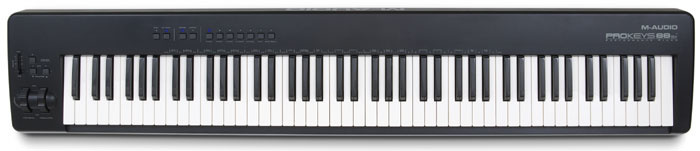 Photo: Mark Ewing The SX features most of the sounds of the original Prokeys, but the second organ, strings, warm pad, two basses and the ride cymbal are missing, as is the means to layer/split sounds. There are also fewer button- and knob-accessed parameters, but with fewer sounds overall, that's understandable — and the chorus and reverb still have dedicated switches. The supplied sustain pedal is a more basic square design than the robust one which comes with the original Prokeys, but it works equally well, and there are two headphone jacks below the pitch and mod wheels, which is handy.
All in all, the Prokeys 88SX makes a fantastic first-time home/stage piano. Personally, I'll always want the extra sounds of the larger Prokeys, plus its ability to combine and control them quickly. That's worth the additional £110 to me, but if you just want piano sounds and basic MIDI control, the 88SX has no rivals at this price point.
No Negatives?
I found myself playing the Prokeys 88 for hours and coming up with great Split/Layer combinations when I should have been writing this review. At band rehearsals, the formerly difficult songs which constantly switch backwards and forwards between piano, organ and strings suddenly became a pleasure to play, as I could simply fade between these sounds in layer mode instead of having to switch at the right moment.
So was there anything I wanted to do but couldn't? Well, it would have been nice to be able to assign the chorus to the left of the split for bass and the reverb to the right (because bass is usually best without reverb) and control the split and layer balances from foot controllers, for those pieces where you really can't spare a hand for a quarter of a second, but I suspect these are both features that could be added in a software update. However, as no other stage piano I have ever come across has these features, it is unfair to complain that the Prokeys 88 doesn't either.
My only serious complaint is that when using either of the organ sounds, there is absolutely no way to ramp up the chorus speed from slow to fast and back again in that signature way that Leslie speakers do. Even if you use the Chorus switch to change the speed (which requires two hands but can be done using the Sustain pedal), the switch is immediate, so it doesn't have the glorious effect of the spin up or down. One thing you must not do is use the mod wheel, which is often where manufacturers hide the speed switch, as this brings in a standard vibrato, which sounds fairly hideous! So for any serious Hammond playing, I do still need to reach for my laptop with NI B4 or Emagic's EVB3 on it.
However, these are niggles. The features and facilities that the Prokeys 88 offers would cause me to recommend it even if it cost significantly more than rival products. However, it retails at several hundred pounds less than its nearest rivals from more established manufacturers of stage pianos, and, as such, has a price/performance ratio that no-one else can beat at present. At £469 including VAT (and bundling that robust sustain pedal) it is difficult to fault, and should help to encourage a new generation of piano players. I would have nothing but praise for this product even if M Audio had delivered it at a couple of hundred pounds more, but the fact that they have brought it in at under five hundred pounds is really extraordinary.
Pros
- Unrivalled ease of use in a difficult stage environment.
- Great playable sounds with lots of very effective sonic combinations.
- The effects and EQ are good without being over-complicated.
- High-quality sustain pedal included.
- Amazing value for money.
Cons
- No 'Leslie spin up/down' available on organ sounds.
- No knobs or sliders for MIDI control.
Summary
Unbeatable value for money in a stage piano which is a delight to set up as well as play — and the Prokeys 88SX, while cut down, is even better value! They're both decent master keyboards, too, if you don't need knobs and sliders.
information
Prokeys 88, £469; Prokeys 88SX, £289. Prices include VAT.
M-Audio +44 (0)1923 204010.
+44 (0)1923 204039.