

With the demand for (and prices of) old combo and tonewheel organs rising all the time, a keyboard that emulates both at a reasonable cost seems like an excellent idea - but can the Nord C1 cut it when compared to its ancestors?
 Photo: Mike CameronSwedish synth maker Clavia's first stab at a Hammond emulation was featured on the Nord Electro 61 keyboard, which I reviewed in the December 2001 issue of SOS. I was very complimentary about its organ mode but, due to some serious errors in the implementation of its electromechanical pianos, I described my time with it as "an emotional rollercoaster". So when I read that Clavia were designing a new keyboard based on the Electro, throwing away the pianos but further refining the organ model, I was rather excited. When I heard that the resulting instrument was to have dual 61-key manuals and include emulations of the Vox Continental and Farfisa Compact Duo (which, perhaps for copyright reasons, Clavia refer to as the Electric-V and Electric-F models) I was very excited.
Physically
The C1 arrived in a padded and wheeled soft case. This is a chargeable option, but it's nice nonetheless. Removing the organ gave me a pleasant shock: it's lighter than many modern workstations. I had prepared a heavy-duty double-X stand for it, but it was apparent that this would not be necessary. The C1 will be a doddle to transport and set up for live use.
The back of the C1 is not complex by modern standards, but you have to watch what you're doing. For example, there are three MIDI sockets, but these are not In/Out/Thru, they're In, Out and a dedicated omni-mode MIDI In for bass pedals, the input from which is channelised and directed to the MIDI Out if required.
Alongside the MIDI sockets, a USB connector is available for upgrading the OS, should it be necessary. Since the review unit had an early version (v1.02), I upgraded it to the latest (v1.12) by downloading the application, connecting my Mac to the C1, running the program, and waiting about 20 seconds for it to do its thing. The procedure was faultless, and PC owners should also have no difficulty, although they will require a driver (available on the company's web site) to enable Windows to 'find new hardware'.
There are three control pedal inputs: a TRS (stereo quarter-inch) socket for a swell pedal, a switch input for controlling the speed of the rotary speaker effect, and a sustain pedal input (which is not as odd as it seems, given that you can use the C1 as a MIDI controller).
Finally, we come to the outputs. These include a headphone output and the main stereo outputs, which can also be used as independent outputs for the Hammond emulation (left) and the Vox and Farfisa emulations (right). When you consider how you might amplify and/or mix these organs, this makes a great deal of sense. Next comes an 11-pin Leslie connector. I suspect that the C1 would sound stunning through a real rotary speaker, but I have six-pin Leslies in my studio, so this will have to remain speculation. Finally, there's a high-level (14V) output for a Leslie preamplifier. This also uses a quarter-inch socket, so you must be careful not to connect it to standard line-level inputs.
Operationally
Like the Electro, the C1 has no physical drawbars, and uses pairs of buttons to increase or decrease the contribution from each footage. It's a more useable system than it sounds, but if your Hammond performances rely on 'playing' the drawbars, you may find that the C1 is not for you, and that one of the other, more conventional 'clonewheels' will fit the bill better. Nonetheless, the use of buttons and LED readouts has at least two significant advantages. Firstly, the system is flexible enough to mimic the disparate controls of the Hammond, Vox and Farfisa organs that the C1 imitates. Secondly, the LEDs give you immediate feedback about the nature of a Program (or 'preset') when you recall it from memory, which physical drawbars cannot do.
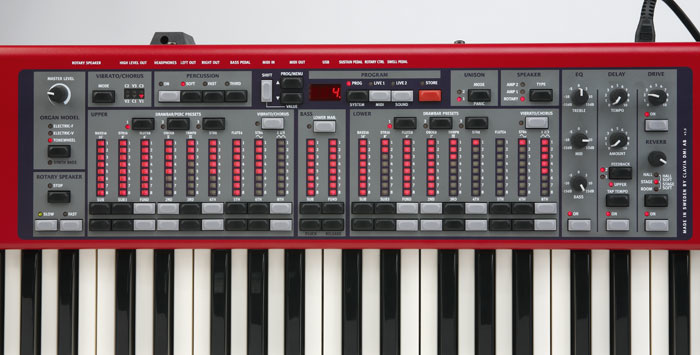 The C1 uses pairs of buttons to emulate the drawbars found on more traditional organs. This does, of course, make it a good deal easier to save and recall preset sounds.Photo: Mike CameronThere is memory for 126 Programs that can be saved and recalled in the normal fashion, and dumped and loaded using SysEx. There are also two buttons called Live 1 and Live 2 associated with each manual. These act as non-volatile memories and allow you to recall your favourite registrations without scrolling up or down the patch list.
Inevitably, not all of the C1's parameters and functions are available on dedicated buttons or knobs, so there are three System Settings menus: System, MIDI and Sound. These contain the detailed settings that you are unlikely to want to change during a performance. Navigation is a little clunky, but simple once you get the hang of it. Happily, the manual is wrong when it says that "System settings are global; they are not stored within a program, but apply to all programs all of the time". This would greatly reduce the flexibility of the C1, and I suspect that the writer intended to refer to the System menu, not the System settings as a whole.
The dual 61-note keyboards are interesting, having two possible responses. 'Fast trigger' mode is not velocity sensitive, but responds as soon as the key is depressed. This is ideal for organ playing, and is always used internally. In addition to this, a velocity-sensitive 'normal trigger' mode is directed only to the MIDI Out. Neither mode generates or receives aftertouch but — depending upon the MIDI mode chosen in the menus — the control panel can send and/or receive MIDI CC data, thus allowing you to record and automate changes in drawbar settings and so on. Unfortunately, the C1's knobs are potentiometers rather than rotary encoders, so if the physical position is different from the value recalled within a memory, the parameter will jump to the physical value when you touch the knob. This can lead to some unpleasant results, especially where the EQ and overdrive knob are concerned.
Before starting the review in earnest, I connected a set of Korg MPK180 MIDI bass pedals, and everything worked swimmingly. This is a big advantage over my favourite clonewheel, the Korg BX3, which has no ability to host a set of pedals. However, had I not had the pedals to hand, I could have used the C1's 'Split' function, which allows you to divide the lower manual into two sections, the upper three octaves responding to the sound chosen for the lower manual and the lower two octaves responding to the sound chosen for the bass. I tested this, and it worked perfectly.
Half-mooning
The review unit came with a 'half-moon' switch for controlling the speed of the rotary speaker effect. This is a chargeable extra, but I imagine that most players will want it, because it is what one expects when playing a real Hammond. The C1's switch can be mounted in a number of positions to the front and left of the lower manual, which is where it should be. Strangely, the manual tells me that, with the switch connected, the rotary speaker controls on the top panel are disabled. This is not correct. If you tell the C1 that it has a 'closed polarity' pedal connected to the rotary control input, the slow and fast options of the half-moon switch work, as do the top panel controls, so you are free to use either.
The Hammond Mode
You select the organ model — Hammond, Electric-V or Electric-F — using a dedicated button that cycles through the three. If you're programming a Hammond sound, your next stop is the Tonewheel model, which resides in the Sound menu. There are three models, called Clean, Vintage 1 and Vintage 2, and these offer increasing levels of artifacts such as leakage and crosstalk between drawbar settings. Of these, my favourite was Vintage 1, which sounded very realistic. Clean was also nice — the 'ideal' Hammond, maybe — but I found Vintage 2 to be unusable. If I ever met a Hammond that sounded like this, I would send it to the doctor. For example, there is a sub-octave leak on D-flat 4 and E-flat 4 that was clearly an electronic fault on the organ used to develop the model. Discovering this was not a question of microscopic investigation: I was playing Pink Floyd's 'Echoes' and there was a low-frequency rumble ruining the delicate registration used for this piece. I double-checked it against my Hammond A100 (see box opposite) and no such artifacts should exist.
Returning to Vintage 1, I then carried out a careful comparison against my A100 and was impressed. The raw sound and pitching across all footages and across the keyboard was excellent, the subtle inconsistencies of a real Hammond were reproduced accurately, the wrap-around at both extremes was correctly recreated, and the gentle compression of the original organ was much as it should be. However, as on the Electro, the key-click and key-bounce artifacts on the C1 are far too loud, and the only way to attenuate them is to turn down the treble EQ. But I don't want a dull sound; I just want less key click! I would like to give Clavia the benefit of the doubt and assume that the C1 conforms to the sound obtained from the Hammond(s) that they analysed to create its models, but somebody within the company should have realised that this level of click is not typical. In my view, correcting it is vital.
Moving on, the C1's percussion sound correctly recreates the tone and response of a Hammond, and there's a bonus, too... The 1' drawbar remains active when percussion is on, which is not the case on vintage Hammonds. This seems trivial, but it isn't, because it allows you to create interesting registrations that are unobtainable on the original.
The 'scanner' chorus/vibrato is the final element in a Hammond emulation, and Clavia's is perhaps the best that I have heard. In 2001, I wrote, "The [Electro] vibrato section offers all six options found on the classic Hammonds, and is worthy of a compliment or three. Accurate imitations of the Hammond scanner chorus/vibrato are notoriously difficult to realise, but this one is excellent, particularly for the deeper effects V3 and C3". The same is true on the C1.
The Hammond A100
The A100 used for comparisons in this review is identical to the B3 and C3 except that it contains a spring reverb plus internal amplification and speakers. If you defeat the chorus/vibrato, switch off the percussion and turn the reverb to zero, you can listen to the un-affected sound of the tonewheel generator through the static speakers, which makes it ideal for a comparative review, to evaluate the un-affected sounds generated by say a Nord C1 versus a real Hammond.
The Vox & Farfisa Models
I suspect that the 'V' model in the C1 seeks to emulate the Vox Continental II but, due to its physical configuration, this isn't quite possible; in particular, the Vox was a spinet organ (dual four-octave keyboards) with a different arrangement of controls. But if we forget the ergonomics and concentrate on the sound, we can make useful comparisons.
The Continental II had differing sets of drawbars for the upper and lower manuals: 16', 8', 4', II and III on the upper, and 8', 4', 2' and IV on the lower, with additional drawbars that controlled the contributions of the sine-wave generator and the triangle-wave generator for each. (The II, III and IV settings were different combinations of the higher harmonics.) The C1 gets things almost right, but with the addition of a 16' drawbar on the lower manual. I view this as a bonus, not an error, especially since the octave relationship between the manuals is correctly retained.
Sonically, the sound of the C1 is close to that of the original, but my Vox Continental II is simultaneously brasher and deeper. Hmm... there's something strange going on here. Despite showing the correct legends on the control panel, the C1's manual suggested that its Electric-V waveforms are triangle and square waves rather than the sine and triangle waves of the original, but my ears told me that the waveforms are neither those of the Vox nor those described in the manual.
When I checked the waveforms on the oscilloscope, I discovered that the Vox's sine wave isn't a pure sine; it's mildly distorted, and there's a slow modulation that adds movement to the sound. In contrast, the C1's sine wave (which, dear manual writer, is not a triangle!) is close to an ideal sine, so it's no surprise that the Vox has more of an edge. Moving on, the Vox's triangle wave looks a bit like a sine wave with the back edge cut off each half-cycle. The C1's is a more precise version of the same general shape, and certainly not a square wave! Happily, we're dealing with small differences here; while the Vox has a little more character in a direct comparison, the Electric-V model still sounds very good.
A more significant difference lies in the nature of the distinctive Vox vibrato. The emulation on the C1 is much slower than on my Continental II. For the percussive playing of, say, Two-tone or post-punk New Wave, the Vox vibrato is more desirable, but for sustained chords I prefer the Nord's.
The C1 differs from the Continental II in other regards, too. For example, some Continental IIs (including mine) had percussion; Electric-V does not. Likewise, the bass controls on the Continentals were a switch to select 16' or 16' + 8', two drawbars controlling the contributions from the sine- and triangle-wave generators, and a sustain knob. In contrast, the 'synth bass' model on the C1 (which is automatically selected when you choose the 'V' or 'F' models) has drawbars for the 16' and 8', and produces yet another wave shape. There are also controls for the amount of 'pluck' as well as sustain. To be honest, I prefer the C1's bass sound but — for the purist — it's not the same.
Unfortunately, I was unable to make a comparison between the Electric-F model and an original Farfisa Compact Duo, because I didn't have access to one during the review period. All I can say is that the C1's emulation sounded much as I remember, as did its four modes of vibrato. Subjectively, I liked the F-mode very much, but I can't guarantee its accuracy.
The Effects
In addition to the effects contained within the organ models, there are seven 'outboard' effect processes available in the C1 — delay, overdrive, EQ, amplifier model, chorus, reverb and rotary speaker — but it strikes me that these are in the wrong order. For example, the overdrive would normally lie immediately before the speaker emulation, and the reverb should lie after the rotary speaker. It would be interesting to discuss this with Clavia's engineers, and to find out why they placed them in the order that they did.
Testing the effects themselves, I have to say that I'm not a fan of the delay; it's too pure and too limited in scope. The overdrive is much more satisfying and, although it has just one control, it is superior to many equivalent effects found elsewhere, imparting anything from a warm growl to a full-on howl.
 The C1's back panel: note the unusual selection of MIDI ports.Photo: Mike CameronThe three-band EQ is basic, with no sweepable frequencies or Q controls to allow you to refine the effect, but it's useable. More so are the amplifier models: L-type (Leslie), F-type (Fender Twin), R-type (which might mean Roland Jazz Chorus, but I wouldn't swear to it), and bypass. These are particularly useful in Electric-V and Electric-F modes, but don't discount them when you're playing in Hammond mode; torturing the output of a B3 through a valve head driven to the point of self-destruction remains a respectable way to get the attention of your audience.
Unison is a stereo chorus with just three settings: medium intensity, high intensity, and off. It's a gentle effect, but I found it much more useful than I had expected. Then there's the reverb, which offers five types but just a single unnamed knob for controlling the level of the effect. Despite the continuing paucity of controls, it's capable of creating some fabulously spacey sounds reminiscent of Pink Floyd and other psychedelic bands of the late 1960s.
Finally, we come to the rotary speaker simulation. This is very pleasing but I am not impressed by the degree of control that you can exert over it. There are just four parameters. The first adjusts the fast and slow speeds of the horn, with just high, normal and low settings that act simultaneously on both. The second controls the horn's acceleration, while the third adjusts the rotor's acceleration, again with high, normal and low settings. The fourth adjusts the fast and slow speeds of the rotor, again with just high, normal and low settings that act simultaneously on both. While the presets are well chosen, it would be nice to have more flexibility and have access to the range of parameters (such as the distance and separation angle of the virtual microphones) that you would find on most modern workstations or multi-effects units.
Put It All Together And...
Make no mistake: despite the lack of real drawbars, I like the C1 very much. It's superbly playable, and the sound is excellent. Choosing the Hammond mode, I experimented with jazz, blues and pop styles, and it responded and sounded just as I wanted. I strayed deep into prog-rock with Deep Purple riffs, Emerson Lake & Palmer and Focus, and then — at the touch of a button — transported myself into soul and gospel territory, and the C1 always delivered.
Having said that, there are problems and, as on the original Electro, it's not the big issues that let the C1 down, it's the details. Indeed, Clavia drive me completely bonkers! ... they get things so nearly right, and then let themselves down with avoidable errors. Sure, the problems in the Vintage 2 model are irrelevant because — in my view — Vintage 1 is as 'leaky' as you need for convincing imitations. But the key-click drives me insane. It's almost as if Clavia's engineers had said to themselves, "let's make sure nobody misses the key-click!" If not for this, I would give the C1's Hammond mode an almost unreserved thumbs-up.
My only other area of concern lies with the effects processors, partly because of the order in which they're implemented, and partly because control over them is so limited. If I were a manufacturer and had decided to place the equivalent of a Space Echo, a simple chorus unit, an EQ, a valve amp and a Leslie in the signal path, I would have given players the opportunity to adjust them at least as fully as they could on low-cost outboard effects units.
OK, that's enough moaning, because I want to finish on a high: I think that you could justify the cost of the C1 for its Vox and Farfisa modes alone! The sound of Electric-V is very close to the original, and I'm sure that I wouldn't be able to tell the difference without the opportunity to compare them directly. Similarly, Electric-F makes me believe that I am sitting at and playing a real Farfisa. Given the cost of a tatty Vox Continental II in today's market (perhaps £750) and that of a Compact Duo (at least as much again) and a Leslie 122RV or similar (as much, yet again) the C1 is a much cheaper and more flexible option. That it weighs just 15Kg and can be carried around in something that looks like a big red suitcase is another huge bonus. I like it!
Conclusion
The C1 is a first-class instrument. Its emulations are excellent, and the chorus/vibrato and Leslie effects are as good as I have heard. Would I use one? Certainly, and I believe that few, if any, listeners would be able to tell that I was not using an original Hammond, Vox or Farfisa. But please, Clavia, please let me turn down the key-click. It's driving me mad.
Pros
- Three classic organs in one.
- Light and transportable.
- Its emulations are all but indistinguishable from the originals except in direct A/B comparison.
- The Leslie rotary speaker and Hammond chorus/vibrato simulations are excellent.
Cons
- If manipulating physical drawbars is an important part of your performance style... well, you can't.
- The key-click in Hammond mode is far too loud, and needs to be controllable without using the EQ.
- The effects deserve more parameters.
- The manual contains errors.
Summary
'Clonewheels' — digital organs that emulate vintage Hammond organs and Leslie speakers — have come of age, and the C1 is an excellent example of the genre. Furthermore, its imitations of the Vox Continental II and Farfisa Compact Duo are far from mere add-ons; they could possibly justify the purchase of a C1 even if the Hammond mode did not exist. If you're in the market for this type of instrument, you cannot ignore the C1.
information
£1595 including VAT.
Hand In Hand +44 (0)1752 696633.