

Logic's Hyper Editor is a powerful way of creating and manipulating MIDI data, but it's often overlooked. We give you the low-down in this advanced workshop, and suggest some ways of using the Hyper Editor in your music.
 Logic's Hyper Editor (top) shows you far more information than the Piano Roll (bottom), so is very handy for programming drums. In the Hyper Editor, each drum is listed down the left-hand side, with event information displayed along the conventional timeline. Logic has always been an excellent MIDI-programming and editing package, offering several different editors which allow you to create and modify MIDI data. Each offers a view of the data in a different form and some editors offer particular advantages in certain circumstances. Quite often it's useful to work with a combination of editors simultaneously, perhaps using the Piano Roll (formerly known as the Matrix Editor) as a general-purpose MIDI editor, with the Event List for fine-tuning note lengths and the like. But by far the most specialised (and most often ignored) editor in Logic's arsenal is the Hyper Editor.
Basically, it is a display that can show all sorts of MIDI data in separate lanes, called Event Definitions, allowing you to see, create and edit different types of data in one window. It follows the timeline in the same way as the Arrange page does, and displays MIDI events as vertical beams, where the height of the beam represents the value of the event. The special benefit of the Hyper Editor is that each lane can have its own timing or quantisation grid, and this grid can be changed at any time to allow for different quantisation to be applied to new events without affecting the data that is already there.
To make life easier, the lanes can be organised into so-called Hyper Sets, and you can quickly create your own, to display the information the way you'd like. By default, there are two Hyper Sets pre-defined: MIDI Controls (to display parameters such as MIDI CC, Pitch Bend and Aftertouch) and GM Drum Kit, where each lane is mapped to a particular MIDI note, according to the GM standard drum map.
To open a new Hyper Editor, you simply navigate to the Window menu and select Hyper Editor from the list of options. The default keyboard shortcut is Apple+5.
Hyper Editor For Drum Programming
One of the most useful applications of the Hyper Editor is programming drums. But why not use Ultrabeat and its built-in step sequencer? Well, Ultrabeat's step resolution is a global setting, therefore you can't mix up 1/8, 1/16 and 1/16 triplets in a hi-hat part, for example, and neither can you view the sequences of multiple voices at the same time. But you can in the Hyper Editor.
 The Create Hyper Set for Current Events command allows you to quickly tailor your Hyper Editor to show only the information that's relevent to your track. With a Hyper Set laid out to display individual notes in whatever software you're using — Ultrabeat, EXS24 or even a third-party virtual drummer — it's a breeze to program realistic-sounding drums (or machine-like ones if that's what you're after).
The quickest and easiest method for making your own drum Hyper Set is to use or modify the existing GM Drum Kit set, found under the Hyper menu of the Hyper Editor pane. Once open, simply select the event definitions that you don't want in your Hyper Set (shift-click to select more than one lane) and use the Delete Event Definition function, also found in the Hyper menu.
You can also customise the the order of the lanes to your liking, by dragging them up or down the list. Personally, I like my toms to go from high to low (top to bottom) rather than the default, which goes low to high! Also, you might want to duplicate some tracks, as it's sometimes handy to have two lanes set to the same note but with different grid settings, making it easy to create flams and replicate other stick techniques.
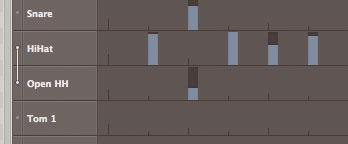 Hi-hat mode is designed to ensure that open and closed hi-hat samples don't play at the same time. Sometimes, you'll need to create your own Hyper Sets from scratch, so let's look at a neat way to define your own. First, in the Arrange window, record in the notes you wish to map out. It helps to play them in the order you want them to appear in the new Hyper Set (though you can move lanes up and down in the Editor later if you need to). In the Event List, select all (Apple+A), and then open the Hyper Editor. In the Inspector area (Hyper Set menu), choose Create Hyper Set for Current Events. This makes event definitions for every note that you recorded (as shown above). In the Hyper menu, choose Select All Event Definitions, then turn to the parameters down the left-hand side of the Hyper Editor (see the box below for guidelines on the parameters). Set the Pen Width and Style and adjust the note length to around 50 ticks; most drum samples play as 'one-shot', so there's no point in using long notes. I set the default Grid to 1/8 notes, but you can change this at any time. Name each Event Definition, by clicking on the name in the left-hand display. If you have a hi-hat in your virtual kit, you may find the Hi-hat mode useful. This only allows one note in the 'group' to be played at the same time: you can't have an open and closed hi-hat happening at the same time on a real hi-hat! Use the small dots on the left of each lane to group tracks using Hi-hat mode.
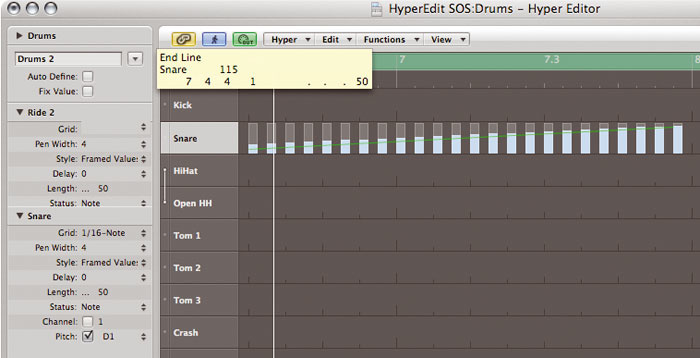 Machine-gun-like effects, such as those found in dance music drum parts, can be created using the line tool. A slightly more long-winded method to configuring your Hyper Set is to use a mapped instrument object in the Environment. This process then automatically names the Hyper Set lanes according to the names in the mapped instrument (and vice-versa), which is very handy, but you may find it's just as easy to stick to Hyper-editing.
Now you can start programming! Using Logic 8's tool priority menus, which are located in the top-right of the Arrange page, I usually set up the main tool as a pencil, with the Command-click tool as the eraser, to make the whole process faster.
You can see by looking at the screenshot on the first page of this article how much clearer it is to see what's going on in Hyper Edit compared to the Piano Roll. It's also very easy to check that you don't have more than four things happening at the same time, which is especially important for drummer realism, unless you have a virtual octopus behind the kit! If less organic drumming is your thing, you can use the Line tool to edit events for that 'machine gun' snare fill.
Event Definition Parameter Guide
 The Event Definition for each lane can be viewed in the Inspector area on the left hand side of the Hyper Editor. Remember that the height of the beam in the lane sets the value of the event, and individual event definitions can be set up by hand, but Logic offers several much faster ways of doing this automatically.
- Grid: this is where you set or change the quantisation grid
- Pen Width: the beams can be displayed at a range of widths, or set to show the length of note events.
- Style: The two settings here (No Frames and Framed Values) enable you to view the beams in different ways.
- Delay: It's possible to time-shift (delay or advance) MIDI events, which is useful for adjusting the feel of a groove or ensuring that CC messages are sent before the note events.
- Length: This sets the length of notes created within the Hyper Editor. The default is 1/16 note, but it can be useful to set this to a shorter value.
The last three parameters are the most important, where you define the exact type of data to be displayed in the lane. The parameters are context sensitive, so selecting one will affect the options for the others.
- Status: choose from a menu the type of data: Fader, Notes, CC messages and so on.
- Channel: select this if you wish to be specific about which MIDI channel is to be displayed.
- Number: selects which particular parameter is being edited (for example, if you are editing MIDI CC events, selecting number 1 will set up the event definition for Modulation).
Setting Up Hyper Sets For MIDI Controls
Since events created in the Hyper Editor are automatically set to a timing grid, there are loads of useful and creative applications for MIDI control messages, pitch-bend messages and so on. You could use 'instant' pitch-bend messages to simulate a hammer-on or pull-off on a guitar part or a bass guitar part, or to create a more realistic guitar vibrato (which, of course, only goes up in pitch). An 'all notes' lane is handy here, especially when it displays the correct note length, but you may want to call up the Event List so that you can fine-tune the data. Being able to see all the required MIDI data on the screen makes it much easier to add events at the right place.
Rhythmic gated effects are also a breeze. But since MIDI CC 7 and 10 (volume and pan respectively) are reserved by the main channel strip controls, it's best to use MIDI CC 11 (expression) to automate volume effects, so that you can still use the main volume fader for adjusting levels whilst mixing. Using some of the swing grid settings here can add interest to otherwise mundane parts.
Some third-party instrument plug-ins, such as Garritan Jazz and Big Band and Personal Orchestra, use particular MIDI Controller numbers to control the articulations. I would recommend making a Hyper Set especially for these. Again, recording some automation data, then using the 'Create Hyper Set for Current Events' function is an easy way to do this.
Internal Hyper Control
Of course, you can use the Hyper Editor to control Logic's instruments and plug-ins, although the process is a little more complicated. The individual parameters of a plug-in can be accessed using what Logic calls Fader messages, but working out which one to use can be challenging. If you only want to program a few parameters, it's easiest to create some track-based automation and then use the Move Current Track Automation Data to Region function to create the basic MIDI Fader data. But if you want a more complete set up, you'll need to create Fader events in the Hyper Editor. To set up a lane to control Fader messages, choose 'Fader' from the status menu.
 Creating a Hyper Set for virtual instruments can help to speed up the programming process. This one is for Garritan's Jazz and Big Band. Once you've done this, you have to navigate a rather cryptic routing system to access plug-ins on a channel, whereby the Hyper Editor Channel parameter corresponds to the plug-in slot within the channel strip. The source object (the virtual instrument, in most cases) is found on channel 2, while the first Insert is called up by selecting slot 3, and so on. The Number parameter selects the specific control within the plug-in. Conveniently, the Info area of the Event List displays the name of the function, and it updates to correctly identify the controls if you change to a new plug-in, so it's an idea to have this open. Also, it's easier if you view the plug-in in Controls view, so you can see the parameter names.
Once you've created the Fader events in the Event List, it's relatively simple to make a Hyper Set for them. You could use one of the functions mentioned earlier to make a complete set, or check the Auto Define box, then click the desired Fader events in the Event List. Just remember to switch it off when you've done this, or you could end up with some spurious results! Within the Event Definition in the Hyper Editor, you'll then need to tick the Channel box, and set it to '2', as it's here that the input object resides. Finally, name each lane.
With your Hyper Set ready, you can now get creative, and start programming whatever parameters you like, with a rhythmic accuracy that would be very challenging to do any other way in Logic. If you want to program insert-effect plug-ins in the same way, redefine the event definition's channel parameter to the corresponding insert slot and start all over again.
As always, remember to keep all your Sets saved, so that you can easily revert back to them.
Forthcoming Logic Events
Apple Solution Experts Digital Village are hosting a series of product demonstrations featuring the eight-core Mac Pro, Logic Studio, Euphonix Artist Series controllers and Apogee audio interfaces. The 21 sessions will take place in each of their eight locations within the UK. For more information and to register, visit www.dv247.com/logic.
- DV Retail Warehouse, Romford: Saturday 5th April, 12pm, 2pm and 4pm.
- West London: Wednesday 9th April, 2pm, 4pm and 6:30pm.
- Bristol: Thursday 10th April, 4pm and 6pm.
- Cambridge: Saturday 12th April, 12pm, 2pm and 4pm.
- Clapham / Gateway School of Recording: Thursday 17th April, 2pm, 4pm and 7pm.
- North London: Saturday 19th April, 12pm, 2pm and 4pm.
- Birmingham: Monday 21st April, 4pm and 6:30pm.
- Southampton: Friday 25th April, 2pm.