

Audio interface, control surface, monitor controller — the Alesis Master Control does it all. Could it be the perfect companion to your DAW?

There was a point in the '80s when every other gadget seemed to have a digital watch built in, or a biro, or a bottle opener, or all three, while today it appears that the flame lit by these early innovators is now carried staunchly by the LED torch. In the home‑studio market, it wasn't too many years ago that the 'Swiss Army knife' award for bundled extras would have gone to an analogue voice channel or digital multitracker, but these days it'd probably be a toss‑up between a software sequencer and a hardware audio/control interface.
The new Master Control from Alesis is a case in point, taking a hardware control surface and bolting on a couple of mic preamps, multi‑channel audio interfacing, monitor control and a 3.7‑megapixel webcam. (OK, I lied about the webcam, but it can surely only be a matter of time...) As befits such an all‑in‑one device, there are specs and features aplenty, but rather than getting bogged down with those straight away, I've popped them all in a separate 'Vital Statistics' box so that I can concentrate on how the Master Control responds in practice.
Audio Interfacing
A lot of computer musicians will be perfectly happy with the supplied eight analogue inputs, so the use of digital interfacing for the remaining 14 makes sense, particularly as there's now a good deal of choice in terms of stand‑alone multi‑channel preamps with ADAT interfacing — names like Audient, Behringer, Focusrite, Presonus, RME and TL Audio immediately spring to mind, but that's by no means an exhaustive list. What project studio owners are likely to be less happy with is only being provided with two mic preamps, especially the ones here. It's not that the preamplification itself is bad — Alesis have been making mixers for a long time, and you get a healthy 60dB of pretty clean gain. The first thing that's a pain is that the gain control knob is exceptionally diddy (like a hardware LCD contrast control) and is tucked inconveniently around the back of the unit below the line of the sockets.
Even had Alesis, like many an '80s gadget entrepreneur, built a pencil‑sharpener into the Master Control, allowing you to slim down the ends of your fingers, you'd still encounter problems, because about 14dB of the available gain has been bunched up so close to the end of our nano‑knob's travel that I was unable reliably to set any intermediate gain level between about 46dB and 60dB. Although this kind of control‑law bunching is by no means uncommon on budget preamps, I don't think I've ever encountered an example as extreme as this before — that last 14dB might as well be a switch. And speaking of switches, the phantom power for both preamps is activated by a small button that could scarcely have been better designed to disguise it as one of the gain controls, so new users should expect a certain amount of inadvertent gain/phantom hilarity to ensue.
Another complaint I have in general about the audio interfacing is that there's no top‑panel legending to let you know which socket is which, and this is particularly tedious for the headphone and line I/O sockets, which form such an inscrutable 8x2‑socket phalanx that you'll forever find yourself craning your neck trying to make out the rear‑panel legending. Which, from that viewpoint, of course, will be upside‑down. Take my advice: don't plan on setting up the Master Control right against a wall, under a shelf, or in front of a moving table fan. And while we're talking about panel markings, leave some budget for a bottle of Tippex, so that you can mark an indicator line on the two otherwise featureless headphone‑level knobs.
Monitoring & Talkback
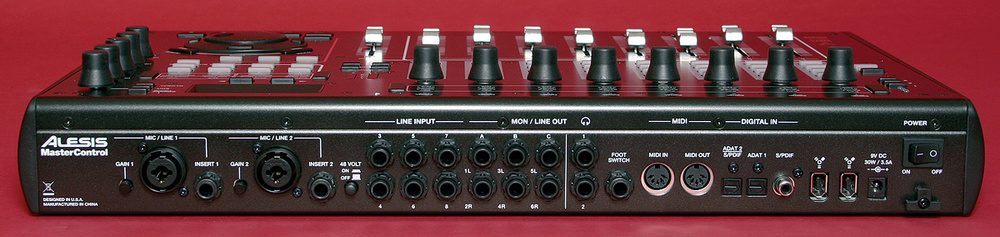 While almost all of the controls are mounted on the front of the unit, the preamps' gain controls are found on the rear, along with the unit's I/O. This can make for some slightly fiddly operation.
That the input metering is limited to simple Signal/Clip LEDs isn't the worry it might once have been, given the extensive metering now available within most typical software applications, but it's nice nonetheless to have the little five‑LED bargraph display for the main outputs, as it would, in theory, be possible to clip these without clipping the outputs of your software. The reason for this is that the Master Control actually includes a separate low‑latency DSP mixer for cue‑monitoring purposes, and this combines its output with that of your recording software.
This cue‑monitoring facility is called Direct Monitoring by Alesis, and the available DSP mixing controls themselves are quite basic, comprising just level and pan controls for each of the analogue and digital inputs, and the ability to route the subsequent mix via a dedicated Direct Mon Level knob to any or all of the available analogue outputs. What is a really nice idea, though, is that if you hit the Direct Monitor button on the left edge of the unit, the assignable faders and knobs abandon their DAW‑control functions and drive the DSP mixer instead, letting you set up your cue balance in a flash. This is a really elegant little system, with the inputs addressed in sensible banks and Mute/Solo buttons operating as you'd hope. If you substantially expand the built‑in analogue input count to push beyond small‑scale recording and overdubbing, you may find the single cue mix becomes a limitation, but as it stands I found the Alesis control approach much friendlier and better than the handful of software cue‑mix utilities I've used up to now on other audio interfaces. (The Master Control's own software control utility is a relatively calorie‑free affair, as it only needs to deal with simple digital clocking and buffer/latency settings.)
It's worth clarifying that Direct Monitoring isn't a true zero‑latency scheme, as you still get a few milliseconds of delay owing to the DSP's A‑D/D‑A conversion and number‑crunching. While Alesis themselves admit that the Master Control's smallest buffer‑size settings will give just as good a latency delay figure via software monitoring, the moment audio processing or virtual instruments start bringing your CPU out in even the slightest sweat, you'll quickly find Direct Monitoring to be the better option. To put this in perspective, I opened a completely empty project in Cubase 4.5.2 with nothing but a single audio track in it, and was able just about to achieve a buffer size of 96 samples without audio glitching. At that setting, the software monitoring latency (reported as roughly 3.7ms in and 3.4ms out) was pretty much on a par with that delivered through the Direct Monitor DSP mixer.
Rounding out the foldback functions is a built‑in talkback mic, which can be routed to any output and, by default, seems sensitive enough to pick up all but the most cautious of sniggers from the back of the control room. If you're monitoring via the built‑in headphone jacks you appear to be stuck with the default level setting in the current firmware, though, because although you can merrily adjust a Talkback Volume parameter in the Master Control's internal menus, this appears to make no difference to the level of the talkback in the headphone feed.
The Talkback switch itself is another problem, despite sensibly muting the DAW and Direct Monitor feeds to all outputs when the talkback mic is active. By locating the switch right next to the mic on the panel and insufficiently damping mechanical vibrations within the chassis, Alesis have allowed it to transmit such a click to the cue monitoring that it renders the talkback function practically unusable as far as I'm concerned. The situation is rescued in some measure by the option to use a footswitch for talkback switching, but I don't think that really gets Alesis off the hook, because it just feels like poor design. How difficult would it have been to locate the talkback mic at a greater distance from the button?
As I mentioned a moment ago, the DSP mixer has its own dedicated digital output level control, addressed from an endless rotary encoder. While it seems fair enough to me to have a software level control here, I'm cagier about the same approach being used for the interface's main output‑level control (labelled 1‑2 Level). To be fair to Alesis, I didn't have any unexpected level jumps during the review period, but you have to ask yourself how your speaker setup would respond if, say, the Master Control's firmware ever decided to crash in such a way that it sent full‑scale digital hash out of the output sockets. What you do get in return, if you're unconcerned by such nebulous risks, is the ability to decide which of the three output pairs are under the knob's control, and in conjunction with the three Speakers/Outputs buttons this gives you simple monitor‑controller functionality: just select the pair of monitors using the buttons, while controlling the levels of any of them from the 1‑2 Level control. Enterprising studio owners might also decide to use the Master Control's six outputs for 5.1 surround monitoring too, for which the ganged volume control would likewise be very handy.
DAW Control Surface
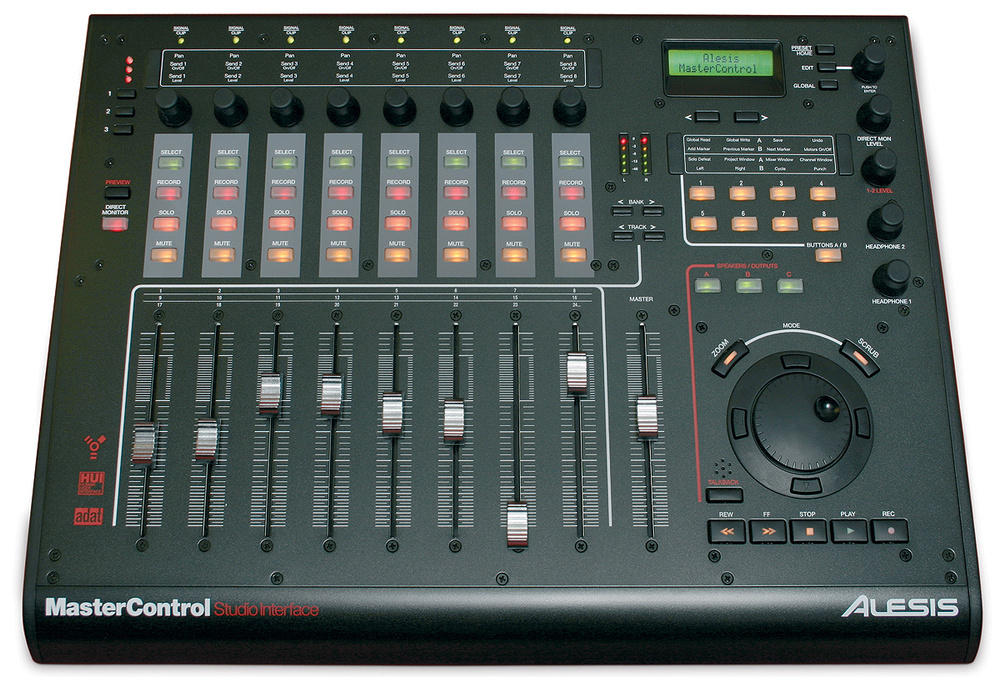 The Master Control's main panel measures 486mm by 368mm, and Alesis have done well do squeeze everything, including the full‑size faders, into this space, with only one or two ergonomic compromises.
When it comes to remotely operating your DAW parameters, the Master Control uses the Mackie Control standard with all supported applications except Pro Tools, for which it uses the HUI protocol. (Whether many Pro Tools users will choose the Master Control, given that its audio hardware won't be accessible to the software, is of course somewhat open to question anyway.) Preset control layouts are available for all the main MIDI and Audio sequencers (Cubase/Nuendo, Digital Performer, Logic, Pro Tools, Sonar), as well as Reason, Samplitude and Live, but in addition to these you can also use the Master Control as a generic MIDI controller, in which case the faders and pots just squirt out a range of MIDI Continuous Controller messages. The hardware ships with a couple of dozen natty plastic overlays that can be slotted snugly into the top panel to remind you of the parameter assignments relevant to your specific sequencer, and you also get bundled 'lite' versions of Ableton Live and Cubase supplied, in the unlikely event that you've spent the best part of a grand on control and interfacing hardware without already owning anything for it to control or interface with!
Setting up the Master Control for use with my Cubase system was pretty easy, given the well‑written manual, which walks you through the various steps of the process. Basic fader, pan, mute, solo and record‑arm controls worked as expected, with the four buttons just under the output meters sliding the hardware controls across the software mixer channels one at a time (Track) or eight at a time (Bank). Touching a fader selects the channel in question and brings its name into the LCD display, while moving a knob not only displays the affected channel's name but also the addressed parameter's value. The rotary controls are switchable to access three parameter layers, which in Cubase adds eight send switches and levels for the selected track, and there is a facility to swap the control destinations of the faders and rotary controls — useful given that the rotary controls give no dedicated visual feedback of their settings.
Transport operations and audio jogging/scrubbing held no surprises, although I see little point in audio scrubbing now that audio waveforms have arrived on the scene. You can move channel and object selections and alter zoom settings in two dimensions using the cursor keys around the Scrub wheel, although I thought the spacing of these conspired with the slightly sloping layout to make them uncomfortable to use, so preferred to use Key Commands for these tasks.
The final control area is taken up with the dual‑bank assignable buttons. These can directly trigger a shortlist of common location, automation and window‑management tasks, and these assignments can be edited via the LCD display and data dial. For any tasks not in the shortlist, you can simply instruct a button to act as one of the Mackie Control function keys, and then map that onto your choice of Key Command within Cubase's Device Setup dialogue. Forgotten what a button's control assignment is? Hold down the Preview button first and you can press the control button to see its function on the LCD, without actually triggering the action.
Although, on the whole, that lot constitutes a pretty well‑rounded set of control features, the rotary controls do still let the side down a bit. For a start, the preset knob assignments for each sequencer are both a bit arbitrary and pretty limited. For example, in both Digital Performer and Pro Tools you get just Pan and Send 1 Level controls per channel, and the only preset to provide any access to EQ parameters is the one for Samplitude. Needless to say, unless you switch over to the generic MIDI controller mode you can forget about any control at all for plug‑ins and virtual instruments.
In addition, there was a problem in the Cubase implementation of the second and third assignment layers, whereby navigating around the Project's mixer channels using Bank keys frequently caused the assignment layer (as selected by numbered keys to the left of the knobs) to reset. So if you're concentrating on setting up reverb levels on different channels using Send 1, you can suddenly find yourself inadvertently disrupting the channel pan controls instead. [Alesis say that this is to do with how their hardware implements the Mackie Control protocol and can be avoided if you press the Bank keys more slowly.]
Too Much Of Everything?
As I said at the outset, the Master Control does manage to cram an awful lot of features into one unit. However, as is often the case with all‑in‑one products, it manages to make many of these features feel a little half‑baked in one way or another. The interfacing, for example, boasts a lot of I/O, but has only two slightly compromised preamps and no instrument input; the control surface has nice long faders and a spacious control layout, but then you have weird cursor keys and some rotary‑control parameter‑access frustrations; the hardware‑controlled cue mixing is great, but you only get one mix for all those inputs; and the monitoring is a neat addition as long as you don't use the Talkback button. All of that said, however, I couldn't find any real show‑stopping nasties, and the unit itself seemed robust and reliable during the review period, so (niggles notwithstanding) this whole package must still demand serious consideration on grounds of bang for buck.
Alternatives
The two main competitors in this kind of price range are the M‑Audio Project Mix I/O and the Tascam FW1884. From a hardware angle, the former doesn't quite match the Master Control's raw I/O count, but compensates for this with eight mic preamps, a high‑impedance guitar input, and a word clock connector. It also can't match 26 inputs, but scores more audio outputs than the Master Control, has four times as much MIDI I/O, and can be expanded via optional FE8 side‑cars, should you wish to increase fader numbers at a later date. In terms of DAW-control functionality, the M‑Audio mounts probably the strongest challenge, in that its rotary controls allow much deeper access to channel and plug‑in parameters.
If you're happy with 60mm faders that aren't touch-sensitive or motorised, then Yamaha's 01X is also an option too, matching the Alesis XLR mic preamp and analogue input count, as well as chucking in a high-impedance instrument input. A further 16 inputs can be added via mLan‑compatible hardware, although there's not been fantastic third-party take-up of this standard, so you may feel this limits your options a bit. The Yamaha is also much more fully featured than any of the other units as far as DSP mixing is concerned, with 28 fully featured channels and twin send effects.
Vital Statistics
- Firewire Audio & MIDI interface, simultaneously capable of 26 inputs and six outputs.
- 24‑bit digital recording and playback at sampling rates up to 192kHz. (Elevated rates can reduce audio and MIDI I/O count and disable talkback.)
- Compatible with Mac OS 10.4 and above, Windows XP SP2 and Vista.
- Balanced analogue inputs: two mic/line inputs on combi jack/XLRs with phantom power and accompanying insert points; and six line inputs on TRS jacks.
- Balanced analogue outputs: six line outputs on TRS jacks.
- Metering: Signal/Clip LED per analogue input channel; five‑segment LED bargraph for main stereo output.
- Headphone outputs: two with independent signal feeds and volume controls.
- Digital inputs: two ADAT multi‑channel optical connectors and one stereo coaxial S/PDIF connector.
- Digital outputs: none.
- Other I/O: footswitch input, MIDI In and Out.
- Hardware DAW controls: nine 100mm touch‑sensitive motorised faders; 10 endless rotary encoders; Select, Record, Solo and Mute switches per channel, plus a further two banks of eight assignable buttons; Zoom, Scrub, and transport controls with jog/scrub wheel.
- Other features: switched talkback mic; three‑way speaker/output switching; Direct Monitor low‑latency cue‑monitoring; 2x16‑character LCD with accompanying data dial.
Pros
- Up to 26 inputs, eight of them analogue, as standard, with six analogue line outputs and a pair of onboard headphone amps.
- The control surface features some nice full‑length touch‑sensitive faders, endless rotary encoders, transport controls and some assignable buttons.
- Slick hardware‑controlled low‑latency cue‑mixing via onboard DSP.
- Basic monitor control and talkback facilities.
Cons
- No high‑impedance instrument input and only two ergonomically compromised mic preamps.
- Rotary controls have fairly restricted preset parameter assignments.
- Only one low‑latency cue mix available despite the 26 possible inputs.
- Talkback button transmits a lot of switching noise to the adjacent mic.
Summary
Despite some operational frustrations, the Alesis Master Control does put a lot of important computer‑related hardware functionality in one place, and does so at a pretty competitive price.
information
Test Spec
- Alesis Master Control firmware v1.0.
- Alesis Firewire Control Panel v3.3.3.3355.
- Steinberg Cubase v4.5.2.
- Rain Recording Solstice O3 PC with AMD Phenom 9750 quad‑core 2.4GHz processor, 4GB DDR2 RAM, and Windows XP Pro with Service Pack 3.