

There may not be many new features, but MaxMSP 5 benefits from a fundamental overhaul that brings Cycling 74's open–ended media programming toolkit into the modern world of multi–processing and slick interface design.
 Most readers of this magazine will know about MaxMSP: if you've not used it, then perhaps you've used applications or plug–ins written with it; or maybe you've seen it in action, or mentioned in interviews. Certainly, the user interface featuring object boxes connected by patchworks of lines is something of a modern visual icon. Although MaxMSP is a little esoteric compared with mainstream music products, it is deeply entrenched in the digital media scene. This is mainly because of its flexibility: as an open–ended audio and media toolkit, artists, programmers and studio engineers have used it to construct all sorts of software systems, from audio plug–ins to art installations, and a fair proportion of laptop gigs worldwide will be at least partially Max–powered. If you're working in hi–tech music or the digital arts and you have a problem to solve, MaxMSP is your Swiss Army Knife. Or if you feel that you're outgrowing the confines of off–the–shelf instruments and recording packages, and want to explore new ways of creating work, MaxMSP is your own personal Meccano set, with an infinite number of pieces.
Working with Max is a form of graphical computer programming, but without the pain of conventional programming languages: everything is graphical, direct and immediate. Max is extremely visual and highly interactive, so it's certainly possible for non–programmers to dig in, select some of the built–in components, and get a basic audio processor, like a simple mixer or parametric EQ, assembled and running in a matter of minutes. (Obviously, as with 'real' programming, more complicated applications will take a lot longer.)
Max is bundled with a large library of pre–compiled objects, often referred to as 'externals' because they are generally written in C or Java and compiled without Max's assistance. A Max document, called a 'patcher', can be thought of as a complete audio or video program, although it needs the Max application to run: Max operates as an interpreter, calling the native code of external objects according to how they are connected and used in the patcher. Alternatively, Max is capable of building 'stand–alone' applications, which can be run on computers that don't have Max installed — a stand–alone is effectively an encapsulated patcher bundled with a copy of the Max kernel and any external objects it needs.
The objects that the user fits together to make a patcher are segments of code that perform specific functions such as numerical calculations, manipulating text, or processing audio streams or video matrices. There are objects for inputting and outputting MIDI, audio and video data, so a patcher can operate as a complete application. Many of the objects supplied in the Max library are designed as user–interface components: buttons, sliders, number boxes and so on. Connect a set of objects together by lines or 'patch cords', and you have a real–time processing graph, which might implement something as simple as a stopwatch or as complicated as a polyphonic modular synthesizer or a VJ performance system.
Max History
Max first appeared as a commercial MIDI processing package when Opcode Systems (producers of the Vision sequencer for the Mac) packaged and shipped it early in 1991. In fact, it had been under development at IRCAM in Paris for some years before that, which makes it easily old enough to vote. Over the last two decades, Max has acquired the ability to create and process digital audio (Max Signal Processing, hence 'MSP'), and with the addition of a separate library called Jitter it can also work with video and OpenGL graphics. Recent releases of Max added support for embedded Java and JavaScript programming, opening the door to databases and web servers and making the package truly Internet–enabled.
A lot has happened in the software world (and the digital music world) in the 17 years since my first copy of Max arrived on a floppy disk and I gleefully installed it on my 16MHz Mac SE/30. The addition of MSP and Jitter have helped Max stay on top of the computer audio and computer video revolutions, and it has survived two changes of processor (from Motorola 68000 to Power PC, and then Intel Core), a major change of Mac operating system ('Classic' OS to OS X), and a port to Windows XP. But this longevity has come at a price: the development effort at Cycling 74 has been concentrated on trying to maintain a 20–year–old code base, designed around the libraries and interfaces available on a 1987 Macintosh, rather than creating new features or porting to new platforms.
 The help patcher for Max's circular dials, as it appears in Max 4 (left) and Max 5 (right).And this legacy is all too apparent to anyone who has used Max: everything about the user interface seems to be a throwback to the late '80s, with its minuscule pixellated icons, crudely drawn control dials and a colour selection palette that seems to be straight out of 8–bit DOS.
In any software project, there comes a point where it makes more sense to replace rather than continually repair, and having delivered Max 4 for Intel Macs, the Cycling 74 team decided it was time for a clean sweep, to prepare Max for its next 20 years.
This decision actually mirrors the one taken by Apple in the move from OS 9 to OS X — the old operating system was becoming unmaintainable, and wasn't providing the robustness or flexibility needed for modern applications, so it was swept aside, to be replaced by something with a modern core and better support for high–resolution screens and powerful graphics cards. At the time there was much gnashing of teeth — pundits hated the anti–aliased, 'fuzzy' fonts, photo–style icons and drop shadows — but it's now familiar, and we're so used to it that Mac OS 9 looks like an antique. As we'll see, Max is going through a similar process.
Since MSP is now a bundled part of Max — there is no longer a version of Max without audio processing — we'll drop the 'MSP' part of the name for the rest of the article, although some parts of the program still refer to it as 'MaxMSP'. Jitter is still a separate product, but we'll make reference to it during the review.
A New Look
The most startling change between Max 4 and Max 5 is the total visual makeover: yes, it still has object boxes connected by lines, and the programming metaphor of direct manipulation is unchanged, but the kernel has been rewritten to support multi–processing, and the user interface has been completely redesigned from the ground up. The primitive, blocky graphics have gone, to be replaced by a smooth, curvy, anti–aliased, full–colour, composited finish. Visually, Max has undergone a Doctor Who–style regeneration: it works in the same way and does the same things, but it now has a fresh new appearance and personality.
The new user interface is built using a software package called JUCE, which was originally developed as part of Mackie's Tracktion music production system, before being spun off as an open–source package. Expect to see other JUCE–enabled software in the future: the forthcoming Circle synthesizer by Future Audio Workshop is also built with JUCE.
There is a particular 'JUCE look' to Max 5 — graphical components are sparse and simple, and everything is anti–aliased, giving a smooth but slightly fuzzy appearance. In fact, Max 5 now looks rather like Ableton Live, although Live and JUCE were developed completely independently.
One of JUCE's strengths is cross–platform compatibility. While Max 4 on Windows was a rather miserable experience, with ugly fonts and a clumsy multiple–document windowing interface, Max 5 on Windows is practically identical to Max 5 on the Mac, apart from some minor OS–specific layout details like the positions of menu bars.
The new interface allows visual components to be zoomed and scaled to an arbitrary degree; the down side is the anti–aliasing. Unlike in Mac OS X, there is no way to get a non–anti–aliased 'screen font' that can be used at small point sizes. Add to this the fact that most of the interface components now have thicker borders and rounded corners, and it becomes clear that it is going to need a bit of effort to make a Max patcher document crafted for Max 4 look good in Max 5.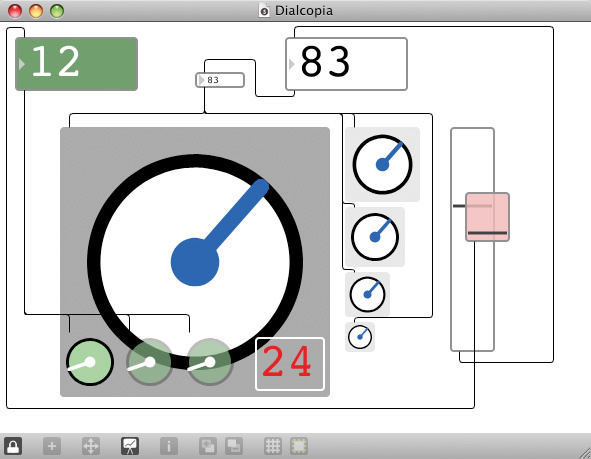 More Max 5 objects in their new guise: number boxes, sliders and dials of various sizes and colours, plus a bit of gratuitous translucency.
First Steps
The first change encountered when launching Max 5 is the application icon. Zeke Berman's 'seatbelts' image is gone, to be replaced by a dark grey circle containing the figure 5: a statement in bold minimalism. The current release of Max 5 also lacks a splash screen, so the first thing to appear after the 'busy' cursor is the Max Console window. This is the text window where Max objects print status or error messages (Max makes very little use of pop–up alerts and dialogue boxes, preferring to let objects log messages to the console).
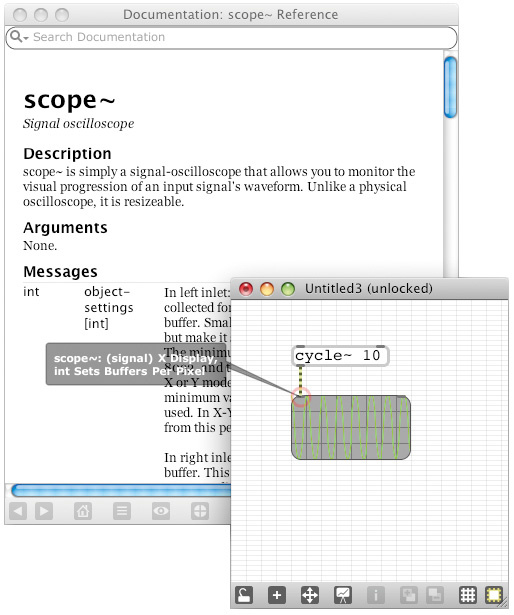 'Balloon' hints and integrated documentation make using Max 5 a much friendlier experience.There are some changes in the appearance of the console, compared to Max 4 — there are two columns rather than one, and a collection of icon buttons on a bar at the bottom — but otherwise we are in familiar territory. Error messages print with a red background, making them highly visible, and the new console now responds to mouse clicks; for example, clicking a message will generally show the relevant patcher and highlight the object that printed it.
Taking
the application as a whole, the main menu layout has hardly changed at all, and Max 5 still manipulates patcher files as it did before. Even though the program now looks completely different, it operates in much the same way as it used to, and there's no real learning curve with the new version.
Documentation
One of the most up–front changes, after the visual redesign, is the tightly integrated help system. A floating Post It–style Clue window gives immediate explanations of icons and menu items, and this on–line assistance is available constantly as you work with the program.
Where Max 4 came with a collection of PDF documents and a folder of tutorial patchers, Max 5 effectively comes bundled with its own internal web site. Selecting the main 'Max Help' item from the menu brings up a hypertext page with links to tutorials, background articles, index pages, 'vignettes' that explain how the Max interface works, a search engine, and even a walk–through explaining the documentation system itself. The documentation is heavily hyperlinked, and there are links in the documentation that launch example patchers directly. The same documentation sources are used for the integrated help, the Clue window and the various assist prompts and menus that we'll see later, so all these snippets of documentation are coherent and consistent.
With a sophisticated built–in documentation system like this, you don't really need printed documentation at all — which is just as well, because there isn't any. The documentation is all mirrored on–line, so you can print what you like from your web browser, but I doubt that anyone would feel the need to. Unlike PDF manuals and Readme files, Max 5's documentation slots into the program's interface almost transparently, putting everything right at your fingertips.
At this stage, it's worth mentioning in passing that Max 5 doesn't support printing at all, although it is possible to export a patcher file in image form (think of it as a built–in screen grab), which can then be printed directly or embedded into other documents.
In a similar vein to the integrated hypertext documentation, Max 5 also sports an integrated file browser. Files are categorised into 'kinds', such as object, patcher, audio file, and so on, and the browser supports search queries (rather like Smart Folders in OS X), so if you want to list patcher files modified in the last two days, for example, or manual pages for objects starting with 'jit.gl' (for Jitter OpenGL), it's an easy process.
 Browsing files by name, date or type — and files can be dragged and dropped into patchers.The file browser also supports some rather clever drag–and–drop behaviour: drag an audio file into a patcher window, and it creates an 'open' message box containing the audio file's name. Drag a patcher file and you get what Max calls an abstraction: the patcher you have dragged is nested inside the enclosing patcher and can now be used as an object in its own right.
Patchers
When it comes to creating patchers, the basic procedure is unchanged, but Max 5 has revamped and streamlined the process. Each patcher window now has a button bar along the bottom, and the patching area now provides a couple of visual cues: there's a grid of dots to help with positioning, and if the patcher is empty the message 'Double–click to make a new object' appears in large, friendly letters in the centre.
 A selection window of object icons makes choosing easy — and the Clue window is there to help.Max 4's pixellated object icon bar is gone; instead, double–clicking inside the patcher brings up a translucent grey object palette, with icons for all the possible kinds of object laid out and arranged under category tabs. Again, the Clue window will happily pipe up with descriptions of the objects as the mouse pointer passes over them. Select an icon and a new object appears at the original double–click position.
There are now simple keyboard shortcuts to create the most common kinds of object right under the mouse cursor: 'n' creates a named object (Max 5 still has a huge number of non–graphical named objects, for which you have to type the actual name), 'm' creates a message box, and so on. And there's more assistance for named objects: auto–completion offers a selection of matching names as you type, or you can pull up a pop–up menu of all objects organised by category — and all the time, the Clue window updates with textual descriptions as you type or select.
Plain objects and message boxes have a similar appearance (text in a curved rectangle) but completely different functions. A plain object is an actual processing element — a piece of native code or a nested patcher — whereas a message box is just a string of characters or formatting codes, capable only of transmitting its contents. In previous versions of Max, the distinction between the two was often lost on beginners, so Max 5 tries to make them look quite different: message boxes have a graduated colouring, and corners that are more rounded than those for named objects.
The patching window has a few other enhancements, most of them indicated by the icons in the button bar. The patcher view is zoomable over a wide range, and there's a floating zoom widget for easy scrolling over a zoomed–in view. As well as window zooming, objects themselves can also be resized, individually or in selected groups. Max's new graphical rendering engine allows anything to be drawn at almost any scale, so if you want a one–letter text message that fills the entire screen, or a 'start' button the size of a dinner plate, you can make them.
The aforementioned grid can be enabled for snap–to–grid editing, for that highly regimented patching experience, and the grid can be drawn as lines, for a graph–paper appearance, although the grid cells don't have to be square. Grid settings are saved with the patcher file.
When it comes to actually connecting objects together, there are other improvements. If the mouse pointer hovers over an object inlet or outlet, a coloured halo appears with a 'speech balloon' describing the inlet or outlet's function. If data sent to an inlet will cause output, the halo is red; otherwise it is blue. Clicking on an inlet brings up a menu of all the messages an object understands, plus links to a help patcher and the documentation.
Attributes & Inspectors
When Jitter was first implemented, it became clear that many of the built–in objects would potentially need long lists of parameters, so a mechanism was introduced for specifying named 'attributes' to configure an object, allowing default values to be selectively overridden to change the object's appearance or behaviour. The attribute system has been making its way slowly into the rest of Max, and Max 5 takes things further, standardising the way the components of a patcher are configured. The 'object inspector' was around in Max 4, but has been seriously beefed up for Max 5, and now exposes an attribute view for each object, as well as for the patcher document itself. A tabbed window presents attributes row by row, colour–coded for clarity, with font selectors, colour swatches, menus and tick boxes as appropriate.
One of the design aims of the attribute system was that an object should be able to accept an attribute change by receiving a message via a patch cord. If you drag a row from the inspector window onto the object, Max will magically create a message box with the correct text to alter that attribute. This is great for Jitter users, where attributes are so crucial to the control of video and matrix objects, but is also a really handy shortcut in the Max world, especially now that so many more aspects of an object's appearance can be controlled.
In Max 4, anyone designing a user interface worked in a world of impoverished colour. A tiny handful of user interface objects knew about RGB colours, but everything else drew on a rather gaudy preset 16–colour palette. In Max 5, everything lives in a full–resolution RGB world with an added alpha value for transparency — objects such as knobs and sliders can have their components drawn in any colour, with arbitrary degrees of translucency, so there is lots of potential for some beautiful user interface design (and, I predict, some that's horrid). There is still a (larger) colour palette, so you can save and restore your own RGB colour choices.
The attribute machinery also allows developers to add notes and comments directly to objects. The 'hint' attribute adds a pop–up–style hint text (or 'tooltip') activated by mouse–over, while the 'annotation' attribute allows a comment for an object to be displayed in the Clue window as a handy reference.
Presentation
 Colour and behaviour settings for a filter graph interface.One more enhancement to Max's user interface promises to have a huge effect on the way that developers design patchers. One of the fundamental aspects of a Max patcher is that the 'program' is the same thing as the user interface. While some of the implementation details of a patcher can be made invisible when the patcher is actually being used, there is often a conflict between the structure of a patcher and how it should look to the user. Part of the reason that many patchers look like a random rat's nest of connections is that objects have been positioned in a user interface that bears little relation to the connections between the objects.
Max 5 solves this problem by providing two distinct ways of organising and viewing a patcher. In Patcher Mode everything works just as in the old days: objects are assembled and connected with patch cords, and when the patcher is 'locked' it operates as a user interface via knobs, dials and other GUI objects. But Presentation Mode offers a new, separate, canvas for laying out and resizing the objects purely as an interface — there are no inlets, outlets or patch cords. Objects within a patcher can be added to, or omitted from, Presentation Mode as required, and their presentation layout has no effect on their positions in the normal patching mode. Presentation Mode provides a clean 'separation of concerns' between the structure of a patcher and the layout of its user interface, so it's no longer necessary to compromise on one in order to make a good job of the other. As an extra bit of design polish, when you flip between Patcher and Presentation Modes, the objects float from one position to the other, so you can keep track of where something is in both modes.
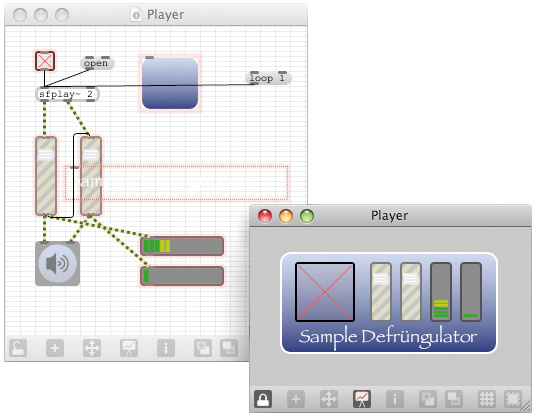 A fictional 'sample defrungulator' patcher window in its raw layout and its pretty Presentation Mode.What's more, Max 5 supports multiple simultaneous views of the same patcher; selecting the New View menu item opens a new window onto the same patcher document. Different views can have different zoom levels, and you can have Patcher and Presentation views running in parallel: one window for programming, one for interface design. Now there's no more excuse for messy patching, or for messy user interfaces.
New Features
Although the Max kernel has had a massive overhaul, there is actually very little on offer in terms of new objects. This is not necessarily a bad thing: the Max framework has been around a long time, and any significant features that have not found their way into the standard distribution by now are almost certainly available in some shape or form as third–party objects or patchers. What is important is that Max remains an efficient platform for letting people get work done, and features like the new user interface and the debugger are more important in that regard than a boatload of additional objects added to an already creaking system. Things like the attribute system and JUCE's graphic compositing give many of the existing objects a new lease of life anyway.
Having said this, there are a few additions to the object family, and some improvements. A major enhancement is a brand-new timing system, which finally lets Max objects operate in a world of bars and beats. This kind of tempo information has always been available to Max patchers running as VST plug–ins under Pluggo, or to Max itself when running as a Rewire slave, but tempo–based timing is now available in Max independently, and many of Max's time–based objects now accept time written in a tempo–based format. This means no more manual calculation of delay times to fit a certain tempo: just say '4nd' for a dotted quarter–note, '8nt' for an eighth–note triplet, or '2.3.240' for a time of two bars, three beats and 240 ticks. There is a 'timepoint' object, which can be used to trigger events at a certain point in the time line, and the transport can be sent position messages to change its location. In fact, Max can run multiple independent transports at once, and timing objects can associate with whichever transport they want, by naming it as an attribute.
Location and tempo information is passed from Max's global transport into VST instruments running inside 'vst~' objects. (I couldn't test location chasing, but my Wavestation VST happily matched tempo with the transport.) At present, the transport isn't integrated with Rewire or the Pluggo VST machinery; expect to see improvements here in the future.
For users who are keen to exploit the processing power of multi–core machines, the 'poly~' object can now run sub–patchers on multiple processors, and 'poly~' now supports dynamic loading of patchers.
 Max 5 reads Sound On Sound. There is a handful of new user interface objects available in Max 5. The 'tab' object provides a multiple tab-selection widget, something so obviously useful that many Max programmers (including this one) hacked together something similar with menus and message boxes under Max 4. And the 'jweb' object provides a fully fledged web browser directly in your Max patcher, complete with URL history and download indication. This might seem something of a folly, but Max's integrated help system is implemented as web pages, so it makes sense to expose some of this machinery in Max itself — it could certainly be useful to patcher developers who want to provide their own documentation, either locally or on–line.
Compatibility
Since Max 5 is such a massive overhaul from Max 4, it is natural to ask how compatible existing patcher files and externals are between the two versions. The short answer is that Max 5 can handle most things written in Max 4, but new material developed in Max 5 will not open in the older version; once in Max 5, there's no going back.
Needless to say, any old patcher files opened in Max 5 will be drawn using the new graphical interface, with anti–aliased fonts and rounded corners. While objects will be in the same positions, the overall appearance will be markedly different, and any detailed tweaking of fonts and layout will be lost.
The file format used for patchers has completely changed in Max 5, for various reasons, including the need to support Unicode characters: file names and patcher contents (as well as support files for objects like 'coll') are now fully Unicode–enabled, so if you want to develop and save your work in Cyrillic or Chinese, it should all work. (As a side–effect, Max 5 now finally supports long file names for patchers.)
The Max 5 patcher file format is a JavaScript notation called JSON, which is more suited to supporting the world of RGB colours, attributes and Presentation Mode than the terse binary format used in Max 4. While Max 5 can open Max 4 files without difficulty, it will save edited versions in the new JSON format with a file extension '.maxpat', and there is no conversion method back to Max 4.
The situation with external objects is mixed. Because the graphical rendering scheme has changed so radically, any Max externals that do graphics in Max 4 will not work at all in Max 5. On the other hand, 'plain' externals with no graphical interface will probably work fine, without even requiring a recompile. Unfortunately, developers of graphical externals who want to update them for Max 5 are currently out of luck, since there is not yet a programming API for the new interface. (A new development kit is promised soon.)
There are a few built–in objects which haven't made the transition from Max 4 to Max 5, or have had features removed. The scriptable graphical envelopes ('env' and 'envi') are gone, as their behaviour is mostly replaced by the 'function' object. The 'detonate' sequencer is still present, but no longer has a graphical editing window — presumably, this was used so infrequently that the effort to convert it to the new graphical environment was not considered worthwhile.
In addition, Max 4's timeline system, and its associated objects, are now dead. In all honesty, the timeline led a short and troubled life, and although it had its proponents, it was complicated and never worked reliably enough to be adopted by mainstream Max users. Clearly, the transport machinery in Max 5 is intended to replace it.
In Use
The Max 5 patching experience is, to start with, slightly disorienting. There are no fundamental shifts to the way Max works, but the new interface is the first major alteration for nearly 20 years, and Max programmers are heavily habitualised to the way things have always looked and felt, so any changes are going to be something of a shock.
The attention to detail in the user interface definitely pays off when one is working — there is a feeling of having a continuous dialogue with the program, as objects highlight themselves, help balloons appear over inlets and outlets, menus become available just when one needs them, and the Clue window is constantly refreshed with snippets of documentation. The documentation system itself is easy to navigate, with heavy use of hyperlinking, so it's easy to dip into information about a topic and be drawn into related areas and concepts, which should deepen a user's understanding of how Max hangs together.
The new, anti–aliased, patch drawing is such a radical change from the 'old school' appearance that users are going to love it or hate it; the fiercest critics will be those who have painstakingly crafted their user interfaces in Max 4 and are now seeing that effort wasted. While I find the new interface much more appealing and easier to live with than the old one, it will probably be the case that things have to be bigger in terms of pixel space to be clearly readable — I am finding that I consume screen real-estate slightly faster in Max 5 than Max 4 for the same complexity of patcher — and it's not possible to tile objects next to each other as in Max 4 and expect a good–looking result. Max 5 interface design is going to require some new approaches, and it's going to be important to make use of the new viewing facilities (multiple views, zooming, Presentation Mode) to keep everything under control.
Some bits of the new interface are a little awkward: since a generic inspector interface is now used throughout the application, some editing operations which were streamlined in Max 4 now take a few more mouse clicks. For example, since an object's position and size are treated as a list of four numbers, editing them requires a bit of fiddly text selection. This kind of thing is most likely to affect power users who have spent several years coding particular keyboard sequences into their muscle memory, and is going to take a bit of adjustment.
It's early days yet to be able to draw any firm conclusions about the performance of Max 5 compared to Max 4. Certainly, the new version can take a bit of time to load. It will sometimes want to rebuild its internal database of objects and patchers from directories on disk when launched; if it's not doing this, it can take a while longer to settle down than Max 4, but not consistently, which suggests that interaction with the operating system might be a factor.
Once running, there seems to be little difference between old and new in terms of CPU utilisation, although it's important to enable the overdrive scheduling so that time–critical tasks do not compete with graphic updates. I fired up my Triptychos sound/video installation, which uses Max, Jitter, Java and JavaScript in a complex cocktail of interactive processing, and the DSP usage figures in Max 4 and Max 5 were practically identical. As always, your mileage may vary.
Conclusions
Max 5 is a brave step forward, in two regards: Cycling 74 have decided to completely change the nature of a graphics–heavy application, in a way that directly influences the appearance and structure of the things that users build; yet this release offers little that's new in terms of what Max can actually do. The changes do amount to something of a culture shock, especially in such a long–standing user community, and when that community is mostly comprised of artists, there is inevitably going to be some heated debate and disagreement over some fundamental decisions that, in the end, are at least partially a matter of taste.
Although I can be as stubborn as anyone when it comes to design and appearance, I take a pragmatic view: some serious structural changes absolutely had to be made to ensure Max's long–term survival, and those changes were more important than attempts to bolt in more and more features. But I also happen to believe that the new graphic designs and the JUCE–based rendering system are rather gorgeous, and though I'll moan occasionally about some fiddly details of the interface, the overall workflow in the application is such an improvement that I already find Max 4 an exercise in frustration. Welcome to the world of Max 5: it's curvy and translucent, and it's the future.
System Requirements
Max 5 requires a Mac PPC or Intel machine running OS 10.4 or later, or a Windows XP or Vista machine, and 1GB RAM. Jitter requires Quicktime 7.1 or later, an OpenGL–compatible graphics card, and OpenGL 1.4 or later.
Max 5 & Plug-Ins
Max 5 supports VST plug–ins that are compatible with the VST 2.4 specification. However, there is currently no support for the Pluggo framework — the current version of Pluggo is based on Max 4.6. This means that it's not yet possible to build VST plug–ins with Max 5, nor is it possible to load Pluggo VST plug-ins into Max 5. This is disappointing, because it means maintaining a copy of Max 4, and a separate collection of Max 4–compatible patcher files, for plug–in development. Hopefully there will be some movement on a Pluggo for Max 5 sooner rather than later. In the meantime, anyone wanting to host Max 5 patchers in other audio software will have to content themselves with using Rewire.
Watching & Debugging
Max is a graphical event–based dataflow language. This means that, as programs get more complex, one can be faced with messages, video matrices and audio flying in all directions. This poses a particular problem because Max objects are acutely sensitive to the order in which messages arrive, and patchers can be very fragile. Even if you are the world's most careful and disciplined coder, sooner or later you'll be faced with something which Just Doesn't Work: a counter that is not resetting, an audio channel with no audio coming out, a video image that refuses to refresh, and so on.
Up until now, Max debugging has largely been a process of staring at a patcher on screen, brows furrowed, adding 'print' objects and awaiting a flash of enlightenment. Max 4 added some simple tracing and stepping machinery, but Max 5 delivers some serious debugging facilities.
 A helpful balloon shows signal value and level, and a pop–up matrix probe shows attributes of a video stream.To start with, there are a couple of simple probing tools. Enable audio probing, and a small floating balloon window will appear whenever you mouse over an audio connection, showing VU level and a running snapshot of the sample values. (Max programmers who are into modular synthesis will know that audio patch cords can also carry control data, so it's useful to be able to see actual numbers.) In a similar vein, a floating Matrix Probe window provides a view onto Jitter matrices flowing between objects, with options to see video data in a variety of formats.
For more detailed observation, Max 5 offers watchpoints. A watchpoint is a tap into a patch cord that observes messages flowing down that cord. When a watchpoint is enabled, a numeric icon appears on the patch cord and a row appears in the Watchpoint window, counting messages and displaying a history of values. Attaching a watchpoint to an audio patch cord isn't terribly interesting, but watching a matrix cord can be a useful exercise, allowing video frames to be counted and tracked before they are displayed.
 The Watchpoint window shows data flowing through a number of patch cords.The Watchpoint window is actually part of a more sophisticated debugging system. Watchpoints can be configured to halt execution when a message arrives. Once this happens, the patch cord under consideration blinks slowly, and a debugger window allows the entire chain of upstream messages to be inspected as a kind of stack trace while the patcher's execution is suspended. Execution can then be single–stepped through downstream objects in sequence, resumed as normal, or aborted. Buttons in the Debug window visually highlight active objects in the patcher window, or open their inspector windows.
With messages, audio and matrices flowing asynchronously through patch cords all over the place, it is perhaps not quite clear what it means to single–step a Max patcher. When a breakpoint is triggered by a message, the Max scheduler stops completely, so there will be no messages sent by any objects in any running patchers, but the audio system keeps going, which will probably manifest itself in drones and stuck notes until the scheduler is running again.
Pros
- New anti–aliased, zoomable, translucent graphic rendering.
- Identical interface between Windows and Mac OS X.
- New Presentation Mode for user interface design.
- Integrated documentation.
- Integrated debugger.
Cons
- New graphic design can require more screen space for patchers.
- Font rendering is a little blurry.
- No backwards compatibility with Max 4.
- No Pluggo support yet.
Summary
MaxMSP is a graphical programming environment for audio and media that has been at the forefront of experimental music software development and digital arts practice for 20 years. Max 5 delivers complete overhaul of the application, with a bold new visual interface, integrated documentation, and added features to boost workflow — but Pluggo users will have to wait for an update.
information
Max 5 (includes MSP) £332.69; upgrade from v4 $199; Max/MSP/Jitter bundle £469.80. Prices include VAT.DACS Audio +44 (0)191 438 2500.