

Get a big, 'produced' sound from Sonar's classic analogue drumbox samples.
Sonar 8 comes with several new analogue drum kits for Session Drummer 2: TR707, TR727, TR808 (four versions) and TR909 (six versions). These are faithfully sampled versions of the originals, which allow the most flexibility but also means they don't have the 'produced' sound you hear on a lot of recordings. So our mission is to build a track template that gets the most out of these classic drum sounds. See the end of this article for how to hear the result on-line.
But First...
Given the multiple TR808 and TR909 versions, audition the various options to find the right kit for your music. The 'Bright' TR808 kit is great for electro, while the 'Dark' version is more hip‑hop. 'Long' tweaks the 808's virtual trim‑pots for maximum sustain, and 'Tight' is — well, tight, as in very percussive. For the TR909, the 'Long' and 'Tight' kits work similarly to the TR808, but there are also four 'Medium' settings within those extremes.
When inserting Session Drummer 2, for the 'Insert Soft Synth Options' I tick 'MIDI Source', 'Synth Track Folder' and 'All Synth Audio Outputs: Stereo'. Session Drummer 2 doesn't use much CPU power, and it's essential to have the drums on separate outs to process them individually. It seems odd that there are 10 drums and only eight outputs, but I assign the toms to the same output and pan them in Session Drummer 2 (the individual outputs are stereo). This allows all drums except for the toms to have their own output.
As for having all these tracks in a track folder, it's very convenient when you don't want your console or track view taken over by all those drum outputs — just fold up the folder to make them go away.
Kick Processing
Almost every time I've heard a 909 kick drum, there's been some distortion added to make it harder. Something like an amp sim is overkill for this type of sound, but Sonar's under‑appreciated FX2 Tape Sim is perfect for adding an edge to the kick.
1. In Session Drummer 2, set the kick drum Vol control at 50 percent, and Width and Pan at zero percent. Adjust Tune to taste; ‑2 semitones works for me.
2. On Tape Sim, set Rec Level and Warmth sliders all the way up, with Input Gain and Hiss all the way down. Set Output Gain to around –20.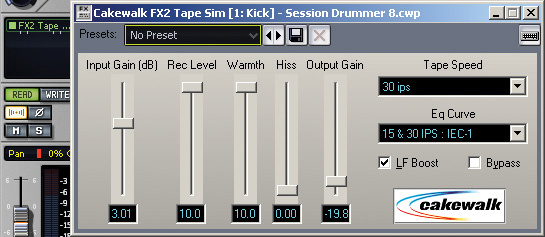 Applying Tape Sim to an analogue kick adds a tough, distorted sound that can really cut through a mix.
3. Tick the LF Boost box. This adds a roundness to the low end that really works for some genres.
4. Try 30ips for Tape Speed and '15 & 30 IPS' for EQ Curve (the differences among these various settings are actually minimal).
5. Bypass the Tape Sim effect and set the kick level so that the peaks hit a nominal setting, such as –3. Next, enable Tape Sim and adjust the Input Gain control for the desired amount of crunch. If needed, trim the Output Gain control so that the processed peaks match the peak levels when Tape Sim is bypassed.
You should be hearing a pretty tough‑sounding kick, but you can definitely shape it further. If you want more distortion, for that Tribute to Belgian Hardcore Techno CD you're working on, increase Input Gain. The overall level won't go up much, if at all, because you've already bumped up against the maximum available headroom. The sound just gets more distorted.
If you prefer a less in‑your‑face distortion effect, leave Input Gain as suggested in step four above, and start pulling down the Warmth control. This fine tunes the distortion but retains the same character; you may need to increase Output Gain a bit to compensate for any drop in level. For a more dramatic reduction in distortion, leave Warmth up and pull down the Record Level control. As you do this, the output will definitely drop, so increase Output Gain to compensate.
This would also be a good time to try unticking LF Boost, as this gives a tighter sound that may be desirable if the kick is booming too much from the distortion. As usual, adjust Output Gain to compensate.
Snare Processing
Let's move on to the snare. in Session Drummer 2, the snare controls are all set to their mid points. Again, I've applied the FX2 Tape Sim plug‑in to add a little more brightness and snap, but with less distortion: Rec Level is pulled back a bit from where it was for the kick. Also, try 'Flat' for the Tape Speed parameter — it gives a slightly brighter sound — and don't tick LF Boost, because it dulls the snare sound a bit. For the snare, the Tape Sim pulls back from the more extreme kick settings. The EQ adds 'beef' in the lower mid‑range, and definition in the upper mids.
The most important processor for the snare is EQ. Adding a major boost just below the snare's fundamental frequency gives more 'wood' to the sound, as if it was an electronic snare with a wooden shell. Try it and you'll hear what I mean. An upper mid‑range boost also adds shape and authority. With these two EQ boosts, the snare is defined, as opposed to sounding more like a burst of white noise.
Hi‑hat Processing
Now we have a big kick that takes over the low end (but not so much that it will fight with the bass: the distortion gives it more highs, so it gets out of the way of the bass), and a tight snare that handles the mids. Next, we'll process the hi‑hat to fill in the high end. By really emphasising the highs, we can bring the hi‑hat down in the mix to leave room for other high‑frequency instruments, but you'll still be able to hear the metronomic hi‑hat at work. Cutting the lows and boosting the highs allows the hi‑hat sound to complement the processed kick and snare.
Referring to the screenshot above left, Band 1 is a low‑pass filter that cuts response pretty dramatically under 1kHz. Meanwhile, Band 5 adds a major boost around 7kHz to really bring out the hi‑hat's sizzle — but to prevent it from going too nuts on the high end, Band 6 applies a low‑pass filter that cuts everything from 14kHz up. As a result, the hi‑hat occupies a 'slice' of high frequencies where you can hear it well, but it doesn't take up too much of the audio spectrum.
Tom Processing
I usually don't want the toms to hit as hard as the kick or snare, but rather to provide a more subdued sound with decent dynamics. Try adding a tiny bit of Boost 11 to shave off the very tops of the toms' amplitude peaks, and some top‑end frequency boost to bring out the toms' initial transients. The boost makes the toms pop out of the track a little bit more, but without boosting the main 'tom sound' components. To maintain a fairly natural tom sound, Boost 11 provides a little bit of peak shaving; a high‑frequency boost emphasises the tom transients.
About Those Aux Sends...
You may notice on some of the screenshots that each of the drums has two sends, one going to a compressor and the other to a reverb. The concept of sending a duplicate mix to a compressor is not new; I use automation to bring up the compressor send return when the drum part needs more body, perhaps because the rest of the song is really building. The reverb is something else. I rarely hear big, roomy reverbs on analogue drums, so the trick is to use only early reflections to give a sense of space. This is particularly important with the type of music I do, which often incorporates natural sound sources such as guitar and voice. Wrapping a little ambience around electronic drums helps them to sound more organic. Using mostly early reflections—but minimal actual reverb—provided by the Sonitus Reverb adds some ambience to the electronic drums' otherwise flat sound.
So what's left? Once I get a good mix of these elements, I group the channels so that I can change levels of the entire kit with one fader if needed. Even more importantly, though, after all that tweaking I save the entire collection of files as a track template, so that whenever I want that analogue drum sound it's only a few clicks away.
Visit  sonaraudio-0809.mp3 to hear the results of this processing (you'll hear eight bars of dry drums followed by eight bars of the same pattern after treatment).