

Technology from SSL's high‑end mixing consoles has been filtering down to the project studio for some time, in the form of the X‑Logic and X‑Rack products, but the desks themselves have remained the preserve of commercial studios. Until now...
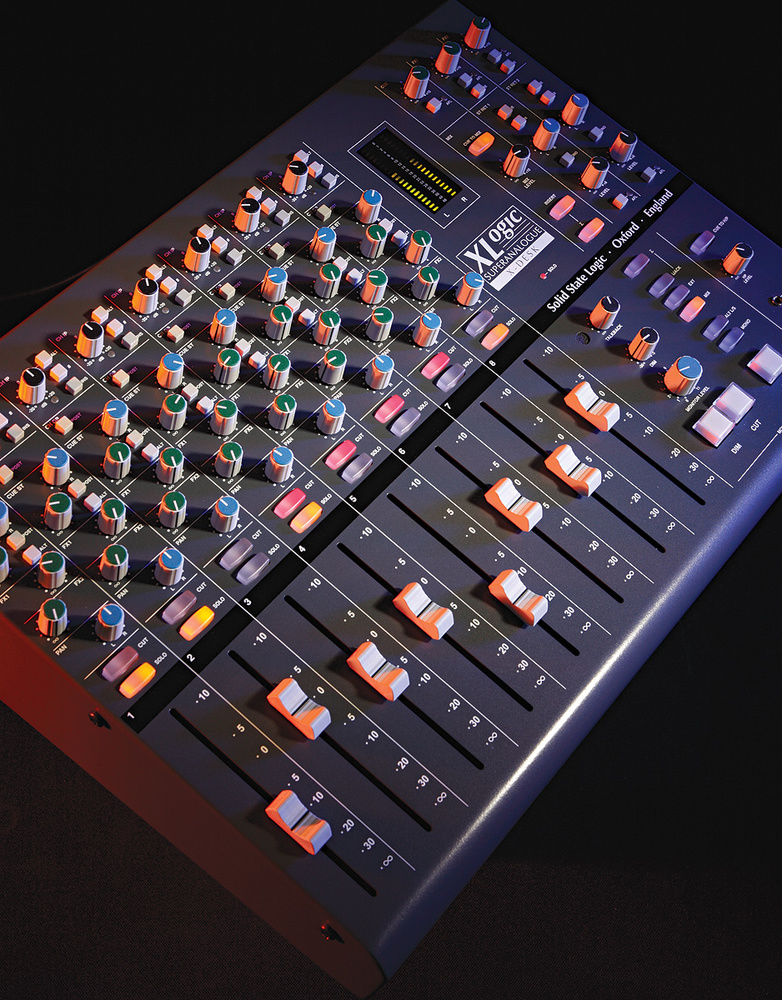 Photo: Mike Cameron
A mere whisper of Solid State Logic's initials is enough to conjure to the minds of a lot of SOS readers a fish‑eye‑lens vision of an enormous studio control room. However, for recording musicians who don't routinely fly business class, this aspirational mental image is probably as likely to be drawn from deeply buried memories of Battlestar Galactica as it is from actual hands‑on experience of SSL's flagship consoles. So it's inevitable that the recent launch of the company's new small‑format X‑Desk mixer has sent a ripple of excitement through the project studio community, if only because its comparative affordability dangles ever closer the tantalising prospect of referring to 'my studio' and 'SSL console' in the same breath.
Get the actual hardware in front of you, though, and it's not the super‑charged desktop mixer you might initially expect: there appear to be only eight channels, there are no preamps, no EQs, and all but a handful of the audio connections are on 25‑pin D‑Sub connectors. So is this latest addition to the X‑Logic range actually worth making a fuss about? Let's poke around it in more detail and find out.
First Impressions
The X‑Desk's eight channel strips each have access to two line inputs, Line and Alt, the former typically receiving the output from a mic or instrument preamp, and the latter taking a return signal from your recording system. At the top of the strip, you can select that channel's input source, trim it by ±20dB, and invert the signal polarity. A switchable (more on this later), balanced insert point comes next, before the channel's cut, fader, and pan controls. The audio then flows on to the main mix outputs, which are controlled via a master‑section Mix Level knob. A direct output for recording purposes is available for each of the eight channels, fed pre/post‑fader, according to the status of the Ch Op switch, which means you're free to uphold the venerable tradition of riding the faders 'to tape' if you wish. The channel Solo button triggers a post‑Cut AFL (after‑fade listen).
Three send buses are available per channel: one stereo send with level and pan controls (Cue St) and per‑channel pre/post‑fade switching; and two mono sends (FX1 & FX2) with level controls and global pre/post‑fade switching. All three of these buses have master level knobs and AFL switches in the top right‑hand corner of the master section. If you choose to send FX1 and FX2 to external effects units, you can return those in mono or stereo to the main mix and/or Cue St buses via dedicated level and pan controls — so it's easy to set up monitor effects in the cue mix that you don't want to hear in the control room, for example. You can, though, also use those inputs for any other stereo source.
On the face of it, there's nothing too surprising about things so far — it all seems to resemble the kind of basic layout we're all familiar with on more affordable small‑format mixers. However, if you scrutinise the front panel of the X‑Desk more closely, you'll see a few extra Cue St switches, and these expand the versatility of the X‑Desk enormously. Firstly, another Alt button on every channel lets you feed that strip's Cue St send directly from the Alt input, rather than from the main channel path; and, secondly, a master‑section Cue To Mix button routes the Cue ST bus directly to the main mix.
One Mixer Or Three?
 Each of the eight channels includes 100mm‑throw faders, two in‑line-style inputs and a polarity invert button, as well as two effect sends and a panner — but not a preamp or EQ control in sight.
At a stroke, this extra functionality allows you to transform an eight‑channel monitor mixer into a 16‑channel line mixer with dual mono sends on the first eight channels. Factor in the two stereo returns as well, and you're up to 20 channels of summing.
A more intriguing alternative, though, is that you could treat the desk effectively as an in‑line design, feeding mic/instrument signals to the recorder inputs from the main channel path's direct outs, and then routing the recorder returns to the Cue St bus via the Alt inputs for monitoring purposes. In this case, the performers and engineer would all have to monitor via the Cue St mix (the latter using Cue St AFL), but the pay‑off would be that you could take advantage of your recorder's automatic input/playback monitor switching for doing drop‑ins, or even connect the X‑Desk's main output to your recorder to mix multiple mic signals to a stereo track pair.
So, in short, you can decide whether you want the X‑Desk to function as a monitor mixer with direct outs, a larger‑scale line mixer, or an in‑line recording mixer — and just by pressing a few buttons. Can't make up your mind? Not to worry, because the per‑channel Cue St and direct output setup also allows any number of less clear‑cut hybrid configurations as well.
For me, it's this kind of flexibility that most clearly highlights the X‑Desk's celebrated lineage, capturing in miniature one of the essential concepts behind SSL's large‑studio consoles: if you have several alternative methods of carrying out a given studio task, you can choose the approach best suited to your engineering style and the specific needs of the session in hand. In particular, the way you can decide to use the faders for either recorder sends or monitor returns reminds me a great deal of those big in‑line designs.
There was one functional quirk I came across, though. If you're not planning to use the Cue St feeds as separate channels, but intend simply to use the mixer to deal with monitoring duties on a multi‑mic ensemble‑recording session, your natural inclination would be to feed the recorder returns to the Alt inputs so that you can listen back to the multitrack machine via the main channel Alt buttons. The problem with this is approach is that if you have any polarity‑invert buttons engaged, you'll find that the signal is re‑inverted on the way back from the recorder, changing the polarity relationships between the channels on playback. There's actually a way to work around this issue, though, by using your channel insert connections as recorder sends and returns instead. As usual on SSL gear, the insert sends are always live, so your recorder will be fed regardless of the front‑panel Insert switch positions, which means that you can use those switches to route either the mic‑input or record‑monitor signals into the remainder of the channel instead, without passing the latter through the polarity switch a second time. Of course, in this case you'd need to connect any insert processing for recording between the mic/instrument preamps and the X‑Desk's line inputs, but I'd have thought that's unlikely to cramp anyone's style unduly in practice. Furthermore, the fact that this kind of workaround is possible at all constitutes another example of this unit's chameleon‑like adaptability.
Master Insert, Monitoring & Talkback
 Most of the I/O is presented on D‑Sub connectors, which helps to keep the X‑Desk small and portable, while providing an amount of connectivity typical of a much bigger console.
Below the X‑Desk's master level knob, you'll find a couple of buttons that together control the operation of a pre‑fade insert point in the master bus. As with the channel inserts, you get separate send and return connections. The send remains live at all times, and the return interrupts the master output's signal path when the Insert button is selected, much as you'd expect. The second button (labelled with the Greek sigma character, to indicate the idea of summing) causes the insert return signal to mix with, rather than replace, the main mix output. If you're using the insert point for a bus compressor, this allows parallel compression effects to be easily achieved with any analogue compressor, but other potential uses for this feature aren't difficult to imagine: cascading another mixer into the X‑Desk's mix bus, perhaps, or monitoring some additional external source.
There's a solid line‑up of monitoring and communication facilities. The monitor matrix can be fed from three different sources, either one at a time or, if another sigma‑labelled button is lit, in any combination. Besides the main mix bus, the two other sources are externally fed, one via the rear‑panel balanced D‑Subs, and the other through a front‑panel unbalanced stereo mini‑jack (or 'iJack') designed for portable music players and the like. I'm not sure that mini‑jack connections of any type really belong on a unit of this calibre: I'd personally be much more convinced of the robustness of phonos or quarter‑inch jacks for a consumer‑level unbalanced connection, and I certainly find it hard to believe that anyone in the market for an X‑Desk would baulk at the expense of a phono‑to‑mini‑jack adaptor lead!
A large Monitor Level control is at the front of the mixer, close at hand, along with large Dim and Cut buttons, the former reducing the monitoring level by anything up to 30dB, depending on the setting of another rotary control. There are also switches so that you can monitor in mono and/or via a second set of loudspeakers. Hitting the T/B button feeds a built‑in talkback mic via predictably draconian compression to Cue St, as well as dimming the monitor level. The button action can be toggled between latching and momentary if you hold it down as the console powers up.
While the talkback mic seems to do its intended communication job fairly efficiently, I have to say that it does, nonetheless, sound pretty horrible, and also picks up quite a lot of mechanical noise from the T/B switch and the X‑Desk's front panel. There's no way to plug in a substitute either, and there's also no access to a post-T/B‑switch signal for slating takes. As it is, if you wanted to slate the main mix via the internal talkback mic, you'd have to use Cue St for that purpose exclusively, perhaps feeding it to a powered speaker in the recording room (to be picked up by your mics) or combining it directly with the main mix bus using the master insert's summing facility.
On the bottom right‑hand corner is a stereo headphone output, with a rotary level control above it. This normally follows the main monitoring source selection, but is otherwise independent of the other Monitor‑section controls. The button above its level control, however, allows you to substitute the Cue St signal instead, obviating the need for an additional headphone amplifier in simple overdubbing situations.
So Where's The Rest Of The Mixer?
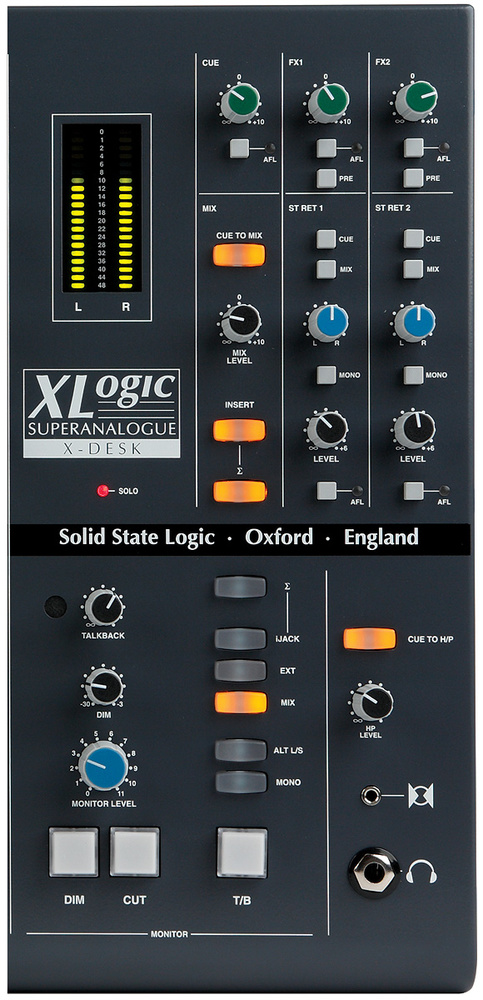 Two examples of the X‑Desk's flexibility: the effect returns offer a means of inputting stereo signals; and the ∑ (Sigma) button usefully enables you to mix (rather than insert) the insert signals with the master bus.
If your preconceptions of a small mixer are anything like mine, one of the first questions you'll have asked yourself is why the hell SSL are selling a mixer without preamps, channel processing, or normal audio socketry. Did some blueprints slip down the back of the designer's sofa?
When you look at the X‑Desk's price, however, and scale that up to factor in the cost of building in all that extra circuitry, the whole concept begins to make much more sense. What SSL have realised is that people willing to spend this kind of money on a small‑format mixer are also likely to have strong views about the subjective merits of different preamp and processor brands. Their specific requirements in terms of processing facilities and socketry will also vary tremendously. So why try to second‑guess the customer? Let them decide which kind of preamp they want, what complement of EQ/dynamics is beneficial, and what socketry is actually necessary in their setup, so that they only pay for what they're actually going to use; then let the X‑Desk concentrate on glueing the user's chosen outboard together into a mixer which, while small, offers professional‑grade features, flexibility, and sonic transparency well beyond the scope of most small‑format designs.
The design is also, I think, a canny move on SSL's part, in terms of luring in new project‑studio custom — because it provides a way for the less flush audiophile to gradually build a small recording system that offers no‑compromise audio quality and routing flexibility from the outset, but allows considerable expansion of its feature set as time and funds allow. Right out of the box, the X‑Desk will do your DAW summing and cue mixing (with talkback) in the studio, and will also double as a first‑class monitor controller into the bargain. Save up for a worthy multi‑channel preamp and you suddenly have a serious tool for small‑scale studio or location recording; add in a couple of headphone amps, and multi‑room studio sessions move within range too. From there you can add channel processing in increasing quantities (and in line with your own unique and discerning taste, of course) to enhance both tracking and mixing results, or specify separate A‑D/D‑A conversion units for the resolutions and output formats that make most sense.
You can also pay for, say, insert sockets only when you need them, and then you can use a D‑Sub connection loom which suits your needs. Indeed, you'd feel justifiably cheesed off if you'd paid good money for jack or XLR direct outs on your mixer and your choice of multi‑channel preamp or recorder sported D‑Subs. In addition, by using D‑Subs SSL can provide the extensive connectivity you'd expect of a large‑format console without dramatically increasing this mixer's small footprint.
Getting Down To Business
The design and colour scheme of the X‑Desk exude a kind of no‑nonsense, businesslike air, which is backed up by the solid casing and a sturdy feel to the controls. Despite this, the unit is lighter than you'd think it would be, partly on account of a rear‑panel cutaway that effectively shields the 10 D‑Sub connections, the four XLR monitor outputs, and a switchable IEC mains socket. The casing is the standard 19‑inch rack width, and rack fixings are supplied as standard. You get full‑size faders with a fairly light feel, while the rotary controls offer a pleasantly positive resistance. I did think it a shame there was no proper master fader, especially given that the Mix Level rotary control is small and detented — if it had to be a rotary control, a larger, undetented knob (like the Monitor Level control) would have been better for real‑time adjustments.
Visual feedback from the console is good, on the whole, especially the colour‑coded rotary controls and nice bright backlit buttons, but I'd have liked clearer indications of unity gain for some of the knobs, and the little grey status buttons would have benefited from status LEDs or a two‑tone button colour to make it easier to take in the console's configuration at a glance. Given the lack of any built‑in recall facilities (this is an all‑analogue desk, remember) I'd also have liked white colouring around the faders, as pencil marks won't stand out well on the grey background. In an ideal world, we'd all carry around a rainbow selection of chinagraphs, but do you? A recall-sheet template in the manual assists with reinstating complete mixer setups, should that need arise.
Given SSL's reputation, and the fact that the X‑Desk incorporates the same Super Analogue‑brand circuitry as that which inhabits the company's latest top‑end Duality consoles, you shouldn't really need me to tell you that the sound is as clean as a whistle (bar the talkback signal that I've already mentioned, of course). In terms of usability, the full ramifications of the Cue St routing options may take a little time to sink in, but one of the things that I think is great about the X‑Desk design is that you can pretty easily just ignore all that to start with, and you can be up and running with the console's basic eight‑channel configuration in seconds flat if you have any previous experience of small‑format mixers. Once you do get more in‑depth with it, though, the open‑endedness of the design manages to feel both liberating and logical.
Even if the audio quality and routing capabilities of a more affordable 8:2 mixer are enough to meet your needs, the X‑Desk still scores strongly in terms of feature set. Yes, I know, you have no preamps or EQ; but what you do have is a whole load of other features that, while perhaps less thrilling in the abstract, really make a difference when you're actually on a recording job. I'm talking about proper 100mm faders, channel polarity inversion, pre/post‑switching for all sends and direct outs, switchable input selection, switchable channel/master inserts, built‑in talkback with adjustable monitor dim, decent source and speaker selection, a mono button, AFL for all send masters, and the ability to get balanced audio in and out of the mixer at practically any point in the signal path. While the X‑Desk's innovations are certainly appealing, it's the way it handles the worthy but dull majority of mixer tasks that unmistakably marks it out as a tool for professionals.
'X' Hits The Spot
There's no question in my mind that a lot of readers would baulk at the thought of paying this much money for what is, in crude terms, the arse end of a mixer. But what an arse: J‑Lo eat your heart out! While there can never be a perfect product, for me SSL's X‑Desk gets within a gnat's whisker of that vanishing point — and I can't think of any other product that has so dramatically reversed my initial impressions of it.
Within the limits of what the company are trying to achieve here, the few criticisms I've made don't stack up to much, the lack of talkback I/O and a proper master fader being my main concerns. The design manages to be inventive without losing sight of the importance of robust efficiency, and the lack of onboard processing and socketry makes sense as a design choice (not just as a cost‑cutting measure), allowing impressive expansion possibilities without simultaneously rendering previous investments redundant or, for that matter, locking you into SSL's own product line. The X‑Desk is a brilliant product which, despite its considerable price, nonetheless represents an excellent long‑term investment. I want one!
Alternatives
The problem with a unit like this is that it provides only a subset of a typical mixer's functionality, so it's not really appropriate to compare it with more typical small‑format mixers in the same ballpark price‑range — say TL Audio's M1F. If you are considering creating, in effect, a complete small‑format mixer based around this unit and selected outboard units, then how such a system compares with all‑in‑one units in terms of its full‑system price will depend on what outboard you've chosen, so there's little general guidance I can give that would be of much use to a potential purchaser. Perhaps most comparable in terms of features are some of the summing mixers on the market (units such as the Neve 8816), but these typically fall short of what the X‑Desk offers in terms of the send count, amount of audio I/O, and master‑section facilities.
Whatever you're comparing it with, though, the X‑Desk has two particular strengths that should be given due consideration. Firstly, it has been designed with modularity in mind, so you can upgrade its feature set without too much duplication of built‑in facilities — for example, if you wanted to use boutique preamps with most normal mixers, the mixer's internal preamps (for which you'd have already paid) would be rendered redundant. Secondly, the extensive connectivity via the D‑Subs bucks the trend for small consoles, and this, even more than any of the X‑Desk's nifty routing innovations, allows it to deliver a tremendous number of real‑world applications and workarounds from a single circuit design.
Second Opinion
The X‑Desk looks for all the world like some bespoke, custom SSL add‑on to a large-format SSL console; an MD's monitoring controller or something... But the reality is that this is actually a remarkably flexible console in its own right, and the diminutive size is very misleading. Although clearly designed with X‑Rack integration foremost in mind, SSL have been charitable enough to make it very straightforward to partner the X‑Desk with any professional outboard you wish, enabling the construction of a very high‑end modular studio system to meet pretty much any specific requirements and workflow preferences.
Sound quality is everything you would expect of SSL: plenty of clean headroom, respectable noise performance, wide bandwidth and a fundamentally transparent sonic signature. The control styles and layouts are all traditional SSL/X‑Rack/Alpha designs and look great, although in practice more illumination or colour banding on the switches would make it easier to see how the thing is configured. I also found the channel faders to be frighteningly light and surprisingly rattly — not at all what I would associate with an SSL product. But this was one of the few minor disappointments of operating the desk. Had I not read Mike's review, I wouldn't have known about various power‑on mode switching, as the Installation Guide doesn't mention any of that, but it turns out that a full operating manual is currently being written (Mike saw a proof copy) detailing this and every other aspect of the console — so, by the time you read this and feel the need to buy an X‑Desk, that handbook should be inside the box too.
I was a little surprised to see the mix bus metering scaled with zero at the top, digital style, even though this is a fully analogue console without converters. However, it makes sense in the context of the ubiquitous digital recording environment, and the ability to configure the metering mode for 0dB peak levels of +24dBu or +18dBu covers the most common alignment requirements.
I like the inherent neatness of the D‑sub interfacing, and particularly the way it is all hidden in the rear of the desk. I like the flexibility of signal paths, and I like the reasonably comprehensive monitoring section. Like Mike, the use of a mini‑jack socket for the iJack input causes me some concern, but SSL aren't the only manufacturers to have adopted this practice. The lack of a slate talkback facility seems rather short-sighted, and the mechanical noise on the talkback mic is distinctly disappointing. A clear 'ping' is generated whenever talkback is activated, caused by the built‑in microphone picking up the Dim relay's operation, and a louder click ensues when the talkback button is released. If the Cue mix is summed to the stereo bus, these noises send the meters to within a few dB of clipping with even a modest talkback gain, which isn't really acceptable. Hopefully, SSL can modify the way the mic is mounted in the case to address this issue to some extent. It's not a deal buster, but it does detract from SSL's reputation. It would have been nice if SSL had also adopted the common practice of dual‑mode switching, so that a stab on the talkback button latches it, while a longer press makes it momentary. During recording sessions I find I often need to work in both ways, depending on the context of the communication, and rebooting to change mode is impractical.
Having said all that, this desk costs just under £2k in the UK$3k in the US, rendering these niggles far less significant than would be the case had the desk cost close to £10k$15k, say. At its current asking price, the SSL X‑Desk is very well priced to form the heart of any DAW-based recording or mixing operation, allowing favourite outboard hardware to be integrated neatly and flexibly — and in stages — with a DAW, to work in a semi‑traditional way. The lack of DAW control facilities will undoubtedly rule this console out for some, but for others it will form the perfect solution — and more so if a 12‑channel X‑Pander unit was produced to link with it! Hugh Robjohns
Metering
Level metering on the X‑Desk comprises a single, tri-colour LED on each channel and an LED ladder meter in the master section, the latter following monitor and AFL selections. The channel LEDs register ‑24dBu, +4dB and +21dBu for green, yellow, and red respectively, but can be switched on power‑up to ‑24dBu/+0dBu/+16dBu if you'd prefer a lower reference level. In both cases, the red LED lights before any audio clipping actually occurs, rather than just mocking you when you've already scorched something! All 20 segments of the main LED bargraph are clearly labelled with decibel values relative to a zero at the top.
Expansion Connectors
Three of the rear‑panel D‑Sub connectors are specifically set up to link with other X‑Logic units. Two of them enable the mix/send/AFL buses and solo switching of up to seven slave X‑Desks to be accessed by a single master unit, thereby increasing the available system input count. The scheme seems elegant in theory (although I couldn't test this with the single review unit), but the X‑Desk's small number of sends and the lack of audio subgroups may make larger cascaded systems a slightly less attractive proposition in practice, alongside dedicated large‑format competitors. Plus I'm probably not the only person who will be hoping that SSL follow up the X‑Desk with a separate slave version (the X‑Pander perhaps), ditching the X‑Desk master‑section features, which become redundant when the console is slaved, and perhaps saving enough panel space to add a couple more channel strips within the same case width.
The third expansion D‑Sub accepts the AFL and Mix outputs from SSL's X‑Rack modular processing frame, allowing you to cascade that unit's multi‑input modules with an X‑Desk in a similar way. Although all three expansion D‑Subs are designed for their stated applications, however, the signal pin assignments are all clearly documented in the supplied installation guide, so you can freely press them into service as duplicate centre‑section I/O instead, if you prefer.
Pros
- SSL's squeaky‑clean Super Analogue signal path.
- All balanced I/O, and a degree of connectivity worthy of a larger‑format console.
- Imaginative re‑purposing of the stereo cue send significantly expands the mixer's versatility.
- Includes a good selection of pro‑grade master‑section facilities.
- Specifically designed with expansion in mind, both in terms of channel facilities and input count.
Cons
- Small rotary master fader may not be to some users' tastes.
- Stereo mini‑jack socket is not the most robust choice for the iJack input.
- Talkback signal isn't particularly pleasant, and there's no input for a substitute. There's no talkback output either, which makes slating takes from the talkback mic a bit unwieldy.
Summary
The X‑Desk represents an impressive bit of lateral thinking on the part of SSL. It provides a real taste of a big SSL's sonics, flexibility, and professionalism, but on a scale that's small enough for serious home recordists to afford.
information
Sound Technology +44 (0)1462 480000.