

It’s not often you encounter plug–ins that combine detailed emulations of analogue classics with a wealth of new tricks, but Sound Toys' Native Effects do just that.
 It’s probably a sign of something amiss in my life that the email announcing the availability of Sound Toys plug–ins for Windows made my week. Having become hopelessly addicted to their Filter Freak effect on my old Mac, I had been forced to spend a couple of years in cold turkey on XP. It would be like being reunited with an old friend; and not only that, but the Sound Toys range had grown in the meantime.
Filter Freak is now part of Sound Toys’ Native Effects bundle, wherein it is accompanied by no fewer than five of its colleagues. These are available in RTAS and Audio Units formats, but not as VST plug–ins. Anyone wanting the full low–down on the filter should revisit our original review from January 2004, which is available on–line at www.soundonsound.com/sos/jan04/articles/filterfreak.htm. Suffice to say that, nearly four years on, it is still a fantastic plug–in; it remains my first choice for almost all filtering duties, and the output distortion its Analog Mode offers is excellent for adding dirt to drums or synth bass.
Also included in the Native Effects pot is the equally marvellous Echo Boy delay. This too has already been reviewed by Sound On Sound, in April 2006 (www.soundonsound.com/sos/apr06/articles/echoboy.htm), and all I can add is that it is the best plug–in of its kind that I’ve heard.
The oldest of the Native Effects plug–ins is Speed (see ‘The Need For Speed’ box), which dates back to Sound Toys’ earlier incarnation as Wave Mechanics, and was originally reviewed in SOS February 2001 (www.soundonsound.com/sos/feb01/articles/plugin.asp). Unlike the others, it’s an off–line plug–in which is only available in Audiosuite format, so it won’t work with Audio Units hosts such as Apple Logic. Speed offers high–quality pitch–shifting and time–stretching, which can be applied via a graphical interface for maximum flexibility.
The other three plug–ins are new to me, and to the pages of SOS. Tremolator models classic hardware tremolo units, but, like Echo Boy, goes well beyond vintage emulation into new worlds of wibbliness. Phase Mistress applies a similar philosophy to modulation effects such as phasers and flangers, while the most intriguing inclusion is Crystallizer. This is billed as a ‘granular echo synthesizer’, and draws on the Eventide H3000’s widely used ‘Crystal Echoes’ algorithm to create a weird and wonderful array of sounds based on granular resynthesis.
False Dawns
My joyous reunion with Filter Freak got off to a frustrating start. The Native Effects plug–ins appeared to install correctly, but generated an error every time I booted up Pro Tools. The problem turned out to be connected with outdated iLok drivers, and a few email exchanges with Sound Toys’ very helpful tech support sorted it out. They say that it hasn’t affected most users.
 Apart from Speed, all the Native Effects plug–ins share a similar interface, with large, retro–style rotary knobs on a black background. The designers have avoided the temptation to take over the entire screen by allowing the main window to contain only the basic controls for each plug–in. More detailed control is available through a number of pop–up menus and additional windows that ‘float’ over the main plug–in GUI. This system allows Sound Toys to pack a lot of control into a small plug–in window, but it can be a bit fiddly, and in the initial Windows versions, the interface is frustratingly slow to respond to user input. Sometimes I also found that graphical elements went missing from the pop–up windows, usually when switching back to Pro Tools from another application. Sound Toys are aware of the GUI issues, and promise that they will be fixed soon. Fortunately, in most real–world situations you can find something that works without venturing too far from the main controls.
The Crystal Maze
Having confirmed that Filter Freak and Echo Boy are, indeed, as good as I remembered, I was keen to discover what Crystallizer was all about. A few minutes’ experimentation revealed that this is a very well–named plug–in. It really does seem to ‘crystallise’ the input signal, in a way that’s hard to describe but makes instant sense when you hear it. What comes out has the same tonal quality as what went in, but frozen into shards of continuous sound. Some of the presets, for example, can take a dynamic or even percussive signal such as an acoustic guitar and turn it into something resembling a synth pad. Others range from almost–conventional delays to strange, pitch–shifted swoops and gurgles.
 Audio coming into Crystallizer is sliced up into chunks at a rate determined by the Splice control, and these chunks are pitch–shifted by up to four octaves in either direction. They can also be reversed, delayed and filtered before being sent to the output and, optionally, fed back into the input via the Recycle control. Splice and Delay values can be sync’ed to host tempo.
What you get out of Crystallizer depends above all on the settings of the Splice and Pitch controls. Short Splice values give you a crunchy, metallic sound, while larger values preserve more of the input signal’s pitch and tonal character. Small Pitch adjustments can be used to create useful, subtle thickening and doubling effects, but things get weird fast when you take the Pitch value into the hundreds or thousands of cents. Pitch settings that correspond to whole octaves or fifths often deliver pad–style sounds. One of the neat features of Crystallizer is that automating controls such as Pitch and Splice really works, without causing horrendous glitching. For example, I created a neat ‘shuddering to a halt’ effect at the end of a song by using automation to reduce the Pitch to –4800 over the course of a few seconds.
 Another neat idea is the Gate/Duck control. In conjunction with the Threshold setting, and Attack and Release controls within the pop–up window that comes up when you hit the Tweak button, this allows you to change the level of the wet signal to correspond to, or complement, dynamic changes in the input signal. At its centre position it does nothing. Move it to the right and the wet signal is attenuated until the input signal falls below the Threshold, so you can create effects that pop up during gaps in the source signal. The Gate direction does the opposite, so you’ll hear less of the effect in gaps. I say the Gate/Duck control is a neat idea, because in practice I found it quite hard to set up accurately enough to get the results I wanted, and in many cases I think it would be easier and more precise to use automation for the same ends. And given its inclusion here, it’s slightly odd that there’s no comparable ducking control on the Echo Boy delay plug–in, where it would have been even more useful.
 In the scheme of things, however, that is nit–picking, because Crystallizer is a fantastic plug–in that manages to be quite versatile whilst having a definite character of its own. Perhaps because of its hardware heritage and grainy pitch–shifting, Sound Toys describe it as ‘retro’, but don’t be fooled into thinking this is only useful for recreating ’80s guitar sounds. It’s an accessible yet deep effect with plenty of potential left to explore.
Head Mistress
After the head–spinning possibilities opened up by Crystallizer, it’s a relief to turn instead to a simple phaser. Well, it would be, except that Phase Mistress is anything but a simple phaser. Behind its simple facade lurks what must be the most flexible and detailed digital implementation of this effect ever created.
The basic idea of a phaser is straightforward. The wet signal is fed through an all–pass filter, which doesn’t actually do any filtering in the sense of removing energy from it, but does alter the phase relationships within the signal, delaying high– and low–frequency content by different amounts. When recombined with the dry signal, this phase shift results in cancellation at some frequencies and reinforcement at others, an effect known as comb filtering. When a modulation source such as an LFO is added to modify the degree of phase–shifting that is going on, the comb filtering moves up and down the frequency spectrum, creating the swooshing effect we all know and love.
 Various refinements of this effect have been developed over the years, the most important being the addition of extra ‘stages’, whereby the signal is split two, four, eight or more times and phase–shifted by different amounts before being recombined. Phase Mistress not only incorporates all these refinements, it adds some of its own.
No fewer than 24 stages of phasing can be implemented within the plug–in, and unusually, you can have odd as well as even numbers of stages. What’s more, you can also control the number, intensity, positioning and polarity of the resonant peaks in the comb–filtered signal independently of the number of stages of phasing. On top of that, you can modulate not only the centre frequency of these peaks, but other aspects of their resonant quality too, and you can use a wide range of sources to do this. And if that’s not enough, Phase Mistress also includes the Analog Mode output stage first seen in Filter Freak, allowing you to overload the results in all sorts of fun and freaky ways.
 Less important parameters in all the Sound Toys plug–ins are relegated to ‘floating’ sub–windows like this one in Crystallizer. Plenty of low–level control is available to the user, but it has been thoughtfully relegated to the floating Tweak window, which I imagine most people won’t need to visit. Sound Toys have used these low–level controls to set up a number of different phasing Styles, many of which are intended to emulate classic analogue phasers such as the Mutron and MXR Phase 90. The idea is that once you choose a Style, the high–level frequency, resonance and modulation controls function like their counterparts on that particular piece of hardware (though there are also Styles that are new to Phase Mistress), making it trivial to access a wide range of old and new phaser sound characters.
And once again I can only report that Phase Mistress delivers the goods. I don’t have a cupboard full of vintage stomp boxes to compare, but the vintage Styles all have distinctive and familiar characters, and the more extreme effects are great. Whether you like your phasing rich and luxurious, thin and watery, or out–of–control science-fiction style, you’ll find what you want here, behind an interface that strikes a good balance between immediacy and depth. The only quirk I ran into was that sometimes the output seemed to leap in level for a few seconds when I switched presets. It won’t kill your speakers but it made me jump on occasion.
The Mighty Wobble
Tremolo, in principle, is an even simpler effect than phasing: it’s just a periodic change in volume, otherwise known as amplitude modulation. As any guitarist knows, though, no two hardware tremolo units are created equal. From the gentle wobble of a Vox tremolo through to vicious, choppy auto–gating, every variation in circuitry generates a different modulation waveform, and hence a different sound. And, like Phase Mistress, Tremolator takes what’s on offer in hardware, feeds it a whopping dose of steroids and plonks it into an insert point of your Pro Tools Session.
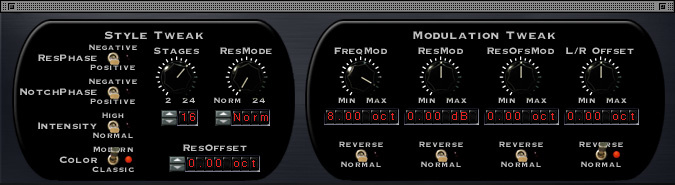 The Tweak menu in Phase Mistress provides access to all the low–level parameters that are used to set up phasing Styles.At the core of Tremolator’s ability to mimic classic hardware is a Shape editor, which allows you to define very precisely the waveform that is used to modulate the input signal. The Shape editor can store its own presets independently of the rest of the plug–in. Few analogue circuits generate mathematically precise sine, square or triangle waveforms, and the Shape presets bundled with Tremolator include a number modelled on the real–world output of popular designs such as those built into Fender amps and Wurlitzer electric pianos. What’s more, it allows you to apply the tremolo in a dynamic way which responds to level changes in the input signal. Rate and Depth modulation parameters can be set up in such a way that modulation is triggered only when the input signal exceeds a user–defined Threshold; so you could, for instance, have slow tremolo on the quiet passages that speeds up on the louder parts, or tremolo that only appears when the signal gets loud. You can even have the rate go so high as to put the LFO in the audible range, yielding lots of fun ring–modulation effects. The modulation parameters have their own Attack and Release parameters to let you determine precisely how the effect responds to level changes in the incoming signal.
 Not only can you define the exact wave shape Tremolator uses to modulate your audio, you can also create rhythmic patterns.That, however, is not the half of it, because Tremolator goes way beyond conventional tremolo, thanks to its Rhythm editor. Rather than simply repeating the same waveform at a constant rate, Tremolator can store sequences of tremolo ‘events’. You could, for instance, set up a two–bar loop with a tremolo that pulsed on every beat in the first bar, but ony half as fast in the second bar. Or you could pick out the third and eighth beats in a measure. Or you could have a tremolo that becomes heavier as the measure progresses. Or... you get the idea. And that’s without considering the Groove and Accent controls, which let you shuffle and swing your tremolo, and emphasise or duck downbeats.
The Rhythm editor is identical to the one in Filter Freak: clicking in the timeline adds or deletes a Rhythm event, while Alt/Option–clicking and dragging enables you to make events taller, wider, shorter or narrower. You can save your own Rhythm editor presets independently of the rest of the settings. The whole process is fairly intuitive, but is an area where the unresponsive GUI of the current Windows version is particularly frustrating.
 Tremolator’s Threshold parameter makes all sorts of dynamic tremolo effects possible, and the undocumented Width control allows it to work as an auto–panner.Reading the Tremolator manual left me wondering why there didn’t appear to be any way of creating auto–panning as well as conventional tremolo. However, when I opened up the floating Tweak window, I found an undocumented Width control, which does exactly that — providing, of course, that you’re using a stereo or mono–to–stereo version of the plug–in. I presume this was added in a later version of Tremolator, because it seems to be a bit of an afterthought; I couldn’t find any presets that made use of it, and personally I think it’s important enough to merit a place on the main plug–in window.
That is about the only weak link in Tremolator’s armour, though. Once again, this is a plug–in that combines a convincing repertoire of retro sounds — it also features the Analog Mode output stage, for added grit and warmth — with a head–spinning array of additional possibilities. It’s often hard to believe that the mind–bending sound you’re hearing is nothing more than level being turned up and down!
Summing Up
In use, one thing you notice straight away about Sound Toys plug–ins is how much thought has gone into creating the presets. There are lots, they’re sensibly named, they’re logically and intuitively categorised into banks, and most of them are very usable. The other thing you notice before long is that these effects can be pretty CPU–intensive. The company say that the Windows versions are not yet as highly optimised as they might be, so hopefully we can expect some improvements in this regard soon. After that, if the development team could turn their hands to creating VST versions, I’m sure they’d find a willing audience.
As you can probably guess, then, I am hugely impressed by Sound Toys’ Native Effects. In fact, I would go so far as to say that Phase Mistress and Tremolator pretty much set the standard to beat as far as their particular effects go. They are simply more flexible and better–sounding than other implementations I’ve heard. Echo Boy and Filter Freak probably have more competition, but again, they yield to nothing in terms of sound quality, and although one or two rivals, such as Antares’ Filter, have more features, I’m not convinced they’re better for it. Speed is a very handy bonus for Pro Tools users, while Crystallizer is one of those rare plug–ins that manages to be both versatile and distinctive at the same time.
All too often, buying a plug–in bundle means shelling out an inflated price for one or two effects that you really want, padded out with second–rate filler plug–ins you know you won’t use. Sound Toys Native Effects is a rare exception. All these plug–ins are of the highest quality, and the five real–time processors included here complement each other beautifully to build a really powerful armoury of effects.
Test Spec
- Sound Toys Native FX v3.01.
- 2GHz Pentium–M laptop running Windows XP, with 2GB RAM.
- Tested with Pro Tools M–Powered v7.3.
Alternatives
There are no plug–in bundles around that directly match the Native Effects bundle. If I was looking for a substitute for Crystallizer, my first port of call would probably be Eventide’s H3000 Factory plug–in, but this is hardly a like–for–like swap. The Eventide Anthology II bundle also includes their Instant Phaser and Instant Flanger, which are the best–sounding alternatives to Phase Mistress I’ve heard. They are, however, much less flexible, and the entire Eventide range is TDM–only.
I’m not aware of any tremolo plug–in that’s remotely comparable to Tremolator. There are, however, some nice delay plug–ins around from the likes of PSP and Ohm Force, which would make interesting if not precisely similar alternatives to Echo Boy. Likewise, there’s a vast array of filter plug–ins around, but feature sets and sound quality vary widely. If you need the kind of graphical pitch- and time–shifting interface found in Speed, Waves’ Sound Shifter and Serato’s Pitch ‘n Time are both good alternatives.
The Need For Speed
 Sound Toys’ off–line pitch– and time–shifting plug–in has been around for donkey’s years now, and must be one of the most enduring third–party processors available for Pro Tools. Unlike some rivals, it can’t be set up as Pro Tools’ default time–stretching engine in the Preferences, so you can’t use it with the TC/E Grabber tool. However, it’s straightforward to select it from the Audiosuite menu in the usual way.
Speed operates in one of three modes. Simple is as good as its name, allowing you to specify a fixed amount of time–stretching and/or pitch–shifting, in whatever units are most convenient. Calculator is similar, except that it will do the maths necessary to make your changes fit a tempo change or key transition.
The most interesting of the three modes is Graphical. I’m not sure whether Wave Mechanics or Serato were the first to develop this kind of interface for pitch and time manipulation, but it has since been adopted by other developers such as Waves, too. Simply put, you click with the mouse to add break points to two graphical envelopes, one controlling pitch and the other time. It’s an easy and addictively enjoyable way of mucking about with recorded audio, with applications ranging from adding slow–downs to the ends of songs to faking dive–bombs on guitar. Speed’s interface doesn’t have all the bells and whistles of Waves’ Sound Shifter, but it works well enough. For conventional pitch–shifting and time–stretching, the quality is not as remarkable as it once was, though, and in most situations Digidesign’s Time Shift has the edge.
Pros
- All of these plug–ins sound absolutely first–class.
- They combine convincing emulations of vintage gear with lots of innovation.
- There are lots of excellent presets.
Cons
- Current Windows versions are rather slow and CPU–intensive.
- No VST versions, and Speed is Pro Tools–only.
Summary
We’ve waited a long time for Sound Toys to port their plug–ins to Windows, and was it worth the wait? You bet.
information
£305.50 including VAT.Unity Audio +44 (0)1440 785843.
+44 (0)1440 785845.