

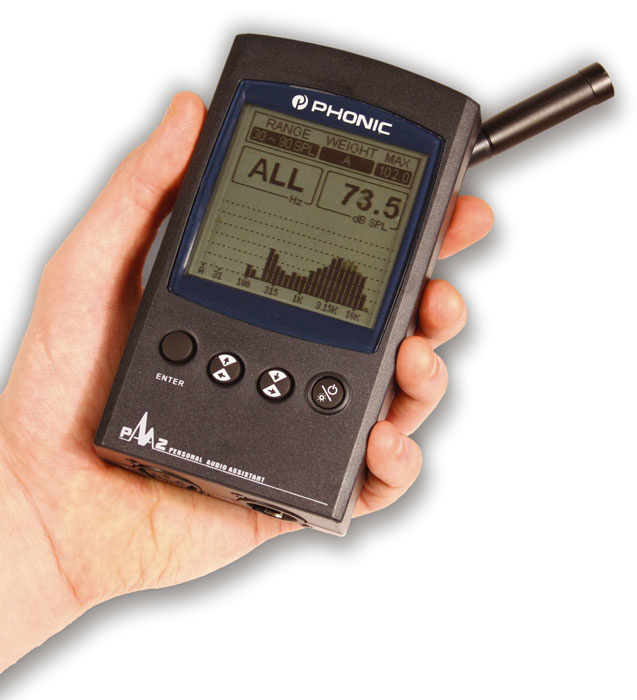
Phonic's new audio analyser is certainly portable, but how well does it work?
The PAA2 is a portable sound analyser designed to aid sound engineers, particularly those who have to set up audio rigs on a regular basis. Very roughly speaking, half of the tools on offer help the user identify and measure signal and wiring problems, while the rest analyse the actual sound itself within the acoustic environment.
At the heart of the PAA2 is a 31-band real-time spectrum analyser which allows the user to see exactly what is going on in any given burst of audio. Although the entire spectrum is shown across the screen, individual bands are easily selected so that their specific level is displayed (in dBu). This can be done in real time, where values change according to incoming audio, or, alternatively, a snapshot reading can be taken and analysed at a later date. A memory function allows up to 10 readings to be saved, and, if required, an average figure can be calculated and saved, using any combination of the 10. Having taken an average SPL reading, an EQ function can be used to analyse the result, after which the display provides the positive or negative gain value required for each frequency band in order to flatten the response. Even if you don't plan to use EQ to sort out acoustic problems, this display is useful for making the extent of the work clear. The main Settings menu.
Taking SPL readings is made possible by an onboard condenser mic, which conveniently folds away when not in use, but the PAA2 will also measure line-level signals input via a balanced female XLR connector. Readings can be made in units of dBu, dBV, or Volts, and for each measurement the weighting, level range, and response time can be set. Weighting options are 'A', 'C', and Flat, and response-time settings are 35ms, 125ms, 250ms, and 1s. The level range, for optimising the reading to suit the signal level, differs depending on whether the mic or line signals are being used.
Next to the input is a male XLR output, which delivers the signals created by the PAA2's own internal signal generator. On offer are pink noise, a 1kHz tone, and a polarity signal — the last has been included for checking speaker wiring when using the Phase Check mode. Having just the three audio test signals seems a little restrictive, but the PAA2 does ship with a CD-ROM which plays 26 test signals, including the three mentioned above. The 1kHz tone is joined by six other frequencies, ranging from 250Hz up to 12.5kHz, and there is also a handy 31-band tonal sweep which is ideal for identifying the shortcomings of a system's output. The Memory Store page, where you can save analyser readings.
Software Editor
PC owners may want to take advantage of the complementary software, also included on the CD-ROM, which offers an on-screen control interface. Connection is made by way of a serial interface cable which plugs into the mini-jack of the PAA2 at one end, and the serial port of a PC at the other. Once setup, the PC's mouse is used to navigate menus and to select functions, and the program itself enables data storage on the computer hard drive. It's also possible to use the computer printer to run off hard copies of saved settings. Unfortunately, the included lead isn't much longer than a domestic cat's tail, so remote operation is out of the question. Only those with portable laptop computers would be able to position the PAA2 freely around a room and still have it connected. The EQ Setting screen, which suggests what EQ settings would be required to flatten the frequency response of the audio system under analysis.
The software itself is easily installed, and my PC synchronised with the PAA2 without any messing about. The interface is basically a colour version of what appears on the display, possessing the same menus and features. It doesn't offer anything much in the way of additional features, but the main function of storing memory data works well, and future revisions will no doubt expand on the features.
In Use
Although an AC power adaptor is provided as standard, four AA batteries power the PAA2 quite comfortably for a few hours, making it eminently portable. Even with the batteries, the PAA2 is comparable in size to a cassette-based personal stereo. Mobile phone and digital cameras with more features come much smaller, but they usually have fiddly buttons and tiny displays. For its size, the PAA2 has a huge backlit screen, so data can be read clearly at arm's length, and the buttons are large enough that even the most sausage-fingered engineer won't get frustrated.
Curiously, there are two ways to navigate through the menus. You can either scroll through and select items using a single rotating wheel (found on the left-hand side of the case) which doubles as a button, or you can use the cursor and Enter buttons situated just below the display. I found myself using a combination of both, depending on how I was holding the device at any one moment. In the palm of my left hand, for example, the scroll wheel was ideally placed for thumb operation. The measurement mic built into the PAA2 locks into a stowing position flat against the case, which makes the system easier to carry. In the stowing recess can be found the main power switch and an LCD contrast control.
Operating the PAA2 is a matter of diving in and out of various menus and submenus, changing settings, and then returning to the current mode of operation. Although doing this proved to be very intuitive, repeated use revealed the menu arrangement as tiresome. I suspect that testing the PAA2 required far more flicking back and forth than a user might do in normal practice, but I still wonder whether another button of two might be worth adding in future versions, so that reliance on the menus is reduced.
Although there is a master power switch under the mic, the manual recommends using the Off item in the Power menu in normal use. I found it a pain to have to navigate to a submenu to turn off the PAA2, and would have liked the front-panel On/Backlight switch to have had a press-and-hold function to take me straight to the Off menu.
Final Analysis
The PAA2 is one of those products that doesn't need flashy gimmicks to sell; its strength lies in its ability to do a variety of useful tasks simply, effectively, and to a high standard, and in that respect it is a success. In terms of operation, it's a pretty straightforward bit of gear, so not much learning is required.
There are a few shortcomings. As mentioned above, the PC software is lacklustre, the serial lead is 'lack-length', and I think there is room for improvement in the menu structure. For some reason, the internal memory is only able to record SPL readings, and not any of the line voltage measurements, which is a shame. I also think that some more of the test signals found on the CD-ROM should be generated by the PAA2 itself, for when a CD player is not available.
Even at its comparatively reasonable UK price, the PAA2 is likely to be considered a bit of a luxury by the typical home-studio user, especially one who doesn't test audio systems on a regular basis. However, if you rely on these kinds of analysis tools day to day, then this unit would prove a very portable and convenient solution.
Pros
- Easy to use.
- Large, clear display.
- Very portable.
Cons
- PC software disappointing.
- Some useful test signals on CD-ROM only.
- Memory can't store readings for line input signals.
Summary
A practical product which contains all the important basic sound-analysis tools an engineer might wish for when setting up a sound system.
information
£325.01 including VAT.
+44 (0)20 8808 2222.