


If you need more audio interfacing, do you really have to trash an interface that's otherwise perfectly satisfactory and buy a bigger one? Maybe not, as ways of using several smaller interfaces together are becoming easier to find.
There's been a recent spate of queries from musicians asking how feasible it is to add more inputs and outputs to an existing audio interface, as their recording and playback requirements become more sophisticated. For instance, those moving from stereo to surround work will need perhaps six outputs instead of two, while those who suddenly find themselves faced with a live band or other ensemble recording may suddenly require another half-dozen mic-input channels for multitrack work. Others are lusting after various recent interfaces that offer high-quality mic preamps and built-in DSP effects.
Of course, you could buy a new interface that provides all the features you need in one neat hardware package, but many musicians are loath to abandon the perfectly good interface they already have, especially since it's probably worth peanuts second-hand. After all, while PC technology generally moves forward in huge leaps and bounds, the performance of audio interfaces is a much more measured affair. Lots of musicians are still perfectly happy with the performance and audio quality of units that are a few years old, especially since they cost a lot of money when first bought.
So what are the options? Well, some musicians fall at the first hurdle, by assuming that they can buy a second interface identical to their existing one, to double up on features. This may indeed be possible, but it requires specially written drivers that can recognise and support multiple interfaces. Standard drivers that support a single device would be totally confused when presented with two or more identical interfaces. They wouldn't be able to differentiate between them and the second interface would be ignored, or (more likely) your PC would crash or fail to boot up at all.
Fortunately, quite a few manufacturers have developed suitable multi-device drivers that typically support up to four identical interfaces, or a mix of up to four similar models from the same range. The best advice (as always) is to download the latest drivers for your interface, so that you can read the accompanying Read Me or Help file to see what expansion possibilities there are, before purchasing an additional unit.
It's more tricky to check whether or not a new interface that you're thinking of buying already has multi-device drivers. Over the years, I've noticed that multi-device support for new models is rare but often promised in a future driver update. Unfortunately, this information isn't always easy to find on the manufacturer's web site when multi-device drivers are finally released, so the safest approach is to telephone or email the local distributor or tech support line to obtain the latest information for the range in question. To help you on your way, here are a few up-to-date examples.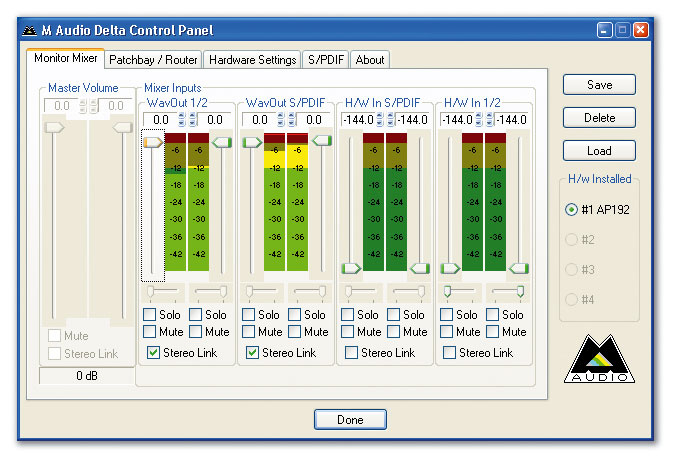 The easiest approach to running multiple interfaces is to buy those that can share the same multi-device driver, such as M-Audio's Delta series (the Audiophile 192's control panel is shown here). Then they effectively become one larger interface with their inputs and outputs pooled.
Interfaces With Multi-device Support
M-Audio's Delta range has supported up to four devices under Windows for many years (three under Mac OS X and up to eight with the Linux OSS driver). I know musicians successfully running four M-Audio Delta 1010s under Windows XP, as well as mixtures of the smaller Delta interfaces such as the Delta 44/66 or Audiophiles. M-Audio's Internet Knowledge Base also includes full details on the various settings that are required.
MOTU are also enthusiastic about multi-device support, and if you received one of their PCI424 cards with your MOTU Audiowire interface you can plug a further three interfaces into it, from a large range of options including any 2408 (Mk1 to Mk3), 308, 24i, 24i/o, 1296 or HD192. Similarly, you can daisy-chain up to four 828MkII, 896HD or Traveler Firewire interfaces for more I/O channels.
ESI Pro's Maxio XD drivers support up to four units, and by the time you read this, Echo should also have released multi-device drivers for their Audiofire range, although their PCI products don't have multi-device driver support, and nor does Emu's Digital Audio System range, or any of Edirol's range. However, some older PCI devices do have multi-device support, such as Terratec's Phase 88.
If you ever think you'll need more inputs and outputs than you have at present, the best approach is to choose an interface that already has multi-device drivers, such as the ones I've mentioned. Then, when you buy another compatible interface, your ASIO (Audio Streaming Input Output) compatible audio applications will simply see one larger interface. Most musicians find this runs like a dream, althoughin the case of multiple PCI cards, very occasionally the odd PC motherboard may throw a spanner in the works and prevent the cards from running smoothly alongside each other.
ASIO Driver Options
Those with several entirely different interfaces should find that Windows will run them all separately, but whether or not you can use them all simultaneously in your chosen audio application is another matter. Unfortunately (despite many requests from users), ASIO still doesn't officially support multiple devices, so if you have several completely different models of interface with ASIO drivers, while all will appear in the list of available devices, you can only choose one at a time. Sadly, some musicians don't realise this before buying an expensive second interface and then finding that they can't add it to their existing one inside their audio application.
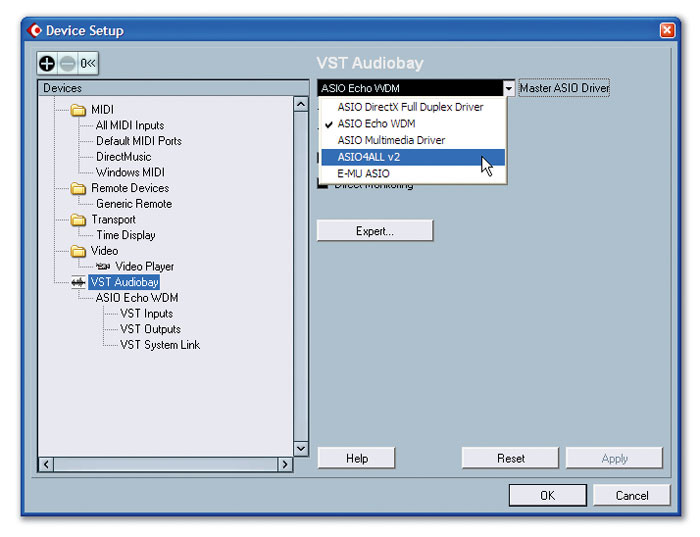 Cubase SX3, an ASIO-compatible host application, allows only one driver at a time to be selected in its Device Setup window, although it may be possible (using special drivers like ASIO4ALL, highlighted here) to persuade several interfaces to run with one driver.
Nevertheless, some musicians do buy several interfaces for use with the same ASIO application, with the intention of using them one at a time. For instance, I spotted one person running an RME HDSP 9652 for 24-track playback via ADAT interfacing into a Yamaha 01V96 mixer, but was sometimes using an M-Audio Delta 1010 instead, for old projects and some analogue recording. If you have several completely different requirements, this may make sense.
There is also one sure way of combining several completely different interface models from different manufacturers without running into problems, and that's when they are each performing an entirely separate task. For instance, I'm currently running three PCI interfaces in my PC. The main one I use for my ASIO audio recording/playback is Emu's 1820M, because, of the three, this one has the best converter quality. However, I haven't discarded my old Echo Mia, bought in 2001, because I still use it with GSIF drivers for Gigastudio 3 (the Emu range doesn't offer GSIF support, and although I could connect Cubase SX and Gigastudio 3 internally, using Rewire, I often find that approach more complex and frustrating). My third interface is a Yamaha SW1000XG, bought in 1998 and no longer used for audio, but still occasionally called upon for its MIDI synth.
Locking The Clocking: Multiple Interfaces & Sync
Whether you're lucky enough to have dedicated multi-device ASIO drivers from the manufacturer of your interfaces, are using WDM/KS drivers inside Cakewalk's Sonar, or have made use of the generic ASIO4ALL overlay (see main text for details of all these options), your various interfaces will still be 'free-wheeling': although they may all start synchronised to sample accuracy, thereafter they rely on their internal clocks, which will inevitably be running at slightly different frequencies. While each new part will be started/stopped in perfect sync, long parts will slowly start to drift apart. If you have no special driver sync options and no word clock or digital audio ins and outs, there's nothing you can do about this except follow the following advice:
- Allocate all time-sensitive tracks, such as drums, percussion, bass, guitar and so, on to the outputs of your first interface to keep them locked together.
- Use the second interface and any others for sounds with less percussive attacks, such as vocals and pads, and you may never notice any drift, particularly if your songs use short parts rather than a single long take.
- Never split the two channels of stereo tracks across two interfaces (at the very least, the stereo imaging will probably prove dreadful). If you have to split drum sounds between free-running interfaces, you may hear 'flamming'.
A few interfaces (notably M-Audio's Delta 44) provide special 'Multiple Card Sync' options in their Control Panel utility. These prevent the interfaces from drifting apart over long periods, by using Windows 2000/XP's 'Kernel Sync' feature. Many musicians may notice no drift at all using such techniques. However, the various interfaces are still not sample-locked, which requires that all the interfaces are synchronised to the same digital clock. If you're using PCI cards from the same manufacturer, it may be possible to lock them together by connecting an internal Sync cable between the cards, but for other PCI cards, and for USB and Firewire interfaces, you'll either need to use Word Clock I/O if you have suitable ports (which generate and receive a dedicated clock signal), or the embedded clock signal from one of your S/PDIF, ADAT or other digital audio ports.
Anyone with a stand-alone high-quality Word Clock generator (as used by larger studios) should connect its outputs to the Word Clock inputs of the interfaces. Those relying on another clock signal from one of their interfaces should choose the one with the best audio quality (and therefore lowest jitter) to provide the Master Clock, make sure its clock setting is set to 'Internal' and then connect a cable from its digital output to the digital input of the next interface, which should, in turn, be set to 'External' clock. Similarly, any further devices should also be attached to this digital chain and set to 'External'.
Once this has been done, all interfaces will be locked to the clock of the one designated as Master and you can safely do multitrack digital and analogue recording and playback across several interfaces, while they remain permanently locked to sample accuracy. Make sure you always use proper digital cables and always observe any specific Sync advice and settings recommended by the interface manufacturer.
WDM/KS Drivers
Those running Cakewalk's Sonar from version 2.2 onwards have the option of using ASIO drivers, but choosing the WDM/KS (Windows Driver Model/Kernel Streaming) driver option instead lets you assemble a composite interface from any combination of the stereo inputs and outputs that appear in the drop-down Sonar list. Since WDM/KS drivers bypass Microsoft's kernel mixer (which is normally used to mix the outputs from multiple audio applications into one stereo stream), this option can provide very low latency. However, quite a few musicians also seem to have used the feature to assemble an ad hoc arrangement of interfaces from different manufacturers. As long as you lock their clocks together in some way (see 'Locking The Clocking' box), they should be able to exist in perfect harmony.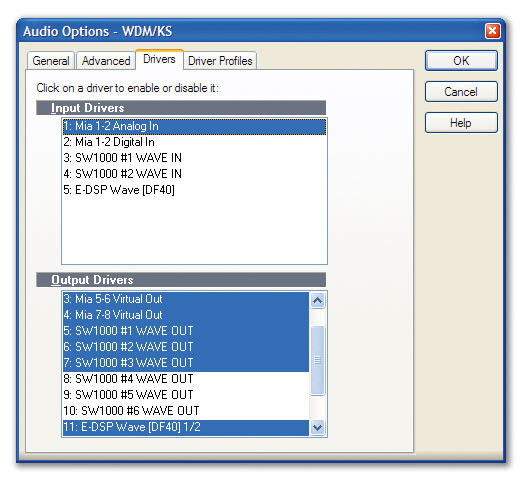 With Sonar's WDM/KS driver option, you can run several completely different drivers side by side, as shown here.
But there are some restrictions you should bear in mind. As I explained in some detail in my two-part feature on 'Real World Latency', back in SOS September/October 2002, in addition to the latency imposed by the interface's buffer size, the interface's A-D and D-A converters also impose some latency of their own, and there may also be other 'hidden extras', such as interface DSP code, that have further latency implications. For example, I measured a total of 189 samples of extra latency on my Echo Mia, 152 samples on M-Audio's Duo and 91 samples on the Egosys Wami Rack 192X. These figures may also change from driver revision to driver revision.
The upshot is that if you run different interfaces alongside each other (and even if you lock them to the same clock to keep them in perfect sync), their input and output signals may still be separated by a small fixed offset of perhaps 100 samples or less (a couple of milliseconds at 44.1kHz, and less at higher sample rates). Essentially, while notes on different interfaces may be perfectly 'lined up' if you quantise them or zoom in on them and drag them by hand to the same playback position, they may still play back at slightly different times, albeit by a tiny amount.
These offsets won't drift over time, but you may hear them if you're assembling a complex rhythm part across multiple interfaces. If you come across such issues, the answer is to use your ears to set the timing, or to calculate the fixed timing difference between the interfaces (I suspect this timing difference to be the main reason why Steinberg haven't yet added multi-device support to their ASIO driver protocol.)
Multiple Interface Hints & Tips
- Disable Unused Inputs: If you're experimenting with multiple interfaces, remember that unused audio inputs will still need to be polled by the computer for possible input signals. So if you know you're not going to use some inputs, disable them or otherwise remove them from the list inside your sequencer. This will save resources and may give better stability at low latency settings. The same advice applies even if you're only using a single interface, and it may prove a useful tip when you're trying to play soft synths 'live' with as low a latency as possible.
- On The Move: Here's a tip for if you have a laptop and a host application such as Cubase that includes Rewire support, plus Gigastudio 3 (which also has Rewire support), but you want to work 'on the move' without carting about an expensive audio interface with GSIF and ASIO support. Just use Rewire to port the audio output from Gigastudio to Cubase and then ASIO4ALL to provide low-latency ASIO drivers for the laptop's sound chip.
ASIO4ALL
Although the ASIO protocol doesn't officially support multiple devices unless they have dedicated drivers, there are a couple of notable exceptions in the case of generic multi-device drivers that allow several completely different interfaces to be combined. The first generic ASIO driver I came across was Tobias Erichsen's ASIO2KS (www.asio2ks.de), back in 2003, which used the WDM/KS drivers that already existed for most audio devices and added a further layer of its own code to provide them with low-latency ASIO functions. A lot of musicians received the beta version of this driver and the results looked promising, but, sadly, the final release never appeared.
To the rescue in 2004 came Michael Tippachs' freeware ASIO4ALL overlay, which employed the same techniques and has since been widely used by many musicians to perform two main tasks. The first is providing the on-board sound chips found on most PC laptops with low-latency ASIO support. While these chips are mostly restricted to 16-bit operation and rarely provide good audio quality, they are nevertheless extremely handy if you want to 'travel light' with your laptop and make some music. Prior to ASIO4ALL, the only Cubase driver alternatives provided by Steinberg for them were the ASIO Multimedia Driver and the ASIO DirectX Full Duplex Driver, neither of which resulted in latencies much below about 20ms. With ASIO4ALL, my laptop soundchip managed an excellent 5ms latency.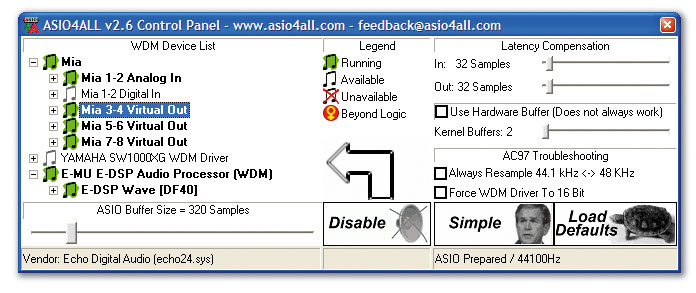 ASIO4ALL may not have the most professional-looking Control Panel, but it can work rather well if you want to mix several different interfaces and run them simultaneously in an ASIO-compatible host application.
The second task is providing support for multiple interfaces, introduced in version 2 of the driver. All you need to do is install it and then choose the ' ASIO4ALL v2' option as your ASIO driver. It's also important to note that ASIO4ALL causes no audio degradation — it simply routes audio and makes the various inputs and outputs appear as extra options inside all ASIO-compatible hosts.
Given that it's freeware, we can forgive a few quirks, as well as a 'novel' Control Panel window (see screen on previous page). In addition, sometimes particular interfaces or applications refuse to play ball with it — for instance, some users have encountered problems with Fruity Loops and Creative Labs soundcards, and it seems that RME WDM drivers don't work with ASIO4ALL either. Remember, also, that ASIO4ALL relies on the existing WDM drivers for your interface, so if these only provide reduced I/O support compared with their ASIO drivers, this is all you'll be able to access with ASIO4ALL. Echo's current Audiofire drivers and Emu's DAS drivers are a case in point.
I've also found that sometimes, although the correct number of input and output connections appear inside Cubase SX when you choose the ASIO4ALL drivers, their names don't appear correctly. However, as long as you remember the total number of inputs and outputs belonging to each device, and count down the displayed list to the appropriate one, the connections still work reliably.
Despite these quirks, many musicians have used ASIO4ALL to 'achieve the impossible' and run several dissimilar interfaces side by side inside Cubase and other ASIO-compatible applications, to provide them with more inputs and outputs. However, as in the case of Sonar 's WDM/KS driver option, there could well be a tiny fixed offset between the different interfaces.
Interface Driver Conflicts
Drivers that only support a single device will become confused when faced with two identical interfaces, but sometimes Windows can also get confused when you plug in a new interface, and can think it knows what the new device is before you've installed the correct drivers. This may be a one-off anomaly that can be ignored, but it may also be because both the new device and a previous one contain a similar chip. Sometimes this previous device is still active, or it may be one that you've removed without properly un-installing its drivers first. In such cases, you should always follow the manufacturer's step-by-step installation instructions for the new interface, and cancel or ignore any attempts by Windows to automatically install any other drivers for it.
Emu, for example, warn existing Creative Audigy 2 users that after installing one of their 1010 cards and rebooting, Windows may attempt to use the previously installed drivers for these older Audigy cards. However, if users ignore Windows and install the 1010 drivers and software correctly, these products can actually run happily alongside each other without conflict.
Professional Universal ASIO Drivers
 Centrance's forthcoming Universal Driver promises professional low-latency performance if you want to run several different Firewire audio interfaces simultaneously, and even divide up their I/O amongst several ASIO-compatible applications.By the time you read this, Centrance (www.centrance.com) should have released their CE1506 Universal Driver for Firewire audio devices. This uses the low-level 'kernel' mode (without employing the Windows usbaudio.sys file), for low latency, and will support multiple devices. Running under Windows XP, it will not only provide up to 32 input and 32 output channels under Firewire 400 (up to 64 of each with Firewire 800) but will also offer multi-application support, for combining audio streams from several apps running simultaneously (see diagram).
The driver is written for the three major Firewire chip sets (Oxford Semiconductor, Wavefront Semiconductor and BridgeCo), so version 1.0 should support a wide variety of interfaces, including the Apogee Rosetta 200, Behringer FCA202, Focusrite Saffire, M-Audio Firewire Solo and Ozonic keyboard and Miglia Harmony Audio. Future versions of the driver could add support for products from Alesis, Presonus and Yamaha, amongst others. Round-trip latency (recording plus playback) should be under 10ms, and supported ASIO host applications so far include Cubase LE, SE and SX, Nuendo, Live, Sound Forge and Vegas, Sonar 5 and Reason, with others, such as Acid and Fruity Loops, to follow. Given the pedigree of some of the supported products and applications, I expect this new driver to create a lot of interest in the ranks of professional musicians.
Converter Expansion
After all this talk of exotic drivers, I should remind those with unused ADAT ports that they already have an easy way to add more analogue inputs and outputs to their interface, to cater for live recordings or surround requirements, simply by plugging in a hardware box containing some A-D or D-A converters, or both. Quite a few audio interfaces offer suitable ADAT I/O, including Echo's Gina 3G and Layla 3G, Edirol's UA1000, Emu's 1820 and 1616 models, ESI's new Maxio XD, M-Audio's Firewire 1814 and quite a few models in both the MOTU and RME ranges.
 If you already have a spare pair of ADAT ports and need more analogue inputs and outputs, you can add eight of each by plugging in a suitable converter box, such as Behringer's ADA8000, shown here.
There are also quite a few compatible converters available in desktop and rackmount formats, many of which have already been reviewed in the pages of SOS. If you want eight more inputs and outputs and have a suitable spare pair of ADAT ports on your existing interface, one budget offering to consider is Behringer's ADA8000, reviewed SOS June 2004. At £185, it's extremely good value for money, providing eight mic/line inputs with rotary gain controls on the front panel, globally switched phantom power, and eight balanced XLR outputs on the rear panel, along with ADAT In/Out. A more up-market alternative is RME's £900 ADI8 DS, reviewed SOS September 2003. If you only need lots more analogue inputs, M-Audio's Octane provides eight mic/line preamps with optional phantom power (two with instrument options, and another two featuring Middle & Side decoding for use with a compatible M&S stereo mic pair), feeding a single ADAT output, for around £300 on the street. It was reviewed in SOS September 2004. Those with more money to spend might want to look at Mackie's Onyx 800R, once again with eight mic preamps (and M&S options), this time taken from their acclaimed Onyx mixers. Hugh Robjohns reviewed this device in SOS February 2005 and it costs about £850 on the street.
If you don't need more inputs or outputs but want significantly better recording/playback quality than your existing converters give you, RME's £450 ADI2 (reviewed in SOS May 2005) provides high-quality stereo A-D and D-A converters with up to 192kHz capability, in a half-width, 1U, rackmount case. Those aspiring to even higher playback quality could look at Benchmark's DAC1 (reviewed SOS July 2005), which provides stereo playback with superb resolution, imaging and jitter suppression, for around £900.