

Which effects and processing plug-ins do the Sound On Sound experts love the best? We asked, they answered...

Just a few years ago, the word 'plug-in' didn't intrude much into the average computer-based musician's vocabulary. These days it's probably true to say that the average computer-based musician wouldn't want to do without plug-ins. But with what seems like about a million of them on the market, in freeware, shareware and commercial varieties, how can you know which ones are really the cream of the crop, aside from spending half your life downloading and auditioning demos?
Well, we can't tell you which plug-ins you're going to like and use the most — but we can tell you which effect and processing plug-ins the team of expert Sound On Sound staff and contributors find themselves turning to again and again as they record, mix and generally make music, because we've asked them. If we stranded the SOS team on a desert island, these would be the plug-ins they'd hope got washed up on the beach — along with a computer, some monitors and a solar power generator, and all miraculously unharmed by their sea voyage...
Favourite Reverb: Audioease Altiverb

 "Altiverb is, to my ears, still the best-sounding convolution reverb." Paul White
"There are a number of convolution reverb plug-ins on the market, but Altiverb was one of the first, and for me is still one of the best. The sound quality is jaw-dropping and the ever-expanding library of freely downloadable impulse responses is top-class. There are great little touches, too, like the buttons that trigger a range of built-in instrumental and vocal samples so that reverbs can be auditioned even if you've no audio in your tracks yet." Robin Bigwood
Reverbs
Favourite Reverb: SIR Convolution Reverb
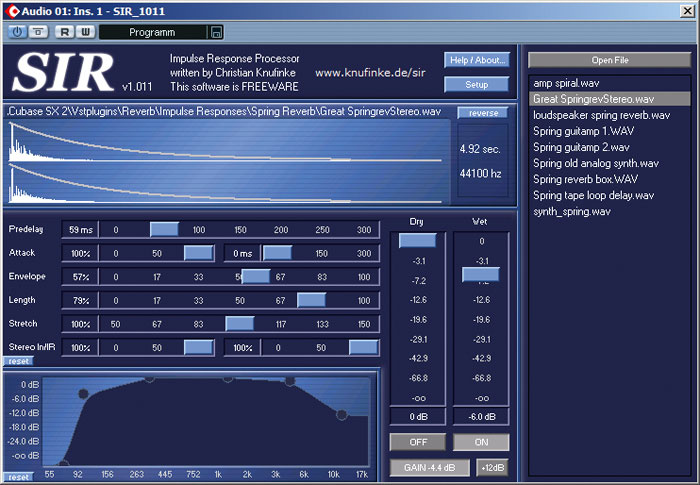 "It's free, its easy to use and — when loaded with good impulse responses (IRs) — it sounds great. It plugs the convolution reverb gap in Cubase really well, but it is capable of far more than reverb: you can load impulses of guitar cabinets, EQ units and so on, and while it doesn't act dynamically it gives a good approximation. You can also shape the envelope of the IR, change the length and reverse it. I like to grab any short sample at random and load it into SIR: your chances of coming up with a cool effect are pretty good. It seems to work particularly well with rhythmic samples like drum loops in place of the IR. I suggest trying one using plenty of cymbals, and then hitting reverse. This is quite possibly the best freeware effect plug-in around." Matt Houghton
"SIR is a convolution plug-in that gives you immediate access to all kinds of spectacular reverb impulse responses freely downloadable from the Internet." Mike Senior
Voxengo Pristine Space: "I use Pristine Space as a result of being very impressed by it when reviewing it for SOS. I find that Pristine Space provides a real sense of the acoustic space that a sound is supposed to be sitting in. It's a great step up in quality from the majority of the algorithm-based reverbs that most of us in 'project studio land' have had to manage with until quite recently." John Walden
 Nomad Factory Blueverb: "Blueverb aims to emulate the sound of those expensive digital reverbs of the '80s, and it succeeds brilliantly. If you're looking to use reverb as an artificial creative effect, rather than to provide natural ambience, this is the one. To my ears, it has 'that sound' — lush and controlled without ever being grainy. After hearing Blueverb 's Lexicon PCM80 emulation I immediately consigned my last remaining hardware reverb to eBay." Nick Rowland
Apple Logic Space Designer: "Logic 's built-in convolution reverb isn't bad at all. If you have fairly modest reverb requirements, like me, you probably don't need to look any further. I try to use no more than a couple of reverbs in a mix these days, generally a small room and a vocal plate, and Space Designer does both perfectly well. I just love the convenience of having it there in my Autoload template song, always pre-configured for use." Dave Lockwood
 Universal Audio Plate 140: "While convolution is great for realism and you can create some wonderful effects, you sometimes need a certain vintage sound that convolution reverbs can't deliver. The UAD Plate 140 plug-in models an EMT 140 plate reverb and is simply the best-sounding software reverb I've heard. The only down side is that I needed to buy additional UAD1 cards to support enough instances of it for a large mix!" Matt Houghton
Waves IR-series: "I think my desert-island reverb of choice would be a Waves IR (whether in the 1, L or 360 version) because it just sounds so damn inspiring for pianos and orchestral sounds in general. The 'Trinity Church' preset was a notable highlight when I first started using the plug-in nearly three years ago, and Waves now have a pretty extensive library of impulse responses." Mark Wherry
Favourite Dynamics: PSP Audioware Vintage Warmer
 "This must surely be one of the most flexible dynamics plug-ins ever produced. It's a compressor and limiter, single- or multi-band, with tape saturation emulation. It can be subtle or aggressive as hell. It goes as well on a vocal or bass as on a string quartet or drum kit submix. It also works magic on entire mixes. What's more, it's easy to use, and PSP are a fine, supportive little company." Robin Bigwood
"A great-sounding tool that combines multi-band compression, analogue-style saturation, EQ and limiting." Paul White
"Warm, analogue-sounding compressor/limiter, able to operate in single- or multi-band mode and equally at home on individual sources or a complete mix. I like to monitor through it during the later stages of a mix, so I can hear what it's doing. This allows me to push the process a bit harder, or back off a bit on some elements within the track, rather than just applying it to a finished mix. You don't have to always drive it hard — some people seem to regard it as a bit of a 'one-trick' saturation processor — as there are a lot of subtler shades to be had here too. Favourite applications: basses, drums and complete mixes." Dave Lockwood
"This is for when you want to set your distortion phasers on stun, not kill, as you can do pretty subtle distortions suitable for use on program material as well as individual tracks. The distortion also has a pleasing, rounded quality that's sweeter than a lot of other plug-ins. Despite Vintage Warmer being one of the earliest distortion/warming plug-ins, PSP nailed the sound and it's a 'secret weapon' for many recording fanatics." Craig Anderton
Dynamics

 Digital Fishphones Blockfish: "This great little compressor has what most digital compressors lack: big dufflebags full of character. Here the normal compressor controls are only the start, because you can choose between VCA and Opto compression, add saturation artifacts and 'air', and do things like putting two gain-reduction elements in series. And if that's not enough, you can click the little switch at the side and access a further funky-looking page of virtual trimmers for even more control. Exhaustingly good fun." Mike Senior
Waves Renaissance De-Esser: "For me, there is no other de-essing plug-in that comes close to this, other than Waves De-esser or their C1 compressor with side-chain, as they all have a Split mode which means that not only is the side-chain filtered, but the dynamics only affect the chosen band and leave the rest of the signal untouched. My presets list now has a range of presets for all the vocalists I regularly work with." Mike Thornton
Universal Audio UAD 1176LN: "This is one of those plug-ins that doesn't just do what it says on the tin. Sure, it's a compressor, but somehow it makes everything routed through it sound just that little bit better and that's why I love it. It's a reasonable facsimile of the hardware, but that's not really the point; it just sounds wonderful and never seems to lose control even if you click on the ratio bar while holding down the Shift key to get the 'all buttons mode'. Even when I have access to the original, I still use lot of these plug-ins on a mix, as every instance gives each track that something extra." Stephen Bennett
Digidesign Digirack Expander/Gate: "It feels odd to nominate such a mundane processor as a personal favourite, but I wish all DAWs included an expander plug-in as flexible as Digidesign's. I rarely use it for hard gating (isn't that what Strip Silence is for?), but the beauty of it is that you can use it to perform very subtle expansion, and trigger it from a side-chain input. It's perfect, for instance, for smoothly chopping off the attack portion of a sound, which is really handy when you want to have a long delay that's prominent in the mix, because repeated transients tend to jar unless they're right on the beat." Sam Inglis
Waves C4: "This plug-in [above] is so useful when I'm working on a sound that needs dynamic EQ. For example, I was able to improve a solo violin part that had a couple of notes that really jumped out of the mix, setting C4 to sit on those notes without squashing the rest of the sound. It seems that, when I go to master projects, there is nearly always one track on an album where using C4 on a particular channel has enabled us to improve the track far beyond what we would have been able to do without it." Mike Thornton
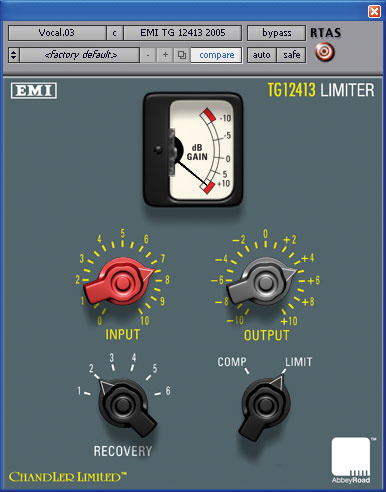 Chandler EMI TG12413: "I first heard the Chandler EMI TG12413 limiter plug-ins at last year's Winter NAMM show, and even in the less-than-ideal listening conditions of a trade show you could hear that this was a great processor. Digital recreations of classic analogue gear are commonplace these days, but the TG12413 plug-ins are simply stunning. The pedigree of the analogue gear in question goes way beyond marketing. There seems to be an industry-wide joke about the need for a 'make it better' button on audio equipment, and TG12413 really is such a button, because with very little effort it just makes everything sound... well, better — and with only four controls! While it's great as a mastering tool over a final mix, TG 12413 works perhaps indulgently well on percussion, and particularly drum kits." Mark Wherry
Waves Renaissance Vox: "This is now my compressor of choice for vocal work. I love it as it provides the sound I like with the minimum of tweaking. I also use this plug-in on broadcast post work to keep dialogue tracks strong and consistent." Mike Thornton
 McDSP Channel G: "You sometimes hear mix engineers say that they know the mix is right when it 'sounds like a record'. I've always been a bit suspicious of this, because I think what they mean is 'It sounds like a record that was mixed in the '80s.' Can't we (I thought) redefine how a record sounds now, using the gear we have now? Then I did a couple of mixes using Channel G, which emulates the EQ and dynamics from the classic analogue mixing consoles. All I did was apply the SSL buss compression and some careful EQ to the drum and guitar submix channels and the main mix, and thought 'Brilliant, this sounds like a record!'" Simon Price
Equalisers
PSP Audioware Neon HR: "PSP's eight-band parametric Neon HR equaliser looks lovely but sounds even better. It's a linear-phase design that offers a more transparent and detailed sound than more traditional IIR (Infinite Impulse Response) types, and this, together with its 'FAT' oversampling, provides a sweet, analogue-sounding high end that's wonderful for adding 'air' to transient-rich sounds such as bells and percussion. Moreover, with eight filter options for each of the eight bands, this is a wonderful tool for mastering where you need precise control over the entire frequency range, combined with a natural sound. I would also happily use it as my main EQ during tracking if it didn't consume so much CPU and impose such a high latency compared with more traditional equaliser plug-ins." Martin Walker
MOTU Masterworks EQ: "It pains me a little that my number one plug-in choice isn't something a bit more esoteric than an EQ, but at least I'm being honest! Masterworks EQ is bundled with MOTU's Digital Performer, and as a MAS-format plug-in it's not available for any other platform. On paper it looks good, but in practice it's just great — it feels and sounds like a nice analogue EQ. I use the Mode III Q setting more than any others, which has a decidedly non-digital feel and a readily audible effect, even at low gain settings. To top it all, an FFT display and pink noise audition feature make zoning in on suitable settings that bit easier." Robin Bigwood
Eliosound Air EQ: "This is one of those plug-ins that grows on you. The first few times I used it, I thought 'This is pretty good,' but I went back to using alternatives because I wanted a graphical frequency display. After a while, though, I began to feel as though other equalisers were muddying or clouding the sound by comparison. Though it's not a linear-phase design, Air EQ seems somehow purer and more clear than other equalisers, and where any sort of mid- or high-frequency boost is required, it's now my automatic choice." Sam Inglis

 Digidesign EQIII: "I was torn here, because Waves' Renaissance EQ was my main tool for years, but Pro Tools ' built-in EQIII sees more use now, and gets the job done just as well as the big-name Pro Tools EQs." Simon Price
Apple Logic EQ: "It may seem a rather dull choice, but Logic 's EQ is precise, sounds very nice and, along with its specialised cousins, Match and Linear Phase EQ, gets used on everything I mix. The visual interface is very clean and makes analytical EQ very easy to perform. The Analyser displays a frequency plot of any audio being routed through the plug-in and is extremely useful for spotting inconsistencies on vocals or whole mixes. You can have about 12 million of them in a mix and it never sounds harsh. It's a bread and butter plug-in for sure, but extremely musically nutritious!" Stephen Bennett
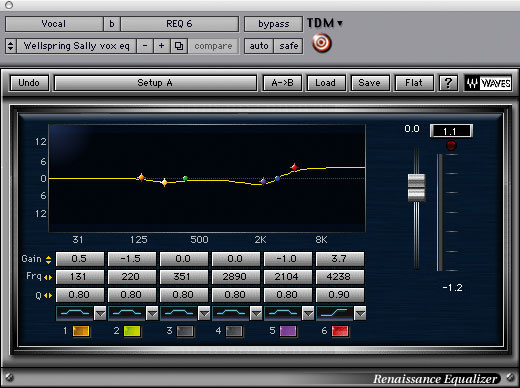
Waves Renaissance EQ: "This is always where I go when I want EQ. I find I can get the desired sound very quickly and easily and I put this down to the combination of a good graphical display, the range of curves available, no limits on frequency range, and the way Waves have designed the sound. It all means that the right sound lands in my lap with ease. I use this for both creative and corrective work and my preset list is now over 100 long and growing with every project." Mike Thornton
TC Electronic Assimilator: "Assimilator imposes the spectrum of one sound onto another. It works well and is still my first choice, even though Logic now has Match EQ built in. The abilities to decide the precise degree of 'assimilation' and to confine the process to a specific area of the spectrum are what really makes it useful for me. I never use it to voice a finished mix, but it's great for quickly hearing some radically different possibilities and generating a feel for the best overall mix tonality." Dave Lockwood
Sony Oxford EQ: "Oxford EQ was the first plug-in to be released by Sony's Oxford audio group, based on the algorithms found in the high-end Oxford series of mixing consoles. While there's no shortage of great EQ plug-ins, Oxford EQ is extremely versatile and offers four different EQ types, plus an optional GML type that's available to Pro Tools HD users. The default 'Type 1' is usually where I'll leave the plug-in set, because it allows you to produce musically natural results in a reasonably transparent manner." Mark Wherry
Favourite Guitar Processor: NI Guitar Rig 2
 "If I'd never installed Guitar Rig 2, I'd have done a lot more useful work in the last year, but I'd have had a lot less fun. Its mix-and-match approach to guitar amp modelling means there's always one more combination of modules to try; and if that means having four amps in series with no speaker, so be it. I'm almost grateful for the fact that my computer won't run hundreds of instances of Guitar Rig 2, because it forces me to freeze guitar parts rather than endlessly tinkering with them." Sam Inglis
"OK, so I don't actually own a guitar, and I know it's cheating to choose a plug-in that consists of dozens of different effects in one modular environment. However, I'll narrow it down a bit. Although GR2 has a host of cool effects, the one that I've used on every electronic drum track recently is the Tube Compressor module. By default it's quite extreme, slamming and grunging up what you put through it. However, if you pull back the level going into it, push up the threshold, and reduce the ratio to about 8:1, it adds a lovely warm analogue saturation. Switch it off and stuff sounds puny by comparison." Simon Price
Favourite Mastering Package: Izotope Ozone
 "No, I don't have a studio environment suitable for proper mastering, nor am I ever likely to be able to build and equip such a studio. However, for DIY mastering I find that Ozone offers a tremendous amount of power at a very low cost. I particularly like the multi-band dynamics and loudness maximiser sections. As with all mastering processes, it is possible to completely destroy a perfectly decent mix but, used with due care and attention, Ozone offers all the tools you need to craft a series of tracks into a coherent whole and to raise average levels without killing dynamics." John Walden
"An integrated package offering multi-band dynamics, paragraphic EQ, mastering reverb, exciter, loudness maximiser and dithering, all at 64-bit, Ozone offers a lot of bang for the buck. The presets cover a variety of program material and are excellent as a starting point. But because the whole program is entirely transparent, you can jump to any of the elements that make up the mastering chain and see exactly what effect they are having. This not only makes fine-tuning easy, it positively encourages you to experiment." Nick Rowland
"Whether or not you think mastering should be left to the pros, some sort of mastering solution is immensely useful to have available. As a processor that can do pretty much everything in this area, it doesn't come much better than Ozone. It's an EQ, reverb, multi-band compressor, limiter, harmonic exciter and stereo imager all in one. All the components are really good, the MBit+ dither algorithm is better than almost anything else out there, the metering and displays are fantastic, and the interface is state-of-the-art." Robin Bigwood
Mastering
Waves L3 Multimaximiser: "There are lots of good mastering limiters around, but this is the one I always return to. Its unique multi-band design allows you not only to achieve more transparent limiting than is possible with most wide-band algorithms, but also to use it as a linear-phase mastering equaliser. To my ears, the results are almost always better than I can get from separate EQ and limiting plug-ins." Sam Inglis
TC Electronic Mastering Dynamics: "Excellent level-maximising tools with largely benign side effects. The Brickwall Limiter in the package uses a clever oversampling strategy to prevent inter-sample overshoots. When I want loudness maximisation with maximum neutrality, this is the tool for the job." Dave Lockwood
 Crysonic Spectra'Q: " Crysonic make some very nice-looking and great value plug-ins. They also sound far better than their modest price tag would suggest, and this is the best of the bunch, combining the EQ, harmonic exciter and loudness maximising functions of their other plug-ins. In fact, Spectra'Q offers most facilities, other than reverb or stereo imaging, that you'll need to finalise your tracks: a 10-band EQ, 10 bands of multi-octave harmonics, each with a bypass, four-band low-frequency phase adjustment, and a very transparent loudness maximiser. The price really doesn't do this fantastic plug-in justice!" Matt Houghton
Restoration
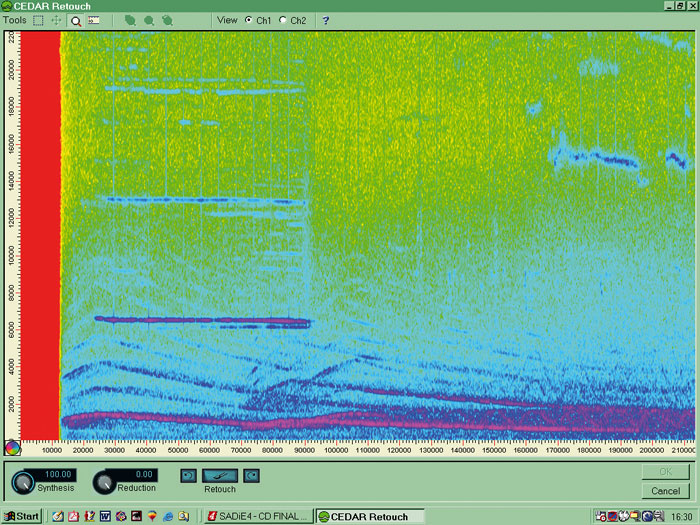 CEDAR Audio's Retouch: here you can see a distant siren sound that has spoiled an otherwise good recording.CEDAR Retouch: "Most of my recording work involves acoustic performances: choirs, orchestras, jazz groups and so on, so plug-in emulations of vintage compressors and reverb plates are rarely required. Instead, when I reach for a plug-in it is usually to fix a serious problem in the recording itself — typically some unwanted noise that ruins an otherwise perfect performance.
"By far the best tool for that kind of salvage work that I have found is CEDAR's Retouch. This is best thought of as a kind of Photoshop for audio, allowing you to 'paint out' the unwanted elements of sound without destroying the wanted parts. Several other DAW platforms now include similar tools, but none seem quite as effective or powerful as the original Retouch design. What siren? Retouch has done its stuff and the recording is rescued.
"Retouch has evolved over the years and is now far more powerful and even easier to use than its original incarnation, but the principle of operation remains the same. You start by identifying the portion of track with the unwanted noise and load it into Retouch. This displays the signal on a three-dimensional graph with time on one axis and frequency on another, and colour is used to show amplitude. Once familiar with this display arrangement, you can usually identify the unwanted sound elements very easily. The next step is to select one or more of them and either reduce their amplitude to render them less audible (or inaudible), or — the clever bit — let the software replace them with interpolated audio of the background noise obtained from the preceding and following areas of the track. The latter mode results in seamless removal of the unwanted sound without any artifacts at all — although a little experience is necessary to achieve perfect results quickly.
"I'm constantly amazed at how well this software works and how serious faults that would have rendered recordings worthless can be fixed relatively painlessly." Hugh Robjohns
Sony Oxford Restoration Tools: "In my post-production work I regularly get material that is not up to standard, and I now automatically reach for Oxford Restoration Tools. As you may have seen from my 'restoration shoot-out' article [SOS August 2005], it out-performed the competition. It has become a firm friend for me and saved many a client from embarrassment!" Mike Thornton
 BIAS Soundsoap 2: "This is a real life-saver when you're trying to clean up poorly recorded dialogue and location sound. Soundsoap impresses with its neat interface and its general ease of use. Just find a two-second sample of the noise you want removing and press 'Learn noise' to wash out the rogue frequencies. Well, theoretically. Like all broadband noise reduction, Soundsoap needs to be used with great care when dealing with complex problems, as it's all too easy to throw out the sound of baby's first words with the gurgling of the bathwater. In such cases, it's often best to run several passes, dealing with specific problems one at a time." Nick Rowland
Favourite Enhancers: Noveltech Character & Vocal Enhancer
 Noveltech Vocal Enhancer. "Noveltech's Character plug-in for TC Powercore would come near the top of my list, as it is able to really focus in on the key essence of a sound in a way that EQ can't. I've also been trying a pre-production version of their Vocal Enhancer, which is unbelievably effective in adding exactly the right kind of presence and clarity and works using the same underlying principle. Exactly how these plug-ins work is still something of a secret, but it appears that once you have defined the part of the audio spectrum that needs enhancing, any naturally occurring bumps and dips in the frequency spectrum of the signal are exaggerated in a dynamic way, so that whatever the natural character of the sound, turning up the knob simply gives you more of it. You can use it to add presence and slap to hand drums, air and brilliance to acoustic guitars, definition to basses, and even salvage muddy drum kit submixes using it. It is only a pity that you need to be a Powercore user to take advantage of it, as it is so useful in a variety of mixing applications." Paul White
 Noveltech Character. "There are loads of plug-ins out there with fantastic user interfaces and an infinite degree of control, but which somehow never quite manage to deliver exactly what you are after. Noveltech's Character is the exact opposite; the interface is a bit quirky and the parameters largely conceptual, to the point where you actually have little idea what you're doing most of the time. In short, it's the very opposite of everything that I like in an audio processor. And yet I love it. The audible effect is that which you would normally seek to achieve with a combination of compression and EQ, yet it sounds neither noticeably compressed or EQ'd. It just sounds more 'right' than it did before. The designers state that Character 'intelligently identifies and enhances characteristics in the instrument or vocal source which are pleasing to the human ear'. Certainly, I've never before come across a processor where the same settings can be applied to radically different sources with equal success, so the process must be adapting to the material to some extent.
"Favourite applications include vocals, drums, acoustic guitars and basses. Character is difficult to over-use on any one source, and using it on lots of sources in a mix doesn't make the track unbalanceable with everything fighting for the spotlight (unlike, say, a mix full of conventionally 'harmonic-boosted' sources).
"Vocal Enhancer is a new variation on the Character theme, from the same programmers. It is optimised for treatment in the vocal range and offers the ability to precisely define the target area for processing, leaving everything else untouched. Despite the name, it's equally adept with other sources; personally, I love it on acoustic guitars." Dave Lockwood
Filters
 Prosoniq Northpole: "I'm a long-term addict, first using this freeware plug-in in its VST format with Cubase. Northpole is a 24dB/octave (four-pole) low-pass and band-pass resonant filter, plus distortion and a simple delay. It's an excellent quick and dirty lo-fi fix for digital synth sounds that otherwise would be rather too squeaky clean. And, yes, it will howl like a wounded werewolf. Apart from kicking the sand in the face of drum loops, I use this a lot as a special effect on vocals for those 'there's a psycho on the phone' moments. Its simplicity is both a strength and a weakness. On the one hand you just twiddle the controls until you come up with something interesting. On the other, delay settings have to be set in the old-school style by ear (and also by careful nudging of the sliders), as it doesn't slave to MIDI clock." Nick Rowland
PSP Nitro & Steinberg Tonic: "My favourite plug-ins include two filters: PSP Audioware's Nitro and the Tonic plug-in included with Cubase SX3. Nitro is the more sophisticated of the two and, for creative mangling of a sound, is very hard to beat. Tonic is easier to use and perhaps offers somewhat fewer options, but also sounds very good. Both can make otherwise very ordinary-sounding audio sources into instant 'ear candy'." John Walden
Sound Toys Filter Freak: "A couple of years ago, I moved over from an ancient Mac running OS 9 to a shiny new PC laptop as my main music machine. In general, I was pleasantly surprised at how painless the transition was — except that I had to leave several of my favourite plug-ins behind, because they hadn't been ported to Windows. The one I still miss the most is the brilliant Filter Freak, because although I have lots of other plug-ins that are supposed to do the same thing, none of them sounds remotely as good as Sound Toys' gem.
"As the name suggests, the main intended function of Filter Freak is as a filter, with various control and modulation options available. But what makes this a killer plug-in, for me, is the Analog Mode switch. This turns the output stage into the best distortion effect I know for basses, drums and practically anything else. The beauty of it is that it doesn't attempt to sound like a guitar amp: instead, it reproduces all those evil, filthy, squelchy, buzzy tones that you can normally achieve only by treating analogue studio gear really, really badly." Sam Inglis
Cycling '74 Pluggo Filter Taps: "I could just as easily have included the whole Pluggo suite, but this is my favourite. It's a delay line and a filter and sometimes unpredictable, yet it's quite easy to create the basis of a whole track from even the simplest performance. It's great to use live with a flute or guitar and it's one of those plug-ins that you can mess around with for hours." Stephen Bennett
Ohm Force Predatohm: "This delightfully twisted plug-in is a multi-band filter, distorter and signal mutation device with no equivalent on this or any other planet. It has a cool feedback feature that can be used for good or evil, and what it does with drums is banned in several countries. You can set it up to do one band or four bands and the quality and tone of the distortion is highly unusual and variable, especially when you bring the filtering into play. It's brilliant and I couldn't have done my Turbulent Filth Monsters sample CD without it." Craig Anderton
Favourite Pitch Processor: Celemony Melodyne
 "For any type of sophisticated pitch correction, Melodyne is the bee's knees because it hands you so much corrective power via such a straightforward visual interface. Not only can it correct pitch in a more natural-sounding way than many of its competitors, but it also allows you to manipulate pitch slurs and to increase or decrease the amount of natural vibrato. You can even use it to lengthen or shorten existing notes or to drag notes to new pitches, to create believable harmony parts. Magic. Providing you use it over a sensible range, the processing artifacts are minimal." Paul White
"I use Melodyne to re-tune and re-position instruments and vocals. It's an excellent program, very musical and with the best-written, most clearly thought-out manual I've ever seen. I like the way you can tweak a note's tuning by a few cents and subtly nudge its position — small adjustments of intonation and feel, rather than the 'bish-bash-bosh' hard-quantised robotic pitch you hear on commercial pop." Dave Stewart
"Top of my list, simply because of the genuine wonder it makes me feel every time I use it, would be Melodyne. For me, using Melodyne for the first time was a jaw-dropping moment. A casual observer might see its key feature as pitch correction and, indeed, it is very, very good at that. However, it is capable of much more — and, within remarkably wide limits, playing with pitch and timing of an audio phrase in Melodyne offers a level of flexibility that is not so far removed from editing MIDI data. This ability to pitch-shift individual notes within a monophonic audio recording so transparently also makes Melodyne a powerful creative tool rather than just a corrective one. Whether it is to completely re-pitch your melody line (vocal or instrument-based) or to create harmony parts, what Melodyne does verges on the magical." John Walden
Pitch Processing
Sound Toys Pitch Doctor: "This is my preferred pitch-fixing plug-in. To start with, it was the only one I had, as I got it as part of a Digidesign bundle. Over the years, I have refined my techniques with it, creating a useful 'starter for 10' preset and then automating the Manual Pitch and Smoothing to deal with the occasional notes that the preset doesn't sort out by itself." Mike Thornton
Honourable Mentions...
Also popular with our team were Wave Machine Labs' Drumagog drum-replacement plug-in; the Surround Zone plug-in for use with the Soundfield microphone system; Spectrum Worx' Delay Dots frequency-domain processor; Roger Nichols Digital's Inspector spectrum anlyser; Logic's Multipressor compressor; Logic 's Gain, Noise Gate and Clip Distortion; Audioease's Riverrrun granular synthesis plug-in; Native Instruments' Reaktor 5 modular sound studio; Ableton's Beat Repeat plug-in for Live; Smartelectronics' KT Granulator delay-line granulator; Steinberg's Quadrafuzz distortion processor; IK Multimedia's Amplitube 2 guitar processor.
Other Effects
PSP Audioware 608 Multi-delay: "Most echo and delay plug-ins can do the job if you just want a couple of specific repeats or some generic ping-pong effects, but in those situations where you can imagine the perfect echo effect to suit a particular track, with each repeat coming from a different but predefined position in the stereo image, perhaps with each repeat also having individual effects such as filtering and reverb, so that they appear to be coming from closer or further away, PSP's 608 Multi-delay really is your man for the job.
"It's amazingly user-configurable, but conversely, if you need inspiration or instant gratification it also has a huge number of presets." Martin Walker
 Sound Toys Echoboy: "This is my Desert Island plug-in choice. Simply put, Echoboy is every type of digital, analogue or mechanical delay you've ever dreamt of, turned into software form. Apart from bog-standard single, dual and ping-pong delays, Echoboy also offers the ability to program highly complex rhythmic-style delays. I mainly use this for tape-delay effects on vocals and guitar, but among the many presets are some absolute corking dub-style delays. I defy anyone to try the 15-day demo and not end up reaching for their wallet." Nick Rowland
PSP Audioware PSP84: "PSP Audioware have three excellent delays in their plug-in range but for me, PSP84 is the best. Lexicon happily lent their name to PSP42, which PSP had modelled on Lexicon's PSP42 hardware unit. The reason they didn't give their name to PSP84 is that, despite giving the same Lexicon sound, its functionality goes much further than the Lexicon: think of PSP84 as the GTi version that Lexicon never made!
"It's primarily a stereo delay plug-in, but you have individual control over each of the channels. It also includes filtering and is capable of a wide range of delay-based modulation effects, which makes it excellent for both music and sound-design purposes. The bewildering array of presets illustrates this very well, ranging from simple slapbacks to all manner of sound-effect weirdness. When I'm looking to add a really dream-like, other-worldly quality to my tracks, this is pretty much the first plug-in I reach for — and it usually comes up with the goods." Matt Houghton
Korg MDEX: "I've found myself reaching for this more and more over the last year. Despite a small and utilitarian graphic interface, MDEX is a real Swiss Army knife for quality chorus, ensemble, flanging and phasing effects, plus reverb, delay, exciter and EQ. While it may not produce the most sophisticated sounds around, MDEX is often my first port of call when I'm looking for something to liven up a bland sound, simply because you can try out a huge variety of different treatments within a few seconds." Martin Walker
Formats, Prices & Contacts
Audioease Altiverb (Windows XP; Mac OS X, OS 9; RTAS, VST, Audiosuite, HTDM), £575.75 for TDM version, £382 for others. Unity Audio +44 (0)1440 785842. www.audioease.com
BIAS Soundsoap 2 (Mac OS 10.3.9 or later, Windows XP; AU, Direct X, RTAS, VST), £75. SCV London +44 (0)20 8418 0778. www.bias-inc.com www.scvlondononline.co.uk
CEDAR Retouch (Windows XP; SADiE, Audiosuite, Pyramix), £2350. CEDAR Audio +44 (0)1223 881771. www.cedar-audio.com
Celemony Melodyne Plug-in (Mac OS X & Windows XP; VST, AU, RTAS) £220. Arbiter +44 (0)208 207 7860. www.arbiter.co.uk www.celemony.com
Chandler EMI TG12413 (Windows XP, Mac OS X; VST, AU, TDM, RTAS). LE version £293.75; TDM version £417.13. Unity Audio +44 (0)1440 785842. www.chandlerlimited.com www.unityaudio.co.uk
Cycling '74 Pluggo Filter Taps (Mac OS X & Windows XP; VST, RTAS, AU), part of Pluggo suite 3.5, $199. www.cycling74.com
Digital Fishphones Blockfish (Windows, Mac OS 9 and OS X; VST, AU), free. www.digitalfishphones.com
Eliosound Air EQ (Windows & Mac OS; VST, AU, RTAS), $269. www.eliosound.com
Izotope Ozone (Windows 98/2000/ME/XP/XPx64, Mac OS 10.3.9 or later; RTAS, Audiosuite, HTDM, VST, MAS, AU, Direct X), $249.99. www.izotope.com
McDSP Channel G (Windows XP, Mac OS X, TDM, RTAS, Audiosuite), £616.88 for all-format version. Unity Audio +44 (0)1440 785842. www.mcdsp.com www.unityaudio.co.uk
Native Instruments Guitar Rig 2 (Mac OS 10.3 or later, Windows XP SP2; AU, VST, RTAS, Direct X), £229.99. Arbiter +44 (0)208 207 7860. www.arbiter.co.uk www.native-instruments.com
Nomad Factory Blueverb (Windows 2000/XP, Mac OS 10.3.9 or later; VST, RTAS, AU, TDM), £99. Time + Space Distribution +44 (0)1837 55200. www.timespace.com www.nomadfactory.com
Noveltech Character (Mac & PC Powercore), £176.25. TC Electronic 0800 917 8926. www.tcelectronic.com
Prosoniq Northpole (Windows 95/98/NT/2000/XP, Mac OS 9 & OS X; RTAS & VST), free. www.prosoniq.com
PSP 608 Multi-delay (Mac OS 10.3.5 or later, Windows 98 or later; VST, Direct X, RTAS, AU, HTDM), $149; PSP84 (Mac OS 8.5, Mac OS 10.3.5 or later; VST, Direct X, RTAS, HTDM), $149; Nitro (HTDM, VST, AU, RTAS; Mac OS 10.3.5 or later, Windows 98 or later), $149; Vintage Warmer (Mac OS 10.1 or later, Windows 98 or later; VST, Direct X, RTAS), $149; Neon HR (Mac OS 10.3.8 or later, Windows XP; VST, Direct X, RTAS, AU), $299. www.pspaudioware.com
Ohm Force Predatohm (Windows, Mac OS X; Direct X, RTAS, VST, AU) 99 Euros for all-format version, 79 Euros for one format. www.ohmforce.com
SIR Convolution Reverb (Windows XP, VST), free. www.knufinke.de/sir
Sony Oxford Restoration Tools (Mac OS X & Windows XP; AU & RTAS plug-in on Pro Tools HD & LE systems), £734.38. Sony Oxford EQ (Mac OS X & Windows XP; TDM, LE, Powercore) TDM £581.62; LE £235; Powercore £411.25. Source Distribution +44 (0)208 962 5080. www.sourcedistribution.co.uk
Sound Toys Echoboy (Mac OS 10.2 or later; TDM, RTAS, Audiosuite), £243.23; Filter Freak (formats as above), £243.23; Pitch Doctor (TDM): part of TDM effects bundle for £846 or stand-alone download at £220. Unity Audio +44 (0)1440 785842. www.unityaudio.co.uk www.soundtoys.com
TC Electronic MD3 (Powercore, System 6000, TDM), £929. Assimilator (Powercore) £159 including VAT. TC Electronic 0800 917 8926. www.tcelectronic.com
Universal Audio Plate 140 (Windows 2000/2003/XP, Mac OS X; AU, VST, RTAS), $119.20. UAD 1176LN (requires UAD1 card and the latest version of the Powered Plug-Ins software; formats as above), $111.75. www.uaudio.com
Voxengo Pristine Space (Windows 98 or later, VST), $119.95. www.voxengo.com
Waves: available for Windows 2000/XP and Mac OS X, supported on selected hosts via RTAS, HTDM (but not Digidesign Mix systems), VST, Direct X, MAS, AU. IR1: part of various bundles with prices starting at around £580; IRL: part of various bundles with prices starting at around £290; L3: part of Diamond Bundle only (TDM £5046, Native £2761); Renaissance EQ and Renaissance Vox: part of various bundles with prices starting at around £199; C4: part of various bundles with prices starting at around £934. Sonic Distribution +44 (0)1582 470260. www.sonic-distribution.com www.waves.com
All prices include VAT.