

The business of TV and film is changing fast, and production or ‘library’ music is becoming ever more important. One of the UK’s most experienced production music composers explains how to get your foot in the door.
 Pete Thomas in his studio.Photo: Simon WarrenWhat we now call ‘production music’ has been through various stages of evolution. Its origins are probably in silent movies, when cinema pianists and organists would watch the movie and supply a live accompaniment. At first, they would use bits and pieces of music, either from memory or collections of sheet music, but very soon volumes of specially composed or arranged incidental movie music were published, with cues arranged and categorised to fit the various screen actions or moods. Perhaps that is why this extract from Krommer’s Double Clarinet Concerto is such a well–known tune!
 Very soon, music became available on discs, and with the advent of TV in the ’40s, ’50s and ’60s, there was a large demand for readily available music, which was known as mood music, atmospheric music and, of course, library music. Much of this was of extremely high–quality orchestral and jazz, though with the proliferation of synths in the late ’70s it gained a reputation for being cheap (but not necessarily cheerful). Originally an American term, ‘production music’ is now in general use here in the UK, as producers have wanted to promote a newer generation of library music that has shed the old image.
Production music has traditionally been distributed on vinyl or CD but it is now also available via download. A production music company is basically a publishing company, or a department of a publishing company, that specialises in marketing, licensing and collecting royalties for production music. The end user is usually a film, TV or radio production company — but tracks can also be used for computer games, web sites, live events and even ringtones. Users choose tracks they want to include in a programme and can license them very quickly, through MCPS in the UK or other licensing agencies worldwide, at a set licence fee per 30 seconds of music. Very often this is cheaper, quicker and less complicated than commissioning a composer.
Much of the TV music of the ’60s was jazz–oriented; composers such as Henry Mancini and Elmer Bernstein set the standard in this respect. Library music producers followed suit, and could corner some very good jazz musicians in touring bands who were happy to supplement their meagre club fees with a couple of sessions.
Today, a much larger proportion of production music is pop or rock. This is due in part to a demand from modern TV producers, but another factor is the digital revolution. The production of convincing pop music is no longer exclusively the realm of companies with big budgets for large studios and vast swathes of session musicians. The standard still has to be high and the use of real musicians wherever possible is definitely a bonus, but it is now possible for anyone with the talent and a decent DAW to compete with the big boys.
 Production music CDs might look like ordinary albums...The recent proliferation of television channels has inevitably thinned out the viewing audience for most individual channels, thus causing advertising revenue, and therefore budgets, to be slashed. Apart from the few at the very top, TV and film composers have had to get used to working on lower budgets. Often — but by no means always — this has resulted in either (at worst) lower–quality commissioned music being produced or, sadly, fewer live musicians being involved. Seizing an opportunity, the library music companies stepped in with a new generation of music having much higher artistic and production values, which could be licensed easily.
My Approach To Composing
When I am commissioned to write production music, it can either be for an entire album, or for any number of tracks to be included in a ‘compilation’ album to which several composers contribute. I have produced six complete albums in the last 10 years and about another 30 or 40 single tracks. My first commission was for a jazz album called Mad, Bad & Jazzy, which now has three sequels. The title says it all, really — the music is mad, bad and jazzy — and a good title can obviously help with marketing, by signalling to producers exactly what to expect from the album. The style that has dominated my writing is slightly left–field or quirky jazz and Latin, with a sprinkling of indie, classical, electronic and just plain bizarre.
I work closely with one or two producers from the company (Universal — formerly BMG — in this case), who function as overall ‘executive’ producers. They have an idea of the whole concept and marketing strategy of the album, and generally I’ll have an initial briefing meeting with them to discuss this. They then leave me to do the composing and production, but will drop by the studio from time to time, especially as tracks evolve or completely new ideas come up during the course of production.
An album will consist of about 16 tracks, and although they can often be as short as one minute, I like to think of them as ‘real’ album tracks, so I will usually make them between two and four minutes long. I also include various shorter versions lasting 30 seconds, 20 seconds and 10 seconds, as well as short ‘stings’. It’s much easier for the producer to generate these at the mixing stage than to try to create them from a stereo master later — more about this in next month’s article.
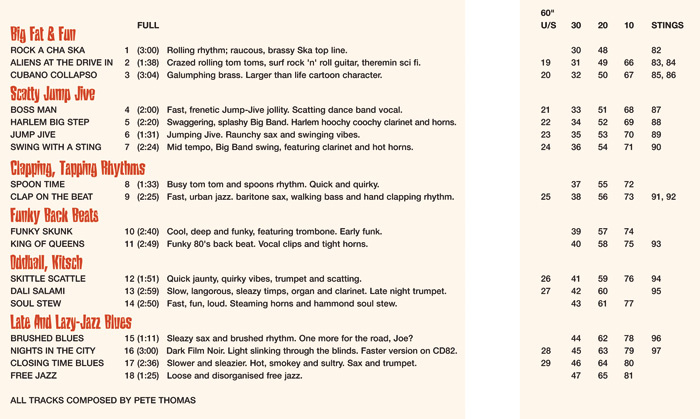 ...but the sleeve notes are designed to help the TV editor in a hurry. Note the additional one–minute, 30–, 20– and 10–second versions, and the short ‘stings’. Because my producers at Universal, Duncan Schwier and Jo Pearson, know the way I work, the briefing session is very much a two–way flow of ideas. I never know what I’m going to be asked to do, but briefs can range from the precise to the vague, such as:
- Writing something that fits a very specific commercial demand, such as lifestyle programmes or quiz shows, or to fit popular search phrases such as ‘sex in the city’, ‘money’, ‘countdown’ or ‘stop press’.
- Taking inspiration from an existing track, composer or style, being very careful not to infringe any copyright or to ‘pass off’ as something copyrighted.
- Taking inspiration purely from a generic film scene, such as a car chase, slapstick comedy sketch or sex scene.
- Creating a dramatic feel or emotional atmosphere.
- “Just have a bit of fun and see what you come up with, Pete.”
Very often I might also suggest using existing tracks I’ve already produced for another reason, such as cues from a commissioned score that has now passed its exclusivity date, demos I did for something that were not actually used, or pieces I wrote just for fun.
I generally take six to 12 months to compose and record a complete album, as I want the tracks to sound great, and not like the stereotypical library music of the ‘old days’. I usually start off with programmed tracks, though before presenting these as demos I’ll make them as convincing as possible by including as much real instrumentation as I can — saxophone, flute and a bit of guitar and bass. Anything that isn’t a live instrument has to have a reason for being there, such as a drum loop that can’t be recreated or a particular rhythm that needs to be quantised to fit the genre. I also have a vast collection of unique samples recorded and collected during my years working in studios as a producer.
Once the early drafts are approved, I print scores and parts from Logic and book sessions for musicians where necessary. This is a crucial step for me — I book musicians I know and am comfortable working with. Once again, I don’t think ‘It’s just library music.’ I need to feel that the musicians are thinking the same way: that they are contributing creatively rather than it being just another session.
It’s great working with Duncan or Jo at Universal — they have an excellent handle on what will work. It’s also very good to get some fresh ears on a project when you’ve lived with it in the studio for a few weeks. I once presented a demo to Duncan and his comment was “great, but the saxophone is a bit too in tune, sounds like library music.” This was on a ska track and he wanted it to sound really raw and rough. I tried a couple of times to play badly, not easy for a seasoned session player who has struggled all his life to play well. In the end I played the sax with the mouthpiece on upside down, so I sounded quite convincingly like I’d only been playing for a few weeks.
Getting A Commission
Getting your music accepted or being commissioned to write production music is every bit as competitive as any of the more traditionally glamorous goals for musicians and composers, such as landing a record deal, publishing deal, film or TV commission. You will need to send in your music on a CD which you should make look as attractive and interesting as possible, though a well–constructed web site or MySpace site with biography and audio clips can be just as or even more useful. A few phone calls to receptionists can help you to find the names of the right people to send your pitch to: a personal letter is better than ‘Dear Sir/Madam’.
 The Internet has changed the way production music is distributed, and most publishers now make it easy to search for and download the tracks you need.The main thing to be aware of is that your music should grab the attention of the listener quickly. If a company is looking for writers, they will definitely listen to music that they are sent, but frequently they are inundated, so it’s possible that they’ll only listen to the first 10 or 20 seconds of each track (which may very well be the way their end user will listen to the product, too).
Most important is not to try to second–guess what you think ‘they’ want, or what is ‘good’ or ‘typical’ production music. The chances are it’s already in their library and they don’t need any more, and if they do, one of their established writers will be asked to do it. If you want to make a good first impression, it’s much better to write something that has some character, originality and flair; and, above all, it should be something that you are good at doing. The best chance of getting your music accepted is to offer something different, fresh and unique.
Very often, a piece you wrote as a demo for something else that got rejected may be ideal, but paradoxically, pieces that have actually been used in TV programmes may not be good for production music. Many times I’ve thought that music I have written for a film on a non–exclusive basis would be accepted in a music library but, as Duncan has explained, music written to a specific scene may work very well only to that scene, and may not necessarily make sense on its own. Surprisingly, it may also be that production values for TV music are often not good enough, especially with today’s increasingly stingy budgets.
The production music company won’t like being told their job, but sometimes there is no harm in helping out with some marketing ideas. CDs and/or sections of CDs will end up being categorised to help the end user, so you might consider doing the same for your demo. Categories can be as vague as ‘drama’ or ‘lifestyle’, or they can be more specific to a music genre or era — for instance jazz, classical, World, ’60s, kitsch, indie, ska and so on. Titles are extremely important, not only as a description but also to help with searches. It’s the same principle as Googling: key words or phrases in a title can be very helpful, especially for on–line searching. On the other hand, there are limits to the number of tracks that could be called ‘Car Chase’, ‘Celebration’ or ‘Feel Bad Blues’!
How Your Music Will Be Used
One of the things that I still find fascinating is where my music ends up. Whatever you think your music will be used for, it could show up on something quite different, be that a feature film, TV drama, documentary, shopping channel, game show or gardening programme. To understand how production music works, try putting yourself in the position of a stressed–out TV editor who desperately needs some good music for a new piece of footage the executive producer asked to be added to a documentary three hours before the deadline. There are various possibilities:
 Pete Thomas’s studio, with Chester the studio manager in his favoured position.
- Go to a production music company web site and do an on–line search, using various keywords that describe either the genre of music or the scene that needs music.
Of course, an experienced editor or director will already have a good knowledge of music that is available, often calling on ‘old faithful’ albums or tracks, but could still be on the lookout for new and refreshing material.
Many production music companies will also aggressively market their music, as any good publisher should. This could mean contacting producers of any film or TV projects that are about to go into production, as well as building up close and ongoing relationships with their main clients, arranging all the stuff that composers would do ourselves if we had the time and money: courtesy calls, birthday cards, free holidays in the Caribbean, that sort of thing.
In this article, we’ve looked at the business dimension of production music: what it is, who uses it, how it’s sold and, most importantly, how you can get your foot in the door. But from the composer’s point of view there are also technical skills that are specific to production music, such as the ability to create versions of your pieces that fit exactly into the 10–second format, so next month, we’ll be looking at techniques you can learn to help make a professional–sounding production music library disc.
Handy Hints & Tips
- Always keep a notepad or recorder with you to jot down ideas, tunes or riffs that come into your head.
- Try to write a tune every day. You may throw out loads, but you will end up with some that you keep.
- If you are using synths and samplers always be on the lookout for sounds that inspire you to write something different.
- Start collecting strange and unusual instruments. They can often give a track an original and quirky flavour.
- Don’t be scared to experiment: mix different styles of music together, shuffle MIDI sequences around on different instruments. However experienced and knowledgeable you are about music technology, just messing around with effects or trying unorthodox or even random settings can yield some great results.
Don’t Chuck Out The Stylophone!
 Pete Thomas plays Schubert...Photo: Steve Shrimpton
 I am an avid collector of junk–shop instruments that might inspire me. These included the Farfisa Pianorgan Uno, a sort of cross between an accordion and a Cappuccino machine. I picked up a Clarosax from eBay — it’s like a conical tin whistle with a saxophone mouthpiece, a sort of training sax. According to the box, it’s “a real musical instrument — not a toy”. I once went into a very expensive vintage guitar shop and asked if they had any really crap instruments. I walked out with an Elfolk, which is an acoustic guitar with built–in amplifier and tremolo — priceless.
Probably the most bizarre instrument I’ve used to date is the frozen fish, of which I used an (almost) perfectly matched pair as a percussion instrument for the album Wild, Dirty & Mean.
Money, Money, Money!
As a composer you may not get paid much, if at all, for the actual production of the music: payment comes when the tracks are used. The composer gets a split of the licence fee (MCPS) and a split of performance royalties (PRS). It can be quite strange to hear your music all over the TV without getting any credits. Although you or the company may have a rough idea of how commercial any one track may be, this can be very unpredictable. One of my tracks was ‘just ticking over’, making a few pounds a year, then one year it was picked up for a major feature film and suddenly pulled in £4000. I’ve heard stories of other seemingly ‘dormant’ tracks suddenly getting a new and extremely lucrative lease of life being used on a loop for 24–hour shopping channels.
Although the genre of music may have some bearing on the money you make, it is not a simple formula. Contemporary pop, rock and dance music may seem more commercial, but their very contemporariness may mean shelf life is short. Jazz, classical and some more niche market styles such as ska, blues, Cajun, doo–wop and so on (and any number of interesting ‘fusions’) may not earn so much immediately, but may retain their currency and bring in the bucks over many years.
A by–product is that some early library music has been picked up by labels and released commercially, very often on ‘cult’ compilations. This is also happening to some more recent production music, and I have discovered a few of my tracks suddenly appearing on ‘actual’ CDs.
What’s In A Name?
Ultimately, it’s the job of the production music company to find a name for each track, but I always try to start with a good working title, and this may well be the one that the marketing department goes with in the end. Songs with vocals are not usually a problem, as the title is obviously derived from the chorus or hook, but it’s a different kettle of fish with instrumentals. With production music, the title can be the deciding factor in whether the tune even gets listened to. However, the most obvious titles that are blatant descriptors (‘Triumphant Fanfare’, ‘Loud & Brash’) can be a double–edged sword. Although they work well for the desperate stressed–out editor I mentioned earlier, many people are now looking for music that is better and ‘hipper’ than their stereotype of ‘library’ music. A cooler title is often more appropriate for a track that should ideally sound like a classic or contemporary piece of pop, jazz classical or whatever, rather than simply ‘mood music’.
Ideally a title that does both jobs can be the most useful, and hence lucrative. One of my most successful tracks is called ‘Rumble In The Jungle’, and although the music itself doesn’t immediately conjure up visions of rainforests, it was chosen for the theme tune of the Meridian TV series Monkey Business and a Croc 2 commercial featuring a real crocodile. I imagine in both cases someone was searching for the word ‘jungle’.
In another case a song called ‘Sunny Day’, written by my lovely wife, was used in a Mentos chewing gum commercial featuring a very hot day. Ironically, they used the wordless scat solo in the middle of the tune rather than the ‘Sunny Day’ hook.
Take A Listen
To accompany this article, I’ve set up an area on my web site where you can hear some audio examples. Surf to: www.petethomas.co.uk/production–music
Sample Aid
For a long time I jealously guarded the samples I have collected over the years while working as a producer. These were recorded in my own studio as well as some top London studios with the best session players. Due to RAM limitations of early samplers they are sometimes not as comprehensive as they might be, but I often use these in preference to more established sample libraries, as I have found them to sound much more real.
I decided in 2006 to share some of these, along with some newly recorded saxophone samples, and to use the income to go towards fundraising for a charity trek in the Andes. Since the trek I have continued to distribute the samples and raise money for various charities including APEC and Leukaemiabusters. Sample Aid instruments are available as small downloads or collections on CD from http://mediamusicforum.com/logic-saxophone-samples.html.