

The M3 workstation, already a powerful beast, has gained impressive new features and an 'Xpanded' name tag. Is it now top of its class?
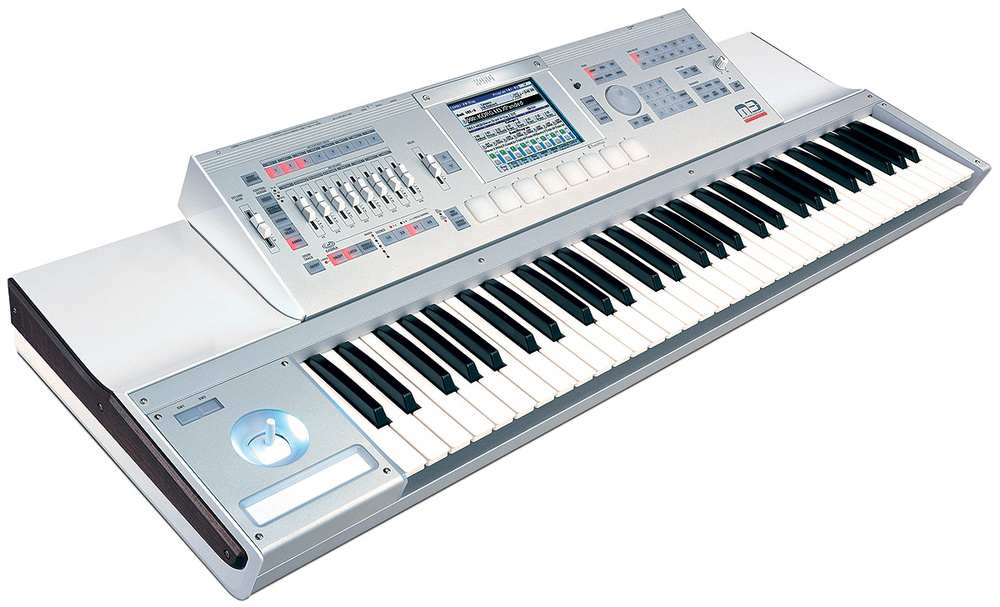
The Korg M3 workstation is still less than two years old, but it has already benefited from a significant upgrade. Somewhat immodestly, Korg's blurb suggests that version 2.0, known as M3 Xpanded, has "entered a new dimension” which, in my view, would make it rather difficult to play. Casting aside the hyperbole, we can categorise its advances into four primary areas: lots of new PCM samples, plus scores of new Programs and Combis built from them; major enhancements to the sequencer; a new Mac and PC editor; and, finally, big improvements in the KARMA (Kay Algorithmic Real‑time Music Architecture).
Hear Anything New?
The expansion to the M3's PCM library comprises a revision to the internal 256MB ROM, plus the inclusion of three OASYS‑derived sample libraries originally projected to be chargeable extras. Korg call these 128MB libraries, but they are data‑compressed to less than 64MB (which, as we'll see, is a necessity) and describing them in the tiny print as "128MB when calculated as 16‑bit linear” is naughty, although not unique to Korg.
Let's start with the modified ROM, which includes a new, stereo acoustic piano, plus a monophonic piano and a re‑sampled version of the 12‑bit stage piano introduced in the Korg SG1D way back in 1987. I'm fussy about piano sounds, so it's a testament to how far we've progressed when I find that a sampled grand piano can be sandwiched between a thousand other PCMs and sound half‑decent. Inevitably, the velocity zones of the M3 Grand Piano are apparent, but I found that careful programming of the sample crossfade feature in the EDS (Enhanced Definition Synthesis) oscillator pages could minimise this. On the other hand, I'd describe the SG1D's piano as a 'mildly unpleasant and clunky piano‑like sound', although I accept that other players may find good uses for it.
Korg have also updated a number of the M3's electric piano samples and its Hohner Clavinets. The electric pianos are excellent, and the Clavis are also good, but the latter instrument is difficult to emulate well and the looping on a handful of the samples is evident. Nonetheless, Programs built from these samples are bright and dynamic, and I wouldn't hesitate to use them.
Alongside these, Korg have added what they call "tape‑playback string and flute sounds... taken from those mechanical nightmare tape‑driven keyboards of days gone by”. You mean Mellotrons, mate, and mine is not a nightmare, it's a thing of beauty, so you're making no friends here. Furthermore, these PCMs are too clean and too in tune to convince aficionados that they're listening to the real thing. Of the Programs based on the string samples, only 'Krimson Strings' sounds even vaguely like a genuine Mellotron, although it's stereo, sustains indefinitely if you hold it, and has added chorus! Korg's programmers have even made it velocity‑sensitive (arghh!). Happily, a few minutes of editing soon sorted out these cock‑ups. Likewise, the Mellotron flute patches are not what you would call authentic, but it's still nice to have them.
Grand Design
Moving on, the EX‑USB‑PCM03 library is devoted to a new Stereo Grand Piano. Korg have never been my favourite purveyor of sampled pianos, but this one is a massive step forward, with four velocity zones and the addition of samples emulating the resonance of an acoustic piano when the sustain pedal is depressed. The result is excellent, with beautifully defined tone, body resonance as good as anything I've heard, and velocity zones less obvious than equivalents on many other workstations. Bravo, Korg!
Next, I decided to test the brass and woodwind samples in the PCM01 and PCM02 libraries. But where were they? I knew I'd loaded them but I couldn't access them. Then I realised that despite being able to hold all three libraries in its system memory, the instrument can't use them unless they're copied into sample RAM. The standard M3 (Xpanded or not) has just 64MB of RAM and can only access one library at a time, so although data compression means that each library can fit into 64MB, loading one leaves almost no room for your own samples or audio. So if you're thinking of buying an M3 or Xpanding an existing one, you'll need the EXB‑M256 RAM expansion board, which lets you load all three EX‑USB libraries simultaneously and still retain around 128MB of free RAM for your own samples. This will cost you £99$99 and at first sight might seem a bit of a con, but it's probably cheaper than buying the equivalent piano and brass/woodwind expansion boards for one of the competition's workstations.
The review M388 didn't have the EXB‑M256 installed, so I unloaded the piano samples and loaded the PCM01 library. I discovered that a whole bunch of Programs in User Bank 'E' took advantage of these, and was impressed. Scores (no pun intended) of instruments such as trumpets, piccolos, flugelhorns and clarinets, many with trills, growls and slides, are not going to appeal to everybody, but for soundtrack composers, incidental music composers and arrangers, they'll be extremely handy. Indeed, I suspect that classically trained orchestrators could make these sound almost indistinguishable from the real thing. My only frustration was that some Programs in User Bank 'E' required the PCM01 and PCM02 libraries to be loaded simultaneously and the review unit couldn't oblige.
The Main Event
When Korg launched the M1 in 1988, its eight‑channel MIDI sequencer was warmly received, and later reappeared in barely modified forms on Korg workstations right up to the Triton family (1999 onward). In 2005, it was even used as the MIDI component of the OASYS's recorder/sequencer, and last year it appeared in another modified form in the M3. This is a remarkable success story, and anyone au fait with the M1's sequencer can use the M3's, which I suppose is a good thing. Conversely, it hasn't advanced as much as you might expect in two decades, which is not.
I've discussed this with Korg on many occasions, most forcefully following the launch of the OASYS, when I pointed out that its powerful processor and large, colourful touch‑sensitive screen offered huge opportunities for replacing the ageing software. However, the company had decided not to reinvent the wheel (meaning Digital Performer, Cubase, Sonar, and so on) and on reflection I agreed that writing something approaching the complexity of these would be unviable. But Korg's programmers have not been idle, and the long‑anticipated revision has now appeared on the M3 Xpanded.
Korg have added three new screens to the sequencer, and call their facilities 'DAW‑Derived Sequencer Editing'. The most significant of these are the Piano Roll and Track View screens. These show notes in a similar way to computer‑based sequencers and allow you to edit them directly. Just select a note with your finger or a stylus and adjust its start position, end point, pitch, velocity, or any other MIDI attribute, simply by sliding it around on screen. You can also add and delete notes at the poke and swipe of a finger. This is fabulous, and adds something I've wanted since I first discovered MIDI: the ability to draw modulation and MIDI volume curves on the screen itself. Of course, you'll see much less at a time on the M3's screen than on a computer display, but I reckon this upgrade will revolutionise how players think about keyboard–based sequencers. Korg had better get their skates on and port this to my OASYS, or I'll be a very unhappy bunny.
Korg are also proud of the M3's new ability to display and edit SysEx data as easily as MIDI CCs, and there are new MIDI velocity displays for each track, which is helpful when you have a complex sequence and can't immediately see which track is doing what. Happily, these displays have also been included in Combi mode so you can see which elements in a Combi are being driven by external sequencers or remote keyboards.
Other Goodies
Korg have updated many other aspects of the M3 in v2. Most obvious of these, which I take for granted on my Trinity Pro, is the ability to select an on‑screen knob or slider and rotate it, or drag it up and down, by moving a finger across the screen. Another improvement designed to provide a quicker route from inspiration to achievement is the addition of 700 presets for the effects algorithms. So now (for example) you can request Korg's preset Rock Organ or Jazz Organ settings when you select the Rotary Speaker effect, rather than designing your own setups. Similarly, the preset drum pattern quotient has been increased, with 149 new patterns you can use 'live', within the sequencer, and in parallel with Real‑time Pattern/Play Recording facilities.
Korg are also supplying a new editor with the M3 Xpanded, and this runs stand‑alone or as a VST, AU or RTAS plug‑in. It allows you to edit and control the M3 Xpanded and its EXB‑RADIAS board, if installed, using MIDI over USB. Alternatively, you can transmit MIDI and digital audio simultaneously across Firewire if the optional M3 EXB‑FW board is installed, with the audio then passing directly to the Mac or PC host. This turns the M3 into a hardware 'plug‑in' and also allows you to use it as a powerful and flexible set of effects units within your host application.
It took me just minutes to get the editor running on my MacBook Pro, and moments later I was editing with it. Even though the touchscreen and editing system on the M3 itself are excellent, this was even quicker, and I was delighted to be able to edit sounds in real time without glitches. There are some bugs in the current version, but Korg have published a list of those they know about and are working on fixes.
The M3 Xpanded now features version 2.2 of KARMA, which — if you can get your head around KARMA in the first place — is a significant upgrade. Most importantly, you can now create and modify the GEs (Generated Effects) that determine how the algorithm handles the notes you present to it. The screen above The new M3 Editor runs stand‑alone or as a VST, AU or RTAS plug‑in, and lets you control the M3 Xpanded from your DAW. shows the GE page in the editor, and the fields you can adjust to alter the nature of the GE. These are not intuitive, and I suspect it will take time to learn to use them analytically, but if you're into experimentation, something interesting will soon emerge. Another benefit is that you can now switch between GEs in real‑time, so you can change the nature of the sequence/arpeggio as it is playing. It's just a shame that KARMA is so mind‑bendingly arcane, because it's a phenomenal system that's very under-exploited. Hopefully, the new version will migrate to the OASYS and elsewhere, and people will start to get more out of it.
Before finishing, there's one other issue I need to mention. Korg supplied the M3 Xpanded as an M388 with 88‑note piano‑weighted keyboard. In my review of the original M3, I suggested that it looked a little like a top‑of‑the‑range home keyboard, and referred to it as the 'iKorg', but the 88‑note version dispels these impressions. Its brushed aluminium panels look much smarter than the plastic ones on the '61', and the proportions of the instrument are generally nicer. I think it looks and feels fantastic, and that's not an accolade I bestow lightly.
Conclusions
Korg won't thank me for telling you this, but the M3 has not yet been the global success they had envisaged. One reason for this may be bound up in the recession, but I fear that a more significant one is that its dealers and potential customers simply don't understand it. This is a huge shame, because the original M3 was a stonkingly good workstation. It sounded superb, offered more facilities than one could easily describe in a review of any sensible length and, in many ways, left its competition in the shade. The M3 Xpanded is even better, and the M388 with the PCM03 piano loaded is a superb stage keyboard as well as a studio workhorse of enormous sonic power and quality. I mean no disrespect to the Fantoms and Motifs, which are also fine instruments but, if you're in the market for a high‑end workstation, the improvements in the M3 Xpanded mean that it has to be at the top of your list of potential purchases.
Alternatives
The alternatives to the 88-note M3 Xpanded are the Kurzweil K2600X, Yamaha Motif XS8 and Roland Fantom X8. The Kurzweil and Yamaha lack the large touch-sensitive screens and some advanced features of the Korg and Roland, so the direct alternative to the M388 XPanded with EXB-M256 RAM expansion board is the Fantom X8 with piano and brass/woodwind SRX boards. The Roland has larger ROM and higher sample RAM capacity, but Korg's EDS synthesis engine maybe has the edge in terms of life and sparkle. The Roland has greater expansion capabilities, but the Korg has the superior effects architecture. The Roland has extras such as V-Link and D-Beam, while the Korg has the superior sequencer. Your choice will be determined by which best fits your needs but, for me, these are the only two games in town at the start of 2009.
Upgrading To Xpanded
If you already own a Korg M3, you can transform it into the Xpanded version free of charge, by upgrading the OS and loading the sample libraries. The review unit was supplied in Xpanded form, but I tested the upgrade procedure anyway, and it's straightforward.
Firstly, locate the OS and additional libraries on the supplied CD (or download the software and additional data from Korg's web site), unzip this, and store the folders and files on a USB storage device such as a memory stick. Invoking 'Update System Software' will perform the OS upgrade, after which you power‑cycle the M3. Invoking 'Update System Software' again will load the new PCM data. Do make sure that you've backed up any important data in the M3 before beginning, or it will be lost.
Pros
- A significant upgrade to the already excellent M3.
- The new stereo Grand Piano in the EX‑USB‑PCM03 library is a revelation.
- The new sequencer sets the standard to which other manufacturers must aspire.
- There's no extra charge for any of it!
Cons
- You will need the EXB‑M256 expansion board to get the best from the upgrade.
Summary
The M3 was superb. The M3 Xpanded is even better. If you have an original M3, upgrade it immediately. If you don't, and you're after a workstation in this price range, you would have to be mad not to check out the Korg. Notwithstanding the minor irritation of needing to install a RAM expansion board to take full advantage of the new sample libraries, the new features in the M3 Xpanded get an unequivocal 'thumbs up'.
information
Korg Brochure Line +44 (0)1908 857150.
Korg USA +1 516 333 9100.