

Pianoteq tackles the virtual piano problem in megabytes rather than gigabytes, and offers flexibility that its multisampling competitors can't match.
 Pianoteq's dark, cool-looking window puts all the essential controls in one place.
What do you do when you want to create a super-accurate software recreation of an acoustic piano? Conventional wisdom says 'sample the hell out of it', and that's exactly the approach used by the likes of Steinberg, VSL, Native Instruments, Synthogy, EastWest and others, in sample libraries running to 30, 40, even 50 gigabytes, and capturing every dynamic gradation of a particular piano, pedal up and down, and often from multiple mic positions.
The current crop of sampled pianos can give great results — but at a cost. First, streaming those tens of gigs of samples is a fairly tall order for a high-end Mac or PC, even with stacks of RAM, dedicated hard drives and high-bandwidth architecture. On a laptop, though, while playing back multitrack audio and other samples? Best of luck! Then there's the question of flexibility. Even the most lavish sample libraries only offer a handful of pianos, and if the sound you're after isn't one of them, you're pretty much stuck. Any real 'sound design' is off-limits — almost none allow it, and aside from offering a few tone tweaks, they're essentially replay engines only.
In the past few years, though, an alternative to sampling has emerged, in the form of modelling — think Logic's Sculpture plug-in, or Applied Acoustics' GS1 guitar instruments. Acoustic modellers like these generate sound on the fly according to mathematical representations of actual physical systems, such as columns of air in a tube, or strings stretched over a bridge and soundboard. Not being based on samples, modelling instruments generally have a much smaller installation footprint, and can offer a remarkable level of freedom in tweaking the mechanical/acoustic systems they represent — even to the point of emulating instruments that don't or couldn't exist.
Does a modelled piano sound and feel as good as a sampled one, though? That's the million dollar question, and one I'll be considering carefully later on in this review.
Music Teq
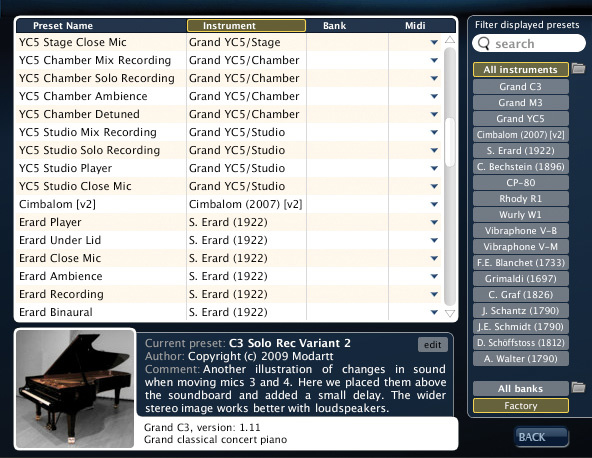 For dedicated savers and traders of Pianoteq's .FXP preset format, the preset manager overlay allows quick grouping and searching of sounds.
Pianoteq was the first commercially available piano modelling software, released in 2006, and it's still pretty much unique — other than Roland's big-money hardware V-Piano, there's very little to compare with it. Dave Stewart's review from the January 2007 issue of SOS sums up its first incarnation very nicely, and gives a bit of background about Modartt and the people behind the maths. The software has moved on a bit since then, though, so here's a quick rundown of the facts.
First off, Pianoteq runs as a stand-alone application or a plug-in, in VST, Audio Units or RTAS formats. OS requirements are Windows XP/Vista, Mac OS 10.4 or later (Intel or PPC), or Linux (x86) with Jack and ALSA back ends. Only 256MB RAM is required, and a mere 20MB of hard disk space — I've saved Word documents bigger than that — but you'll need a dual- or multi-core processor for best performance: this modelling is a CPU‑intensive business. Having said that, various settings let you restrict sample rate or polyphony, allowing Pianoteq to work perfectly well on more modest machines. Installation is quick and straightforward, and authorisation/activation is handled automatically on-line (though a manual activation system is available too). A single licence allows for installation on up to three computers.
Next, and as of the most recent round of updates, there are actually two different Pianoteqs available. Pianoteq 3.5 Pro goes for 399 Euros and offers 'per note' tweaking of many parameters, for the ultimate in virtual piano design. It also supports high sample rates, up to 192kHz. However, Pianoteq 3.5 Standard, at 249 Euros, is more like the previous versions of the program, and it's this I'll get stuck into first, to see what's the same, what's new and what's different.
Get Hammered
 The virtual miking overlay betrays Pianoteq's multi-channel, surround-ready design.
Pianoteq's plug-in and stand-alone graphic interfaces are almost identical — the stand‑alone just has an additional metronome and MIDI file player/recorder section at the very top of its window. The easiest way to choose between the piano presets is with the large pop-up menu at the top left, which also displays the currently selected preset. Click the pop-up and (amongst other things) you discover presets for the two main pianos, referred to as C3 and M3. You can get at these (and Pianoteq's other instruments) in a different way, though: clicking an icon towards the top right overlays a Preset Management window, which can sort the preset list by various criteria, provides a text search field, and gives a little more information about each preset. You can also assign MIDI commands here that will switch to the preset remotely.
The rest of the interface — which, on the whole, is simple and intuitive in use — is split into sections. In the top half are Tuning, Voicing and Design sections, whose tasteful 'piano internals' photographs slide back to reveal a fair number of parameters. Below are some more general parameters: a graph display where you can tweak velocity response and EQ, an Output section that includes master volume and virtual miking options, and a series of 'Effects' toggles, which allow action noise, tremolo, reverb and an output limiter to be turned on and off and small configuration panels for each to be displayed. For quite a compact window, there's a lot going on, and it'd be impossible to go into detail about every parameter without this review turning into War & Peace, so here are some of the highlights.
The tuning section offers the normal 'master tune' function, setting concert 'A' to an accuracy of 1/100th of one Hertz. A handful of built-in historical temperaments is supplemented by support for the Scala tuning format. Other historical, ethnic and experimental tuning systems can be loaded via a Scala .kbm file, and there are thousands available for free on the Internet. Varying the Unison Width (the small variations in pitch a piano tuner introduces across the two or three strings that make up one note) introduces movement and richness into the sound, and at an extreme it creates a honky‑tonk or 'pub piano' effect.
In the voicing section, hammer hardness makes a tremendous difference, conjuring up anything from an almost muted 'practice piano' effect to a sparkling, metallic tone that sounds like you've pushed drawing pins into the hammers. Because it's independently adjustable for varying dynamic levels, and Pianoteq smoothly fades between them, subtle and sometimes remarkable effects can be produced with this parameter alone. The Strike Point fader changes the harmonic content of the sound, as if the string had been struck nearer to or further away from the bridge.
Some of the design section options are really interesting, too. Impedance, Cutoff and Q factor all adjust the response of the virtual soundboard, varying it from (apparently) a thick, inert plank to something weirdly resonant and energetic; somewhere in between those extremes is what most pianos are really like.
 One of the key additions to the Pro version of Pianoteq, the Note Edit overlay allows subtle or drastic adjustment of tonal qualities on an individual note basis.Microphone pickup modelling was introduced early in 2009 in Pianoteq version 3, and it's quite flexible. Up to five virtual mics can feed any combination of five output channels, with individual level and delay settings. They're placed with reference to a plan and side view of a piano (whose lid you can open and close), and their position is adjustable in three dimensions. You're not bound to use this modelling, but it does add a sense of realism. The virtual acoustic, though, is not configurable, nor is the type or model of mic.
Rounding off this little tour, there are plenty of options for action noise: key releases, dampers (that nice 'swoosh' you get on some close‑miked recordings of real pianos) and sustain pedal. The reverb is a useful addition, but its type isn't specified. It appears to have just one quite flexible algorithm, thankfully quite well suited to piano and not too ringing or rough.
Pianoteq Pro
The more expensive Pianoteq Pro offers all the same sound-shaping parameters as the Standard version, but additionally allows you to tweak them on an individual note basis. Clicking the Note Edit button brings up a sort of graph display in the lower half of the Pianoteq window, on which you can set parameter values according to note pitch. If you're just after solid, playable pianos, this feature isn't going to offer you much. But if you regard the piano sound as a starting point for something much more creative and individual, it comes into its own. You might choose to recreate your favourite jazz recordings by detuning the odd note (think Nina Simone...), or create a more complex prepared 'arrangement' in the manner of John Cage. There are limits, of course — you don't get virtual nuts, bolts and bits of rubber to wedge between the strings — but combinations of the modelling parameters go a tremendous way. I found it interesting, for example, to play riffs and ostinatos on pianos with very uneven tone qualities — you get inspiring and engaging results that would hardly be achievable any other way.
The Playing Experience
Now we get to the heart of the matter. What's this latest Pianoteq actually like to play and listen to, and how does it compare to its sample-based competitors?
Taking Pianoteq on its own terms, there's no doubt that version 3.5, in both Standard and Pro editions, is the best yet. All the 'wow' stuff is still there — carefully press down a silent C-major chord in the treble (to raise the virtual dampers), whack a short C-octave in the bass, and that higher chord starts ringing in response, just like on a real piano. Interactions like that are taking place constantly, helping to create a coherent musical result, and often creating an uncannily authentic and rewarding playing experience. For me, no other virtual piano matches the naturalness of Pianoteq's dynamic response, and it's one of the very, very few virtual instruments that you can feel truly involved with, and 'coax', in the same way as a real instrument. The v3.5 model is more subtle than ever, too, and includes (among other things) sympathetic resonance of the strings on the 'dead' side of the nut and soundboard bridge (the so‑called duplex scale), and even more realistic partial damping of strings when very quick or shallow pedalling is used. The breadth of application of the pianos supplied as standard is impressive, and together with the miking, voicing and design options, they cover masses of stylistic ground, from the distant past to cutting-edge experimentalism. The Pro version's Note Edit options won't be for everyone, but they could prove revelatory to established and new Pianoteq addicts.
There's always a 'but', though. Much as I enjoy playing Pianoteq, my personal feeling is that its main pianos don't quite match the level of realism in the raw sound of the multi-gigabyte libraries. It's jolly close, but I'm sometimes aware of a certain 'artificial' edge, very difficult to describe. It's not anything that could be fixed with EQ or dynamic treatments, but more like a slight lack of weight, a stiffness, a sort of absence of beauty. We're getting into poetic realms, but maybe that's inevitable when you get to this level of emulation accuracy. I don't want to overstate this, though — it's a marginal and very subjective thing, and I'd advise prospective purchasers to try out the demo version to see what they make of it.
In terms of CPU usage, it proved more than acceptable on my Apple MacBook. Running stand-alone or as a plug-in in Digital Performer 7 and Logic 9, at 128- or 256-sample buffer settings, even full piano parts with lots of polyphony and plentiful use of the sustain pedal rarely used more than about 25 percent of the processor, and most often about 15 percent. It's not a processor hog, by any stretch of the imagination.
Coda
As an alternative to the huge sampled pianos, Pianoteq is, without doubt, a force to be reckoned with, and for me any minor concerns about the sound are mostly outweighed by the playability factor. Add in great flexibility, and an installation and usage impact that suits laptop users and many other 'real world' computer setups, and Pianoteq looks stronger than ever. And if creative virtual piano design is your thing, look no further — you won't find anything better.
Alternatives
Pianoteq's heavyweight sample-based competitors include Steinberg's The Grand 3, VSL's colossal Vienna Imperial, Native Instruments' Berlin/New York/Vienna Concert Grand, Synthogy's Ivory Grand Pianos and EastWest's Quantum Leap Pianos. Really, though, these are chalk to Pianoteq's cheese (if you see what I mean), and there's very little that bears direct comparison. Perhaps the only dedicated piano software package that shares a similarly small installation size, and doesn't rely on intensive sample streaming, is 4Front's TruePianos. This isn't a true modeller, though, and offers little scope for creative adjustment of its basic sounds.
Extra Pianoteq Instruments
Pianoteq ships with two basic piano sounds: C3 (a serious, full-voiced classical grand) and M3 (a slightly silkier instrument, possibly better suited to jazz and pop), but isn't restricted to those. By installing the free KIViR ('Keyboard Instrument Virtual Restoration) add-on file available from the Pianoteq web site, weighing in at no more than a few MB (yes, megabytes), you gain five early pianos (think BBC period drama), a 1922 Erard and 1896 Bechstein grand, a Yamaha CP80 electro-acoustic, and two harpsichords (whose samples were originally recorded and contributed to Modartt by yours truly). There's also a free Carillon, and a Cimbalom, and some of these instruments are seriously good. But there's more. Embedded into Pianoteq in demo form are a YC5 (Yamaha) rock piano, Rhodes and Wurlitzer electro‑acoustics, and a vibraphone. You can unlock these via the web site, at a cost of 29 Euros (the YC5) or 49 Euros (all the others). These sounds add massive flexibility, and the 'Rhody R1' and 'Wurly W1' in particular are fabulous, sporting appropriately funky interface skins, and holding their own with the best sample‑based and modelled competition.
Pros
- Outstanding playability of a broad range of quality piano sounds.
- Excellent expandability, with free and commercial add-on instruments.
- Unprecedented scope for sound design, especially via the Pro version's Note Edit feature.
- Remarkably compact in installation and efficient in use.
- Straightforward and intuitive interface.
Cons
- An occasional hint of artificiality with some acoustic pianos — very subjective, though.
Summary
Pianoteq has always been a credible alternative to the big piano sample libraries, and this latest version, offering more instrument choice and more creative control than ever before, takes it to the next level.
information
Modartt +33 5 6128 8157.
Modartt +33 5 6128 8157.
Test Spec
- Pianoteq Pro v3.5.1.
- Apple MacBook, 2.2GHz Core 2 Duo, 4GB RAM, OS 10.5.8.