

Build sophisticated multi‑tap and modulated delay treatments using Reason's flexible devices.
When it comes to effects processing, Reason and Record's 'closed' design, which doesn't admit any third‑party plug‑ins, can leave them looking a little short in a few areas. I pick my words carefully here, though, as often there's phenomenal flexibility if you only know where to look, or how to achieve it. So with that in mind, let's look at an area in which the Propellerhead applications can initially appear a touch undercooked: delays.
You want a simple delay/echo effect on a device? Easy: with only the DDL1 Digital Delay Line to choose from, just select the device, create the delay, then use its relatively few controls to adjust the effect. The Unit button switches between absolute delay times in milliseconds and tempo‑locked effects specified in numbers of steps. The step length is either a 16th note or an eighth‑note triplet, which covers all bases. The Feedback control effectively sets how many echoes you get, and the only unexpected parameter is Pan, which steers the delayed signal (but not the dry signal) left or right in the stereo field, assuming you're using a stereo output. The simple, but rather limited, DDL1 device.
So far, so simple. The trouble is that there aren't any obvious ways to go further and produce multi‑tap or ping‑pong effects, use filtering (which could allow old‑school 'analogue' and 'tape' style delays), or create richly modulated effects. But they're all achievable, and here's how.
Multi‑tap Delays
It's a bit counter‑intuitive, but for the more complex delays, don't use DDL1, but instead create an RV7000 Advanced Reverb and open its Remote Programmer. Using the top‑left soft knob, switch the 'reverb' algorithm to Multi Tap. Now you've got a much more sophisticated delay, with up to four separate delay channels or 'taps'. The tap controls are the four right‑hand soft knobs. The top one chooses which tap you're adjusting, then the three below dial in the delay time (again in 16ths or eighth‑note triplets) plus the level and pan position for that tap. Rotate the Edit Select knob fully clockwise and there's a final 'Repeat Tap' parameter, which controls the repeat (think 'echo') time for all four taps.
For clarity, when setting up from scratch I'd recommend using a 50/50 dry/wet balance and working on one tap at a time. You can do this by quickly setting other Tap Levels to ‑infinity. You might then want to try out something like this stereo eighth‑note 'ping‑pong' effect: First, ensure that Tempo Sync is on, then make the following parameter settings:
- Tap 1: Tap Delay 2/16, Tap Level 4dB, Tap Pan ‑64. This is the 'ping' bit of the delay. The 2/16 delay means two 16th notes (equivalent to an eighth note).
- Tap 2: Tap Delay 4/16, Tap Level 4dB, Tap Pan +63. Here's the 'pong', another eighth‑note later.
- Tap 3 and 4: Set Tap Level to ‑infinity, as these are not required.
- Repeat Tap: Set Repeat Time to 4/16. This repeats taps one and two every quarter note.
Now the Decay knob (which would be called 'Feedback' on a dedicated delay unit) controls how many left‑right repeats you get. Also check out the Diffusion knob. For a true delay, set it to zero, but try higher values for a delay that seems to merge into a reverb — often a nice effect.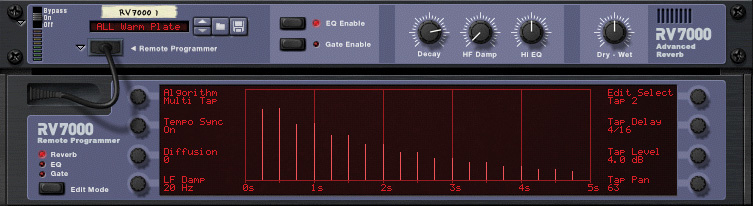 Reason/Record's best and most flexible delays are lurking inside the RV7000 reverb unit.
Analogue & Tape Delays
To emulate simpler analogue and tape delays, with their distinctive echoes that become progressively more limited in frequency bandwidth, try RV7000's Echo algorithm. It's just like a single tap of the Multi Tap algorithm, and is consequently even easier to work with.
Try an Echo Time of 320ms (Tempo Sync Off), and set Diffusion to zero. Set the HF Damp (high‑frequency damping) parameter to around 80, and turn the Decay (Feedback) knob up so that you can hear the effect over a number of echoes. It makes quite an effective analogue delay sound, with the echoes gradually becoming more muted. But also try setting HF Damp at zero, and raising LF Damp (on the top‑right soft knob) to about 800Hz. Now the bottom falls out of the sound and it's another fine vintage‑style treatment, which reminds me of that Paris walk scene, with piano soundtrack, in the movie Diva. Incidentally, the Spread parameter only makes a difference if you use some Diffusion, which gives a smoother effect, like quasi‑reverb. If you need finer control over delay or 'echo time' than the default 10ms increments, hold down the Shift key as you adjust.
Modulated Effects
Some of history's great hardware delays, like the Lexicon PCM42, for example, gain a great deal of flexibility by allowing their delay times to be modulated by onboard LFOs. As the delay time changes, the sample buffer ends up either squeezed or stretched, and subsequent delays appear at a different pitch.
Reason/Record's semi‑modular interface would seem ideal for quickly patching up the same effect, but neither DDL1 or RV7000 have dedicated CV inputs for delay time. It's still possible to rig using a Combinator's additional modulation options, though, as this shimmery 'wow and flutter' tape‑style delay demonstrates.
1. Select the device to which you'd like to apply the delay effect, and create a DDL1. If you haven't disabled Auto‑Routing, the DDL1 should get patched in appropriately. Set dry/wet balance to around 50/50 and Unit to 'MS' (milliseconds).
2. Select the DDL1, right‑click (or Control‑click on a one‑button mouse) and choose 'Combine' to place it in a Combinator. Again, the patching should be automatic.
3. Click in the empty lower section of the Combinator's device rack, and a red 'insert' bar should appear. Right‑click or Control‑click and create a Malström synth, while holding Shift and Command (Mac) or Shift and Alt (Windows), to prevent automatic routing occurring and a sequencer track being created.
4. Now we need Malström's 'Mod A' LFO to modulate DDL1 delay time. At the rack's rear, drag a cable from Malström's Mod Output: Mod A socket to the Combinator's Modulation Input: Rotary 1 socket.
5. Viewing the front of the rack again, click the Combinator's Show Programmer button. Then, in the left‑hand Key Mapping section, click on 'Delay' in the Device list (see screen below).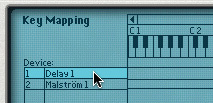
6. Here's the nifty bit. In the right‑hand Modulation Routing section (which should now also say 'Delay' in its Device field), click on a Source pop‑up menu and choose 'Rotary 1'. Then, in the neighbouring Target pop‑up menu, currently empty, choose 'Delay Time (ms)'. You should see DDL1's time display spring to life.
What you've done is make the Rotary 1 knob into a go‑between for the Malström LFO and DDL1's delay time.  By using a synth LFO in conjunction with a Combinator's modulation matrix, you can easily set up Lexicon‑like modulated delays.Try playing your device now, though, and you might get a shock! We need to adjust the effect so that it's a lot more subtle.
7. To set the basic delay time you want, in milliseconds, go to the Modulation Routing matrix once more, and click and drag the value in the Min: column, in the same row as in step six above. Try 250 for now, and hold down the Shift key as you drag, to be more precise (see above).
8. In the Max: column, choose a value fairly close to 250, perhaps 256.
Play something through the Delay, and immediately you should be able to hear the 'chorus‑ey' echoes. You can adjust the speed of the shimmer with Malström's Mod A rate control, and its depth by increasing the difference between those Min and Max values, although the basic delay time will always correspond with the 'Min' value. You might also want to try some of Mod A's other waveforms. Some of the more complex shapes can create unlikely but interesting effects if you set Min and Max delay times very low (between one and 30, say), use a good amount of feedback on the DDL1, and set Malström's Mod A Sync on, to get it going in time with the transport.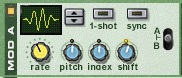 The many waveforms available in Malström's LFOs can help you to create subtle or strong flavours of modulated delay.
Sadly, this same technique doesn't work in RV7000, as some clever aspect of its design prevents the classic pitch‑change behaviour from occurring. Boo! It would have been nice to have those additional filtering options available.
Next month, we'll look at a way of adding 'selective delays', such as on final notes or words of phrases, and also consider some ways of mimicking 'glitch' or granular effects.
Inserts & Sends
I've described all the delay treatments this month as if they're being applied insert‑style, to a single device. But you could just as easily patch them into the Mixer, as a send‑type effect that all channels can access via their aux sends. Just select a Mixer 14:2 in Reason (or the Master Section in Record) instead of a specific device, before creating your DDL1 or RV7000. Then set its dry/wet control to 100 percent wet.