

 1: Operator's user interface has four panels of primary controls on each side and a central display for editing the finer details of the selected side panel. The four left-hand panels are identical and affect Operator's four additive oscillators. The right-hand panels manage the LFO, the multi-mode filter and global pitch and output parameters. In the FM algorithms shown at the bottom, vertical placement indicates frequency modulation, and only oscillators in the bottom row are heard in the mix. In the algorithm chosen here, oscillators A and B (yellow and green) are not frequency modulated and oscillator C (blue) is frequency modulated by oscillator D (orange).
From the conventional to the chaotic, Live's Operator synth does it all.
Ableton's Operator is mostly thought of as an FM synth, which it is, but under the hood you'll find a powerful additive synthesis engine, as well as enough filtering, signal routing and modulation options for full-blown subtractive synthesis. It's this ability to interweave additive, subtractive and frequency modulation that makes for an unusually robust synthesis architecture.
This month, we're going to look at how Operator works and show you how you can get the most out of this often misunderstood synthesizer.
It Adds Up
A first look at Operator can be scary. Crammed into its interface are eight side-panels of common parameters and a central display for more detailed editing. The four panels on the left affect four additive oscillators, whereas LFO, filtering and global parameters are managed in the four panels on the right.
By themselves, Operator's additive oscillators can keep you busy for a long time. Each offers 64 sine-wave harmonics, although you will often want to focus on the lowest 16 or 32 by clicking the buttons to the right of the bar graph. You can draw in bar-graph patterns or use the Shift key to constrain editing to one bar at a time. A miniature waveform graphic below the right-hand end of the bar-graph updates in real time as you edit the bars. The Wave drop-down menu alternatively lets you select a preset waveform whose additive spectrum you can edit in the bar-graph. To explore the oscillators, try this:
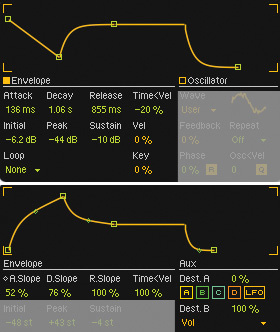 2: Operator provides ADSR envelopes for each oscillator's level, as well as for filter cutoff, LFO amount and pitch modulation. The Attack section is unusual in allowing you to set the start and end levels of the attack. The filter and pitch envelopes (bottom) also let you change the curve of their attack, decay and release segments.
1. Insert Operator into a MIDI track, select the bottom-right panel and then choose the rightmost algorithm at the top of the central display. This gives you a direct mix of the four oscillators without any FM.
2. Disable oscillators B, C and D (click off the B, C and D buttons) and select the oscillator A panel.
3. In the central display, click the orange button next to the word 'Oscillator' and then click the '16' button and edit the bar-graph to try out different additive spectra. Use the context menu (right-click in the bar-graph) to restrict editing to even or odd harmonics, to normalise the level as you add harmonics (always a good idea) and to export the spectrum to the Waveform section of Live's Library for use in Simpler or Sampler or as an audio clip. You can also use these files (.ams) in other Operator oscillators by dragging them to the oscillator's bar-graph.
4. Use the Repeat drop-down menu and the Feedback settings in the lower-right section of the display to rough things up a bit. Feedback uses the oscillator to frequency modulate itself, while Repeat repeats the spectrum, with some attenuation, above the bands shown in the graph. The numerical values (1/4 to 4) on the Repeat drop-down menu indicate the amount of attenuation. For example, Repeat 1/4 with a 16-band graph adds the most harmonic content and Repeat 4 with a 64-band graph adds the least.
5. To make the sound less organ-like, click the orange button next to the word 'Envelope' under the bar-graph. That reveals the oscillator's ADSR amplitude envelope, which is a little unusual in that it lets you set the start and end points (called Initial and Peak) of the attack stage. You'll find bipolar velocity scaling of all envelope times, along with velocity and note scaling of the output level. You use the Loop drop-down menu at the bottom left to configure the envelope as a one-shot (None and Trigger modes) or as a loop that is free-running, sync'ed to tempo or quantised to beat position. (Tip: for algorithms in which several oscillators frequency-modulate the same target oscillator, envelopes let you crossfade between modulation sources.)
Bear in mind that you have four oscillators to work with. After you've set up one oscillator, Operator makes it easy to use it as a starting point for the others. For example, select the oscillator B panel, right click below the bar-graph in its central display and choose 'Copy from Oscillator A.' Now the oscillators are identical and you can edit them to taste using the central display and their panels' Coarse, Fine and Level knobs. The Fine knob has a one-octave range, which is handy for slight detuning or for tuning to sub-octave intervals (see screen 3).
New Maths & Algorithms
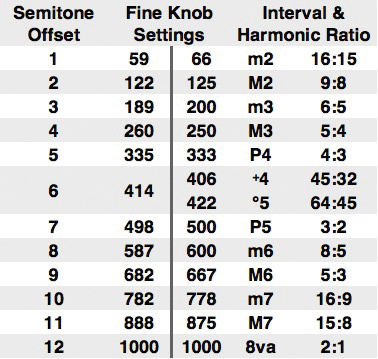 3: Operator's Coarse knob is calibrated in harmonic ratios, like the additive bar-graph in the central display, whereas the Fine knob always spans an octave and displays the decimal part of the corresponding pitch ratio. This table shows the Fine knob settings for equal-tempered semitone intervals on the left and for the closest harmonic ratios on the right. There are several commonly used ratios for some of the harmonic intervals but, in any case, complementary intervals should span an octave (their ratios should multiply to 2).
Although it's great to have access to all the murky details, there are times when simplicity rules, and it's easy to turn Operator into a simple subtractive synth. All you need to do in the central display is select the parallel (rightmost) algorithm, choose a preset waveform for each oscillator and route the pitch envelope to control global volume. You may also want to set up an LFO routing (typically to pitch, filter cutoff, volume or pan) and shape the filter envelope. Then hide the central display and use the side-panel controls to dial in sounds.
A simple modification to this setup provides a nice window into FM synthesis: turn on MIDI mapping (Command-M or Control-M), select the algorithm icon at the left-hand end of the bottom-right panel and map it to a knob or slider on your MIDI controller. You'll be surprised (or at least I was) how often choosing a different algorithm produces a musical result. Try it with all sine-wave oscillators, with other Operator presets and, above all, try scrolling through the algorithms while holding a chord. Using an 11-note MIDI key range is an alternative to using a slider or knob, but for that you need to wrap Operator in an Instrument Rack, map the algorithm icon to a Macro knob, and map that knob to the note range. The up side is that you can more accurately select the algorithm with one hand as you play notes with the other. The down side is that loading Operator presets no longer selects their algorithm.
Frequency modulation generates lots of sine-wave sidebands with complicated amplitude and frequency relationships. For a look at the maths behind this, check out 'Synth Secrets' in the April and May 2000 issues of SOS. Suffice it to say that FM is a great way to generate complex waveforms, but things can quickly become clangorous — although. of course, that's often the point.
Operator offers a fairly robust set of modulation options. You can route the LFO and the pitch envelope simultaneously to each of the oscillator frequencies, to filter cutoff and to an additional destination of your choosing, and you can scale those settings positively or negatively. When you select the bottom-right panel, the central display shows two scalable routings each for MIDI velocity, key, aftertouch, pitch-bend and mod wheel. (Note that Aux Env on the drop-down routing menus refers to the pitch envelope.)
 4: Here's a simple subtractive synth using the parallel algorithm. The preset oscillator waveforms, pitch envelope routing to global volume and LFO routing to pan were set up in the central display. Folding the central display leaves typical subtractive-synth controls in the side panels.
Let's Take It Apart To See How It Works!
Once you know your way around Operator, deconstructing presets is a great way to improve your skills. Start with the Components folder for some basic FM techniques. The Drums, Guitars and Plucked, Mallets, Piano and Keys, String Bass, Synthetic Voice and Synthetic Woodwind folders illustrate how to emulate those instruments. The various Synth folders provide a cross-section of typical FM sounds. For atmospheres, check out the Ambient and Evolving and Special-FX folders. And don't overlook the Synth Rhythmic folder, which shows how to use Operator's LFO and looping pitch envelopes to generate patterns.