


Can this intriguing little box really emulate the recorded sound of many of the world's greatest guitar amplifiers?
The Line 6 company grew out of one of the industry's most respected teams of electronic designers and software engineers. Between them they've been instrumental in designs ranging from classic Oberheim synths to the ADAT digital multitrack and drum machines from Alesis. But it is as Line 6 that their physical modelling guitar combos and amps have been winning over a surprising number of die-hard 'valves or nothing' guitarists, first with the ground-breaking Axyss 212, and then the affordable Flextone range. Now, in the form of Pod, they've produced a dedicated guitar recording preamp based around the same TubeTone modelling technology. Its all-digital engine offers a choice of physically modelled amps and speaker cabinets based on the detailed analysis of traditional and classic amps from Marshall, Fender, Mesa Boogie, Soldano and even old Vox models. In addition, it also provides multi-effects tailored for guitar, including delay, chorus, flanging, tremolo, rotary speaker, slow attack and a very convincing spring reverb emulation.
Housed in a solid aluminium casting that looks like a cross between a squashed kidney bean and a Baywatch babe's bum print, Pod manages to cram a huge amount of functionality into a very small space, and without a menu or cursor in sight! There are clearly labelled 'guitarist-friendly' conventional rotary knobs for Drive, Bass, Middle, Treble, Output Level, Channel Level (patch level), Reverb and Effect Tweak. A simple 16-way rotary switch is used to select the amplifier type to be emulated, with a second 16-way selector used to determine the effects to be added. Once a patch has been created, it may be stored in any of the 36 user memories — to get you started, all 36 locations come filled with example patches. There's also an on-board guitar tuner and one amp model designed to emulate a tube preamp for warming vocals or instruments. Power comes from an included external PSU, but there is still a power on/off switch.
 Pod has a single guitar input, a stereo pair of TRS (3-pole) balanced jack outputs that may also be used unbalanced, a stereo headphone output and a pair of MIDI In and Out sockets. The MIDI spec doesn't just allow patches to be changed remotely and patch data to be backed up, it also makes it possible to edit Pod's patches via software. All parameters are adjustable via MIDI controllers rather than SysEx, but you don't need to write your own editor map as a special Pod-specific version of Emagic's SoundDiver (Mac and PC) is bundled free with the unit. Using SoundDiver provides access to additional amp and speaker models which are not available from the front panel and also makes more extensive effects editing possible.
For stage use, a small connector at the rear of the unit enables Pod to be controlled by the Line 6 Floorboard foot controller or by the simpler FB4. Floorboard users gain access to an otherwise hidden wah function, modelled on the original Vox wah wah pedal, as well as a master volume pedal. Furthermore, the user also gains individual effects on/off control, and direct access to the tuner and Tap Tempo facility, as well as buttons for turning the distortion, gain and presence on or off. A 'Pod stand' for amp-top use and a padded gig bag are available as optional extras.
Controlling Pod
Pod is very simple to use via its 10 knobs and six illuminated function buttons (Manual, MIDI, Save, Tuner, Noise Gate and Tap Tempo). There's also a pair of arrow keys to move up or down through the programs. Even the display is simple — it shows a single digit followed by the letters A, B, C or D to denote nine banks of four programs. Because conventional, non-motorised knobs are used, switching to a new patch means the knobs will no longer reflect the true position of their parameter they represent, although adjusting one will still have an immediate effect. However, pressing the Manual button causes the unit to 'read' the current position of the front panel controls and sets up the Pod accordingly. You could use this facility to create an additional manual patch for use at gigs, or simply when you want to set up a new sound entirely from scratch. Saving patches is simple — after editing an existing patch, the display will show Edit, prompting you to press Save, after which you can select the required memory location, before pressing Save again to complete the process.
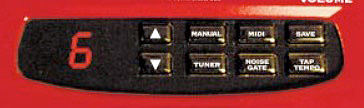 Although most of the controls are self-explanatory, there are a couple of hidden functions. For example, there's no Presence knob, but if you call up a model based on an amp that has a presence control, you can hold down the Tap Tempo button while turning Treble to bring in a fixed amount of presence boost. A similar 'hold and turn' trick enables the Drive knob to bring in extra distortion or the Channel Volume knob to introduce extra gain boost — but that's about as close to multi-function keys as Pod gets. Tap Tempo is primarily used to set delay time (up to a maximum of three seconds) and modulation effect speeds, whilst Effect Tweak performs a different function according to which effect is selected. Half the available range of effects are single processes (eg. just chorus) while the other half are dual effects, where the second effect is always delay — delay level is fixed in the dual effect modes unless you use the SoundDiver editor software, while the amount of feedback varies according to the delay time. Longer delays tend to have more feedback, while short delays give a single slapback. A dual delay system is used to prevent long delays from being cut short when switching to a different program.
A slide switch on the rear of the unit selects between direct recording and live guitar amp mode although, unlike many units, both settings still include cabinet emulation. In DI mode, the AIR process is switched in to create the effect of an amp miked in a room. Adding more AIR gives the sound more spread and a sense of space whilst with AIR set to off, the sound has more of a close-miked character.
Impressions
Even without using SoundDiver, it's possible to coax a huge range of sounds from this little box and it DIs beautifully. The amp models are all reminiscent of the real thing, with plenty of touch‑responsiveness on the overdrive sounds — you can turn down the guitar volume to clean up the sound, just like on a good valve amp. Equally importantly, the guitar feels light and responsive and harmonics flow naturally rather than having to be evicted by brute force. The tone controls within each model are closely based on those of the original amps, so depending on what model you choose, they'll behave differently, just as they should.
The clean and mildly raunchy sounds are also very true to the amps they model, right down to the non‑top boost AC30, which is just as thick and lumbering as I remember it from the days when I owned one! The Marshall models produce the classic 70s Brit rock and blues sounds, the latter being particularly impressive when the sound is just on the edge of breaking up. Choosing a more modern amp and winding up the gain gets you all the thrash metal overdrive you could wish for, and if that's not enough, there's also a fuzz-box model.
Using the onboard compressor with clean or very mildly overdriven sounds yields satisfying results, though, as with any compressor, you need to watch out for interference noise picked up by the guitar. The built-in noise gate helps here, and though it isn't a perfect solution if your guitar is very noisy, this one is about as unobtrusive as noise gates get. In fact the Pod's only real vice is that if you switch between patches while you're still playing, there's an audible glitch.
In just a couple of hours I'd reprogrammed most of the factory sounds to my own taste, and booting up SoundDiver proved worthwhile as it enabled me to be more choosy about the delay settings and to swap speaker cab models around. Putting a big Marshall through a little 1 x 12 Fender cab can produce very interesting and usable results!
Conclusion
The bottom line here is that although a top engineer with a great live room, a vintage amp and a good mic or two just might get a better recorded sound, those working in more modest studios would, I think, be very hard‑pushed to better Pod's endeavours. The end result is so authentic that I doubt if many people could tell, simply by listening to the recording, that the guitar was DI'd. There's as much tonal variety as you could wish for, and while the effects section is simpler than you might expect from a dedicated multi‑effects box, it's quick to set up and the effects themselves sound great. The flanging is as close to an Electric Mistress as anything I've tried, the rotary speaker bubbles along nicely and the tremolo is also very convincingly authentic. At the price, Pod is simply too good to pass up.
SoundDiver
SoundDiver is Emagic's universal synth editor and librarian, although the free version you get here (Mac and PC) works only with Pod. Multiple banks of user programs may be stored in your computer via SoundDiver and editing is accomplished via a single screen that provides virtual knobs, switches or sliders for every parameter.
When using dual effects from the Pod front panel, the amount of control you have is limited by what you can achieve using the Tap Tempo button and the Effect Tweak knob, and even though the reverb has its own level knob, the type and decay time is fixed. Amp models with spring reverbs default to the spring model while Marshalls and other non-reverb amps get a hall reverb. Using SoundDiver, however, you can choose which reverb type to use, you can change its decay time and tone, and you can adjust the delay time, level and feedback parameters (independently for both channels if stereo delay is selected).
SoundDiver makes the presence parameter fully variable (presence is disabled on amp models where the real thing does not have a presence control) and also brings the number of amp models up to 28. The front-panel amp selector always calls up the speaker cabinet model normally used with that amplifier, but using the editor allows you to mix and match amps and speaker cabinets at your leisure. Finally, without SoundDiver, the amount of AIR is fixed for each amp model (other than switching to Amp mode and bypassing it altogether), but SoundDiver allows you to use different levels of AIR in different programs.
Pros
- Looks great.
- Sounds great.
- A doddle to use.
- SoundDiver software included.
- Seriously cheap for what it offers!
Cons
- More control over the delay parameters from the front panel would be useful, especially in the dual effects modes.
- Some glitching is audible when changing between patches, unless the input is muted.
Summary
This is instant guitar gratification in a box. Everything about the Pod says 'buy me', which is exactly what I plan to do!