

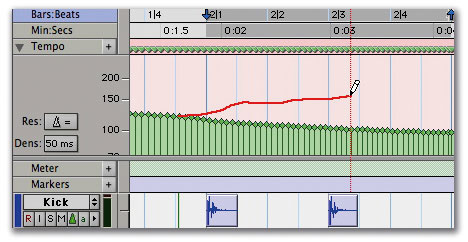
 Beat Detective can now be used on MIDI tracks just like on audio, allowing you to conform the tempo of your song to a freely played MIDI performance.
Our new columnist provides the detailed lowdown on a new version of Pro Tools...
With the new version 6.7, Digidesign have made huge leaps forward in the area of MIDI functionality within Pro Tools. It's aimed squarely at the musician, improving MIDI integration and adding new features specifically designed to support the work of music composers. I would go as far as to say that a lot of users will now be able to say goodbye to that two-stage process of starting off in a sequencer like Logic or Cubase before going through a messy transfer process to Pro Tools to complete the project, knowing that it will become more and more difficult to revert back to your MIDI sequencer the further into your project you go. Even for people like me who mainly record 'real instruments', the benefits of tempo curves and 'tick-based' timelines, colour coding and the Patch Manager are all going to be incredibly useful. The update is free for TDM users (provided they're already running v6.4), but will cost LE users £50. It also leaves out Digi 001 owners, whose hardware is not supported in the new LE version.
So let's take a look at the new features. All these improvements are for both Mac and Windows, and both TDM and LE versions, unless otherwise specified.
Beat Detective
Beat Detective, which up until now has only been available on the TDM version of Pro Tools, is now available in the LE versions too. Now LE users can tap into this feature to 'quantise' audio, fit it to grooves, and so on, just like you can with MIDI. The only difference now between TDM and LE is that TDM users can use Beat Detective across multiple tracks, which is very useful if you are quantising a drum kit's worth of tracks and want to keep the edits sample-accurate. Even without this feature, Beat Detective will be a very welcome addition for LE users.
MIDI Detective
Digidesign have taken all the features of Beat Detective and applied them to MIDI tracks as well. The new MIDI Detective enables you to generate tempo maps and groove templates directly from freely played MIDI performances; you can also use grooves acquired from MIDI performances and apply them to audio tracks, and vice versa. The new MIDI Step Input window.
RTAS Instrument support
The TDM version now supports RTAS instruments on aux inputs, which will improve plug-in integration and LE/TDM Session compatibility — previously, you could put RTAS instruments on aux inputs in the LE version but not in the TDM version. They have also done a lot of 'under the hood' work to improve the support and integration of RTAS instruments into a Pro Tools Session. You will find things a lot more stable and consistent with v6.7. In addition, 6.7 will support multiple outputs for multitimbral soft instruments on separate Pro Tools tracks, but you will need to wait for the soft instrument manufacturers to update their software to support this feature.
MIDI Step Input window
Like the similar features in most sequencers, this enables you to input MIDI parts a note at a time, which is great for when you need to build complex or difficult MIDI passages or, like me, you aren't a very good keyboard player!
MIDI TC/E tool
The familiar TC/E tool now works on MIDI tracks too, allowing you to time-compress or expand individual MIDI regions without affecting the tempo of the whole Session.
Tempo Editor
At last we can now edit tempos using the pencil tool to draw in your own tempo variations, or preset curves from the Tempo Operations window that are adjustable in same way you change the fade shapes in the Fade window.
Before You Jump
With such a tempting new upgrade available, this would probably be a good time to offer some advice on things to do before upgrading your system. First, don't update an unstable system. You are more than likely to make it worse, not better. Fix your system before you upgrade.
Second, make sure your plug-ins are up to date. Check the developers' web sites for updaters and after you have installed 6.7, but before you run it for the first time, use the 'Plug-in Validator' application in the Utilities folder in the Pro Tools folder in your Digidesign folder. This should check that all your plug-ins are up to date, though it doesn't check the Waves plug-ins. I would recommend that Waves users upgrade to v5, although there are reports that v4 users are managing to cope with a few hiccups.
As far as soft instruments go, we have had reports that Mach Five v1.2, Indigo v2.4, Atmosphere v1.2, Stylus RMX v1.05, Reason v2.5, Sampletank 2, Ableton Live, NI Kontakt, FM7 and Reaktor all seem to be working OK. Most developers will be releasing new versions which will be multi-output-compliant for use in Pro Tools 6.7, and offering improved support for the Patch Manager option, so expect loads of updates over the coming months.
Time Operations window
You can now easily insert or delete space globally in a Session by using the Time Operations window, so adding two bars here or taking out four bars there can be done precisely. Other options in this window include moving the song start point and Change Meter, so again you can precisely insert two bars of 2/4 time in a song.

Tick-based Audio tracks
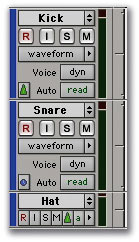 Tick, or musical tempo-based audio allows you to change the tempo of a piece and have all the region boundaries remain at the same musical position. This means you can change the tempo of a song after recording and, providing there are region boundaries in the right places, all the audio files will move in time so they remain at the same points in the song. What it won't do, though, is time-compress or expand audio to fit — it only moves region boundaries. You will need time to get your head round this one, but the impact of it for integrated MIDI and audio work in one application is enormous.
Colour coding
You can now colour-code tracks, regions, markers and much more for easy identification. You can decide what colour the regions will be in your kick-drum track, or colour code all your drum tracks red, strings blue, vocals green, and so on. I suspect some Sessions are going to look very garish before we settle down to sensible use of this feature!
Undo History
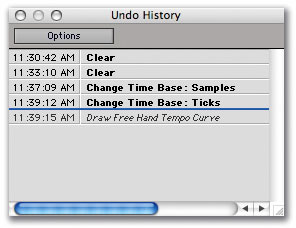 You now can view a list of the Undo options available to you, in a very similar way to how applications such as Photoshop present them. You still can't pick and choose which ones to undo, but you can now see what will change before you hit the Undo button.
Patch Manager
This works for plug-ins and especially well for Instruments. Trying out different patches was a drag when you had to go into the Preset menu, drill through several folders to get to a possible patch, then wait while it loaded, decide it wasn't the one and do it all again. Now there is Patch Manager, which allows you to try different patches in a number of ways. Use the '+' and '-' keys to increment your way through the list one at a time, or click on the list button and select each one from a multi-column list in one window, or even get it to change patch automatically every few seconds so you can audition the sounds. Patch Manager.
Non-administrator user support
This option allows Pro Tools to be run by users who don't have 'Admin' access to their computers. This is especially useful in educational settings where administrators don't want students to have unrestricted access to the machines.
There are also several improvements that bring Windows users features that previously had been available only on the Mac platform. The Windows XP version now features the same MIDI device management that has been available on Macs through MIDI Studio Setup in OS X, plus support for MIDI Time Stamping and Digidesign's MIDI I/O unit. The XP version can also now open and convert in one step older SDII-based Sessions that weren't saved as Mac/PC-compatible.
All in all, this is an excellent 'incremental' upgrade which all music users of Pro Tools will find very useful. It now has the feel that the MIDI hasn't just been tacked on to an excellent audio tool. The integration between MIDI and audio is almost complete, and it will be interesting to see how Logic, Cubase and others respond.
Teething Troubles
Of course, an update wouldn't be an update without some 'known issues', some of which have already been fixed:
- There have been reports of 'mute lag' with automatic delay compensation activated in Sessions that were created in v6.4 and then opened in v6.7. Digidesign have reported that this is due to a problem in v6.4 where the timing of mutes was not correctly handled when ADC was active. They have fixed this in v6.7, but for Sessions created in v6.4 it gives the impression of a problem. The 'workaround' for any Session that has this problem is to 'nudge' the mutes into the correct position once you open it in Pro Tools v6.7.
- Meanwhile, there has been a Pro Tools 6.7cs1 update which fixes the following 'known issues'. Attempting to reset the tempo slider to 120bpm by Option-clicking on it would result in a crash in both LE and TDM systems; when Pro Tools TDM was playing with a track record-enabled, stopping playback could result in a pop if the input source was bussed or was a hardware insert; with some external hardware configurations, an audio glitch could be recorded to the beginning of a file when pre-roll was activated in a TDM system; and when using a control surface in a TDM system, it was possible to assign a multiple-output instrument plug-in's output to its own input, thereby causing a crash. Again, check Digidesign's web site for the latest 'cs' version.
- There appear to be problems with Pro Tools 6.7 and some of the Native Instruments plug-ins, especially B4, Pro 53 and Battery v1.3.2. These can range from graphical glitches to complete crashes to graphics problems — watch NI's web site for news of updaters to fix them.
- If you use the Save Session Copy In... function, make sure that the option to copy fade files is checked, and check the new Session before moving on. The bug causes the new Session file to be corrupt and have no regions or playlists. The workaround is just to include copying fade files when using this function.
- After a BTD (Bounce to Disk) the keyboard command focus is disabled. The workaround is to click on the desktop and back to Pro Tools to re-enable command focus mode.