

 The main 'Manual' view in B4 II.
Since its launch in 2000, NI's B4 has been the software instrument of choice for those who want realistic tonewheel organ sounds from their computer. But NI are clearly convinced it can be better...
Since 1980, when Korg released their original CX3, and made what was arguably the first serious attempt to replicate the sound of a Hammond organ in a portable keyboard, there have been scores of ersatz tonewheel organs, some good and others, well, not so good. With the advent of software instruments, 'virtual' tonewheel emulators began to appear, and it was NI's B4, first reviewed in SOS back in November 2000, that went on to become something of an industry standard. B4 hasn't been without its competitors — Emagic (now Apple) soon followed up with EVB3 (see SOS February 2003), and since then, we've seen the likes of USB's Charlie, a sample-based VST instrument (reviewed in SOS September 2004). Despite these, though, NI's B4 has remained the benchmark for Hammond plug-ins, gaining favour not only with studio-based musicians but with live performers, too.
There is, however, always room for improvement. Whereas Emagic/Apple's EVB3 offers four different 'Leslie' cabinets and a choice of single or dual rotary speakers, B4 has no choice of cabinet simulations and no ambience simulations, and one frequently voiced complaint is that the volume level rather frustratingly tails off from around middle 'C' downwards. What's more, B4 's functionality has not been updated since its first release, five years ago! However, rather than making changes to B4, NI have opted to create a new generation of the plug-in. Significant enhancements and additions abound in this version — a choice of cabinet emulations, dual rotary speakers, and a new modelled tube amp are just a few of the goodies on offer. So does it sound even more authentic than before?
Installation & Compatibility
B4 II will run as a stand-alone instrument or as a VST, Audio Units, RTAS or DXi plug-in. Minimum system requirements are Windows XP with a 700MHz Pentium or 1.3GHz Athlon XP processor and 256MB of RAM, or a 733MHz Mac G4 with OS 10.3 and 256MB of RAM. Once installed, you have 30 days of full functionality before the software has to be registered to continue working. You do this using NI's Registration Tool method; this generates a System ID based on your computer's hardware, which you email to Native Instruments. They in turn email an Authorisation Key back to you, which, when entered into the Registration Tool, activates B4 II permanently. In the event that you have no Internet connection available at all, registration can also be done by snail mail — but not, apparently, by telephone.
New Look, New Toys
In contrast to B4 's two screens, or views, B4 II presents five different views. Constantly visible at the top of all five views is a panel from which you can select Presets, store sounds and select any of the five views. The main view, 'Manual' (shown above) displays the entire instrument with both manuals, pedalboard, three groups of drawbars and the performance controls from a real Hammond.
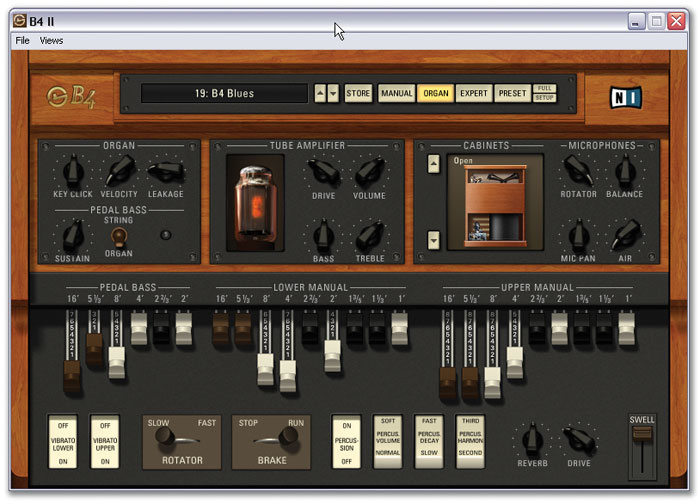 'Organ' view gives better access to the drawbars than Manual view, and provides quick access to the modelled 'Tube Amplifier' and speaker cabinet options.Changes which are immediately obvious are the addition of a Rotator Brake/Run toggle switch below the keyboard (B4 's Rotator and Drive on/off switches are gone) and a control box housing Reverb level and Drive (tube distortion) amount knobs. The Rotator Brake/Run switch allows the Rotator to be stopped whilst still allowing the sound to be coloured by the Rotator's crossover network. The Rotator can still be bypassed entirely, but via a different editing view, as will be seen shortly (see page 76). The controls for Percussion and Chorus/Vibrato are present as before.
The upper and lower manuals and pedalboard are accessible via their own MIDI channels as on the previous version, and keyboard splits can be set up, providing 'zoning' of the sounds of both manuals and the pedalboard from one MIDI channel if desired. Keysplits can be assigned directly from the Manual view by holding down the right mouse button (the Control key on a Mac) and clicking on an upper manual key, and then making your choice from the resultant drop-down menu.
The manuals and pedalboard can also be independently transposed by ±1 octave by a similar click-and-right-mouse-button (or Control button on the Mac) manoeuvre. Keysplits and transposition settings are global to B4 II — in other words, they're not storable on a per-preset basis.
The Organ view (above) is where many of B4 II 's new features are to be found, and is divided into four sections. The lower section duplicates the drawbars and performance controls of the Manual view, but displays them larger, for which my aging eyes are truly thankful. The upper section is split into three panels: Organ/Pedal bass, Tube Amplifier and Cabinets/Microphones. The Organ section provides control over Key Click amount, fully variable response to keyboard velocity and Leakage amount. Leakage is a characteristic of older Hammonds, where the crosstalk 'whine' between the tonewheel outputs can be heard, varying in timbre according to which drawbars are in use, and which notes are playing. When applied carefully, this can add a great deal of realism.
The bass pedals now have a String/Organ option, with a Sustain (release time) amount. When in String mode, notes decay to silence like a string bass when pedals are released. When in Organ mode, increasing the Sustain parameter acts like a 'hold' feature — the notes are held at full level according to the Sustain time amount — which is very useful for keeping the bass notes flowing if you're not too nimble on the pedals. Rather cunningly, this hold/decay works monophonically (although the pedals still play polyphonically), in that new notes curtail the previous decaying/held note to avoid unpleasant bass-note 'smudging'.
Teething Troubles
A couple of problems came up with B4 II during the review period. Under certain conditions, B4 II 's CPU usage ran exceptionally high when using it alongside other plug-ins in Cakewalk's Sonar 5 (my sequencer of choice). When B4 II is the only instrument present, the CPU meter runs at around 12 percent. However, in one particular arrangement, which included two instances of Kontakt 2 and various effects plug-ins, B4 II gobbled up nearly 40 percent of the available CPU, causing it to max out. Replacing it with the original B4 reduced the CPU to normal levels.
B4 II 's track audio meter (in Sonar) also displayed irrational (but inaudible) overloads of +18dB — but curiously only when it wasn't playing! Finally, in the stand-alone version, I noticed that moving the Drive knob fully anticlockwise sometimes caused audio to cut out completely.
Better By Tube
NI have completely redesigned the built-in tube amplifier emulation for B4 II, and claim that the new model has been modelled on the original Leslie tube amplifier. The character of the distortion, especially at high drive levels, is considerably more authentic than in B4, being far less fizzy and imparting a satisfying growl. This makes for a more solid, focused sound that works just as well with single notes as with chords. At lower drive levels, it doesn't entirely capture the soft, sexy 'purr' of the real thing to my ears, erring a little on the crackly side. Nevertheless, this can be greatly improved by the choice of virtual speaker cabinet (see the 'Cabinet Office' box below). The new Tube Amp also offers extremely effective tone controls that work at just the right frequencies, especially when emphasising the bass end of things — an area in which B4 was rather lacking.
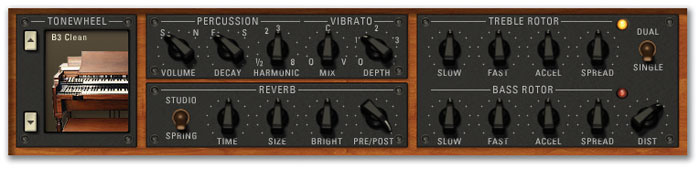 The Expert screen (see below) is similar to the Organ view, but provides this panel of more detailed controls for the organ percussion, reverb, and Leslie rotors.
An additional benefit of the Tube Amp is the way in which it compresses the volume level as you drive it harder, much like a real tube amp. This, in conjunction with the tone controls and various other niceties, goes a long way towards addressing B4 's problem of the drop in volume in the lower key ranges. Now it's a doddle to recreate aggressive, spitting bass tones (think 'History Repeating' by the Propellerheads) that were frustratingly elusive on the original B4. Speaking of volume consistency, B4 II now features loudness robbing, another Hammond 'feature' whereby the sound's volume is 'compressed' whenever the same tonewheel is being played simultaneously by multiple keys. All this leads to a much better sound balance overall.
As well as the various speaker cabinet simulations that can be chosen in Organ view, four of the virtual microphones' parameters are located here. Firstly, the relative levels of the dry tonewheels and Rotator output can be balanced. As hinted earlier, turning this fully anticlockwise is how you would completely bypass the Rotator (as opposed to hitting the Brake), and the option to balance the two is there for those wanting to recreate the effect of playing both through a Leslie and a Hammond's own stationary speaker. The treble and bass rotors' levels can be balanced, as well as the treble and bass microphones' relative pan positions. The Air parameter is the most interesting here, increasing the level of early reflections in the sound. This creates a convincing sense of distance from the speaker cabinet without adding any significantly measurable reverb.
Cabinet Office
B4 II offers 13 different speaker cabinet simulations. The first four of these are variations on Leslie 122 and 147 cabinets, each one being either fully enclosed or with the 'back' removed to reveal the rotating speakers. With the exception of the final simulation, Direct (a model of a DI box), the remainder are modelled after classic guitar speaker cabinets. Although NI have avoided using brand names, the illustrative icons make the intended references clear. 'Citrus', for instance, is sure to be an Orange 4x12 guitar cabinet, 'AC Box' must be an AC30, and 'Jazz' looks very much like a Roland Jazz Chorus amp. The most interesting one here is, unusually, 'Bass VT' — undoubtedly Ampeg's famous bass guitar cabinet. This has a particularly beefy sound with a lot of high frequencies, and is excellent for emphasising the rotary effect's swirling of the upper drawbars.
These cabinet simulations are the real key to modelling specific Hammond sounds that are associated with certain genres of music. Each cabinet confers signature frequency characteristics to the sound, in some cases dramatically so. For example, there is a clear distinction between the Open 122 Rotary model, which delivers a bright, aggressive rock tone, and the Closed 147 Rotary model, which produces a mellower, jazzy timbre but with a shiny-sounding top end. Such subtleties of tone could be quite difficult to convey with the original B4. For example, I have tried to duplicate the classic Al Cooper 'Like A Rolling Stone' sound — a full, flutey sound but with silvery, swirling upper harmonics. I never quite managed to nail it on B4, but the registration 800036030 through B4 II 's Rotary 147 Closed cabinet with the 'Air' parameter at 50 percent and drawbar Leakage set to around 30 percent hit it dead on.
Interestingly, using a guitar cabinet in conjunction with the rotary speaker balance at 100 percent is an interesting concept. For this to work in real life, you would have to send the rotary speakers' microphone outputs to a matched pair of amps feeding two identical, acoustically isolated speakers and mike these up all over again! However, the inclusion of guitar cabinets is not as daft as it sounds — Jon Lord's signature overdriven Hammond sound in Deep Purple evolved through such experimentation, namely driving Marshall stacks directly from the output of his C3 — often without the Leslie. When using the additional Vox Continental or Farfisa tonewheel sets, the guitar cabinets come into their own, as this is representative of how they might originally have been amplified. The combination of DI Box and rotary effect, on the other hand, is a rather more intriguing fantasy concept! The provision of these cabinet simulations in B4 II is well judged, and broadens the sound palette to a remarkable degree.
Expert, Preset & Setup Views
The Expert view (shown on the previous page) delves deeper into the finer sound-editing details. Percussion volume, decay and harmonics can be fine-tuned here; similarly the Vibrato mix and depth can be adjusted. In the Rotary section, new additions are individual Spread (stereo width) controls for the treble and bass rotors, and the choice of single- or dual-rotary speakers. With Dual selected, the two Rotators spin in opposite directions and at slightly different speeds, for an even fuller, wider sound.
Two Reverb types have been added to B4 II, Studio and Spring. These are surprisingly flexible — in addition to what you'd expect, some very bizarre effects can be coaxed from them, as certain Presets demonstrate. The Reverb takes its signal from the Tube Amp, and this can then be routed before or after the cabinet/rotator, or any mix in between. Some delightfully spooky Doctor Who-style effects can be obtained by routing the Reverb through the Rotator, then sweeping the Spring reverb's Size parameter while playing — a trick that's possible if you assign the Size parameter to a MIDI controller.
 The Setup screen.Tonewheel sets can be changed too. You could optionally purchase extra sets for B4, including the sounds of Vox Continental and Farfisa Compact organs, an Indian harmonium, and a selection of variously aged Hammonds ranging from pristine condition to 'trashed beyond repair'. These extra sets are now included as part of B4 II.
Preset view is the place to keep all your sounds in some sort of order. All the usual Preset management options are here — sounds can be saved and loaded individually or in complete banks, and they can be moved to different locations in the Preset list by simply dragging and dropping. Deleting Presets is similarly simple, and the Preset list may be compacted to move the empty spaces to the end of the list. And very helpfully, the Preset manager has Undo/Redo buttons with up to 30 history levels, so if you regret deleting that cheesy 'Days Of Our Lives' organ 10 minutes ago, the chances are you will be able to restore it. Three handy Audition buttons are provided, each preloaded with short ditties in Jazz, Rock and Blues styles, which is great when you want to appraise Presets away from a keyboard. There's also a built-in MIDI file player, which could be useful for importing your own pre-prepared audition pieces.
Setup view (above) manages the various global settings for B4 II, including Transpose, Keysplits and MIDI channels for the manuals and pedalboard. Various controller options are also provided to ensure maximum compatibility with external MIDI hardware devices. External audio input can be enabled/disabled (in stand-alone mode) when using B4 II as an effects unit — this is automatically enabled when B4 II is inserted as an effects plug-in within a host DAW. The DXi version of the effects plug-in is now fully automatable in Sonar (this was not the case with the original B4, and is warmly welcomed by this Sonar user!). One particularly powerful feature is the comprehensive MIDI controller assignment map. To make a MIDI controller assignment, you simply highlight the desired parameter name in the list, click the Learn button and move a fader or knob on your MIDI hardware. The list then updates to reflect your choice. Once you have made your assignments, they can be saved as a Controller Map file. NI have thoughtfully provided a number of pre-made hardware Controller Maps, including templates for their own B4D hardware controller, plus various Novation, Korg, Kurzweil, Nord and Behringer devices among others. Helpfully, text files accompany these maps (in the B4 II Controllers folder) with information on the assignments for each map. There is even a template for the Korg OASYS — NI are clearly confident that OASYS owners will prefer B4 II to the tonewheel organ engine built into their own illustrious keyboard!
Conclusions
I'm hugely impressed by NI's attention to detail for this version of B4. The new features are well chosen and tastefully implemented, in particular the new tube amp and speaker cabinet models, which make possible the recreation of stunningly realistic Hammond sounds of virtually any style or era. I think the Rotator is one of the best Leslie simulations out there, and the implementation of full, customisable MIDI control makes B4 II compatible with just about any piece of MIDI hardware you wish to use. If you thought the original B4 hit the mark, be prepared to experience deep joy all over again.
Pros
- Excellent tube amplifier and speaker-cabinet models.
- Sounds even more authentic than before.
- Comprehensive MIDI control with recallable controller maps.
Cons
- Some questionable issues regarding CPU usage.
Summary
NI have raised the bar yet again. B4 II is capable of recreating a range of Hammond sounds which were quite elusive on the previous version. This, and its customisable compatibility with a wide range of MIDI hardware controllers, make B4 II a must-have for anyone looking for a serious and eminently affordable plug-in alternative to the real thing.
information
£149.99 including VAT.
Arbiter Music Technology +44 (0)20 8207 7880.
+44 (0)20 8953 4716.