

Mastering keyboard shortcuts makes Cubase easier to use and is good for your health!
 The Key Commands window allows you to define key combinations for your favourite Cubase commands.
Despite the well-designed user interfaces of modern DAWs, the repetitive moving, scrolling and clicking with a mouse can often feel clunky and sluggish, and in the long run can also cause problems with fingers, wrists, elbows and so on. While I'm the first to admit that defining and learning key commands doesn't sound as exciting as, for example, getting to grips with a new soft synth (or even staying in on a Saturday night to wash your hair!), it's something that will both make Cubase easier and quicker to use and help you to avoid suffering from mouse-related physical problems.
Right On Key
Frequently performed tasks such as project navigation — moving between windows or events, moving the playhead along the timeline, zooming in and out, or something more complex — can be made more efficient using Cubase's key commands, providing you're prepared to invest a little time in setting them up and practising using them. As an example of what key commands can offer, then, let's learn how to 'navigate' using just the keys, and get there quicker.
While there are a lot of useful default key commands in the standard Cubase installation, there are also plenty of additional functions that can be assigned a shortcut via the Key Commands window, which is accessible via the File/Key Commands menu option. By default, access to this window does not have a keyboard shortcut assigned (existing key commands are shown to the right of an item within a menu), so I'll use this as a basic illustration of how to define your own key commands.
At the top of the window, the search box allows you to find specific Cubase commands in the (very!) extensive list of possibilities. In the first screenshot example, searching for 'key commands' found an entry under the 'File' section. Where an item has a key command already defined, this is shown in the panel on the left side. If you select an unassigned command, you can then enter a key combination in the 'Type in Key' box. Usefully, if the key combination you try is already assigned to another command, Cubase politely tells you, and you can choose whether to overwrite the existing assignment or not. Otherwise, pressing the Assign button links the key combination with the command and, once the Key Command window is closed, the key combination becomes available for use.
Key commands defined here are 'global', which means that they will be available in any Cubase project on the host system. Usefully, all the key command assignments that you make on your system can be saved as a preset. This is great if multiple users share the same host system and have different key command preferences. Providing you can find the file (search for it based on the preset name you used), it is also possible to move presets between computers, so you can take your key commands with you if you need to work away from your own system.
Behind The Square Window...
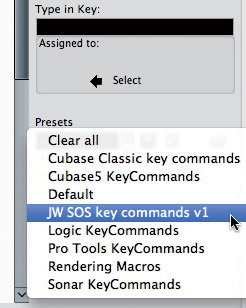 Key commands can be saved as presets to accommodate different needs or facilitate [moving between systems.
Unless you're fortunate enough to use a multi-screen system (and often even then), you'll probably find that you're always switching between a number of the main Cubase windows. The Cubase 'workspace' system — with which you can define a window layout containing any combination of windows and then save them as a workspace — streamlines this process and is accessed via the Window menu. Once your workspaces are configured, the first nine can be recalled by pressing the Option (Mac) or Alt (PC) key and the assigned number key (1-9, but not zero, which is reserved for locking and unlocking the active workspace). The two obvious workspaces you might set up are a full-screen Project window and a full-screen Mixer window, although there are plenty of other possibilities. It's also worth noting that individual workspaces can be 'locked', so even if you then make some temporary changes to it (perhaps opening a further window or resizing a window) while working, the original configuration of the workspace is recalled the next time you open it.
There are other ways to open individual windows, of course. Default key commands will open the Mixer window (F3), the MediaBay (F5), the Video window (F8) and the VST Instruments list (F11), for example. (Mac users might want to check how they have the function-key behaviour configured in the System Preferences, but can still access these function key-based key commands in Cubase if they also hold down the 'fn' function key on the Mac keyboard.) Other heavily used windows also have pre-defined key commands, and a few of these are well worth memorising such as the Pool (Command-P for Mac, Ctrl-P for PC) and Marker windows (Command/Ctrl-M), as well as the Project Setup window (Shift-S).
Project Prowess
 Workspaces can be defined via the Windows menu and then provide instant recall of screen configurations via key commands.
For many Cubase users, the project window is where they spend the bulk of their time, and two sorts of keyboard-based 'navigation' tools can make life here a great deal easier, particularly on large projects: those for moving along the timeline and those for zooming in and out.
There are a number of ways of moving along the timeline, each with their own particular uses. If you just want to get the cursor to step forwards or backwards, the Command (Mac) or Ctrl (PC) key and plus ('+') key combination, and Command/Cntrl key and minus ('-') key combinations move the cursor forwards and backwards along the timeline in increments controlled by the Snap setting. So if Snap is set to a bar or beat, each press of the key command moves the cursor by that amount. Unless you have a penchant for working on 30-minute prog-rock epics, this is a very easy way to move around a project.
An alternative approach uses the 'N' or 'B' keys to move the cursor to the next or previous event on the currently selected track. For example, if you have an audio track containing a series of audio events, each press of the 'N' key will take you to the start of the next event, the end of the same event, the start of the following event and so on — again, an easy and useful way to step through the timeline of your project. Incidentally, the up/down cursor keys can be used to step through the used tracks in the Project window Track List, so a combination of these two key commands allows you to move the cursor to anywhere in the project.
A third approach is available to those who use the Marker Track and markers to highlight the locations of key points in the project. Shift-N and Shift-B move the cursor to the next or previous marker. So, for example, if you place markers at the start of each song section in your project, this provides a very rapid way to move along the timeline to the section you want to work on.
Zooming About
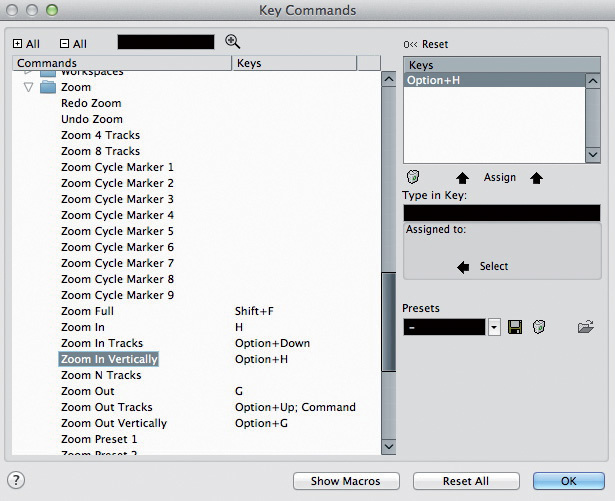 Defining key commands for your most used 'zoom' commands can speed up project navigation considerably.
Aside from moving around the timeline, the other operation repeated many times over in the average project session is changing the zoom level. Key commands provide access to a number of 'zooming' tools. At the most simple level, 'H' will zoom in and 'G' will zoom out horizontally. And if you want to see all of your project at once, Shift-F sets the zoom level to fit it into the current Project window — magic!
If you want to zoom in/out vertically on the currently selected track, the preset key commands Option-up arrow and Option‑down arrow (use Alt on the PC) will get the job done. However, if you want to simultaneously zoom all tracks vertically in or out, you'll need to set up some appropriate key combinations in the Key Commands window, as these are not defined by default. I've set these as Option-G and Option-H on my Mac, so that the 'G' and 'H' keys control both horizontal zoom (without the Option key) and vertical zoom (with the Option key). Of course, you could similarly use shortcuts to increase or reduce the height of the waveform within an event.
Endless Potential...
I've focused on the key commands that help you with the most common Cubase navigation tasks, because these offer the most immediate potential for streamlining your way of working with Cubase, but what's covered here is merely the tip of the iceberg. Almost any operation can be executed via a key command, so if you find yourself regularly repeating a particular operation, learn or set up a key command for it. You don't have to stop at the preset commands, either — you could create Macros (combinations of commands and processes) and assign those to a single key. It should be a simple matter, for example, to use a single key to jump 10 events forward or back on the arrange page.
Learning key commands won't make you 'sound' better, but it will let you capture and manipulate your sound more efficiently, more quickly, and with less chance of physical damage to your all-important hands and arms. John Walden.
Stickers & Keypads
If you're one of those people who finds it difficult to remember which keys control which commands, you should consider investing in a set of keyboard stickers from Editors Keys, which aren't expensive. These have both the standard QWERTY keys and shortcut labels on them. Bear in mind, though, that these will reflect the default shortcuts. The minute you start to reassign or overwrite shortcuts, the stickers will be incorrect!
You could also keep your QWERTY keyboard clear of clutter by using a second, dedicated keyboard for the task. For example, I use a USB numeric keypad, to which I've assigned different shortcuts. By default, a lot of transport controls are assigned to the numeric keypad, but there can be more than 20 keys and two modes on such devices, giving a possible 40 separate commands — and that's before adding Ctrl, Alt, Shift or other modifiers into the equation. This keypad even includes a couple of USB ports that enable me to keep my Cubase dongle and a USB pen drive with my Cubase preferences on it, so it's easy to plug into another machine and be up and running quickly! Matt Houghton