

Drumasonic's eponymous software instrument offers detailed editing control over its generous library of drum and percussion sounds.
 The Instruments Tab is the main microphone control centre, and is where kitpieces are loaded. Every mic has its own envelope and pan controls, and the 10 knobs below adjust velocity response, modulation and pitch for each mic. Here, Split Link is active, so the close and ambient mic parameters can be adjusted en masse, but as independent groups.
The choice of virtual drum software is growing all the time, ranging from full-on, multi-miked affairs to more modest and more CPU- and RAM-friendly offerings. Drumasonic 2 enters the fray as a high‑performance drum library, although, as the '2' in the title suggests, it's been around for a while, yet somehow escaped the SOS radar — until now.
Two Rooms With A View
While some of the big guns in virtual drums have their own proprietary player engines and custom-designed effects, Drumasonic have licensed their product through Native Instruments to run within Kontakt (or the free Kontakt Player, versions 5.0.3 or higher). This brings with it the benefits of Kontakt 5's new bussing architecture and excellent pro-grade effects, providing Drumasonic with comparable tools to rival its major competitors.
Rather than presenting kit presets as numerous patches in Kontakt's library browser, Drumasonic provides just two Kontakt instrument patches, Damped Room and Large Room, each recorded in different ambient spaces. Of the two, the Damped Room provides the largest collection of what Drumasonic call 'kitpieces' and articulations: three bass drums, six snare drums, one tom set comprising five different sized toms, four hi-hats, five rides, nine crashes and various percussion instruments. The percussion category includes five synth bass drums and three synth snare impacts, intended for layering with their acoustic counterparts (see the 'Kitpieces' box for a detailed list). The Large Room offers a choice of one bass drum, three snare drums, five toms, one hi-hat, two rides and eight crashes (no percussion), and with slightly less detail in the number of articulations available — notably no rods, brushes or 'wires off' for the snare drums.
Loading either of the Rooms brings up a default kit (which sounds good before any tweaking) and from there you can either start editing straight away, or else choose one of the off-the-peg factory presets. Drumasonic's built-in Preset system is accessed via its GUI, and offers a selection of factory presets based on musical genre. There are 30 slots for User Presets, and if that isn't enough, you can also save kits to a file anywhere you want on your hard drive. The system is very flexible when loading Presets, allowing you to load specific attributes of any other preset, so you could, for example, keep the same kitpieces but load only the mixer settings or effects from another preset, making it very quick to apply different mix scenarios to the same drum set.
The Close & Room Mics
 The Articulations Tab, where MIDI note assignments are made. Individual articulations can also be loaded or unloaded as required. The 10 knobs below apply offsets to the equivalent settings on the Instrument Tab, for each individual articulation.
Drumasonic's GUI has four tabbed pages, two of which focus on mixing functions. The Instruments tab is the mixer for the various microphone signals of each kitpiece, and where kitpieces are selected for editing. Kitpieces are also loaded from here. Depending on the particular drum, up to nine mics can be involved; the Maple Master and Lina Cat snares, for example, have no fewer than five close mics and four ambient mics. Mics can be individually disabled if not needed, removing their samples from memory, which is a great help for those working with limited RAM. This mix'n'match approach to miking accounts for much of Drumasonic's tonal variety, with different mic combos substantially affecting the drums' character.
Clicking on any of the seven instrument category tabs below the mixer displays the available mics for that instrument and its mixer settings. Alternatively, enabling the 'MIDI follow' button selects drums automatically when they are played. The number of slots available for each drum type are shown on each category's tab; clicking on a slot number shows whether it's occupied or empty, and displays the mixer settings for that slot. To load a drum to a slot (or replace an existing drum), click on its name field and choose from the drop-down menu. If a drum is loaded to a slot that has not yet been assigned a MIDI note, it can't be played until it's assigned (this is done on the Articulation page, more on which later). As well as level faders, every mic channel has its own AHD envelope, panning, mute and solo, whilst stereo channels additionally have stereo width and L/R flip controls. A useful tip: some mics, particularly the ambience mics, bypass the AHD envelopes by default and play their samples to the bitter end. Enabling their envelopes and trimming the decay times down to a sensible value can reduce the polyphony count considerably.
The 10 control knobs below the faders provide further scope for customising each instrument slot: minimum and maximum velocity range, velocity curve, velocity randomising, velocity to volume, velocity to pitch, base pitch, pitch randomising, delay (as in forced latency) and, lastly, shape, which, in Drumasonic's own words, will "subtly alter the character of the transients in terms of sharpness/softness”. Applying the same edits to all of an instrument's mics could be time-consuming, given so many parameters. Fortunately, Link and Split Link functions make light work of this. When Link mode is active, all channel controls in a horizontal direction are grouped together, which means, for example, that you can adjust all the mic levels (relatively or absolutely) for a particular drum slot in one movement. Split Link groups the close mics and ambient mics separately, so adjustments can be made to each group independently. In a similar vein, edits can be applied globally either to all the slots of one instrument category (by clicking 'All' on an instrument's tab) or for the entire kit (by clicking 'All' at the tabs' far right). This is useful, for example, for changing the overall pitch of all the toms at once, or for altering velocity response of the entire kit.
Finally, on the Instruments tab, each mic's output can be routed to any one of 10 mix buses or the Master bus, or to any of Kontakt's direct outputs. The Presets' kitpiece mics are all pre-routed to their appointed mix buses, which we find under the Effects tab.
Bus Mixing & Effects
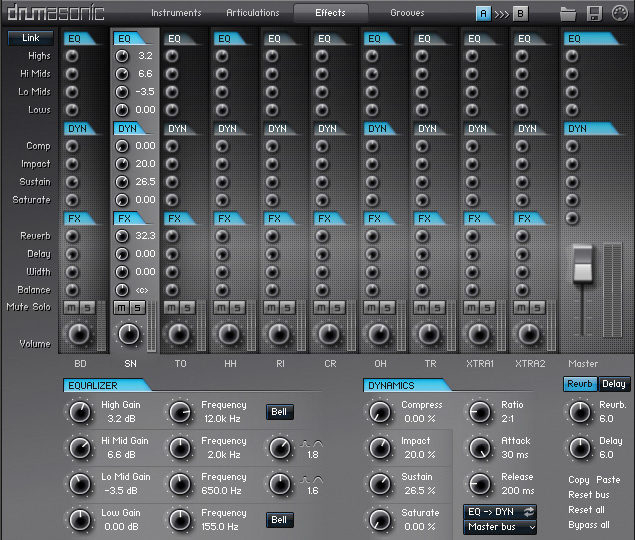 The Effects Tab, where each instrument and ambience type appears on its own bus, and is further processed by the built-in effects.
The Effects tab is home to the Bus Mixer, where the various mic signals can be further balanced and effects applied. The first six bus channels handle the kick, snare, toms, hi-hat, ride and crash-cymbal close mics. It's unusual (and rather nice) to see close mics for the cymbals, as many virtual drum products rely only on the overhead and room mics for these. The last four channels vary depending on which 'room' you have loaded: in the Damped Room, overheads and room mics share one 'overhead' bus, whilst one bus is given over to the 'trash' ambient mic. The last two 'Xtra' buses are generally intended for the percussion category, but of course you can route any microphones you like to them. The Large Room differs in having an alternative ambient mic arrangement, with room mics and surround mics, but no overheads.
All 10 buses and the Master bus each have a range of effects at their disposal; EQ, dynamics, saturation, reverb, delay and stereo width. Equalisation is provided by Kontakt's excellent SSL-inspired four-band Solid EQ, whilst dynamics come in two flavours: Solid Bus Comp and Transient Designer. The 'EQ to dynamics' signal flow of each channel can also be swapped to be 'dynamics to EQ', if desired. Saturation applies warm, tape-style distortion, ranging from subtle coloration to more grungy drum stylings. Reverb offers a choice of 21 convolution types, from small, medium and large spaces to tom resonances and a sort of simulated mic bleed, all editable for length and pre-delay, with low- and high-pass filters to further tailor the sound. I'd like an option to load your own convolution impulses: maybe that could come in a future update? Delay is the standard Kontakt type, with time, feedback, damping and pan parameters, but no host tempo syncing: delay times must be specified in milliseconds.
Mapping & Articulations
The Articulations tab displays each instrument slot's available articulations, with the option to unload unused ones, thus saving on RAM. It looks a little confusing at first, but is actually quite logical. If an articulation's name button is black, it exists for that drum model; if it's grey, it doesn't. Similarly, if its accompanying tick box is blue, it's loaded; if it's grey, it isn't. The smaller boxes to the right show which MIDI note(s) an articulation is assigned to. Up to four notes can trigger one articulation, and up to four articulations can be layered onto one MIDI note. Any unneeded note assignments can be deleted, and existing notes reassigned to make your own custom keymap, which can be saved to a file. Ten keymap presets are provided, including templates for Superior Drummer, Addictive Drums, V-Drums, GM, Steven Slate, and NI's Studio Drummer. On the Remapping sub-page you can specify which alternative articulations 'fill in' for any unavailable ones, using a recursive search system. The Control sub-page governs how the hi-hats behave when played from an electronic drum kit, while keyswitches can be specified for controlling cymbal chokes, choice of sticks, rods or brushes, and snare wires on or off — these being applicable only to suitably endowed snare drum models.
The 10 knobs below duplicate those on the Instruments Tab, except that these are offsets, unique to each individual articulation. So if your open hi-hat seems too quiet relative to the closed one, it's no problem: you can just bump it up until it's right.
Integrated Groove Player
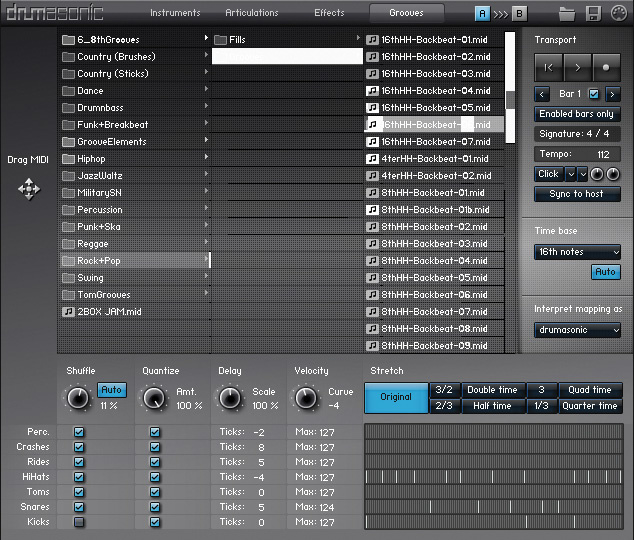 The Grooves Tab, where ready-made grooves can be selected and dragged into your DAW project, with the facility to record your own custom grooves. Third-party grooves can also be imported, with a number of real-time remapping templates available for popular formats.
Drumasonic includes an integrated Groove Player, similar in concept to those found in other virtual drum products. Its large library of pre-recorded grooves and fills covers various musical genres, and it can be expanded in two ways: firstly, by importing third-party groove libraries, and, secondly, by creating your own. To ensure that third-party grooves play correctly, the groove player includes real-time remapping, using the same product templates as found on the Articulation page, described earlier. If you have created and saved your own mapping templates, you can use those too. Although grooves aren't editable per se from within the Groove Player, there are various tools to vary the way they play back. The Stretch function acts as a time multiplier, offering double, half, quad and quarter time, as well as 3/2, 2/3, 3 and 1/3 variations, useful for converting compound time grooves to triplet-based ones, or vice-versa. Time signature can also be adjusted anywhere between 1/2 and 12/16, so prog rockers needn't feel neglected.
Drumasonic's unique twist is that grooves are divided into 'lanes' — one lane per instrument type. Each lane can have one of four offsets applied; shuffle, quantise, delay and velocity curve. So you could shuffle your hi-hats whilst having a strictly quantised bass drum, for example. The shuffle, delay and velocity curve offsets all work positively or negatively, so the timing of any instruments can be advanced or delayed relative to the others, or you could adjust the velocity curves of any instruments independently from the others in the groove. The Groove Player supports drag and drop, so grooves can easily be incorporated into your DAW project. Custom grooves can also be recorded, although the only way to add them to the groove library is to drag them into your DAW, save them as MIDI files, and copy those to Drumasonic's Grooves sub-folder. Some people may prefer to bypass the Groove Player recording process (which offers no overdubbing or remedial editing facilities) and record grooves straight into their DAW.
The Sound
How does Drumasonic sound? The short answer is: like an extremely well-recorded acoustic drum kit. The raw samples pack punch, vitality and presence; the kicks, in particular, cut through a mix with satisfying clarity. The snares have plenty of detail, long ringing tails and an authoritative attack; they pop satisfyingly when compressed, and can easily be damped to taste with the AHR envelopes. Even though there's only the one set of toms, they're capable of producing a wide range of different characters, depending on the balance of the close and room mics, EQ and dynamics effects. The cymbals also shine, with plenty of top-end sheen and sustain.
I'd be tempted to describe the overall sound as 'Transatlantic', nestling somewhere between the 'Britishness' of BFD2 and the more American sound of Superior Drummer. Nevertheless, between the various kit pieces provided and the two distinctly different recorded room ambiences, there are so many possible mic combinations and ways to manipulate the sound that you're highly likely to find the feel you're looking for.
Conclusion
Clearly, a great deal of thought has gone making the most flexible use of Kontakt's architecture, and Drumasonic offers plenty of options within that paradigm. The level of detailed microphone control, particularly for the Damped Room program, is very powerful. The Large Room, while not as well-endowed in the mic department, still offers tons of scope for modifying the sound. The effects may not encompass the entire panoply of phasing, flanging, bit-crunching and migraine-inducing distortion (although they could have, as these are in Kontakt's effects repertoire). Intstead, Drumasonic's designers have decided to opt for those effects most suited to creating a natural drum sound. You can always route drums directly out to your DAW's effects, if you want more radical treatments.
At the time of writing, no sample expansion packs are available, but the makers have confirmed that a wealth of new material is in the works. Nevertheless, Drumasonic's comprehensive feature set makes it surprisingly quick to create the sound you're after using the existing library. Whether you're making your first virtual drum purchase or just looking to expand your existing arsenal, Drumasonic deserves serious consideration.
Alternatives
Drumasonic 2LE provides a reduced number of drum models, but otherwise retains all the same functionality as the full version. Toontrack Superior Drummer 2 and FXpansion BFD2 both offer an arsenal of effects, fully customisable routing and mixer configurations, with extensive sample expansion packs available. XLN Audio Addictive Drums continues to win Brownie points with its easy-to-use architecture, superb compressors and a growing number of stylistically themed expansion packs. Like Drumasonic, Native Instruments Studio Drummer Series takes full advantage of Kontakt 5's effects and architecture, while suffering slightly from the inability to cross-match kitpieces between titles. Steven Slate Drums 4 offers a wide selection of high quality sampled kits and enjoys many ardent followers. Although it has no built-in effects, it provides full multitrack routing to the host DAW and its plug-ins.
What's In A Name?
Whereas similar products acknowledge the brand names of their sampled drums, Drumasonic almost seem to be making a point of not crediting any of their source instruments. Apart from 'Lin Cat' (a reference to Gretsch's Catalina range) names such as 'Fat Kick', 'Versatile Maple' and 'Stainless Steel' are the only clues given. Even the mics are named 'Close 1, 2, or 3', with no information on the type of mics involved. Good for them, I say – we're too often seduced by a piece of virtual mimicry because of associations with revered brand names, when it should be our ears that are the judge. If it sounds right, it is right.
Installation & Activation
Drumasonic 2 is supplied as a download-only package, comprising one .rar file containing the installation file, documentation and required data folders, plus six self-extracting .rar archives for the sample data. Once extracted, the data folders and sample folder must all reside at the same directory level on the destination drive of choice.
Activating the software is via the usual NI Service Centre procedure, with an extra twist: to further protect their product, Drumasonic also require an additional license file, delivered by email once the software purchased. This must live inside the Data folder within the main Drumasonic 2 folder, otherwise the product will still think it's in Demo mode, and time out even after the Service Centre activation. This is where problems arise if you're still using Windows XP (as I am). Drumasonic officially supports Windows 7, but not XP. Normally this isn't a problem, as most things work fine on XP. However, the Drumasonic installer assumes the presence of Win 7, and installs its components to the 'wrong' location on Win XP. So when a Win XP installation of Drumasonic looks for the Presets and the license file in the Data folder, it finds nothing. I also ran Drumasonic from a dedicated sample drive, so the installation instruction to put all the data together is misleading, because the program actually looks for the Data folder on the system drive. The problem is easily solved: just copy the contents of the Data folder (wherever you may have put it) to this location: C:\Documents and Settings\Administrator\Local Settings\Application Data\Drumasonic\Data, everything will run perfectly, and the product will no longer time out.
Specifications
- Windows 7, Mac OS 10.6 or higher.
- Kontakt 5 or Kontakt 5 Player, version 5.0.3 or higher, which run as stand-alone applications as well as AU, VST and RTAS plug-ins.
- 5.3GB of free hard-disk space (lossless compressed 44.1kHz/24-bit samples representing 17GB uncompressed).
Drumasonic Kitpieces
| Bass Drums | Snares | Toms | Hi-hats | Rides | Cymbals | Percussion |
| *Light Maple Fat Kick Lina Cat | *Versatile Maple*Fat Birch *Solid BirchStainless SteelMaple MasterLina Cat | *Light 8*Light 10*Light 12*Light 14*Light 16 | *Dark 14Constant 14Custom 13Edged 14 | Heavy 20*Dry 20Firm 20Dominating 20*Turkish 20 | *CR Dark 18**CR Dark 18*CR Medium 16*CR Medium 17CR Xplodin' 16*CH Dark 17*CH Piercing 16CH Trashy 18*SP Radiant 10*SP Airy 8 | Clap SingleClaps Tight AClaps Tight BClaps Loose AClaps Loose BCowbell Sticks TambourineBD DistortedBD SynthBD SinesBD SweepsSN SynthSN ImpactsSN Keyring |
Numbers refer to the diameter of the drum or cymbal in inches.* Models available in Large Room. ** Choked crash model only available in Large Room.
Pros
- The sound: punchy, vibrant and believable.
- Generous number of kitpiece slots.
- Easy-to-use bussing system.
- Good onboard effects processing.
- Flexible key mapping and remapping.
- Every kitpiece articulation is individually tweakable.
- Disabling mics and articulations you don't need saves on RAM.
Cons
- Windows XP users have a little extra prepping to do during installation.
Summary
With its lively and punchy sound, highly flexible mic control and detailed editing down to articulation level, Drumasonic has plenty to satisfy the serious virtual drum enthusiast. Throw in high-quality effects and two radically different real room ambiences in the one package, and you have a powerful tool for creating high-quality virtual drum productions.