

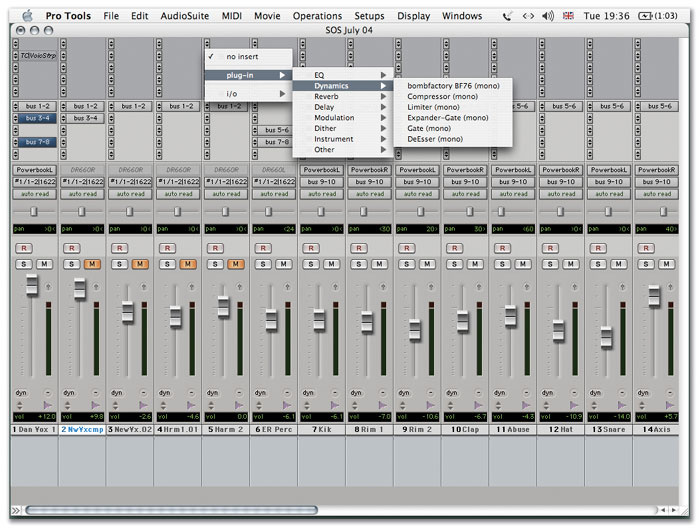
 Pro Tools 6.4 has a new tidy plug-in list structure, and faders that go up to +12dB. That's one louder than 11. But you'll need a HD TDM system for the new automatic delay compensation feature.
Pro Tools version 6.4 comes with some surprising and long-awaited new features.
It's been an incredibly busy couple of months in the Digidesign universe, and we've finally found out what they've been ferreting away at over in San Francisco. All in a flurry Digi have announced the amazing-looking Icon mixer, the small-format Command 8 control surface, a proper surround reverb (Revibe), and plans for live gear. It's perhaps not surprising, then, that Pro Tools version 6.4 slipped out fairly quietly in April, at first looking like a simple support release for the new hardware controllers. However, it's a pretty significant upgrade that introduces some new features, including one right from the top of the wanted list: automatic delay compensation. Many of the other additions show that Digidesign have been listening to some of their customers in the TV and film production worlds, but there's plenty of stuff in there to make it worth upgrading for everyone.
Quick Tips
- A shortcut to bypassing plug-ins (without having to open their window) is to command-click on their slot in the Inserts section of the mixer.
- Command-clicking on break points in automation graphs deletes them. This is often one of the quickest ways of cleaning up and smoothing automation.
- Sometime it's useful to know what the loudest point of a region of track is, especially if you want to find out whether the level reaches 0dB (and is therefore probably clipping). The Gain Audiosuite plug-in has a Find Peak command that will scan a selection and report the top level.
- It's often best to leave out the Master Bypass parameter when enabling automation for a plug-in. This way you can easily bypass the plug-in manually during playback without fighting any automation. Also, plug-ins often click, pop or otherwise make unhappy noises when you automate their bypass. It's better to just automate the controls to a 'flat' or inoperative state where you don't want the plug-in to do anything.
It Goes To 12
There are a couple of things that are obvious when you fire up 6.4, especially if you open up an existing Session. You're immediately asked if you want to switch the Session to the new +12dB fader mode, or leave it alone. Yep, Pro Tools ' faders now provide +12dB gain above the unity point, where they used to have only 6dB. In rock and pop music production you tend to be working with loud signals most of the time, but in other areas like TV and film, there's much more variation in levels, and the +6 faders have been a long-term bugbear. This change should reduce the need for adding gain at the plug-in stage, which always risks clipping the channel before you've even got to the fader. Many of the other tweaks are also angled towards post-production, but the biggest change is near the top of the list for many music-based Pro Tools users...
Compensation Culture
Automatic delay compensation aims to remove problems caused by the small delays introduced into signal paths by routing through plug-ins, sends, and outboard gear. As described in Pro Tools Notes February 2003, these small delays can cause phase problems when mixing signals, or in some cases sync problems when working to video. We'll come back to ADC in detail in another Pro Tools Notes soon, but here's a quick overview of what it does: the system looks at every signal path in the mixer, and identifies the largest latency between any track and the final mix outputs. It then applies the appropriate amount of delay (in real time) to all other paths so that everything comes out the same. This is a sophisticated and resource-hungry scheme, but is capable of much more than the some other ADC methods that simply nudge recorded audio about. For example, the delay is applied to aux input tracks, which means that signals coming through the mixer live are taken into account, as are hardware inserts and send/return paths that go outside the virtual mixer. The power comes at a price: ADC is only for TDM systems, and HD/Accel ones at that (see box about Mix hardware).
 Both LE and TDM versions now have transport controls in the Edit Window's toolbar, and a new method for navigating around large projects.
Another persistent feature request that's been heeded is for a menu structure in the plug-ins list. Until now of course the plug-in list has been one long jumble, with an often bemusing ordering. The most common request has been for users to be able to create sub-folders in the plug-in folder, which would then translate into a hierarchical list in Pro Tools ' insert selectors. Well, instead Digi have opted for a menu structure that is predetermined by the plug-in developers. The plug-ins list is now subdivided by effect type, with the type being flagged by the manufacturer. No doubt this will infuriate a few people who want to be able to manage this manually, but let's be honest, life's way too short to be poking around in your computer's library directories unless you really have to! Some customisation is possible, however, in the form of a 'favourites' system. Plug-ins designated as favourites are listed at the top of their categories.
Like the plug-in list improvements, a new track-numbering scheme comes to both LE and TDM, and provides an extra way to navigate across large mixers. As you can see from the screen shot, all the tracks have been designated a number, so you can scroll directly to particular places in a similar way to using memory locations. Similarly small but useful improvements have been made to signal clip indicators in version 6.4. I mentioned before about the annoyance of plug-ins clipping a channel pre-fader, a problem can that be irritating and difficult to track down. TDM software now indicates that a plug-in has clipped in the inserts section of the mixer, so you can identify the offender straight away. Any tracks that have clipped will also now light up in the track show/hide list.
End Of The Line For Mix Hardware
At the same time as announcing the new version of the Pro Tools software, Digidesign confirmed what has been becoming more and more obvious to many users: there will be no further development for Mix hardware, except for one final software release. The company cite the increasingly complex testing and development required for multiple platforms as the reason for this decision. It's certainly a tricky one, because the reason Mix was such a milestone was that for many people it represented the first DAW that could pretty much do everything they needed. Now those people are faced with a choice between upgrading to HD, or keeping their computer frozen at its current configuration to continue with Mix. There is a third option of course, which is to get a really top-of-the-pile G5 or XP workstation and go the LE route.
To sugar the pill (a little), Mix owners can upgrade from 6.x to the 6.4.1 release free, and there are extra discounts on HD upgrades until the end of June. Version 6.4.1, which will be released some time in the summer, brings most of the new 6.4 TDM features to Mix, with the notable exception of automatic delay compensation, which Digi say requires too much DSP memory for Mix cards to handle.
Recording Improvements
The other major area of tweakage apart from ADC is the addition of some advanced recording and monitoring features, again just in the TDM version of Pro Tools. The previously global input monitoring status ('Auto Input Monitoring' vs 'Input Only Monitoring') can now be set differently from track to track. The status is now displayed and controlled in the channel strips, making it easier to swap on the fly between what's recorded on a track and what's coming in live. Punch recording has been improved along similar lines. It's now possible to punch different tracks in and out of record independently during the same record pass. Previously, punching into record acted globally on all record-enabled tracks. This new functionality is called TrackPunch, because it's important that new features get their own two-words-joined-together name. Being able to change input monitor status is called, of course, TrackInput (look it up if you don't believe me). Apparently, in early alphas of Pro Tools, the on-screen fader concept was known as VolumeChange.
TDM upgrades to 6.4 are £95 unless you got your system this year, making it the first paid upgrade since 6.0, while the LE version is free (or £50 from v5) as it doesn't gain so much. The most encouraging thing about 6.4 is that it is largely concerned with changes that really help some day-to-day work situations, rather than flashy features that look good at trade shows. Well, they hardly need to try too hard with that enormous Icon thing gleaming away in the booth!