

Warping has changed entirely in Live 8. We show you how to get the most out of the new system.
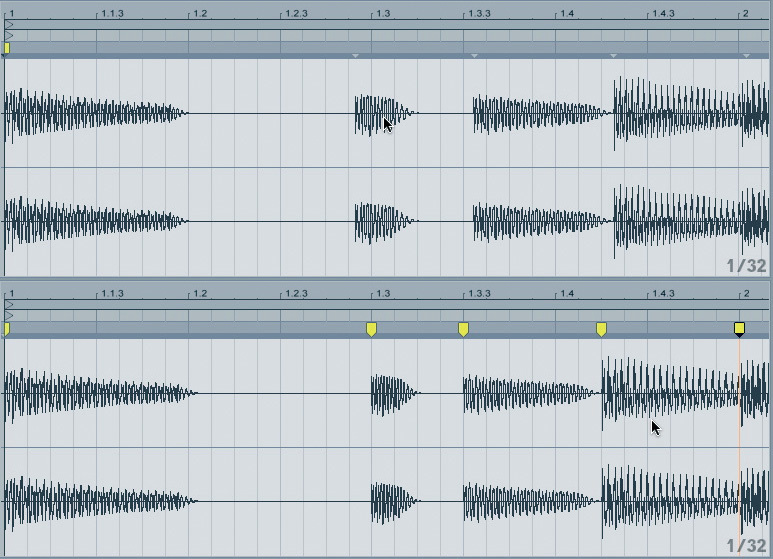
 Warping in older versions (left) and Live 8 (right). It's now the waveform that moves, not the timeline.
Ableton always manage to pack lots of exciting new stuff into their upgrades (as you can read in the Live 8 review from the last issue of SOS), so we've got a wealth of fresh new features and techniques to explore over the coming months. In this month's column, we're going to focus on the new warping system. Time warping is at the very heart of Live, and although most other DAWs can do it now, for many, 'Live' and 'audio warping' are synonymous. So it's quite a bold move for Ableton to completely reverse the paradigm used for warping audio.
Back In The Day
In our Warping 101 article (SOS December 2006), we explained the different ways in which Live manipulated imported audio. Short audio files are assumed to be loops, so Live guesses their lengths in bars, then stretches them to match the current session's tempo. Longer files are assumed to be whole songs or recordings, and are analysed for transients so that Live can 'pin' them to the current tempo map if required. Lastly, the internal timing of audio clips can be manipulated manually by creating and moving Warp Markers. It's this last topic that needs revisiting now, to bring us up to date.
The screens above show a summary of the key difference between Live 8's warping scheme and previous versions. Prior to Live 8, the waveform display was fixed, and warping was achieved by stretching the timeline around the audio. So, as in the example, to correct a note that was played late, you would drag a point on the timeline grid toward the note in the waveform. This appeared as though you were changing the tempo to suit the audio, when in fact the result of the operation was that the audio was warped into time at this point.
Most would agree that this is counter‑intuitive, and it would make more sense to move the waveform with respect to a fixed time grid, and that's exactly how warping is now represented in version 8. In fact, this, and the addition of automatic transient detection, makes Live's warping implementation very like Digidesign's Elastic Audio functionality, introduced in Pro Tools 7.
Detecting Beats
 Live 8 generates transient markers, which can be quantised, or moved as warp markers.
As before, you can warp audio at any point in a clip, but in most cases you want to move the start of a note or beat. To help out, Live now adds markers at detected transient points. As well as automatically providing points for warping or anchoring audio, these markers are also important for another new feature: audio quantisation (more on this in a moment).
Before we start shifting audio around, let's look at some important ways in which you can manage these transient markers. Firstly, you can edit the markers directly without warping the audio, which is important in cases where Live doesn't quite get the transient detection right, or when you want to remove markers. For example, in the screen at the bottom of the previous page you can see that the third transient marker has been placed a little late. Before using this marker to warp or quantise the audio, you would normally want to move it to exactly the right point, to avoid unpredictable results. To move it, simply Shift-drag it.
Sometimes you may get a false trigger, when Live adds a transient marker where it shouldn't. To delete a marker, right‑click it and choose Delete Transient(s). You can also drag out a selection across the waveform and press Backspace/Delete to remove multiple markers simultaneously. This is useful for removing markers from legitimate transients too, in order to exclude some notes or beats from a quantise operation. If Live has failed to detect a transient, you can add one manually by right‑clicking and choosing Insert Transient(s). At any time, you can right‑click and choose Reset Transients to return to the Clip's original state (without disturbing any warp markers that have been created).
Warping
 A quantised audio clip.
Manual warping can now be applied simply by grabbing a transient marker and moving it. As soon as you move a transient marker, it becomes a fully‑fledged warp marker, indicated by a yellow tag. Moving a transient marker does not just affect the local part of the audio clip: all audio on either side will also be scaled, unless there are warp markers present to 'pin' points on the waveform to a specific location. In older versions of Live, you'd routinely double‑click the positions of notes or beats either side of a part you were about to move, to anchor the rest of the clip. Now, you can hold Command (Mac) or Ctrl (PC) while dragging a transient marker and the neighbouring markers will also become warp markers, isolating the section you're shifting.
Dragging transient markers is not the only way to create warp markers. You can double‑click transient markers to switch them to warp markers without moving them. You can also double‑click anywhere in the waveform to add a warp marker that doesn't correspond to a transient. Alternatively, Command-I (Mac) or Ctrl-I (PC) will create a new Warp Marker at the current cursor position.
Audio Quantise
Although manual warping can be used to manipulate audio timing in whatever way you like, most commonly it's used to correct poor timing in a recording, by moving notes or beats toward the tempo grid. As Live 8 detects all the notes and beats in audio Clips now, it's an obvious next step to automate this process. Which is a roundabout way of saying that in Live 8 the Quantise function works on audio clips.
The screen below shows the full two‑bar bass guitar clip from the previous examples after it's been quantised. Each detected transient has been given a warp marker and moved toward the grid based on the quantisation settings. The command is the same as for quantising a MIDI Clip: Command-U (Mac) or Ctrl-U (PC), or Edit / Quantise. The same options apply: choose a grid resolution and a percentage strength. If you want to remove the quantisation at a later point, simply remove the warp markers by selecting the whole clip in the Clip Editor (Command/Ctrl-A) and pressing Backspace/Delete.
In most cases, this should save you a lot of manual dragging of markers. Any fine adjustments or corrections can be made by simply dragging the offending warp markers to the correct location. Personally, although I've seen Pro Tools doing this for a couple of years, it still blows my mind that you can quantise an audio recording in Live. And we haven't even got to groove quantising and extraction of MIDI and audio Clips yet — that'll have to wait until next time.
Slave To The Algorithm
Ableton have made some updates to the warping algorithms in Live 8. The warp mode for a clip is set in the Clip Properties, and each mode takes a different approach to time‑stretching, aimed at particular types of material. The default Beats mode is usually best for drums and percussion. Rather than simply stretching audio in a linear way, Beats mode tries to leave the significant parts of the audio (the beats or hits) intact, and adjust the gaps in between (similar to beat slicing). The Live 8 update adds a couple of features that enhance this process, especially for audio that has been slowed down from its original tempo.
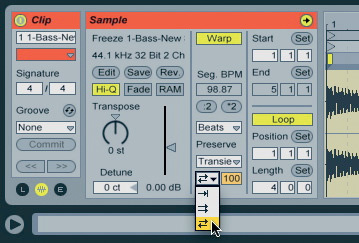
The Transient Loop Mode (the menu shown in the screenshot) gives you control over how the gaps between the beats are treated. As anyone familiar with beat-slicing techniques will know, slowing down audio that has been sliced leaves gaps. When Loop Off is selected, this gap is allowed to remain, which can be the best option for material with very little noise or decay between beats. Loop Forward loops part of the section after a transient to fill the gap. This is the same technique employed by Recycle when you create REX loops. Finally, Loop Back‑and‑Forth does the same, except that the loop alternates between forward and backward, helping to prevent glitches, especially when there are decay tails in the looped portion.
The value to the right of the Loop Mode menu is the Transient Envelope amount. The Transient Envelope fades out each audio slice before the next transient, helping to mask gaps caused by slowing the tempo. In essence, it's a gate with variable decay time. The value in this field sets the decay time, so the default 100 applies no fade, and zero gates the audio very quickly after each transient. The Transient Envelope is only active when the Loop Mode is set to Off.
The other change is a new mode: Complex Pro. Like the existing Complex mode, this algorithm is designed to deal with polyphonic material such as complete mixes, rather than individual instruments. This mode is even more CPU intensive than the (already processor heavy) Complex mode, but promises higher sound quality.